
Smarter by Design.Simpler for Business
AGS - AAM
AGS - AAM (Application Access Management) is TR7's central authentication and access control module that runs in front of a vService. A request that arrives at a vService on which AGS is enabled passes through that vService's access flow before reaching the Backend Service: a login form is shown to the user, the credentials are verified in the selected provider, a second factor is requested if necessary, and the identity of the verified user is propagated to the Backend Service.
The core promise of the module is that it moves authentication outside the application. No code change, library installation or identity provider integration is required in the Backend Service itself; the verification is performed on TR7 and the result is added to the request in the form the Backend Service understands (an HTTP header, Basic Auth, a Bearer token or a cookie). An old application without authentication and a modern application with its own identity system are both brought into scope in the same way.
The access flow is not a single switch but an editable chain of steps. Which form is shown, where the identity is verified, whether a second factor is requested and which branch is taken under which condition are set up in a flowchart per vService. Several providers can stand side by side in the same flow: the corporate directory can be used for employees, an external identity provider for business partners and the local database for contractors.
Control is not limited to the moment of login. The session that is opened is bound to the client and its durations are limited; failed attempts are counted on a ladder consisting of warning, CAPTCHA and lock levels; automated traffic is answered with bot policies. The appearance and the language of the login pages are determined with separate profiles, so the same corporate look is managed from a single place on all vServices.
AGS is not a single module that is turned on and off device-wide: it is enabled separately for each HTTP vService and every vService runs with its own access engine. The profiles selected in the flow and in the settings, on the other hand, are defined once device-wide and are used in common by several vServices.
It runs on the vService
AGS runs in the HTTP processing chain of the vService: after the request is met by the vService and TLS is terminated, it passes through the access flow before being forwarded to the Backend Service. For this reason AGS is enabled only in vServices of the HTTP type; L7 TCP and Network (Layer 4) traffic is not parsed at the application layer, so it cannot be directed to the login flow.
It is used together with WAF - WAAP and Bot/DDoS Protection in the same vService; AGS's own bot protection policies can read the vService's Threat Protection bot score.
TR7 Product
AGS - AAM is TR7 AAM (Application Access Management), one of TR7's four separately licensed products. Products are licensed individually or in bundles; licensing details are available on tr7.com.
TR7 products: Load Balancer - ADC · WAF - WAAP · AGS - AAM · GTM (Global Traffic Manager)
9
Provider Types
OAuth2, OpenID Connect, SAML 2.0, LDAP, HTTP, Local Database, RADIUS, Portal and Web Form
14
Built-in OAuth Providers
e-Devlet, Google, Microsoft, Apple, Keycloak, Okta, Auth0 and others; the endpoint addresses come from TR7's catalog
3
MFA Methods
Email OTP · TOTP · HTTP OTP; backup codes and device trust in TOTP
3
Operating Modes
Standalone Application · Portal · Portal Application: determines how many applications the session covers
4
Protection Policies
Session protection, account lockout, bot protection and CAPTCHA providers in separate profiles
18
Form Field Types
The login form is designed field by field; the texts are resolved with a 10-language catalog and dictionaries
4
Identity Propagation Methods
Header · Basic Auth · Bearer Token · Cookie; no change is required in the Backend Service
vService
Enablement Unit
Every HTTP vService is enabled separately and runs with its own access engine
No code change is required in the application
Authentication is performed in front of the Backend Service. No library is added to the application and no identity provider integration is written; the identity of the verified user is added to the request as a header, Basic Auth, a Bearer token or a cookie.
No separate identity server is installed
The login pages, session management, MFA and lockout run on TR7. There is no separate portal application to install, no separate session database to manage and no separate device to direct traffic to.
Profiles are defined once and used in many places
Providers, policies, forms, templates and dictionaries are defined device-wide; each vService selects from them. A corporate directory record or a corporate login page is updated in a single place and is reflected on all vServices.
What Is AGS - AAM?
Not all the applications an organization publishes are at the same maturity. Some have their own user management but are not connected to the corporate directory; some expect only HTTP Basic authentication; some have no authentication at all and run openly on the internal network; and some can talk to a modern identity provider but do not perform controls such as multi-factor authentication, session binding or account lockout on their own.
In this picture, adding authentication to every application separately is both costly and scatters the control: the question of who accesses where, with which rule and for how long no longer has a single answer. AGS moves this question to a single place. Authentication and access control are taken out of the application and placed at the point the traffic passes through, in front of the vService.
Where Is Authentication Performed?
A request that arrives at a vService with AGS enabled is in one of three states:
- It has no session. The request is directed to the access flow; the user sees the login page.
- It has a session and it is valid. The request never enters the flow; the credentials are added to the request and it is forwarded to the Backend Service.
- It has a session but it is invalid. If the session has expired, the signature bound to the client has changed or the concurrent session limit has been exceeded, the session is dropped and the user is taken into the flow again.
This distinction determines the cost of AGS: the verification is performed once per session, not on every request. The request of a user who has a session passes only through a session check and an identity injection step.
The session cookie is signed and the signature verification is performed in the traffic engine: a cookie whose signature does not hold or that has expired never reaches the session store. The cookie also carries which vService issued it; a cookie belonging to one vService is not accepted on another vService that does not trust it. AGS's own cookies are stripped from the request before it is forwarded to the Backend Service, so a compromised Backend Service cannot read the session cookie.
The Difference from WAF and Bot/DDoS
All three modules stand in front of the vService, but they answer different questions:
WAF - WAAP Is the request malicious?
It looks at the content of the request: it searches for attack patterns such as injection, script execution and protocol violation. It does not ask who the user is.
Bot/DDoS Protection Who is sending the request?
It looks at the source and the volume of the request: how much is coming, where it is coming from, whether the sender is a browser or automation. It does not ask for identity, it measures behavior.
AGS - AAM Who is this user and can they enter?
It looks at the owner of the request: it verifies the user identity, asks for a second factor, manages the session and carries the identity to the Backend Service. It is not concerned with the content of the request.
The three layers do not replace one another
A verified user can send a malicious request as well; for this reason AGS does not take the place of WAF. In the same way, WAF does not block the access of a user whose identity has not been verified. The three run together on the same vService and each one asks its own question.
When the three are enabled together on the same vService, the order is as follows: first the bot score is calculated, then the AGS session verification is performed, and the WAF inspection runs last. This order has two consequences:
- Identity softens the bot decision. The bot score of a user whose AGS session has been verified receives a trust discount; a user who has logged in is not evaluated at the same threshold as an anonymous client.
- AGS's own pages are outside WAF and bot enforcement. Since login form, CAPTCHA and OTP traffic carries passwords, codes and tokens, it is not submitted to WAF inspection; this content does not enter WAF learning and statistics either. In the same way, the bot column of Threat Protection does not recommend enforcement on the login surface; the answer to automated traffic is given by AGS's own bot protection policies, because the right answer on this surface is not blocking but adding a CAPTCHA to the form.
AGS in TR7
In TR7, AGS is the combination of three parts:
- An access service per vService. When AGS is enabled on a vService, an access flow, a set of settings and a separate access engine belonging to that vService are created. The engine processes only the login traffic of that vService.
- Device-wide profiles. Providers, server records, local databases, MFA profiles, protection policies, forms, templates, dictionaries and integration profiles are defined device-wide; vServices share them.
- Monitoring surfaces per vService. Sessions, locks, TOTP records, audit events, live counters and the engine status are monitored separately for each vService.
Why Is It Needed?
| Need | What AGS provides |
|---|---|
| Bringing an old application without authentication into scope | A login flow is placed in front of it without touching the application; the identity is propagated with a header or with Basic Auth |
| Collecting scattered user management in a single place | The corporate directory, an external identity provider and the local database are used side by side in the same flow |
| Not writing multi-factor authentication into every application separately | The MFA step is added to the flow; the application is unaware of it |
| One login, access to many applications | A vService in Portal mode shares the identity with the application vServices that trust it |
| Slowing down password guessing attacks | Failed attempts are counted on a scope basis; the warning, CAPTCHA and lock levels come into play |
| Making a stolen session cookie unusable | The session is bound to the client; if the signature changes the session is dropped |
| Adapting the login page to the corporate look | The logo, color, text and language are managed from a single place with template and dictionary profiles |
| Auditing who logged in and when | Audit events are kept on the vService and are forwarded to SIEM or syslog targets |
How Does It Work?
01 · LoginA request without a session is taken into the flowThe form step of the flow runs; the designed login form is shown with the appearance of the vService's page template and the language of its dictionary. The values entered by the user become input for the following steps.
02 · VerificationThe identity is tested in the selected providerThe Authentication provider step verifies the user in the corporate directory, in an external identity provider, in an HTTP service or in the local database. Failed attempts are counted by the lockout policies and a CAPTCHA is asked for if necessary.
03 · Second factorThe MFA step runs if it is requiredIf there is an MFA step in the flow, a one-time code is sent by e-mail or SMS, a code is requested from the authenticator application, or the verification is performed through a custom HTTP service.
04 · SessionIf the flow reaches the Allow step, a session is openedThe session protection policy binds the session to the client and limits its durations and its concurrency. The attributes of the user are written to the session and no verification is performed again on the following requests.
05 · Backend ServiceThe identity is added to the request and the request is forwardedAccording to the Backend SSO profile, the user identity is added to the request as a header, Basic Auth, a Bearer token or a cookie. The session loss and the logout of the Backend Service are monitored; the audit event is recorded.
A user who has a session does not see the flow again
The flow runs only for requests that do not have a valid session. The request of a user who has a session goes directly to the fifth stage: the credentials are added and the request is forwarded to the Backend Service. For this reason the login cost occurs per session, not per request.
The default flow does not let the user in
The default flow that is created when AGS is enabled on a vService for the first time consists only of the built-in Basic Login form and the output of the form is connected to the Deny step; there is no path in the flow that reaches the Allow step. This is a deliberate starting point that prevents an AGS enabled by mistake from passing traffic without verification. For users to be able to reach the Backend Service, an authentication step must be added to the flow and connected to the Allow step (see How to Enable AGS?).
Access Flow
The access flow is built by connecting the steps to one another on a canvas on the Flowchart tab. The flow starts from the Start node and the outputs of each step are connected either to another step or to one of the two end nodes of the flow. The number of outputs varies by step type: the authentication and MFA steps have success and fail outputs and the decision step has yes and no outputs; the form and attribute assignment steps have a single output.
The steps used in the flow and their outputs are as follows:
| Step | Outputs | What it does |
|---|---|---|
| Start | Single output | The entry point of the flow. |
| Form | Single output | Shows a login form to the user and carries the entered values to the following steps. The values are accessed with %AGS_USER_INPUT(field name) expressions. |
| Authentication Provider | success · fail | Verifies the identity in the selected provider profile. It can be used more than once in the flow; each one can be connected to a different provider. |
| MFA | success · fail | Verifies the second factor. It runs after the authentication step. |
| Decision Point | yes · no | Splits the flow into two branches according to a condition. |
| Switch | One output for each branch · noMatch | Splits the flow into many branches according to a value; if no branch matches, the noMatch output is taken. |
| Assign User Attributes | Single output | Writes a user attribute to the session; it does not perform authentication. |
| Backend SSO (Re)Sync | Single output | Re-syncs the session of the Backend Service; it is used in the Re-sync strategy of the Backend SSO profile. |
| Allow | It has no output | The positive ending of the flow. The session is opened and the user reaches the Backend Service. |
| Deny | It has no output | The negative ending of the flow. Access is denied. |
The steps are presented to the user as separate pages and each one runs at its own address under the AGS root path: the form step corresponds to /form, the authentication step to /auth (/oauth in the OAuth2 and OpenID Connect types), the MFA step to /mfa, the decision and branching steps to /security-check, the attribute assignment step to /context, and the Allow step to /access-check. When a second step that shares the same path is added, an order suffix is appended to the end of the path.
The flow is not limited to a single provider
Redundant verification is set up by connecting the fail output of a step to another provider step: a user who cannot be found in the corporate directory is looked up in the local database, and if they cannot be found there either, they fall to the Deny step. The same structure is also used to direct different user groups to different providers.
The Flow Is Built by Drawing
The access flow is built on a canvas, not in a configuration file or in a long form. The Flowchart tab draws the login logic of the vService as it is: which step leads to which step, which profile runs in which box and through which path the user reaches Allow and through which path they fall to Deny are seen at a glance.
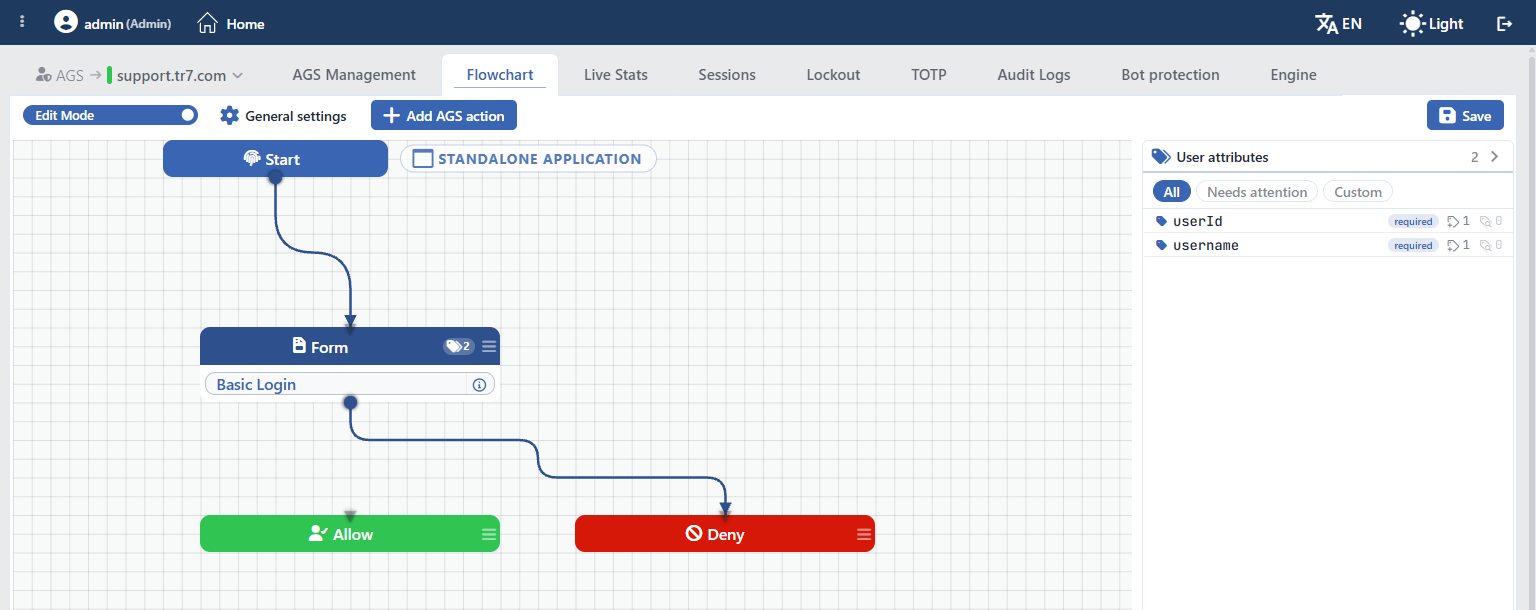 AGS Flowchart Access Flow Canvas
The canvas is both a reading and an editing surface. While Edit Mode is off, the flow is examined as a read-only diagram; when it is turned on, work is done on the same diagram:
Steps are added and connected
A new step is dropped onto the canvas with Add AGS action; the output points of the steps are dragged and connected to the target step. Since the success and fail outputs of the authentication and MFA steps are connected separately, the question "what happens if it fails" becomes visible in the diagram.
The profile is selected inside the box
Every step box carries the profile it will run on itself: the login form in the form box, the authentication profile in the provider box. The summary of its settings is opened with the information icon next to the profile, and a new profile is defined with the add shortcut without leaving the canvas.
The endings are separated by color
The two endings of the flow are marked clearly on the canvas: the green Allow lets the user in, the red Deny denies access. If there is no path that reaches the Allow step, this is noticed immediately in the diagram; why the default flow does not let the user in is also read from here.
User attributes are monitored in the side panel
The User attributes panel on the right lists the user fields the flow produces and uses: which attribute is required, where it is produced, in how many places it is used. The Needs attention filter picks out the fields that are expected to be filled but have no counterpart in the flow.
The operating mode stands at the top of the canvas
The Standalone Application, Portal or Portal Application mode of the vService appears as a badge at the top of the canvas. The mode also determines what the canvas draws: an application that inherits its identity from the portal has no login flow of its own.
A change is not applied until it is saved
The edits made on the canvas are saved with Save; the running flow does not change until they are saved. In this way the flow is rearranged without affecting live traffic and is put into effect in one go.
The flowchart is documentation at the same time
Keeping a separate document to explain how an access flow works is not necessary: the canvas itself is an up-to-date diagram that shows which user passes through which steps. It is the only place to be read during an audit and a handover.
Three Operating Modes
The gateway mode of a vService with AGS enabled determines how many applications the session that is opened covers:
Standalone Application Default
The vService runs its own login flow and the session it opens covers only itself. It is used to protect a single application; it does not share the session with other vServices.
Portal The source of the identity
It is the center that runs the login flow and produces the identity. The user logs in here once; the portal hands the identity over to the application vServices that trust it. The applications the portal publishes are also listed here and the access method is selected for each one.
Portal Application The consumer of the identity
It does not run its own login flow; it inherits the identity from the portal it trusts. The trusted portals are defined separately on this vService and the list cannot be left empty.
The organization-wide single sign-on (SSO) scenario is set up by using these two modes together: one vService becomes the entry point in Portal mode and the applications to be protected connect to that portal in Portal Application mode. The counterparts of the three modes on the flow canvas are explained on the Standalone Application, Portal and Portal Application pages.
Core Building Blocks
Access Flow Per vService
The diagram in which the steps and the branches are defined. It determines which form is shown, where the identity is verified and which path is taken under which condition.
Authentication Profiles Device-wide
The provider profiles define where and how the identity is verified, the server records define the connection settings, the local databases define the accounts kept on TR7 and the MFA profiles define the second factor.
Protection Policies Device-wide
How the session is bound to the client, how failed attempts are counted, how automated traffic is answered and which CAPTCHA service is used are kept in separate profiles.
Page and Language Profiles Device-wide
The fields of the login form, the logo, color and background appearance of the access pages and the multilingual resolution of the texts are defined in separate profiles.
Integration Profiles Device-wide
By which method the identity is propagated to the Backend Service, on which events an alarm is produced and where the audit logs are forwarded are determined in these profiles.
Access Engine Per vService
The component that serves the login pages, runs the verification and holds the sessions. It is created for the vService automatically when AGS is enabled, uses half of the memory of the vService and talks to the traffic engine over a local socket; its status and maintenance are monitored from the Engine tab.
Authentication Options
Every Authentication Provider step added to the flow is connected to a provider profile. The type of the profile determines where and with which protocol the identity is verified:
| Type | Where it verifies the identity | Typical use |
|---|---|---|
| OAuth2 | An external authorization server | The providers in the built-in catalog or a custom OAuth2 service; for providers that do not produce an identity token |
| OpenID Connect | An external provider that produces an identity token | Corporate identity providers such as Keycloak, Okta, Auth0 and Microsoft Entra ID; Apple is listed only in this type |
| SAML 2.0 | A corporate identity provider (IdP) | SAML-based corporate SSO infrastructures |
| LDAP | A directory server | Active Directory and OpenLDAP; authorization with group membership |
| HTTP | The organization's own verification API | Sending a request to a custom identity service and deciding according to its response |
| Local Database | Local accounts on TR7 | Contractor, business partner or test accounts that are not connected to an external directory |
| RADIUS | A RADIUS server | NPS, FreeRADIUS and MFA servers that speak RADIUS |
| Portal | Another vService in Portal mode | In-house single sign-on |
| Web Form | The login form of an existing application | Applications that have no authentication API and only a login page |
The attributes of the verified user are written to the session. AGS has 19 standard user fields (username, e-mail, display name, first name, last name, phone, company, department, title, employee number, group memberships and others); in most types this mapping comes ready, and each attribute is mapped manually when necessary. Non-standard names are defined as custom user fields on the vService.
The values written to the session are not only propagated to the Backend Service; they are also used in the conditions and the actions of the vService with Smart Variables expressions such as %AGS_USERNAME, %AGS_EMAIL, %AGS_GROUPS and %AGS_USER_ATTR(name). In this way rules such as directing to a different Backend Service according to the group of the user or restricting access according to the path are written.
Second Factor
The Multi-Factor Authentication (MFA) profiles offer three methods: Email OTP sends the code by e-mail, TOTP requests a code from the authenticator application (with the backup code and device trust options), and HTTP OTP delegates the sending of the code to the organization's own service, and channels such as SMS are used in this way.
Protection Layers
The login flow is not sufficient on its own: password guessing attacks, stolen session cookies and automated traffic are handled separately. Four profile families share this work:
| Layer | What it does |
|---|---|
| Session Protection Policies | Binds the session to the client (None, IP Address, IP + User Agent or Composite, which consists of smart variables), limits the session and idle durations and controls the number of concurrent sessions per user. If the binding signature changes the session is dropped; when the concurrency limit is exceeded, the new session is rejected, the oldest session is closed or all the sessions of the user are dropped. |
| Account Lockout Policies | Counts failed attempts in the selected scope (the username, the IP, the combination of the two or a custom combination) and applies a three-level ladder: first a warning, then a CAPTCHA, then a lock. On repeated lockouts the duration is multiplied. |
| Bot Protection Policies | Catches the automated traffic directed at the login pages with triggers (every request, the request rate, the failed verification rate or the bot score) and applies one of the deny, slow down, block, bandwidth limiting, CAPTCHA or custom content actions. |
| CAPTCHA Providers | Defines the verification service to be used at the CAPTCHA level of the lockout ladder and in the CAPTCHA action of the bot policies: TR7's own CAPTCHA or Google reCAPTCHA, hCaptcha, Cloudflare Turnstile. |
The policies come with built-in profiles
TR7 comes with built-in profiles for each family: 4 lockout, 6 bot protection, 4 session protection and 2 CAPTCHA profiles. When AGS is enabled on a vService for the first time, Standard Session Protection, Default Username Lockout, Default IP Lockout, Standard Rate Limiting, Bot Score CAPTCHA Challenge and Bot Score Deny among them are bound automatically.
The built-in profiles are not visible in the lists of the screens; they appear only in the selectors in the vService settings and in the flow, and they cannot be edited. When different values are required, a new profile is created on the related screen and bound to the vService.
Identity Propagation to the Backend Service
The identity of the verified user is added to the request according to the Backend SSO Configurations profile. A profile can carry more than one injection and each injection can be bound to its own condition:
| Method | What it adds |
|---|---|
| Header | An HTTP header whose name and value are set; the header with the same name that comes from the client is removed first |
| Basic Auth | From the user:password value, the produced Authorization: Basic … header |
| Bearer Token | The Authorization: Bearer … header; the header name is changed when necessary |
| Cookie | A cookie whose name and value are set; the cookie with the same name that comes from the client is removed first |
The profile also monitors the loss of the own session of the Backend Service and the user logging out from within the application. On session loss the user is either informed by closing their session or the session in the background is re-synced; on logout from the application the AGS session is closed as well and the user is directed to the specified address.
Monitoring and Visibility
| Surface | What it shows |
|---|---|
| Dashboard | The dashboard with a selectable time range for the session, authentication, lockout, MFA, system and bot metrics of the vService |
| Live Stats | The access, session, authentication, CAPTCHA, MFA, lockout and storage counters that are refreshed once per second |
| Sessions | The list of the open sessions and session termination |
| Lockout | The failed attempt counters and the active locks; removing the locks and resetting the counters |
| TOTP | The authenticator application registrations of the users and registration reset |
| Audit Logs | The authentication, MFA, lockout and access decision events |
| Bot Protection | The live count and block tables of the bot protection policies |
| Engine | The per-device status of the access engine and the maintenance operations |
There is no separate device-wide log or report screen for AGS: audit events are examined on the Audit Logs tab of the vService and are forwarded to SIEM and syslog targets with Log Forwarding profiles. The situations in which the operator has to be informed are defined with Notification Profiles.
Audit events are kept on the device as hourly files and the forwarding is done by following these files. For this reason the audit record is per device as well, like the session and lock lists; the cluster view is produced by merging the records of the two devices.
Management and Operation
- Enablement is per vService. AGS is enabled in bulk from the AGS-Enabled vService List screen or one by one from the vService form. A separate access engine is created for each vService.
- There is no separate permission area. The AGS screens are opened with monitoring permission in the Load Balancer area; fetching and changing the records also depend on the Load Balancer permission area. For a user who has only the WAF permission, the AGS screens do not open.
- The license closes only writing. While there is no AGS license, reading the records is not blocked; creating a new record, changing it and engine maintenance are rejected. Disabling AGS on a vService is also independent of the license.
- Profiles are synchronized between the cluster devices. Changes are distributed together with the vService configuration; user operations are monitored on the User Logs screen.
- Sessions, locks and TOTP records are per device. This data is not synchronized; each device keeps its own records. The screens show a single list by merging the two devices at query time and delete operations are applied to both devices.
- The configuration is not deleted when AGS is disabled. The flow, policy, template and dictionary selections are kept as long as the vService exists; when AGS is enabled again, the same configuration applies.
Key Features
Nine provider typesFrom the corporate directory to an external identity provider, from local accounts to an existing login form, in a single flow.
14 built-in OAuth providersThe endpoint addresses and the attribute mappings are provided by TR7; only the client information is entered.
An editable flowThe steps and the branches are built on a canvas; a failed verification can be directed to another provider.
Multi-factor authenticationAn e-mail code, the authenticator application and an HTTP channel specific to the organization; backup codes and device trust.
In-house single sign-onA vService in Portal mode shares the identity with the application vServices that trust it.
Session bindingThe session is bound to the client; a stolen cookie cannot be used on a different client.
Graduated account lockoutThe warning, CAPTCHA and lock levels; a duration that is multiplied on repeated lockouts.
Bot protection specific to the login pageFour triggers and six actions; the Threat Protection bot score is also used as a trigger.
Corporate lookThe logo, color, background and texts are managed from a single place with template profiles.
Multilingual access pagesWith a ten-language catalog and translation keys, the same page is served in different languages.
Four identity propagation methodsHeader, Basic Auth, Bearer token and cookie; no change is required in the Backend Service.
Audit record and forwardingLogin, MFA, lockout and access decision events are recorded and forwarded to SIEM or syslog targets.
Use Cases
The headings below are the situations in which organizations turn to AGS most often. Each one corresponds to a problem; the solution is set up on TR7 without touching the application.
"The application has no authentication" Adding a login screen
An application written years ago that runs open to everyone on the internal network. Its code cannot be changed and it has no developer. AGS is enabled, a corporate directory step is added to the flow and a login screen comes in front of the application. The username is propagated to the Backend Service with a header; if the application wants to, it recognizes the user from this header, and if it does not, it does nothing.
"We have a directory but we have no MFA" Second factor
Active Directory or RADIUS is running in the organization, the users are already there. The only missing thing is the second factor. An MFA step is added after the directory step in the AGS flow: the code is sent by e-mail, requested from the authenticator application or delivered through the organization's own SMS service. Not a single record is added to the directory and not a single line of code is written into the applications.
"Our login page is under a flood of bots" CAPTCHA + lockout
Automated requests keep arriving at the login form, the logs are filling up with failed attempts. The bot protection policy directs the form to a CAPTCHA and the lockout policy counts the attempts: first a warning, then a CAPTCHA, then a lock. The CAPTCHA is solved with TR7's own service or with reCAPTCHA, hCaptcha or Turnstile.
"An employee enters a password five times every morning" In-house SSO
The intranet, the reporting tool, the request system, the wiki; each one asks for a separate login. One vService is put into portal mode and the others switch to portal application mode and connect to it. The user logs in once in the morning and is not asked for a password again between the applications throughout the day.
"We do not want to open a directory account for the contractor" Mixed providers
The external stakeholder has no place in the corporate directory but needs to access the application. In the same flow employees are verified in the directory, business partners in an external identity provider and contractors in TR7's local database. The contractor account is closed from a single screen when the work is finished; the directory is never polluted.
"Not everyone should go to the same place" Directing by identity
Different teams are required to go to different environments under the same address. The group, the username and the attributes of the verified user are carried into the vService conditions with smart variables; the directing, access restriction and header addition rules are written according to these values.
"Citizens should log in with e-Devlet" e-Devlet + multiple languages
On a service open to the public, authentication is required to be performed through e-Devlet. The built-in e-Devlet provider is added to the flow; the login pages are served with the corporate template and according to the language of the user.
"The application drops its own session" Backend SSO
The user still has a session on the AGS side, but the application loses its own session and throws the user to the login screen. The Backend SSO profile recognizes this situation and either logs the user out cleanly or re-syncs the session in the background silently.
Terminology
| Term | Description |
|---|---|
| Access service | The whole of the AGS configuration of a vService: the flow, the settings and the bound profiles. |
| Access flow (flow) | The diagram in which the login steps and the branches are defined. It consists of the form, authentication and MFA steps and the Allow and Deny endings. |
| Access engine (engine) | The component that serves the login pages, runs the verification and holds the sessions. It is separate per vService. |
| Gateway Mode | The operating mode of the vService: Standalone Application, Portal or Portal Application. |
| Authentication Provider | The profile that defines where and with which protocol the identity is verified; it is used as a step in the flow. |
| Authentication Server | The record that holds the address, port and connection settings of a directory, RADIUS or HTTP server. Provider profiles are bound to this record. |
| Local Database | The local database in which the user accounts are kept on TR7; the password policy is defined per database. |
| MFA | The second verification step added next to the password: Email OTP, TOTP or HTTP OTP. |
| Policy Scope | The key for which the lockout policy counts failed attempts: the username, the IP, the combination of the two or a custom combination. |
| Session Binding | The way the session is bound to the client. If the binding signature changes the session is dropped. |
| Backend SSO | The propagation of the identity of the verified user to the Backend Service; there are four injection methods. |
| User Attribute | The user information written to the session from the provider response (such as the username, the e-mail and the group). Non-standard names become custom user fields on the vService. |
| Page Template | The profile that determines the logo, color, header/footer and background appearance of the access pages. |
| Dictionary | The profile that holds the multilingual equivalents of the texts on the access pages. |
| Trusted Portal | The portal from which a vService in Portal Application mode is allowed to inherit the identity. The list cannot be left empty. |
| AGS root path | The path at which the pages of the access flow are published; its default is /ags-portal and it is changed per vService. |
| Decision point · Switch | The steps that split the flow into two branches according to a condition or into many branches according to a value. |
| Assign User Attributes | The flow step that writes a user attribute to the session and does not perform authentication. The written fields are accessed with %AGS_USER_ATTR(name). |
Sections
Getting Started
Monitoring and Management on a vService Basis
AGS-Enabled vServices
The management screen of a vService with AGS enabled: the division of labor between the ten tabs, the access paths and the permissions.
→
Dashboard
The dashboard with a selectable time range for the session, authentication, lockout, MFA, system and bot metrics.
→
AGS Management
The surface on which the AGS configuration of the vService is read section by section and edited with windows.
→
Flowchart
The canvas on which the login flow is displayed and edited as a diagram; the flow counterparts of the three gateway modes.
→
Live Stats
The access, session, verification, CAPTCHA, MFA, lockout and storage counters that are refreshed once per second.
→
Sessions
The list of the sessions opened by the access engine and session termination.
→
Lockout
The failed attempt counters and the active locks; removing the locks and resetting the counters.
→
TOTP
The authenticator application registrations of the users and registration reset.
→
Audit Logs
The audit record of the authentication, MFA, lockout and access decision events.
→
Bot Protection
The live count and block tables of the bot protection policies.
→
Engine
The per-device status of the access engine and the maintenance operations.
→
Device-Wide Profiles
AGS-Enabled vService List
The view in which the vServices with AGS enabled are collected in a single list; bulk enabling and removal.
→
Authentication
Authentication providers in nine types, server connection records, local user databases and MFA profiles.
→
Protection Policies
The session protection, account lockout and bot protection policies and the CAPTCHA providers.
→
Pages & Language
The field-by-field design of the login forms, the appearance templates of the access pages and the multilingual dictionaries.
→
Integrations
Identity propagation to the Backend Service and session monitoring, operator notification profiles, the forwarding of the audit logs.
→
Binding Profiles to a vService
| Profile | Where it is bound on the vService |
|---|---|
| Login Forms, Authentication Providers, MFA | Flowchart (edit mode; the form, Authentication Provider and MFA steps) |
| Session Protection Policies | AGS settings Session Protection Policy |
| Account Lockout Policies | AGS settings Default Lockout Policies; Lockout Behavior in the provider profiles |
| Bot Protection Policies | AGS settings Bot Protection Policies |
| CAPTCHA Providers | Lockout policy Captcha Provider; bot policy Captcha action |
| Page Templates, Dictionaries | AGS settings Page Template and Dictionary |
| Backend SSO Configurations | AGS settings Backend SSO Config |
| Notification Profiles | AGS settings Notification Profile |
| Log Forwarding | AGS settings Audit Log Forwarders |
Typical Deployment Flow
1
Step 1 Enable AGS
AGS is enabled on a vService of the HTTP type. The default flow starts with the built-in Basic Login form and ends with Deny; at this stage users do not reach the Backend Service (see How to Enable AGS?).
2
Step 2 Define the identity source
If a corporate directory or RADIUS is to be used, an Authentication Servers record is defined first; if local accounts are to be used, Local Databases are defined. Then a provider profile suitable for its type is created on the Authentication Providers screen.
3
Step 3 Build the flow and connect it to the Allow step
On the Flowchart canvas an Authentication provider step is added to the form and the success output of the step is connected to the Allow step. If necessary, the fail output is directed to a second provider.
4
Step 4 Propagate the identity to the Backend Service
A Backend SSO Configurations profile is created and bound to the vService; the username, e-mail or group information is added in the form the application expects (a header, Basic Auth, a Bearer token or a cookie).
5
Step 5 Make the appearance and the language corporate
The logo, color and background are defined with Page Templates, and the supported languages and texts with Dictionaries. If necessary, the fields of the login form are edited on the Login Forms screen.
6
Step 6 Review the protection policies
If values suitable for the organization are required instead of the built-in policies, session protection, lockout and bot protection profiles are created and bound to the vService. If an external service is to be used for the CAPTCHA level, a CAPTCHA Providers profile is defined.
7
8
Step 8 Set up being informed and auditing
The situations in which an alarm is produced are defined with Notification Profiles, and the SIEM or syslog targets to which the audit logs are forwarded with Log Forwarding. In the first days the Audit Logs and Lockout screens are monitored.
