
Smarter by Design.Simpler for Business
Response Size (bytes)
What Is the Response Size (bytes) Condition?
Response Size (bytes) is a condition type used to make traffic manipulation decisions by evaluating the body size (in bytes) of the HTTP response coming from the Backend Service server.
The measured value is the size of only the body of the response; headers are not included. The size is read from the Content-Length information declared by the server: the body is not buffered and the response is not delayed.
This condition can be evaluated only at the response stage.
WARNING
The Response Size (bytes) condition works only at the Response stage; it cannot be evaluated before the Backend Service responds.
In responses that do not declare Content-Length (chunked/streaming), the body size is unknown; the value reflects only the data received up to that moment. These responses may match Less than thresholds by mistake, and may not match Greater than / Range thresholds even if they reach the expected size. Size conditions are reliable only for responses that declare Content-Length.
The Importance of the Response Size (bytes) Condition
Response size control is critically important for cache management, bandwidth optimization and content processing.
With the Response Size (bytes) condition:
- Compression can be applied for large responses,
- Cache strategies can be determined according to size,
- Special processing can be performed for large file downloads,
- Bandwidth monitoring and throttling can be applied,
- Responses of abnormal size can be detected.
Response Size (bytes) vs Request Size (bytes):
| Criterion | Response Size (bytes) | Request Size (bytes) |
|---|---|---|
| Direction | Server → Client | Client → Server |
| Measured | Only the response body (headers excluded, declared size) | Header block + buffered part of the body |
| Evaluation | Response stage | Request stage |
Supported vService Types
HTTP
L7 TCP
Network
How to Add?
A new Response Size (bytes) Condition can be added through the TR7 web management interface by following the steps below:
- The Configuration Menu is opened by clicking the TR7 logo at the bottom left.
- The Load Balancer → Conditions → Add steps are followed.
- Response size (bytes) is selected as Criteria.
- The related configurations of the condition are made.
- The condition is added by clicking the
Addbutton.
Response Size (bytes) Condition Add Form
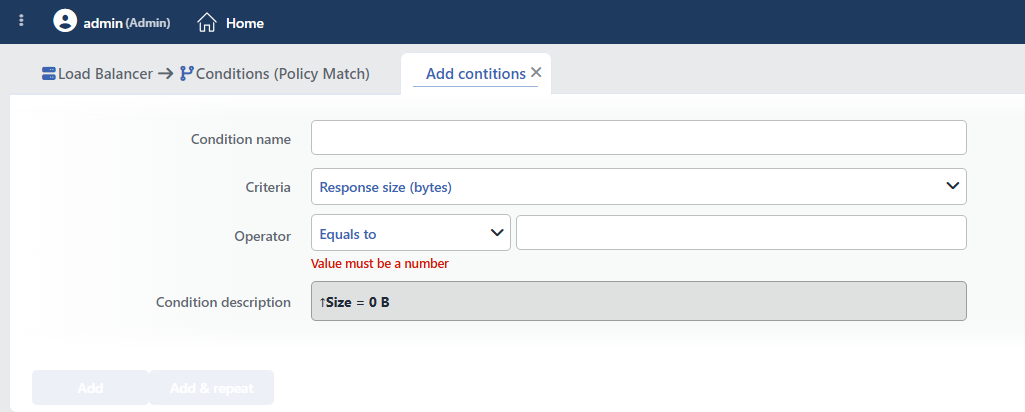 Response Size (bytes) Condition Add Form
INFO
Condition Name
An optional name can be entered for the condition to be created.
This field is especially important in the following scenarios:
- When many conditions are defined under the same vService,
- When conditions with similar criteria need to be distinguished,
- When it is necessary to quickly understand which business rule the condition represents.
When this field is left empty, TR7 analyzes the content of the related condition and creates an automatic, descriptive name in the Condition Description field. This generated description is used as the name in condition lists.
INFO
Criteria Required
The field that determines the type of the condition; Response size (bytes) is selected from the searchable dropdown list. This selection determines the fields displayed in the form. The criterion cannot be changed after the condition is saved: if a different criterion is needed, a new condition is defined. For all criteria in the list and their scopes, the criteria catalog on the Conditions page can be referred to.
INFO
Operator
The numeric comparison operator and value are entered.
| Operator | Symbol | Description |
|---|---|---|
| Less than | < | The value must be less |
| Equals to | = | The value must match exactly |
| Greater than | > | The value must be greater |
| Range | - | The value must be between two values |
Sample response size comparisons:
| Operator | Value | Description |
|---|---|---|
> | 1048576 | Responses larger than 1 MB |
< | 1024 | Responses smaller than 1 KB |
- | 102400-1048576 | Between 100 KB and 1 MB |
= | 0 | Responses with an empty body (204 No Content) |
Common size references:
| Unit | Bytes |
|---|---|
| 1 KB | 1024 |
| 10 KB | 10240 |
| 100 KB | 102400 |
| 1 MB | 1048576 |
| 10 MB | 10485760 |
| 100 MB | 104857600 |
TIP
When the Range (-) operator is selected, two values are entered: the minimum and maximum size.
INFO
Condition Description
It is created automatically by TR7 in line with the entered criteria and values.
This description:
- which value the condition applies to,
- which criterion it works on,
- the quick understanding of the condition on listing screens
is produced dynamically by the system so as to provide these. The entered byte values appear with a readable unit in the description (e.g. 1048576 → 1 MB).
TIP
The form opens with the operator Equals to (=) selected and the value empty; the entered value must be an integer. When Range (-) is selected, a second value field opens; both boundaries are included in the range. The measured response size can be used in actions with the Response size smart variable.
INFO
Form Buttons
Add
The condition adding process is completed by clicking the Add button.
Add & Repeat
With the Add & Repeat button, the condition adding process is completed, and another new condition can be added with different configurations without leaving the related window.
 Condition Added
Operational Usage Recommendations
- It Should Be Used for Compression. Gzip compression should be applied to responses above a specific size.
- Cache Strategy. Small responses should be cached, and very large responses should be excluded from the cache.
- Throttling. Large file downloads should be detected and bandwidth limitation should be applied.
- Anomaly Detection. Responses much larger than expected should be detected and examined.
Common Usage Scenarios in Live Environments
The examples below show how the related condition is applied in the most frequently encountered use cases in real systems. These scenarios are based on practices that are widely preferred in live environments and rest on experience gained in the field.
Scenario 1: Caching Small API Responses
Purpose: To increase performance and enable the CDN by caching API responses under 50 KB. (Since streaming responses that do not declare Content-Length can also fall below this threshold, the condition should not be used on paths that serve chunked content.)
Configuration: Operator → Less than (<) 51200
Action Recommendations:
- ✅ Add HTTP Header → The
Cache-Control: public, max-age=3600header is added, and the CDN and browser cache are enabled. - ✅ Set HTTP Header → The
ETagandLast-Modifiedheaders are edited, and cache validation is provided.
Scenario 2: Video/Media Content Optimization
Purpose: To add special headers to static media files between 1 and 5 MB that declare Content-Length (images, audio, downloadable video). (Since the size is unknown in media served as chunked/stream, this condition may not match.)
Configuration: Operator → Range (-) 1048576-5242880
Action Recommendations:
- ✅ Add HTTP Header → The
Accept-Ranges: bytesandX-Media-Type: optimizedheaders are added, and range request support is provided. - ✅ Set HTTP Header →
Content-Type: video/mp4andCache-Control: max-age=86400are edited.
