
Smarter by Design.Simpler for Business
Conditional Silent Log
What Is the Conditional Silent Log Action?
The Conditional Silent Log action stops log sending to the Syslog and SIEM servers when the specified conditions are met in the vServices running on TR7, and thus prevents the related request/response from being written to the logs. This action can be put into effect at the request (request) or the response (response) stage.
Request (e.g. /health)
↓
The condition matches
↓
Not written to the log · Not sent to the SIEM
The Conditional Silent Log action is widely used for the purpose of preventing the unnecessary loading of the SIEM and log infrastructure in scenarios where high-volume, low-value or repetitive traffic increases the log density. In this way, the logs focus on more meaningful events, and the cost and the noise are reduced while the operational visibility is preserved.
The Importance of the Conditional Silent Log Action
In live environments, the logs are critically important in terms of monitoring, incident response, forensic analysis and compliance. However, certain traffic types (for example health-check requests, intense scans coming from specific IP ranges, known bot traffic or repeated requests to specific endpoints) can create noise in the logs and make it difficult to filter out the real events.
The Conditional Silent Log action;
- reduces the log noise and increases the visibility of meaningful events,
- lowers the resource consumption of the SIEM and log infrastructure,
- minimizes the log-related performance impact under high traffic,
- reduces the operational costs (storage/indexing) in certain scenarios,
- enables the log policies to be applied in a controlled and flexible way at the vService level.
For this reason, the Conditional Silent Log action is a critical control mechanism on TR7 in terms of log management and operational sustainability.
Supported vService Types
HTTP
L7 TCP
Network
Execution Timing
On Request
On Response
How to Add?
A new Conditional Silent Log Action can be added through the TR7 web management interface by following the steps below:
- The Configuration Menu is opened by clicking the TR7 logo at the bottom left.
- The Load Balancer → Actions → Add steps are followed.
- A unique and descriptive name is entered for the action.
- Conditional Silent Log is selected as Action Type.
- The related configurations of the action are made.
- In the Conditions tab, the condition/conditions under which the action takes effect are determined.
- The action is added by clicking the
Addbutton.
Conditional Silent Log Action Add Form
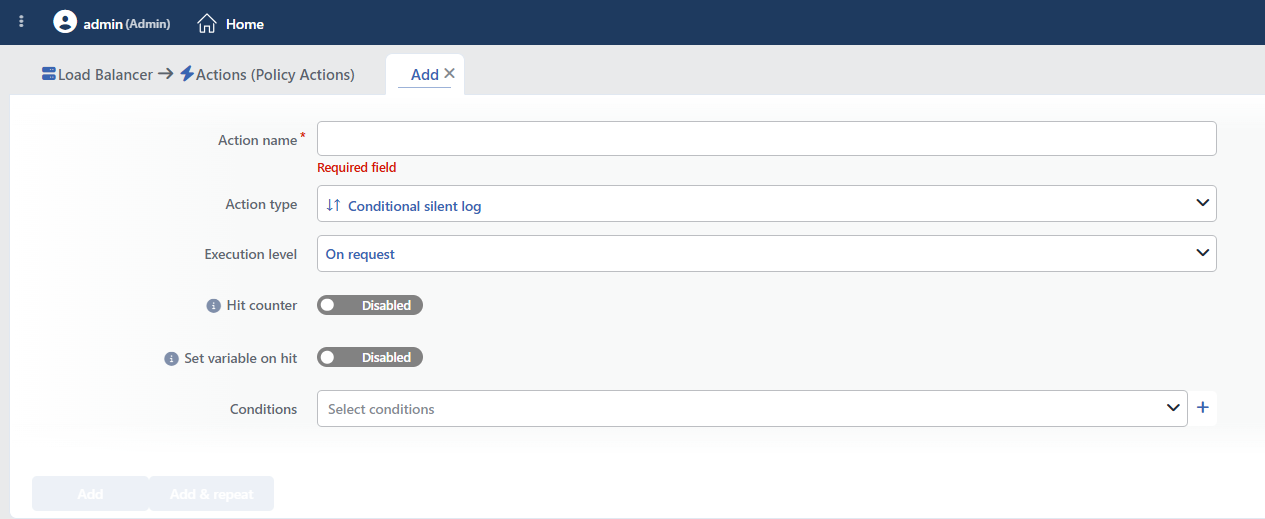 Conditional Silent Log Action Add Form
INFO
Execution Level
Determines at which stage the action is run.
When the field is changed, the Conditions field is reset (the entered conditions are deleted). When On Response is selected, only the criteria that can be evaluated at the response stage are offered in the condition list. If the action is added from within a vService, this field is filled automatically and cannot be changed; it also cannot be changed after saving.
- On Request: The action is applied before the request is forwarded to the related Backend Service. This level is used in cases where changes need to be made to the request or additional information needs to be passed to the Backend Service.
- On Response: The action is applied before the response is forwarded to the client. This level is used in cases where edits or additions need to be made to the response sent to the client.
INFO
Hit Counter Default: Off
Hit Counter counts every run of the action (it is evaluated together with the action's own condition; the count is not lost even in terminating actions such as Deny). Action-based rates and totals are displayed in the Action Hits tab of the vService dashboard and on the live statistics screen; they do not appear as a separate column in the lists. The counter is cumulative; there is no interface for resetting it manually: it starts from zero when the set of counted actions changes or when the vService is reloaded, while the history is preserved on the dashboard as a rate (hit/s).
INFO
Set Variable on Hit
A variable name whose value is assigned each time the action runs can be entered (optional; empty by default). The name can consist of letters, digits and underscores (at most 32 characters). When the action is triggered, the variable is set to 1, and chained behaviors can be built by reading it with the %TR7VAR(name) smart variable in other conditions and actions on the same vService.
INFO
Conditions
In this field, it is defined under which condition or conditions the related action takes effect.
By adding one or more conditions, the behavior can be applied in a targeted and controlled way with the and/or structure.
Detailed information about conditions is on the Conditions page.
WARNING
If no condition is defined in this field, the related action runs unconditionally (Always). In this case, the action is applied to all traffic coming to the related vService.
In live environments, using an action without defining a condition can lead to unexpected situations (service outages). For this reason, it is recommended that at least one condition always be defined when an action is created.
INFO
Form Buttons
Add
The action adding process is completed by clicking the Add button.
Add & Repeat
With the Add & Repeat button, the action adding process is completed, and another new action can be added with different configurations without leaving the related window.
 Action Added
Operational and Safe Usage Recommendations
The Conditional Silent Log action offers a powerful mechanism for simplifying log management on TR7. The recommendations below provide safe and controlled use in live environments.
- Attention Should Be Paid to Late-Forming Conditions. In conditions bound to late-forming information such as the bot score or the WAF state, the requests terminated earlier (e.g. the traffic dropped by the protection layer) can still be logged; log silencing gives the most reliable result with conditions that can be evaluated at the beginning of the request (path, source IP, header).
- Noise-Generating Traffic Should Be Targeted. It should be used for traffic types that create log noise, such as health-check requests, specific bot traffic, repeated scans or low-value endpoint requests.
- The Conditions Should Be Kept Minimal and Clear. Conditions that are broader than necessary can cause critical events not to be logged. The conditions should be defined as targeted and verifiably as possible.
- Its Use on Critical Endpoints Should Be Limited. At critical points such as authentication, management interfaces, payment flows and sensitive APIs, a more selective approach should be preferred instead of turning off the logs.
- The "Used In" Information Should Be Checked Before a Change in the Live Environment. Making a change without checking in which vServices a Conditional Silent Log action is active can cause unexpected loss of visibility.
- The SIEM and Audit Requirements Should Be Taken into Account. In environments that have compliance and audit requirements, which traffic will be left out of the logs must be in line with the operational policies.
Common Usage Scenarios in Live Environments
The examples below show how the related action is applied in the most frequently encountered use cases in real systems. These scenarios are based on practices that are widely preferred in live environments and rest on experience gained in the field.
Scenario 1: Leaving Health-Check Requests Out of the Logs
Problem: The load balancer and monitoring systems send a request to the /health and /status endpoints every 5 seconds. These requests create hundreds of thousands of log records a day and fill up the SIEM and the log storage unnecessarily.
Solution: By leaving the requests made to the health-check endpoints out of the logs, the SIEM noise is reduced and the focus is on meaningful events.
Configuration:
Result:
- ✅ /health, /status and /ping requests → Are not written to the logs, and the SIEM noise decreases.
- ✅ The SIEM and the log storage → Focus on meaningful events, and the cost decreases.
- ❌ The other endpoint requests → Continue to be logged normally.
Scenario 2: Filtering Prometheus/Grafana Metrics Requests
Problem: Prometheus makes a request to the /metrics endpoint every 15 seconds. This high-frequency monitoring traffic inflates the log files and it becomes difficult to see the real user traffic.
Solution: Leave the /metrics requests coming from specific monitoring IPs out of the logs.
Configuration:
- Execution Level: On Request
- Conditions:
Result:
- ✅ A /metrics request from the monitoring servers → Is not written to the logs.
- ✅ The log files → Focus on the real user traffic, and the analysis becomes easier.
- ❌ A /metrics request from the other IPs → Is logged normally (for security).
Scenario 3: Leaving Static File Requests Out of the Logs
Problem: The requests made to CSS, JavaScript and image files make up 60-70% of the log volume. These static files are not critical in terms of security and the log analysis becomes difficult.
Solution: By leaving the requests that have static file extensions out of the logs, the log volume is reduced significantly.
Configuration:
- Execution Level: On Request
- Conditions:
Result:
- ✅ .css, .js, .png and .jpg requests → Are not written to the logs.
- ✅ The log volume → Decreases by 60-70%, and the storage cost falls.
- ❌ Dynamic page requests → Are logged normally, and the security visibility is preserved.
Scenario 4: Filtering SEO Bot and Crawler Traffic
Problem: The bots of Google, Bing and the other search engines continuously request the /robots.txt and /sitemap.xml files. This legitimate bot traffic creates unnecessary log records.
Solution: Leave the requests that the SEO bots make to the discovery endpoints out of the logs.
Configuration:
Result:
- ✅ /robots.txt and /sitemap.xml requests → Are not written to the logs.
- ✅ The log noise → Decreases, and the real user behavior is monitored instead of the bot traffic.
- ❌ The other page requests → Are logged normally.
