
Smarter by Design.Simpler for Business
Show Content for Backend Service Errors
What Is the Show Content for Backend Service Errors Action?
The Show Content for Backend Service Errors action shows a predefined content page on the HTTP error codes returning from the Backend Services. This action replaces the Backend Service error responses with customized content.
In order to make a redirection in the case of an error code, the Redirect for Backend Service Errors action is used.
This action works only at the response stage and does not require a condition.
Backend Service Errors vs Traffic Manager Errors
In TR7, error redirection is separated according to two different sources:
| Error Source | Action | Execution Time |
|---|---|---|
| Backend Service | This action | Response (after the Backend Service has responded) |
| Traffic Manager | Show Content for Traffic Manager Errors | Request (before reaching the Backend Service) |
Examples of Backend Service Errors:
- 404 Not Found
- 500 Internal Server Error
- 403 Forbidden
- 401 Unauthorized
The error responses produced by TR7 itself (e.g. the 503 returned while no Backend Service is reachable or the 504 returned on a timeout) are not changed with this action; the Show Content for Traffic Manager Errors action is used for these responses.
Changing the Content of a Backend Service Error
The Backend Service applications usually return their own error pages. These pages:
- can be inconsistent (different Backend Services, different designs)
- can be insecure (they can contain a stack trace, server information)
- may not be user-friendly (technical messages)
With this action, the Backend Service error responses are replaced with central, consistent and secure content.
The Importance of the Show Content for Backend Service Errors Action
The central management of the Backend Service errors provides a consistent and secure user experience.
The Show Content for Backend Service Errors action;
- standardizes the Backend Service error pages,
- hides the sensitive error details (stack trace, etc.),
- serves error pages suitable for the corporate identity,
- gives the possibility to customize the HTTP status code,
- provides a consistent experience for different Backend Services.
For this reason, the Show Content for Backend Service Errors action is an important tool for security and user experience.
Supported vService Types
HTTP
L7 TCP
Network
Execution Timing
On Request
On Response
How to Add?
A new Show Content for Backend Service Errors Action can be added through the TR7 web management interface by following the steps below:
- The Configuration Menu is opened by clicking the TR7 logo at the bottom left.
- The Load Balancer → Actions → Add steps are followed.
- A unique and descriptive name is entered for the action.
- Show Content for Backend Service Errors is selected as Action Type.
- The related configurations of the action are made.
- The action is added by clicking the
Addbutton.
Show Content for Backend Service Errors Action Add Form
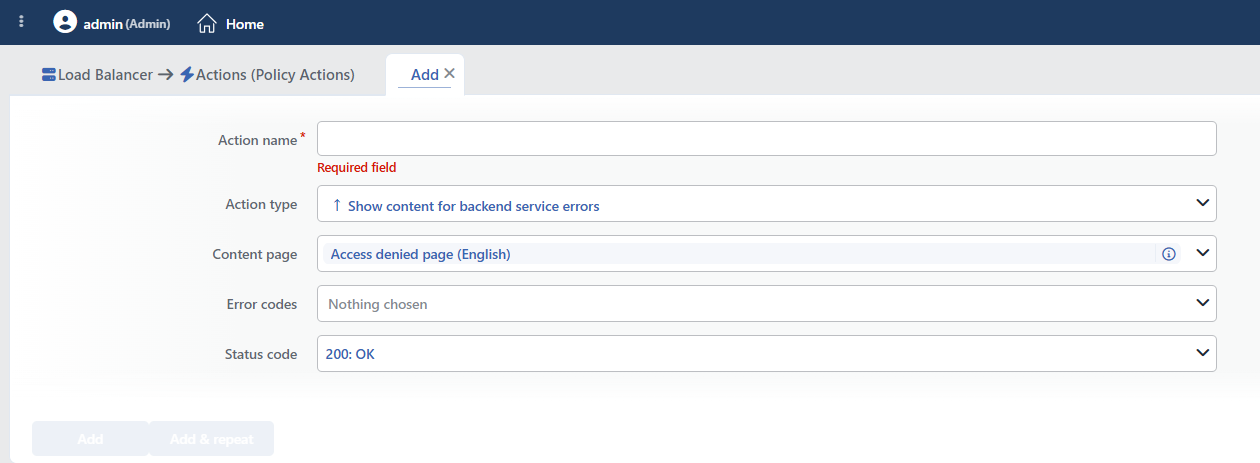 Show Content for Backend Service Errors Action Add Form
INFO
Content Page
The Content Pages to be shown to the client is selected in this field.
A selection can be made from the previously created content pages, or a new content page can also be created during the action adding step by clicking the Add button.
The content pages are managed centrally in the Load Balancer → Profiles → Content Pages section. Detailed information is on the Content Pages page.
Creating a Content Page
If there is no content page, the Default content page profile can be used, or a new page is created quickly by clicking the Add button in the dropdown list. The content pages can contain HTML, CSS and JavaScript.
INFO
Error Codes
The HTTP error codes on which the content will be shown are selected. More than one error code can be selected.
Common Backend Service Error Codes:
| Code | Status | Backend Service Scenario |
|---|---|---|
| 400 | Bad Request | The application parameter is faulty |
| 401 | Unauthorized | The session has expired |
| 403 | Forbidden | Insufficient authorization |
| 404 | Not Found | The page/API was not found |
| 500 | Internal Server Error | The application crashed/gave an error |
| 502 | Bad Gateway | The error returned by an intermediate server in front of the Backend Service |
| 503 | Service Unavailable | The maintenance response returned by the application itself |
INFO
Status Code
The HTTP status code to be returned to the client is selected. 200 OK is selected by default.
Status Code Selection
This field is used in order to preserve or change the original status code coming from the Backend Service.
- Preserving the original code is generally recommended
- Returning 200 can lead to SEO problems
- For APIs, preserving the original code is critical
Common Options:
| Code | Use Case |
|---|---|
| 200 | The error is hidden (it is used carefully) |
| 404 | Not found (SEO compatible) |
| 500 | Server error (API compatible) |
| 503 | Maintenance mode |
INFO
Form Buttons
Add
The action adding process is completed by clicking the Add button.
Add & Repeat
With the Add & Repeat button, the action adding process is completed, and another new action can be added with different configurations without leaving the related window.
 Action Added
Condition Status
The Show Content for Backend Service Errors action does not require a condition and is applied unconditionally (Always) on the vService on which it is defined.
Actions that run unconditionally directly affect all traffic or behavior on the related vService, without an evaluation based on traffic content.
In live environments, it is recommended that target service behaviors and possible effects be evaluated carefully before such actions are enabled. Otherwise, unexpected service behaviors or operational problems can occur.
Security: Hiding the Backend Service Error Details
The Backend Service error responses can usually contain the following:
- Stack trace: It gives information about the application architecture
- Server information: Framework, version, etc.
- Database errors: Table names, SQL queries
- File paths: The server directory structure
This information is valuable for attackers. With this action, the Backend Service error responses are completely replaced and the sensitive information is hidden from the user.
Behavior Details
- The Content Page field comes preselected with the ready Access denied page (English) page; if it is not touched, this page is shown in an error situation.
- The Default profile option in the list is only an empty page that carries the TR7 logo; it does not contain error text, its use is not recommended.
- The Error Codes field can be left empty; if no code is selected, the action does not do anything and no warning is given.
- If the content page bound to the action is deleted, the action is silently disabled; the deletion is not prevented.
- The smart variables in the content text are resolved; the client address or the timestamp can be shown on the page.
- The action cannot take a condition; the Conditions field is not located in the form. Since a counter is not supported either, the Hit Counter and Set Variable on Hit fields are not present.
- There is no number limit per vService; if a second definition is made for the same error code, no warning is given and only one of the definitions becomes valid. If a redirection action is also defined for the same code, which one is applied depends on the action order.
- The codes on which content cannot be returned (1xx, 204, 304) are not in the Status Code list.
It covers only the responses returned by the Backend Service
This action evaluates the status codes of the responses that actually return from the Backend Service.
When the Backend Service cannot be reached (the service is down, the connection times out), the 502/503/504 responses returned are produced by TR7 itself and this action does not take effect. The Show Content for Traffic Manager Errors action is used for these situations; the two actions can be defined together on the same vService.
The responses of WAF blocking, CAPTCHA, quarantine and the Block action are also outside the scope of this action.
WARNING
The Content-Type information of the content shown comes not from the action but from the setting of the selected content page itself. If a JSON response will be returned, the content page must be defined as application/json. Since the character set information is not sent in the response, it is recommended that the content be defined as UTF-8 on the pages with Turkish content.
Operational and Safe Usage Recommendations
- Definitely Customize the 500 Errors. 500 errors can contain a stack trace. With this action, the Backend Service 500 responses are replaced with secure content.
- Helpful content is served for 404. A search box, popular pages or a site map is located on the 404 pages.
- A Single Status Code Is Selected. For APIs and SEO, preserving the original HTTP status code is important.
- A consistent design is used. The same design language is applied on all the error pages; this provides a professional appearance.
- Verify in a Test Environment. The error scenarios are simulated in a test environment and it is verified that the content is shown correctly.
Common Usage Scenarios in Live Environments
The examples below show how the related action is applied in the most frequently encountered use cases in real systems. These scenarios are based on practices that are widely preferred in live environments and rest on experience gained in the field.
Scenario 1: Hiding the Stack Trace and Sensitive Information (500 Internal Server Error)
Problem: When the Backend Service experiences an application crash, it returns a 500 Internal Server Error and the full stack trace, the database connection string, the framework version and the internal file paths are shown in the response body. This information provides valuable reconnaissance data for attackers and creates a security vulnerability.
Solution: The 500 errors coming from the Backend Service are caught and the responses that contain a stack trace are replaced with a generic, secure error page.
Configuration:
- Content Page:
Internal Server Error - Generic - Error Codes: 500, 502, 503
- Status Code: 500 Internal Server Error
Result:
- ✅ Security hardening → The stack trace, the database errors and the file paths do not leak outside.
- ✅ Information disclosure prevention → The framework version and the technology stack are hidden.
- ✅ Professional appearance → The generic error message preserves the user experience.
- ✅ Compliance → It is compatible with the PCI-DSS and OWASP security best practices.
The Hidden Information:
- Java/Python/PHP stack traces
- Database connection errors (table names, SQL queries)
- Internal server paths (
/var/www/app/...) - Framework versions (
Django 2.1.5,Spring Boot 2.3.0)
Scenario 2: A Custom 404 Page with Search and Navigation
Problem: When the users try to access pages that do not exist, the Backend Service returns a simple "404 Not Found" message. There is no helpful information at all on these pages and the users leave the site. The bounce rate is high and the user experience is bad.
Solution: The 404 errors are replaced with a user-friendly custom page that contains a search box, popular pages and a site map.
Configuration:
- Content Page:
404 - Page Not Found with Search - Error Codes: 404
- Status Code: 404 Not Found
Result:
- ✅ The bounce rate decreases → The users can find the content they want with the search.
- ✅ SEO friendly → The 404 status code is preserved, the search engines perceive it correctly.
- ✅ User engagement → Navigation options are offered with the popular pages and the sitemap.
- ✅ Brand consistency → A single branded 404 page for all the Backend Services.
The Elements of the Content Page:
html
<h1>Page Not Found</h1>
<input type="search" placeholder="Search...">
<h3>Popular Pages:</h3>
<ul>
  <li><a href="/">Home Page</a></li>
  <li><a href="/products">Products</a></li>
</ul>
Scenario 3: Multi-Backend Error Standardization
Problem: A microservice architecture is used and the different Backend Services are written with different technologies (Java Spring, Python Flask, Node.js Express). Since every service returns its own error page format, the user experience is inconsistent. A modern design is seen on one service and an HTML 1.0 style page on another.
Solution: All the Backend Service errors are standardized with a single corporate, professional error page.
Configuration:
- Content Page:
Service Error - Corporate Branded - Error Codes: 400, 401, 403, 404, 500, 502, 503
- Status Code:
500
Result:
- ✅ A consistent experience → The Java, Python and Node.js services return the same error page.
- ✅ Corporate branding → All the error pages are suitable for the corporate identity.
- ✅ Central management → The error page is updated from a single point.
- ✅ API compatibility → The original status code is preserved, the clients perceive it correctly.
The Architectural Advantage:
- A legacy Java app: 500 → TR7 branded error page (500)
- A modern Python API: 404 → TR7 branded error page (404)
- A Node.js microservice: 503 → TR7 branded error page (503)
Scenario 4: Backend Service Maintenance Mode Notification
Problem: The Backend Service returns a 503 Service Unavailable during a deployment or a database migration. The users see a generic browser error and do not know when the maintenance will end or why it is under maintenance. A large number of tickets are opened for the support team.
Solution: The 503 errors are replaced with a professional maintenance page that contains the estimated end time (ETA), the reason for the maintenance and alternative contact information.
Configuration:
- Content Page:
Scheduled Maintenance with ETA - Error Codes: 503
- Status Code: 503 Service Unavailable
Result:
- ✅ User information → The reason for the maintenance, the estimated duration and the alternative channels are shown.
- ✅ The support load decreases → Proactive communication lowers the number of tickets.
- ✅ SEO is preserved → The 503 code informs the search engines that it is temporary.
- ✅ Professional appearance → A branded maintenance page instead of a generic error.
Content Example:
html
<h1>Planned Maintenance</h1>
<p>The database migration operation is in progress.</p>
<p>Estimated End: 14:30 (30 minutes)</p>
<p>Support: support@example.com</p>
Scenario 5: API Gateway Error Conversion (HTML to JSON)
Problem: When the REST API Backend Service gives an error, it returns an HTML formatted error page. The API clients (mobile app, SPA, third-party integrations) expect a JSON response and crash because they cannot parse HTML. The API contract is broken and the integrations fail.
Solution: The Backend Service HTML errors are converted into the standardized JSON API response format.
Configuration:
- Content Page:
API Error Response - JSON Format - Error Codes: 500, 502, 503, 504
- Status Code:
500
Result:
- ✅ The API contract is preserved → The clients always receive a JSON response.
- ✅ Client crash prevention → The HTML parse errors disappear.
- ✅ Standardization → All the error responses are in a consistent JSON format.
- ✅ Third-party compatibility → The API integrations work stably.
The JSON Error Response Format:
json
{
  "error": {
    "code": 500,
    "message": "Internal Server Error",
    "timestamp": "2025-01-31T10:30:00Z"
  }
}
Content-Type: application/json
