
Smarter by Design.Simpler for Business
Client Language Preference
What Is the Client Language Preference Condition?
Client Language Preference is a condition type that detects the client's language preference by evaluating the Accept-Language header of the HTTP request, and is used to make traffic routing and manipulation decisions according to this information.
Browsers send the user's language preferences in the Accept-Language header together with q-factor (quality value) weights:
Accept-Language
tr-TR,tr;q=0.9,en-US;q=0.8,en;q=0.7
The client's strongest preference: Turkish (tr)
The condition evaluates the languages in the header not with simple text matching but with q-factor logic. For example, the text "tr" occurs in the en-US,tr;q=0.1 header; however, the client's actual preference is English: plain text matching would make the wrong decision here. TR7 decides by selecting, among the languages listed in the condition, the client's language with the highest quality value (languages marked as q=0 are eliminated).
TIP
Regional variants are included in the base language: selecting English (en) also covers en-US and en-GB requests; no separate definition is needed for variants.
The Importance of the Client Language Preference Condition
In systems that serve in multiple languages, routing the user to the correct language version is the first step of the user experience. Making this selection based on the preference declared by the client itself is more accurate than IP/geography-based guesses.
With the Client Language Preference condition:
- Users can be routed to the page version in their preferred language,
- Which translation of a page is served can be selected according to the client's preference,
- The client's language preference can be forwarded to the Backend Service as a header,
- Clients that accept/do not accept a specific language can be distinguished,
- Language-based usage statistics can be collected.
Supported vService Types
HTTP
L7 TCP
Network
The condition can be used only at the request (At Request) stage; Accept-Language is a request header.
How to Add?
A new Client Language Preference Condition can be added through the TR7 web management interface by following the steps below:
- The Configuration Menu is opened by clicking the TR7 logo at the bottom left.
- The Load Balancer → Conditions → Add steps are followed.
- Client language preference is selected as Criteria.
- The related configurations of the condition are made.
- The condition is added by clicking the
Addbutton.
Client Language Preference Condition Add Form
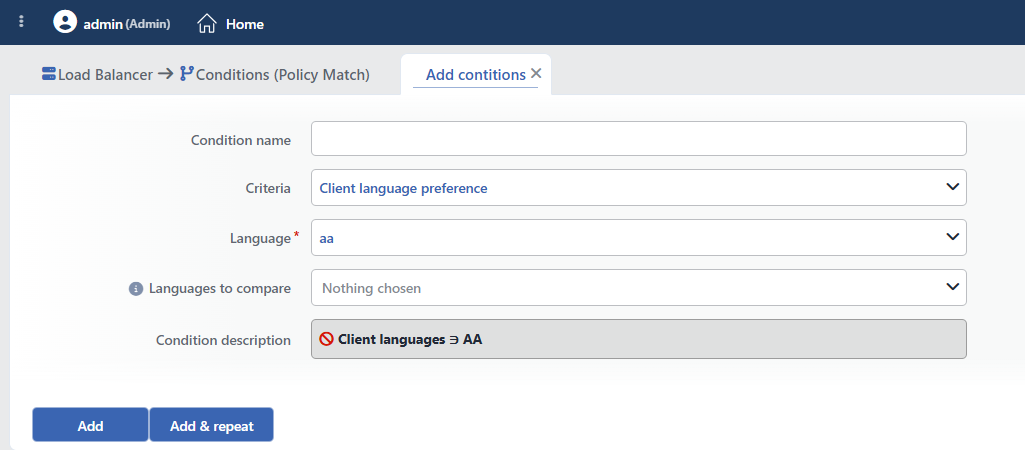 Client Language Preference Condition Add Form
INFO
Condition Name
An optional name can be entered for the condition to be created.
This field is especially important in the following scenarios:
- When many conditions are defined under the same vService,
- When conditions with similar criteria need to be distinguished,
- When it is necessary to quickly understand which business rule the condition represents.
When this field is left empty, TR7 analyzes the content of the related condition and creates an automatic, descriptive name in the Condition Description field. This generated description is used as the name in condition lists.
INFO
Criteria Required
The field that determines the type of the condition; Client language preference is selected from the searchable dropdown list. This selection determines the fields displayed in the form. The criterion cannot be changed after the condition is saved: if a different criterion is needed, a new condition is defined. For all criteria in the list and their scopes, the criteria catalog on the Conditions page can be referred to.
INFO
Language Required
The language to be checked is selected from the searchable dropdown list. The list contains the languages of the ISO 639-1 standard, 184 languages in total, in the Name (code) format (e.g. Turkish (tr), English (en)); the language names are displayed according to the active language of the interface. Languages whose names cannot be resolved are listed only with their codes. The field cannot be left empty, and it opens with the first item of the list (aa) selected; the language to be checked must be selected deliberately.
INFO
Languages to Compare Optional
The field that determines the question of the condition; the language selected in the Language field is not offered in this list:
- When left empty, the condition asks only the question "does the client accept this language"; if the selected language occurs in the client's acceptance list (except q=0), the condition is met.
- When filled, the condition asks the question "does the client want this language more than the languages here"; if the language in the Language field comes before the languages in the comparison list in the client's q-factor ordering, the condition is met. This is the standard way to select which translation of a page is shown.
More than one language can be selected.
WARNING
When setting up multilingual routing, the same language set should be used in the conditions defined for each language (e.g. comparison with English in the TR condition and with Turkish in the EN condition). If the conditions are weighed with different sets, they do not exclude each other; visitors that meet none of them fall to the default content.
TIP
For the Turkish–English pair, two ready-made conditions are offered in the condition selection lists: If the client prefers Turkish over English and If the client prefers English over Turkish. There is no need to define a separate condition for this pair.
INFO
Condition Description
It is created automatically by TR7 in line with the entered criteria and values.
This description:
- which value the condition applies to,
- which criterion it works on,
- the quick understanding of the condition on listing screens
is produced dynamically by the system so as to provide these. Languages are shown in the description with uppercase language codes (e.g. TR > EN).
INFO
Form Buttons
Add
The condition adding process is completed by clicking the Add button.
Add & Repeat
With the Add & Repeat button, the condition adding process is completed, and another new condition can be added with different configurations without leaving the related window.
 Condition Added
Operational Usage Recommendations
- Comparison Should Be Used for Translation Selection. For the "which language version should be shown" decision, the Languages to Compare field should be filled; a condition left empty performs only an acceptance check and does not distinguish between clients that accept more than one language.
- Symmetric Conditions Should Be Set Up. When defining conditions for each language version, the same language set should be used in all conditions; otherwise, the conditions do not exclude each other.
- The Default Should Not Be Forgotten. The default language version should be planned for clients that meet no language condition (including those that send no header).
- Variants Should Not Be Defined. Regional variants such as
tr-TRanden-USare included in the base language; selecting only the base language is enough.
Common Usage Scenarios in Live Environments
The examples below show how the related condition is applied in the most frequently encountered use cases in real systems. These scenarios are based on practices that are widely preferred in live environments and rest on experience gained in the field.
Scenario 1: Multilingual Site Routing
Purpose: To route visitors who prefer Turkish to the Turkish version of the site and those who prefer English to the English version.
Configuration: Language → Turkish (tr), Languages to compare → English (en) (the second condition is the reverse: Language → English (en), Languages to compare → Turkish (tr))
Action Recommendations:
- ✅ Set Path → The request of a visitor who prefers Turkish is redirected to the
/trpath. - ✅ Show Content → A welcome/information page is shown in the visitor's preferred language.
Scenario 2: Forwarding Language Information to the Backend Service
Purpose: To forward the client's preference with a standard header to the Backend Service that makes the language selection on the application side.
Configuration: Language → Turkish (tr), Languages to compare → English (en)
Action Recommendations:
- ✅ Add HTTP Header → The
X-Preferred-Lang: trheader is added; for traffic that does not meet the condition,X-Preferred-Lang: enis added with a separate rule. - ✅ Advanced Traffic Inspection → The language preference distribution is reported.
Scenario 3: Distinguishing Clients That Accept a Specific Language
Purpose: To serve an announcement or content specific to a language to clients that accept that language (regardless of the preference order).
Configuration: Language → German (de), Languages to compare → (empty)
Action Recommendations:
- ✅ Show Content → A German announcement page is shown to visitors who accept German.
- ✅ Add HTTP Header → The
X-Accepts-German: trueheader is added, and the Backend Service makes the content decision.
