
Smarter by Design.Simpler for Business
Manage HTTP Security Headers
What Is the Manage HTTP Security Headers Action?
The Manage HTTP Security Headers action automatically adds the security header information to the HTTP responses returning from the Backend Services. These headers give instructions to the browsers in order to increase the security of modern web applications.
For detailed information about the HTTP security headers, the Mozilla HTTP Headers page can be checked.
TIP
In the cases where a header that is not present by default in the Manage HTTP Security Headers Action or a different value is to be entered, the Add HTTP Header action (Execution Level → On Response) should be used.
This action works only at the response stage and adds the selected security headers to the responses returning from the Backend Service.
The responses produced by TR7 itself are out of scope
The headers are applied only to the responses coming from the Backend Service. The responses produced by TR7 itself (blocking pages, WAF block responses, CAPTCHA pages, redirections, shown content pages and error pages) are not affected by this action. The server fingerprint cleaning does not work in these responses either.
The Importance of the Manage HTTP Security Headers Action
The security headers provide protection at the browser level against XSS attacks, clickjacking, MIME sniffing and other common web security threats. OWASP and the other security standards strongly recommend the use of these headers.
The Manage HTTP Security Headers action;
- provides protection against XSS (Cross-Site Scripting) attacks,
- blocks clickjacking attacks,
- closes MIME type sniffing vulnerabilities,
- makes the use of HTTPS mandatory,
- controls the leakage of the referrer information,
- hides the server fingerprint information.
For this reason, the Manage HTTP Security Headers action is a critical component for strengthening the security posture of web applications.
The Security Headers That Can Be Selected
The security headers below can be added with this action:
| Header | Description |
|---|---|
| Content-Security-Policy | Provides protection against XSS and data injection attacks. Default value: default-src 'self' |
| Strict-Transport-Security (HSTS) | Forces the browser to connect only over HTTPS. Default value: max-age=16000000; includeSubDomains; preload; |
| X-Frame-Options | Provides protection against clickjacking attacks. Default value: SAMEORIGIN |
| X-XSS-Protection | Enables the built-in XSS filter of the browser. Default value: 1; mode=block |
| X-Content-Type-Options | Prevents MIME type sniffing. Default value: nosniff |
| Referrer-Policy | Controls how the referrer information will be shared. Default value: no-referrer-when-downgrade |
| Permissions-Policy | Sends only the interest-cohort=(); policy. It does not restrict permissions such as location, camera and microphone; the policy text cannot be changed |
| Remove Server Fingerprints | Cleans the Server, X-Powered-By, X-AspNet-Version and X-AspNetMvc-Version headers from the response |
WARNING
These headers increase the security on the client side; however, since they also directly change the way the browser interprets and runs the content, they can produce unexpected results in the application behavior. Especially enabling all the headers at the same time with aggressive defaults can create effects such as breakage in the page design, some resources not being loaded, embedded content not working or certain browser features being disabled.
Supported vService Types
HTTP
L7 TCP
Network
Execution Timing
On Request
On Response
How to Add?
A new Manage HTTP Security Headers Action can be added through the TR7 web management interface by following the steps below:
- The Configuration Menu is opened by clicking the TR7 logo at the bottom left.
- The Load Balancer → Actions → Add steps are followed.
- A unique and descriptive name is entered for the action.
- Manage HTTP Security Headers is selected as Action Type.
- The related configurations of the action are made.
- The action is added by clicking the
Addbutton.
Manage HTTP Security Headers Action Add Form
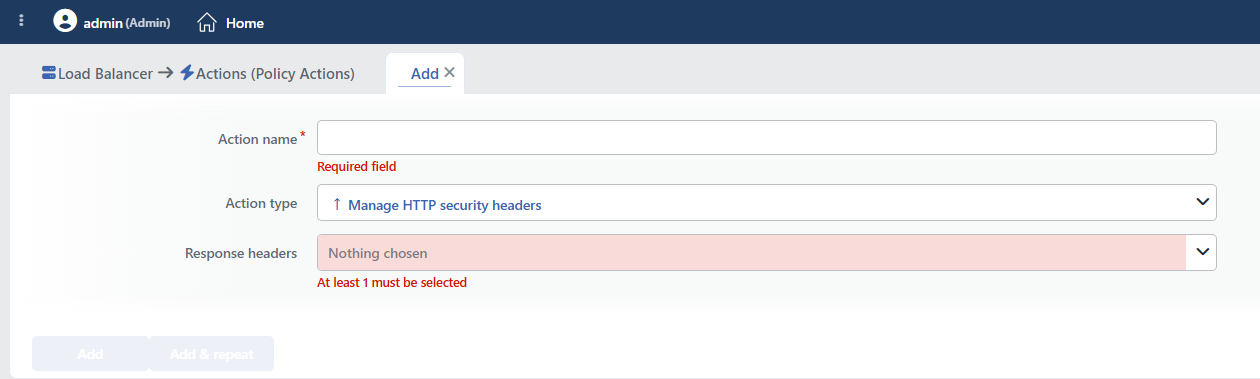 Manage HTTP Security Headers Action Add Form
INFO
Action Type
Manage HTTP security headers is selected as the action type.
Since the action works only at the response stage and unconditionally, the Execution Level, Rule Protocol, Conditions, Hit Counter and Set Variable on Hit fields are not located in the form.
INFO
Response Headers Required Default: Empty
The security headers to be added to the returning responses are selected in this field. More than one header can be selected at the same time.
The headers that can be selected:
- Content-Security-Policy (
default-src 'self') - Strict-Transport-Security (HSTS) (
max-age=16000000; includeSubDomains; preload;) - X-Frame-Options (
SAMEORIGIN) - X-XSS-Protection (
1; mode=block) - X-Content-Type-Options (
nosniff) - Referrer-Policy (
no-referrer-when-downgrade) - Permissions-Policy (
interest-cohort=();: only this policy; the other browser permissions are not restricted) - Remove Server Fingerprints (cleans the
Server,X-Powered-By,X-AspNet-VersionandX-AspNetMvc-Versionheaders)
TIP
In the cases where a header that is not present by default in the Manage HTTP Security Headers Action or a different value is to be entered, the Add HTTP Header action (Execution Level → On Response) should be used.
INFO
Form Buttons
Add
The action adding process is completed by clicking the Add button.
Add & Repeat
With the Add & Repeat button, the action adding process is completed, and another new action can be added with different configurations without leaving the related window.
 Action Added
INFO
Overwriting the Existing Headers
If the Backend Service already sends the same header, the behavior changes according to the header:
| Header | Behavior |
|---|---|
| Content-Security-Policy · Strict-Transport-Security · X-Frame-Options · Referrer-Policy · Permissions-Policy | The value of the Backend Service is deleted and the value of TR7 is written |
| X-XSS-Protection · X-Content-Type-Options | The existing header is not deleted, a second header is added (a double header can occur in the response) |
There is no limit to the number of the action per vService; adding it more than once multiplies this double writing.
HSTS is added only in encrypted connections
The Strict-Transport-Security header is added only to the responses of the requests coming over TLS; it is never sent on an unencrypted HTTP listener.
When this option is checked, if there is an HSTS setting defined in the security profile, the value of the action is valid and the profile setting is not applied.
The max-age value sent is approximately 185 days. Since a condition of at least one year is generally required for an application to the browser preload lists, this value is not sufficient for a preload application.
WARNING
The Manage HTTP Security Headers action does not require a condition and is applied unconditionally (Always) on the vService on which it is defined.
Actions that run unconditionally directly affect all traffic or behavior on the related vService, without an evaluation based on traffic content.
In live environments, it is recommended that target service behaviors and possible effects be evaluated carefully before such actions are enabled. Otherwise, unexpected service behaviors or operational problems can occur.
Operational and Safe Usage Recommendations
- Use Content-Security-Policy Carefully. The
default-src 'self'value allows resources to be loaded only from the same origin. If external CDNs, fonts or scripts are used, this value may need to be customized. Otherwise the application can break. - Complete the HTTPS Preparation before Using HSTS. When HSTS is enabled, the browsers connect to the site only over HTTPS. The HTTPS configuration must be fully working.
- Use Remove Server Fingerprints. Removing the server fingerprint information (
Server: Apache/2.4.41,X-Powered-By: PHP/7.4, etc.) prevents information about the server from leaking to attackers. - It is verified in a test environment. Especially Content-Security-Policy and X-Frame-Options can cause unexpected behavior in some applications; the change is tested before it is taken to the live environment.
- If application-specific values are needed, Manual Action is used. The default values in this action are suitable for general use; when custom values are needed, the header is added manually with the Add HTTP Header action.
Common Usage Scenarios in Live Environments
The examples below show how the related action is applied in the most frequently encountered use cases in real systems. These scenarios are based on practices that are widely preferred in live environments and rest on experience gained in the field.
Scenario 1: Basic Web Application OWASP Compliance
Problem: An e-commerce site is going through a security audit and does not meet the OWASP Top 10 requirements. Clickjacking, XSS and MIME sniffing vulnerabilities are detected. Changing the Backend Service code will take a lot of time, and they want to add the security headers from TR7.
Solution: Provide OWASP compliance by adding the basic security headers (X-Frame-Options, X-XSS-Protection, X-Content-Type-Options, Remove Server Fingerprints).
Configuration: Response Headers → X-Content-Type-Options · X-Frame-Options · X-XSS-Protection · Remove Server Fingerprints
Result:
- ✅ Clickjacking protection → iframe attacks are blocked with X-Frame-Options: SAMEORIGIN.
- ✅ XSS protection → The browser XSS filter becomes active with X-XSS-Protection: 1; mode=block.
- ✅ MIME sniffing protection → File type guessing attacks are blocked with X-Content-Type-Options: nosniff.
- ✅ Server hiding → The Server and X-Powered-By headers are cleaned, and attackers cannot learn the server version.
- ✅ OWASP compliance → Meets the basic security requirements and passes the security audit.
Scenario 2: Browser HSTS Enforcement after the HTTPS Transition
Problem: A banking site has moved from HTTP to HTTPS, but the users still enter the site by typing http:// in the browser address bar. They are open to SSL stripping attacks and some users try to connect over HTTP.
Solution: Make it mandatory for the browsers to connect to the site only over HTTPS by adding the HSTS (Strict-Transport-Security) header.
Configuration: Response Headers → Strict-Transport-Security (HSTS) · X-Content-Type-Options · X-Frame-Options · Remove Server Fingerprints
Result:
- ✅ The HTTPS requirement → The browser connects to the site only with HTTPS during the max-age period (approximately 6 months).
- ✅ SSL stripping protection → The HTTP connection attempts are automatically upgraded to HTTPS.
- ✅ Subdomain protection → With includeSubDomains, all the subdomains are forced to HTTPS as well.
- ✅ HSTS preload preparation → With the preload parameter, it is ready for addition to the Chrome HSTS preload list.
- ❌ HTTP access → The site does not open over HTTP in any way, HTTPS is mandatory.
Scenario 3: CSP Protection for a Legacy Application with an XSS Vulnerability
Problem: There is an XSS (Cross-Site Scripting) vulnerability in an old ASP.NET application and it is not possible to fix the code immediately. Attackers steal user sessions by injecting JavaScript. The application does not load scripts from outside, it uses only its own resources.
Solution: By adding the Content-Security-Policy header, the browser is made to run scripts only from the same origin and inline scripts are blocked.
Configuration: Response Headers → Content-Security-Policy · X-XSS-Protection · X-Content-Type-Options · X-Frame-Options
Result:
- ✅ The impact of the XSS attack decreases → External script loading is blocked with CSP default-src 'self'.
- ✅ Inline script protection → The
<script>tags injected by the attackers do not run. - ✅ Double-layered protection → CSP and X-XSS-Protection work together.
- ⚠️ The use of inline scripts → If there are inline scripts in the application, they break and must be moved to external files.
- ❌ The use of a CDN → Resources cannot be loaded from external CDNs (jQuery, Bootstrap, etc.), there is the 'self' restriction.
Scenario 4: KVKK/GDPR-Compliant Privacy-Oriented Configuration
Problem: A health application must provide KVKK/GDPR compliance. With the referrer header, the user navigation information leaks to third-party sites and the server information is clearly visible in the responses.
Solution: By adding the Referrer-Policy and Permissions-Policy headers, the information leaking out is reduced.
Configuration: Response Headers → Referrer-Policy · Permissions-Policy · X-Content-Type-Options · Remove Server Fingerprints
Result:
- ✅ Referrer protection → With no-referrer-when-downgrade, the referrer does not leak in HTTPS→HTTP transitions.
- ⚠️ Browser permissions → The policy sent contains only
interest-cohort=(); permissions such as location, camera and microphone cannot be restricted with this action. If these permissions need to be restricted, the policy must be defined manually with Add HTTP Header. - ✅ KVKK/GDPR compliance → Meets the user privacy standards.
- ✅ Server hiding → With Remove Server Fingerprints, the server information does not leak.
Scenario 5: Maximum Security for a Banking/Finance Application
Problem: A banking application requires PCI-DSS compliance and the maximum security posture must be provided. All the security headers must be active and protection at every kind of browser level is needed. However, the application uses an external CDN, the CSP must be adjusted.
Solution: The highest protection is provided by enabling all the security headers; a custom value is used for the CSP instead of the default value.
Configuration:
Step 1: The basic headers with the Manage HTTP Security Headers action:
- Response Headers: Strict-Transport-Security (HSTS) · X-Frame-Options · X-XSS-Protection · X-Content-Type-Options · Referrer-Policy · Permissions-Policy · Remove Server Fingerprints
Step 2: A custom CSP with the Add HTTP Header action:
- Execution Level: On Response
- Header to Add: Content-Security-Policy
- Header Content:
default-src 'self'; script-src 'self' https://cdn.jsdelivr.net; style-src 'self' 'unsafe-inline' https://fonts.googleapis.com; font-src 'self' https://fonts.gstatic.com;
Result:
- ✅ Maximum security → All the security headers are active, multi-layered protection.
- ✅ The HTTPS requirement → HTTPS is enforced in all the traffic with HSTS.
- ✅ Clickjacking protection → iframe attacks are blocked with X-Frame-Options.
- ✅ XSS protection → CSP and X-XSS-Protection work together.
- ✅ The custom CSP policy → The external CDNs (jsDelivr, Google Fonts) are in the allow list, and inline style can be used.
- ✅ PCI-DSS compliance → Meets all the security requirements.
- ⚠️ Two actions are required → The default CSP is not sufficient, a separate action must be added for the custom value.
