
Smarter by Design.Simpler for Business
Connection Abuse
What Is Connection Abuse?
Connection Abuse deals with what comes after the handshake is completed in the TCP band: not with the rate at which the connection is established but with its staying open.
It meets two separate forms of exploitation. The first is a source consuming the resource pool by holding a large number of connections at the same time; against this a ceiling is put per source. The second is the connections being left idle without being closed; against this, how long after the dead records in the connection table will be collected is adjusted.
2
Rules
One is the concurrent connection limit, one is the on/off cleanup setting
1,000
Default Connection Ceiling
The number of connections a source can hold at the same time
Concurrency
Measurement Base
Not the rate per second but the number of connections open at that moment
10 / 30 / 14400
Cleanup Times
The FIN · keepalive · established connection timeouts in seconds
1
Able to Send to Quarantine
Only the concurrent connection limit; the cleanup setting cannot send
To the Device Only
The Scope of the Connection Limit
The limit is applied on the connections directed at the device; the measurement is read from the whole of the connection table
The Connection Abuse Box on L4 DDoS Management
The box is the second box in the body of the TCP band. In its header there are its name and the number of rules it carries, and in its body two rule rows.
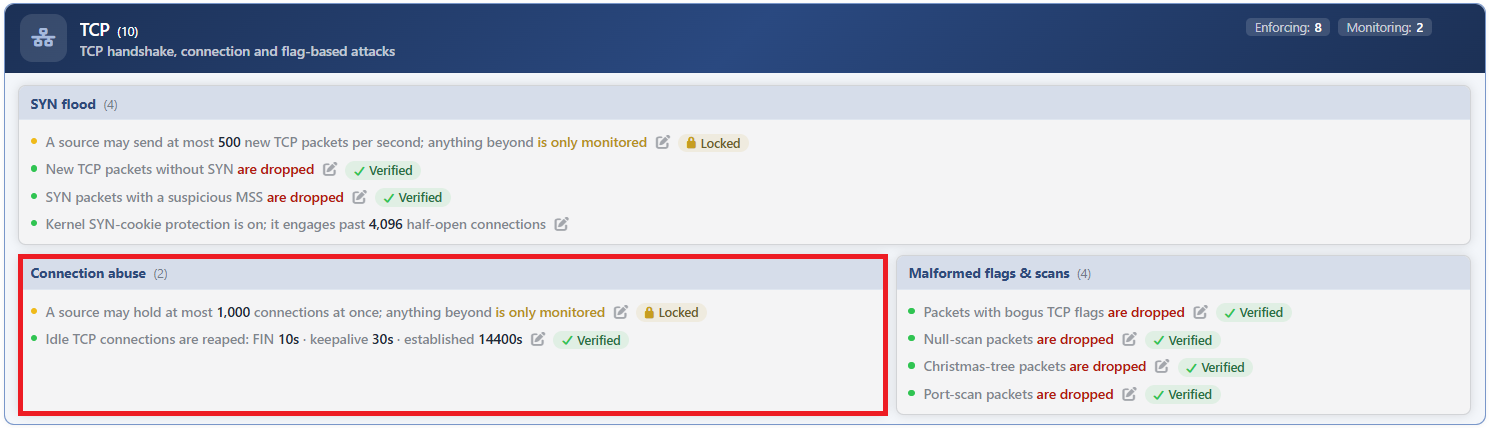 TCP - The Connection Abuse Box
| Row | Rule | Its method |
|---|---|---|
| 1 | Total Conn/Src | The number of concurrent open connections per source. |
| 2 | Zombie TCP | The collection times of the idle connections. |
Total Conn/Src
Limits how many connections a source address can hold at the same time. The measurement is address based and every source carries its own counter.
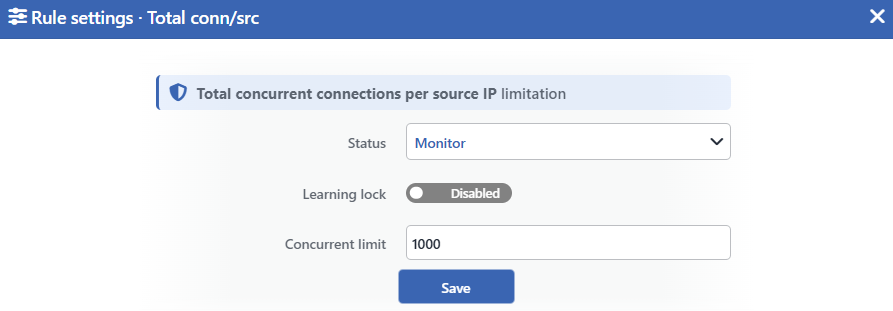 Total Conn/Src Edit Screen
INFO
Status
Selects the rule's operating mode. Four values are offered, and the selected value also determines the sentence on the row:
| Value | The sentence in the row |
|---|---|
| Disabled | A limit of <limit> connections at once is configured, but the rule is off |
| Monitor | A source may hold at most <limit> connections at once; anything beyond is only monitored |
| Block | A source may hold at most <limit> connections at once; anything beyond is dropped |
| Quarantine | A source may hold at most <limit> connections at once; a source that exceeds it is quarantined |
INFO
Learning Lock Default: Off
Closes the rule to the learning engine. When the switch is turned on, the engine cannot change the limit and the mode of this rule; the rule is changed only manually from this window.
It is off by default. While the lock is on, an unlabeled padlock icon is displayed on the row, to the left of the pencil.
INFO
Concurrent Limit Default: 1000
Determines the number of connections a source can hold at the same time. The default value is 1000 and only an integer of 1 and above is accepted.
The field has no time unit; this is a conscious choice, because what is measured is not a rate.
INFO
Save
Saves the change made and puts it into force immediately. Only the changed fields are updated. While there is a validation error, the button is inactive.
This is not a rate limit
The rule counts not "how many connections are opened per second" but "how many connections are open right now". The difference between them is large in practice: a source that opens a single connection per minute and never closes it can also lean on this ceiling.
The rule that deals with the rate of opening connections is not in this box but in the SYN Flood box.
In the monitoring mode no rule is written, the measurement is still made
While this rule is in the monitoring mode, it produces no firewall rule. On the other hand its graph continues to fill on the Connection Limits tab of the dashboard: the counting is read not from the rule but from the device's own connection table.
This is different from the rate-limiting rule of the same band; there a targetless rule is written in the monitoring mode as well and the measurement comes from that rule.
The limit is applied only on the connections directed at the device
The rule works on the connections that come to the device itself and is not applied to the traffic passed through the device; for this reason the connections forwarded to the backend over a Network (L4) vService are not caught by this ceiling. On the other hand, since the client connections of the HTTP and L7 TCP vServices terminate on the device, they are included in the ceiling.
In addition, the enforcement is triggered only on new connections: an established session is not cut even if the source exceeds the ceiling.
Zombie TCP
Adjusts how long after the records left idle in the connection table will be cleaned. It does not write a firewall rule; it determines the timeout stance of the system.
Its purpose is to prevent the connections that have not been closed or that have been left half-finished from accumulating in the table and consuming resources. Short times empty the table quickly, and long times allow the long-lived but silent sessions to survive.
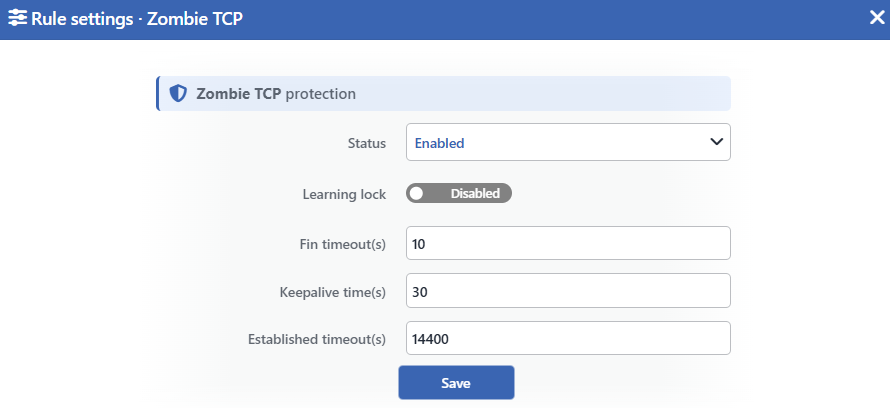 Zombie TCP Edit Screen
The times are written in the row as raw seconds; they are not converted to hours or minutes and they do not take a thousands separator.
INFO
Status
Determines whether the rule is on or not. Unlike the concurrent connection limit, only two values are offered:
| Value | The sentence in the row |
|---|---|
| Enabled | Idle TCP connections are reaped: FIN <time> · keepalive <time> · established <time> |
| Disabled | Idle TCP connections are not reaped |
INFO
Learning Lock Default: Off
Closes the rule to the learning engine. Since the engine never produces a recommendation for this rule, the switch has no practical effect; since the rule has a measurement definition, the form displays it nevertheless.
INFO
Fin Timeout(s) Default: 10
Determines how long a connection that has passed into the closing stage will be kept waiting in this stage. The default value is 10 seconds.
INFO
Keepalive Time(s) Default: 30
Determines how long after the liveness check will start for an idle connection. The default value is 30 seconds.
INFO
Established Timeout(s) Default: 14400
Determines how long an established and idle connection will be held in the table. The default value is 14400 seconds.
This value represents a different balance from the other two: keeping it too short can lead to the silent but healthy sessions that are kept alive by both ends with liveness packets (such as long-lived database or remote access connections) being dropped silently.
INFO
Save
Saves the change made and puts it into force immediately. All three time fields accept only an integer of 1 and above; while there is a validation error, the button is inactive.
Turning it off does not take the timeout values back
When the rule is made Disabled, the sentence in the row becomes "Idle TCP connections are not reaped", but the timeout stance of the system continues to be written: turning it off only cancels the special values here, and the system continues to reap with the defaults in the catalog (10 · 30 · 14400).
That is, this switch does not "turn the cleanup off", it "stops using its own times".
This rule produces no recommendation but carries a lock switch
The learning engine produces a row for this rule, but never gives a mode recommendation: the rule has no enforcement levels. On the other hand a Learning Lock switch is displayed in the edit window; since the rule has a measurement definition, the form displays this switch.
It has no panel of its own on the dashboard; its measurement is recorded but it is not graphed on the ready tabs.
Measurement and Dashboard
Only one rule of the box is displayed as a graph on the dashboard: the Total Conn/Src measurement is on the Connection Limits tab, in an L4 DDoS Concurrency — <rule> panel.
| Rule | Panel tab | What is measured | Quarantine panel | Dropped Traffic |
|---|---|---|---|---|
| Total Conn/Src | Connection Limits | The concurrent TCP connections per source: the highest source concurrency, the p95 value, the number of active sources and the configured ceiling line | Yes | Yes; it produces a value only in the Block and Quarantine modes |
| Zombie TCP | None | The total number of the TCP connections in the closing stage in the route table; it is recorded, it is not graphed on the ready tabs | None | None |
The concurrency counting is independent of the mode and reads the whole table
The Total Conn/Src counting is read not from the rule but from the device's connection table; it is recorded while the rule is Disabled as well, but its panel is displayed only while the rule is on. The IPv4 and IPv6 connections are counted together. The sources in the exemption list, the route table's own addresses and the closed connections do not enter the counting.
The counting covers the connections passed through the device as well, while the limit is applied only on the connections directed at the device. For this reason, while a source exceeding the ceiling is seen on the panel, the Dropped Traffic value can stay zero.
Zombie TCP does not take an active row in the live view
The Zombie TCP measurement does not separate sources, is recorded independently of the mode of the rule and counts only the connections that terminate on the device. On the L4 DDoS Live View screen it is counted into the Connections card, but since it has no limit it is always listed as idle.
Scope and Limits
INFO
- The concurrent connection limit is not a rate limit. The field has no time unit either.
- The limit is applied only on the connections directed at the device; it is not applied to the traffic passed through the device.
- In the monitoring mode no firewall rule is written, the measurement is still made.
- Zombie TCP cannot send to quarantine and does not carry mode levels; it is only on or off.
- When Zombie TCP is turned off the system timeout writing does not stop; only the special values are cancelled.
- Zombie TCP has no panel on the dashboard; its measurement is recorded but it is not graphed on the ready tabs.
- Both rules are subject to the mode promotion permission. Since the concurrent connection limit measures a threshold, and Zombie TCP because it cannot be promoted anyway, they do not pass into enforcement without the Mode Promotion permission.
- In an untouched route table the concurrent connection limit is born in monitoring and the cleanup setting on.
- Editing requires modify permission in the Network area.
