
Smarter by Design.Simpler for Business
How It Learns
What Is How It Learns?
How It Learns reduces the current definition of the learning into a single sentence: it writes looking at which history the engine learns and whether what it learns is submitted for approval or is applied on its own. In short, it answers a single question: how is the engine working right now?
It is not a result surface; it is the summary of the settings. It does not say how many recommendations are waiting, and it does not start an operation either: the numbers belong to the counters in the upper band of Learning and the actions to the other two cards. On the other hand it is the door of the learning settings: when the card is clicked, the edit window opens.
The whole card is clickable
When anywhere on the card is clicked, the editing window of the learning settings opens; the pencil icon at the bottom right corner is only a mark stating this, it is not a button on its own. When the card is hovered over, its background being colored and the pencil being highlighted also show that the whole of it is clickable. The same window is also opened with the AI Learning Settings → link in the upper band of the strip. Details: AI Learning Settings.
The How It Learns Card in the Learning Strip
The card is the one on the left among the three cards in the body of the band. At the top the title and the icon, in the middle the sentence explaining the learning, at the bottom the name of the current mode and the pencil icon are located.
 The Learning Strip - The How It Learns Card
The anatomy of the card:
| Section | What it shows |
|---|---|
| Title | How It Learns and the setting icon. |
| The sentence | The current definition of the learning. The duration value (in the automatic mode the period value as well) is written highlighted; there is no highlight in the sentence in the off mode. |
| The name of the mode | At the bottom left of the card, the name of the selected Learning Mode value: Off, Smart Advisor or Automatic. |
| Pencil icon | At the bottom right; it states that the card opens the editing window. |
The Three States of the Sentence
The sentence takes one of three forms according to the selected mode:
| Mode | Sentence |
|---|---|
| Smart Advisor | Learning from the last <history>; suggestions are offered to you, never applied on their own. |
| Automatic | Learning from the last <history>; what it learns is applied on its own (<period>). |
| Off | Learning is off — no suggestions are produced for this pool. |
The <history> value comes from the Learning Lookback setting and is written in a readable form (e.g. 1 month(s)); if the setting has not been written at all, the default history of one month is used. If the mode has not been written at all either, the card directly writes the Smart Advisor sentence.
The <period> appears only in the sentence of the automatic mode and comes from the Learning Interval setting (e.g. Daily). In the other modes the period is not written, because it has no correspondence: the Smart Advisor evaluation runs at a fixed frequency, every hour, independently of the setting.
The duration in the sentence may not be the same as the window the engine uses
The history entered is rounded to the ready windows in which the engine works: approximately one week, two weeks, one month and two months. The sentence always writes the value entered; for example, when 20 days is entered, 20 day(s) appears in the sentence while the engine learns from the two-week window. In the same way, all the selections above 45 days correspond to the two-month window.
The card stays in place while learning is off
While Off is selected, the card does not disappear and continues to be clickable: the sentence writes that learning is off and the mode name below becomes Off. In this case the periodic evaluation of the engine is not made; however, since an instant evaluation is still carried out when the screen is opened and every time an edit is made on the record, the numbers on the second and third cards can appear full. There is a second situation that stops the periodic evaluation: in the Smart Advisor mode, if Mute Suggestion Notifications is on, the run is not made at all either.
The Screen the Card Opens
When the card is clicked, the edit window titled Edit - Smart Advisor opens. The window carries all of the settings that the card summarizes: the working mode, the learning history, the trusted countries and network type groups, and the period and the brake specific to the automatic mode. The number of fields seen depends on the selected mode: while Off is selected, only Learning Mode remains in the form.
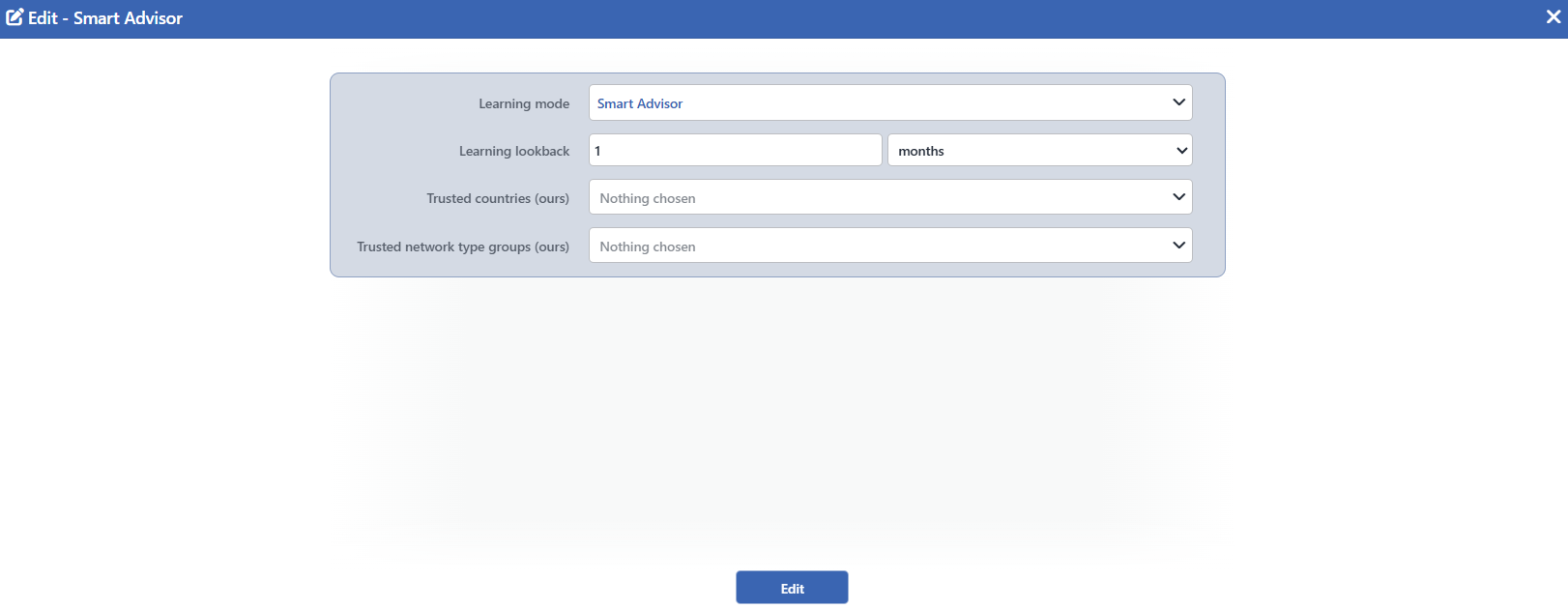 The Screen the How It Learns Card Opens
For the explanation of the fields one by one, the visibility table according to the mode and the saving behavior: AI Learning Settings.
Scope and Limits
INFO
- The card is a settings summary, it does not show a result. How many settings have been judged and how many recommendations are waiting is written on the What It Concluded card and in the counters in the upper band.
- The sentence reads only two settings. The learning mode and the learning history; in the automatic mode the period is added to these. The trusted lists and the brake setting do not enter the sentence.
- The pencil icon is not an independent button. The edit window is opened by clicking anywhere on the card.
- The window opens only on the users that have edit permission. On a user that does not have the permission, although the card appears clickable, the window does not open.
