
Smarter by Design.Simpler for Business
Smurf
What Is Smurf?
Smurf limits the ICMP echo query rate per source and the rate of the connection reset packets that come to the device in the ICMP & Reflection band. One of the two rate limits of the band and its only rule on the TCP side are found here.
The attack that gives the box its name is based on taking on the address of the victim and sending an echo query to the broadcast address of a network: all the devices on the network send the answer to the victim and a single packet turns into hundreds of answers. The same logic has a TCP counterpart as well; there what is sent to the victim is a connection reset packet.
The two rules of the box close these two surfaces: one limits the ICMP echo query rate per source, and the other puts a general ceiling on the reset packets that come to the device.
2
Rules
One is the ICMP echo query rate, one is the TCP reset packet rate
100/s
Default ICMP Ceiling
The number of echo queries per second per source
20/s
Default Reset Ceiling
A common budget per IP version; it is not measured per source
1
Able to Send to Quarantine
Only the ICMP rate limit; the reset limit cannot send
Monitor · Disabled
Default Values
The ICMP limit is born in monitoring and the reset limit off
No Broadcast
Matching Criterion
No rule looks for sending to a broadcast address
The name of the box does not describe exactly what it does
The distinguishing mark of the classic Smurf attack is the packet being sent to a broadcast address. The rules of the box do not use such a criterion: the ICMP rule is a general limit that measures the echo query rate per source, whatever its target is.
The second rule, on the other hand, does not deal with ICMP at all; it looks at TCP packets. The reason they stand together in the box is the commonality of the attack form, not a commonality of protocol.
The Smurf Box on L4 DDoS Management
The box is the second box in the body of the ICMP & Reflection band. In its header there are its name and the number of rules it carries, and in its body two rule rows.
 ICMP & Reflection - The Smurf Box
| Row | Rule | Its method |
|---|---|---|
| 1 | ICMP Smurf: Pkt Limit | The ICMP echo query rate per second per source. |
| 2 | Smurf: TCP Reset Limit | The general rate of the TCP reset packets that come to the device. |
ICMP Smurf: Pkt Limit
Determines how many ICMP echo queries can be sent per second per source. Its definition in the information band is as follows: (ICMP Smurf atak) - IP based ICMP packet limitation.
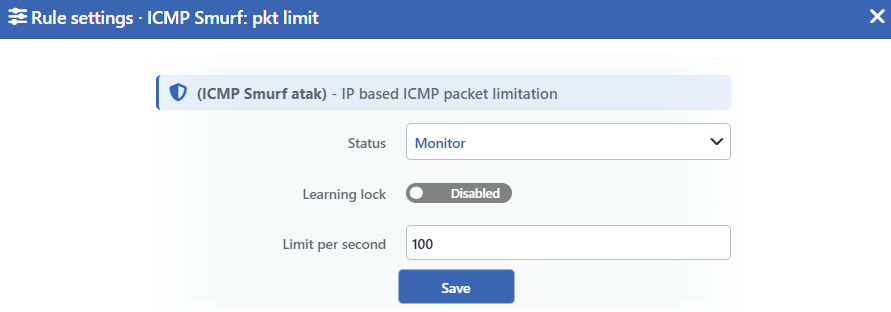 ICMP Smurf: Pkt Limit Edit Screen
INFO
Status
Selects the rule's operating mode. Four values are offered, and the selected value also determines the sentence on the row:
| Value | The sentence in the row |
|---|---|
| Disabled | A limit of <limit> ICMP packets per second is configured, but the rule is off |
| Monitor | A source may send at most <limit> ICMP packets per second; anything beyond is only monitored |
| Block | A source may send at most <limit> ICMP packets per second; anything beyond is dropped |
| Quarantine | A source may send at most <limit> ICMP packets per second; a source that exceeds it is quarantined |
INFO
Learning Lock Default: Off
Closes the rule to the learning engine. When the switch is turned on, the engine cannot change the limit and the mode of this rule; the rule is changed only manually from this window.
It is off by default. While the lock is on, an unlabeled padlock icon is displayed on the row, to the left of the pencil.
INFO
Limit per Second Default: 100
Determines how many echo queries per second will be allowed per source. Its default value is 100. Only an integer can be entered and the smallest value is 1; there is no upper bound.
INFO
Save
Saves the change made and puts it into force immediately. Only the changed fields are updated.
The rule limits only the echo queries
The rate measurement is applied not to the whole of ICMP but to the echo query type. The other types such as destination unreachable, time exceeded and packet too big are not caught by the ceiling of this rule; whether they will pass is determined by the permission in the ICMP box.
Since the rule is applied before the routing decision, it is not limited to the traffic directed at the device; the echo queries passed through the device are counted and limited as well.
In the enforcement mode three discovery types are dropped separately
When the rule is taken to the Block or Quarantine mode, in addition to the rate ceiling three more ICMP types are dropped: address mask request, timestamp request and router solicitation. These are the types used in network discovery.
For these three types the rate is not taken into account; they are dropped from the first packet on. Even in the quarantine mode their sources are not taken into quarantine, the packets are only dropped. While the rule is in the monitoring mode, these three types are not dropped at all. In addition, this extra dropping is written only in the IPv4 traffic.
Pulling the limit to 1 turns the rule into a blanket block
When the limit is made 1, the threshold comparison falls out of the rule completely. In the enforcement mode the rule is applied to all the echo queries and all of them are dropped; in the monitoring mode, on the other hand, since the rate counter is not set up, a real measurement is not produced, but the panel continues to be displayed and the series is displayed with a zero value.
Since the form accepts the value 1, this situation does not give an error message.
The learning engine can recommend the limit, and looks for permission for the promotion
The engine can recommend the limit of this rule by looking at the past measurements. The value it recommends does not go below 20; this floor limits only the recommendations of the engine, not the values entered manually.
The promotion of the rule from monitoring into enforcement, on the other hand, depends on the Mode Promotion permission. While the permission is off, the engine cannot recommend a promotion.
Smurf: TCP Reset Limit
Puts a ceiling per second on the TCP connection reset packets that come to the device. Its definition in the information band is as follows: (Smurf atak) -TCP reset packet limitation.
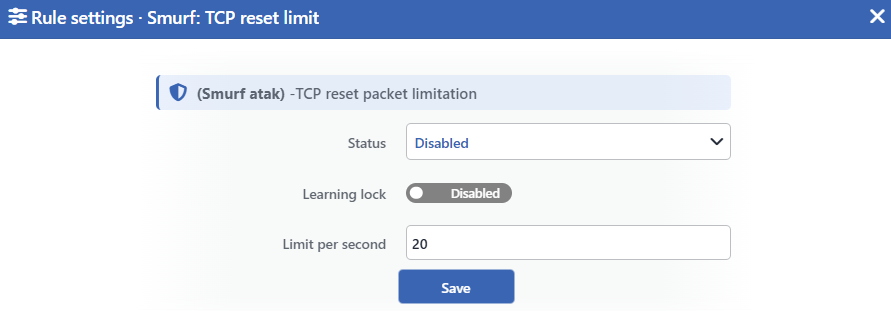 Smurf: TCP Reset Limit Edit Screen
INFO
Status
Selects whether the rule is on or not. Two values are offered:
| Value | The sentence in the row |
|---|---|
| Enabled | TCP reset packets are rate-limited to <limit> per second |
| Disabled | TCP reset packets are not rate-limited |
In this version a dash is displayed in the place of the limit value in the Enabled sentence; the value in force is read from the field below.
INFO
Learning Lock Default: Off
Closes the rule to the learning engine. When the switch is turned on, the engine cannot touch this rule.
It is off by default. While the lock is on, an unlabeled padlock icon is displayed on the row, to the left of the pencil.
INFO
Limit per Second Default: 20
Determines how many reset packets will be accepted per second. Its default value is 20. Only an integer can be entered and the smallest value is 1; there is no upper bound.
INFO
Save
Saves the change made and puts it into force immediately. Only the changed fields are updated.
This ceiling is common not per source but per IP version
The other rate limits of the band measure every source separately. This rule does not measure per source, but it does not use a single budget either: since the rule is written separately for IPv4 and IPv6, every IP version carries its own common budget. If a single source consumes the budget, the packets of the remaining sources cannot benefit from the acceptance of this rule either.
Above the budget there is a small burst allowance; this allowance is fixed and cannot be changed from the interface.
The rule does not drop, it accepts
The rule is not a blocking rule: it accepts the packets below the ceiling. The packets that stay above the ceiling are not dropped explicitly, they are only not accepted by this rule and fall to the rules in the continuation of the chain. One of the pool or user rules can accept these packets; if none of them matches, the packet is dropped with the default decision of the chain. A separate drop counter is not kept for these packets.
For this reason the traffic the rule drops is not seen on the Dropped Traffic tab of the dashboard.
The packets the rule sees are only the sessionless resets
The packets belonging to an established session are already taken by the general acceptance rule that comes before this rule. For this reason the packets caught by the ceiling are the reset packets that have no open session; this is also the form used in an attack.
The sources in the exemption list do not gain a privilege in this rule as they do in the other rules: the packets of the sources on the list are not passed through the rate budget of the rule and fall to the rules in the continuation of the chain.
The learning engine never produces a recommendation for this rule
The rule has a Learning Lock switch, but there is no change the engine could apply to this rule: the rule has no enforcement level it could be promoted to.
For this reason turning the switch on or off does not change the behavior of the rule.
Measurement and Dashboard
The measurement of the two rules is displayed on separate tabs.
| Rule | Panel tab | What is measured | Quarantine panel | Dropped Traffic |
|---|---|---|---|---|
| ICMP Smurf: Pkt Limit | Floods | The highest source rate, the p95 value, the number of active sources and the configured limit line | Yes | Yes |
| Smurf: TCP Reset Limit | Suspicious Packets | The number of reset packets per second | None | None |
The reset counter works independently of the mode
While the rule is off as well, the reset packets that come to the device continue to be counted. In addition, since the counter works before the routing decision, it counts the reset packets passed through the device as well; whereas the rule itself is applied only to the ones that come to the device.
When the rule is made Enabled, because of these two scope differences the number on the panel can be higher than the traffic the rule really limits. Since the panel of a rule whose mode is Disabled is not displayed, the counter is displayed only while the rule is on.
Scope and Limits
INFO
- No rule looks for sending to a broadcast address. The ICMP rule is a general rate limit per source.
- The ICMP rule limits only the echo queries; the other ICMP types are not caught by this ceiling.
- The ICMP rule covers the traffic passed through the device as well; the TCP reset rule is applied only to the packets that come to the device.
- The TCP reset rule does not measure per source; since it is written separately for IPv4 and IPv6, every IP version carries its own common budget.
- Only the ICMP rule can send a source to quarantine and only the packets that rule drops are written to the counter.
- In an untouched route table the ICMP rule is born in monitoring and the reset rule off.
- The promotion of the ICMP rule depends on the Mode Promotion permission; the reset rule has no level it could be promoted to.
- The measurements do not separate the IP versions.
- Editing requires modify permission in the Network area.
