
Smarter by Design.Simpler for Business
Edit Interface (Cluster)
What Is Edit Interface?
Edit Interface is the operation of changing the configuration of an existing network interface on TR7. The editing form has the same structure as the Add Interface form; it comes filled with the current values of the interface and the type of the interface cannot be changed. The other fields can be edited according to the type of the interface.
In TR7 the interfaces can be of these types: physical (ETH), VLAN, VXLAN, V-ETH, V-ETH(Peer), Bond, LACP and Bridge. While on the physical interfaces only the route table and the advanced settings can be changed, on the interfaces added afterwards the parameters given during the creation can be edited as well:
| Interface Type | The Fields That Can Be Edited |
|---|---|
| ETH | Route table, MTU, TCP acceleration |
| VLAN | Interface name, Route table, VLAN ID, Master interface, MTU, TCP acceleration |
| VXLAN | Interface name, Route table, VNI, Underlying interface, Transport mode and the peer fields, MTU, Local source IP, UDP port, TTL, MAC learning, TCP acceleration |
| V-ETH | Interface name, Route table, Master interface, MTU, TCP acceleration |
| V-ETH(Peer) | Interface name, Route table, V-ETH peer, MTU, TCP acceleration |
| Bond | Interface name, Route table, Bond members, MTU, TCP acceleration |
| LACP | Interface name, Route table, Bond members, LACP Transmit Rate, MTU, TCP acceleration |
| Bridge | Interface name, Route table, Bridge members, MTU, TCP acceleration |
Type is read-only in every type and Interface name only on the ETH interfaces. The Route table field is seen only while more than one route table is defined in the system and is locked on the interfaces that are bond/LACP members (the members follow the table of their master interfaces). In a cluster, in addition to these, the VIP communication and VIP communication (v6) fields can be edited in every type and, when a pair is selected, the VIP transition duration (s) and VIP transition method fields as well.
Cluster / Standalone
This page describes the interface editing form used while clustering (cluster) is enabled. All the fields and rules of the standalone form are valid here as well; the cluster form only adds the VIP fields and the changes are applied on the two devices. For the standalone version see the Interfaces (Standalone) page.
The Behavior in Cluster Mode
- A common definition: The interface configuration is kept in common; if the cluster connection is open, the synchronization versions are compatible and automatic synchronization is enabled, the change is applied on both devices. Otherwise it is applied on this device only; the synchronization state appears as Cluster Disconnected while the cluster is broken and as Cluster out of sync when the peer device connects, and in order to transfer it to the peer device, Sync All must be run from the Sync Status screen.
- The VIP fields: The failover behavior of the VIPs on the interface is determined by the VIP communication (the Interface IP pair for the VRRP communication) and VIP transition (duration/method) fields in this form. These fields are seen only in the editing form and only in a cluster.
- After saving: The changes that recreate the interface are applied on both devices; on an interface that carries a VIP this may lead to a short VIP transition. When the VIP fields change, the interface is not recreated, the VRRP (VIP) service of the route table is reloaded.
The Logic of VIP Communication
TR7 #1MASTER
VIP 10.0.1.100 · ActiveVIP Communication IPVRRPFailover
TR7 #2SLAVE
VIP 10.0.1.100 · PassiveWhen the VRRP advertisements from the Master device are cut off (or when the link/gateway check fails according to the selected transition method), the VIP passes to the Slave device and becomes Active there.
Best Practices
- Record the current state before editing. Before making an interface edit, note down the current configuration; this makes it possible to go back in unexpected problems.
- Evaluate the effect of the route table change. When an interface is moved to a different route table, the IP addresses and the static routes on it are moved as well; the sub-interfaces such as VLAN/V-ETH, on the other hand, stay in their own tables. Do not confirm without reading the warnings in the confirmation window.
- Plan a maintenance window in the production environment. On the interfaces other than ETH and V-ETH(Peer), a change of the name, the VLAN ID, the master interface, the member list or the route table causes the interface to be deleted and created again in the system; the connection is cut off for a short time (in V-ETH(Peer) only a name change recreates the pair).
- Use TCP acceleration carefully. TCP acceleration turns on the RFS setting across the device and it is applied to all the interfaces again at every network synchronization; if it is not on on any interface, the setting across the device is turned off. Before enabling it, analyze the network traffic characteristics.
- Meet the preconditions in member changes. There must be no IP, route or sub-interface on the physical interface to be added to a Bond/LACP; otherwise the record is rejected.
How to Edit?
There is more than one way of editing an existing interface on TR7. All the methods below open the same Interface Editing Form as a closable tab (the first three inside the interface list screen, the fourth inside the Dashboard screen):
From the Actions Menu Method 1
On the Network → Interfaces screen the interface to be edited is selected; then Actions → Edit interface is selected. The option is active only while a single row is selected and no network operation continues.
From the Preview Panel Method 2
On the Network → Interfaces screen an interface is selected; the Edit interface button in the header of the preview panel that opens on the right is clicked.
From the Right-Click Menu Method 3
On the Network → Interfaces screen an interface is right-clicked; Edit interface is selected from the menu that opens.
From the Interface Dashboard Method 4
On the Dashboard screen of an interface the Edit interface button in the header of the preview panel that opens is clicked (network configuration authorization is required).
While the editing tab is open, the preview panel on the right shows the interface being edited; the Edit/Delete/Up/Down buttons in the header of the panel are not offered during this time, but the Up/Down in the Details tab and the delete and enable operations in the IP and Routes tabs continue to work.
The Edit Interface Form
By following one of the methods above, the interface editing form is opened in a closable tab named Edit interface. The content of the form changes according to the type of the selected interface; the meaning and the rules of the type-specific fields are explained on the Add Interface page. Below, the physical interface (ETH) editing form is taken as the example.
WARNING
The editing forms of the interfaces added afterwards (VLAN, VXLAN, LACP, etc.) also contain the parameters given during the creation (the VLAN ID, the master interface, the members, etc.) and these can be edited. In a cluster there are also the VIP fields (VIP communication, VIP communication (v6), VIP transition duration (s), VIP transition method) in the form; they take place after the Route table (it is not seen while there is a single route table) and, if present, the VLAN ID / VNI field, and before the Interface name field.
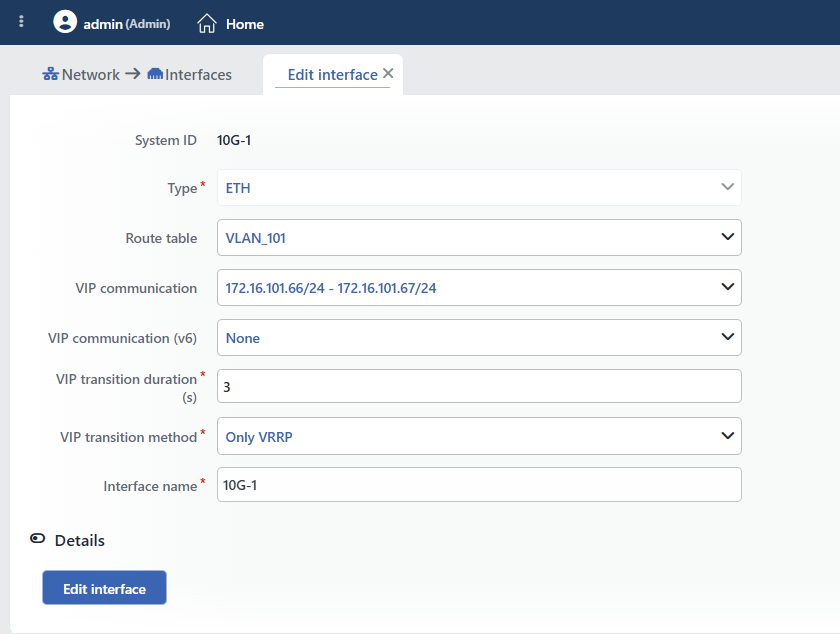 The Edit Interface Form (ETH)
INFO
System ID
The unique identifier of the interface in the TR7 system is displayed as an information row (on the physical interfaces the system name of the interface, on the ones added afterwards a generated identity). It is present only in the editing form; it is read-only.
INFO
Type
The type of the interface (ETH, VLAN, VXLAN, V-ETH, V-ETH(Peer), Bond, LACP, Bridge) is displayed. This field is read-only; the type of the interface cannot be changed.
INFO
Route Table
The route table the interface belongs to is selected. The field is seen only if more than one route table is defined in the system; it is locked on the interfaces that are bond/LACP members. During the move the server checks that the IP addresses and the routes of the interface do not collide in the target table; in a collision the record is rejected with the "IP collision: ..." or "Route destinations collide: ..." error.
The interfaces that cannot be moved:
- Bridge members: the field does not appear locked, but the record is rejected with the "... is a bridge member" error.
- A bridge with members: since the members stay in the old table, the record is rejected with the "Must be in the same namespace" error. Since the members cannot be moved while they are members either, they must first be removed from the bridge membership, moved and then added again.
- Protected interfaces: the interfaces that carry a management access IP (HTTP/HTTPS/SSH/SNMP) or that are the cluster synchronization interface cannot be moved outside DEFAULT: "Interface '...' is protected (...)".
WARNING
When the route table is changed, the IP addresses and the static routes of the interface are moved as well; the VLAN/VXLAN/V-ETH sub-interfaces defined on it, on the other hand, stay in their own tables. These effects are listed in the confirmation window that opens before the record (see below).
INFO
VIP Communication
The IPv4 Interface IP pair to be used for the VRRP communication of the VIPs on this interface is selected. A free address is not entered; in the list, together with None, only the Interface IPs that are defined on this interface and that have an address for both devices are offered in the form ip/cidr - peer ip/cidr. In the Only VRRP method the VRRP advertisements are sent between these two addresses to a single point (unicast); in the TR7-checked methods the pair is a precondition for the VIP configuration to be produced. Without a pair being selected, the IPv4 VIPs on the interface do not become active; when the pair is selected, the required virtual router ID is assigned automatically by TR7. If the selected IP loses its peer device address afterwards, the pair is silently cleared in the record and the VIPs become disabled; a pair with mixed versions (IPv4 on one device, IPv6 on the other) may appear in the list and such a selection is also silently cleared in the record. If one of the addresses of the pair is disabled on any device, the VIP configuration is not produced.
INFO
VIP Communication (v6)
The IPv6 counterpart of the same function: an Interface IP pair that has an IPv6 address defined for both devices is selected. It is required for the IPv6 VIPs; an IPv4 pair does not enable the IPv6 VIPs.
INFO
VIP Transition Duration (s)
It is seen when a VIP communication pair is selected; it is required (the default is 3, the range is 1 – 1000 seconds; outside the range the "VIP transition duration (s) must be in range 1-1000" warning). The VRRP advertisement interval is applied as one third of this duration (rounded up); the Slave device takes over the VIP when the advertisements are cut off for approximately this duration. A low value provides faster failover but may lead to unnecessary transitions in temporary network fluctuations. In the transition methods other than Only VRRP the advertisement interval becomes a fixed 0.2 seconds and this field is not taken into account.
INFO
VIP Transition Method
It is seen when a VIP communication pair is selected; it determines under which condition the VIP will pass to the peer device (the default is Only VRRP):
- Only VRRP: it relies only on the VRRP advertisements: when the advertisements from the Master are cut off, the Slave takes over.
- TR7 link check: in addition, the link state of the interface (up and there is a carrier signal) is monitored; when the interface is down on this device or when the link is broken, the VIP is aimed to pass to the peer device.
- TR7 GW check: in addition, the reachability of the default gateway of the route table is monitored (the Gateway monitoring profile in the Add Static Routing form); when the gateway cannot be reached from this device, the VIP is aimed to pass to the peer device.
- TR7 link and GW check: the link and the gateway check are applied together; when any one of them fails, the transition is aimed.
In the TR7-checked methods the VRRP advertisement interval is lowered to 0.2 seconds; the transition decision is taken according to the check results of both devices (if only the check of this device is successful, Master, and if only that of the peer device is, Slave). After these methods are put into use, the failover behavior must be verified by being tested in a real environment.
INFO
Interface Name
The name of the interface is displayed. It is read-only on the ETH interfaces; in the other types it can be changed with the rules on the Add Interface page (1–15 characters, the "Name is used" uniqueness check). When the name of an interface added afterwards is changed, the interface is created again in the system.
INFO
The Type-Specific Fields
Between Interface name and Details there are the fields in the creation form according to the type of the interface: VLAN ID and Master interface in VLAN; VNI, Underlying interface, Transport mode and the peer fields in VXLAN (VLAN ID and VNI take place above Interface name); Master interface in V-ETH; V-ETH peer in V-ETH(Peer); Bond members in Bond/LACP (in LACP also LACP Transmit Rate); Bridge members in Bridge. All of them can be edited. In the master interface lists only the bond/LACP members are passive; the member lists (Bond members / Bridge members), on the other hand, are not filtered at all; unsuitable selections are rejected during the record by the server (e.g. a physical interface that carries an IP cannot be added to a bond: "Interface '...' has N IPs").
INFO
Details
By clicking the Details header row, the advanced settings (MTU, TCP acceleration; in VXLAN the additional tunnel fields) are opened; the section is closed by default.
 Details
MTU
The maximum transmission unit (Maximum Transmission Unit) value of the interface is entered. When the field is left empty or 0 is entered, the MTU is not changed; the current value is preserved and the real MTU read from the system is shown in the preview panel. No upper limit is enforced in the form; the value must be consistent with the MTU on the master interface and on the switch side. An MTU change is applied in place, without the interface being created again.
TCP Acceleration
When it is enabled, Receive Flow Steering (RFS) is turned on on the interface: the incoming packets are directed to the CPU core on which the application that handles the related connection runs; the performance improves on high-traffic interfaces. The change is applied without the interface being created again.
INFO
Edit Interface
The changes are saved by clicking the Edit interface button; while there is an erroneous field in the form, the button is passive. After the record the form tab closes and the change is applied in the system in the background. If the server rejects the record, an error window opens and the form stays open.
In saving, a confirmation window opens only when the route table is changed and if there is an IP/route or a sub-interface to be moved on the interface ("Are you sure?"); the effects listed:
- 🟠 "N IP and M route entries will move to route table '...' together with the interface": the IPs and the routes of the interface will be moved together with the table.
- ℹ️ "N VLAN/macvtap interface(s) are defined on this interface: ...": there are sub-interfaces defined on the interface; these are not moved.
The other changes such as the name, the VLAN ID, the member list and the MTU are saved without confirmation being asked; a table change of an interface that has no IP, route or sub-interface is applied without confirmation in the same way.
The System Behavior After Saving
TR7 applies the saved configuration by comparing it with the real state in the system; its effect differs according to which field has changed:
| Change | Its effect in the system |
|---|---|
| The name, the VLAN ID / VNI, the master interface, the member list, the LACP transmission rate, the VXLAN tunnel parameters or the route table on an interface added afterwards | The interface is deleted and created again in the system on both devices; the connection is cut off for a short time, the IP addresses and the routes are added again in the same pass; if there is a VIP on the interface, there may be a short VIP transition |
| The route table on an ETH interface | The physical interface is not deleted; it is moved to the target table and turned on. During the move its addresses are cleared and added again in the same pass |
| The name of a V-ETH(Peer) | Both ends of the pair are deleted and created again; only in a route table change is the pair preserved |
| MTU | It is applied in place (if it is 0/empty, it is not applied) |
| TCP acceleration | It is applied in place |
| The VIP fields (communication / transition) | The interface is not recreated; the VRRP (VIP) service of the route table is reloaded with the new configuration |
Turning an Interface On and Off (Up / Down)
The on/off state of the interface is not a field in the form but an instant operation; it is not saved to the configuration and in a cluster it is applied per device. It is done from three places:
- The Down / Up in the menu that opens by right-clicking the interface in the interface list (it is applied on both devices),
- The Up / Down in the
⋮menu in the header of the preview panel (it is applied on both devices; it is not offered while the editing tab is open), - The Up / Down buttons in the Details tab of the preview panel; separately per device column, the only way of turning the interface on and off on a single device. An operation aimed at the peer device is not applied without giving an error while the cluster connection is broken.
WARNING
- The protected interfaces (the ones that carry a management access IP or that are the cluster synchronization interface) cannot be turned off and on: "Interface '...' is protected (...)".
- Down is not permanent: at every network configuration application (even if the configuration has not changed), TR7 turns on again automatically the interfaces it finds down during the IP and route evaluation; this behavior is independent of whether there is an IP on the interface. The Down operation is not sufficient in order to disable an interface permanently.
Deleting an Interface
An interface added afterwards is deleted by selecting it in the interface list and using Actions → Delete interface(s) (more than one selection can be made) or with Delete interface in the ⋮ menu of the preview panel on the interface list screen. There is no interface deletion option in the right-click menu and in the preview panel of the Dashboard screen.
The deletion always asks for confirmation: "Are you sure that you want to delete interfaces object?" (in a multiple selection "Are you sure you want to delete N interfaces objects?"). In the confirmation window the side effects of the deletion are listed with their levels; if there is an item at the 🔴 level, a second "This action has destructive consequences. Are you REALLY sure?" confirmation is asked.
| Level | Warning | Meaning |
|---|---|---|
| 🔴 | "N attached interface(s) will also be deleted: ..." | The VLAN/VXLAN/V-ETH sub-interfaces on the interface will be deleted as well |
| 🔴 | "N IP address(es) will be deleted: ..." | The IP addresses of the interface and of its sub-interfaces will be deleted |
| 🟠 | "N route(s) will be deleted" | The bound routes will be deleted |
| 🔴 | "Route table '...' will lose its IPv4 default gateway" (IPv6 for IPv6) | One of the deleted routes is the default gateway |
| ℹ️ | "Member interfaces will be released: ..." / "Bridge member interfaces will be released: ..." | When a Bond/LACP or a bridge is deleted, the members will be released |
| ℹ️ | "veth peer interfaces will be left unpaired: ..." | The other end of the V-ETH(Peer) pair will be left without a peer |
The interfaces that cannot be deleted
- Physical (ETH) interfaces cannot be deleted: "Cannot delete physical interface". If an ETH is included in the selection, the operation is rejected without the confirmation window being opened and no interface is deleted.
- Protected interfaces (the ones that carry a management access IP or that are the cluster synchronization interface) cannot be deleted: "Interface '...' is protected (...)".
