
Smarter by Design.Simpler for Business
Delete
What Is Delete?
Delete permanently deletes one or more page types (WAF rules) from the Page Types list. The Check Fields configuration of the deleted rule is also removed together with the rule.
The Deletion Steps
- The rule or the rules to be deleted are checked in the list; the check box in the table header selects all the rows at once. How many records are selected is shown on the footer bar.
- The Delete button on the toolbar is clicked; the button is enabled while at least one row is selected.
- The confirmation window that opens is confirmed. For a single rule the question "Are you sure that you want to delete waf path rule object?" is asked; in a multiple selection the question also contains the number of the rules to be deleted ("Are you sure you want to delete N waf path rule objects?"). If the confirmation is not given, no rule is deleted; in both cases the selection in the table is cleared.
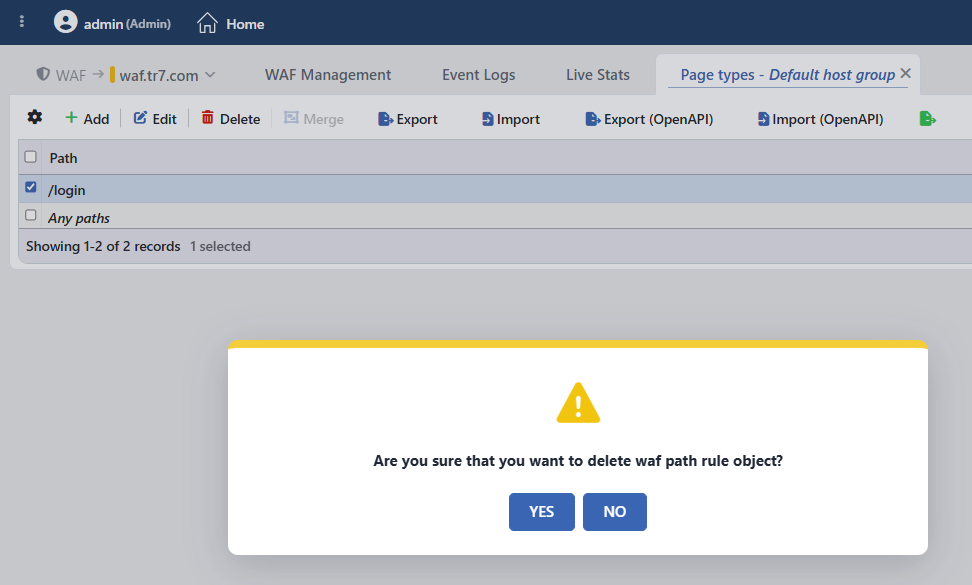 The Page Type Deletion Confirmation
When the deletion operation is confirmed, no additional deployment (deploy) step is needed; the WAF configuration is automatically produced again and applied and the N Page Types number on the mode card is updated.
The alternative access ways
A single rule can also be deleted with the Delete button in the title of the detail panel that opens when the rule is clicked in the list, or with the Delete option in the menu that opens when the rule is right-clicked; the confirmation window is the same. The right-click menu targets only the right-clicked row, independently of the selection.
Any Paths is not deleted, it is reset to the default
When the Any Paths (catch-all) rule is selected and deleted, it does not disappear from the list; within the same operation it is created again with its default configuration: Allowed Methods returns to the GET, OPTIONS, HEAD, POST, PUT, PATCH, DELETE list, Path Length to the 1–8192 range, Path Depth to the ≤ 256 restriction and to an OWASP scanning that is on; the Check Fields are also set up again with the default field inspections and the ready header rules. That is, for Any Paths the deletion is in effect a resetting operation; all the customizations on the rule are lost. The confirmation window does not show a separate warning for this case; in a multiple selection Any Paths is also included in the number of the rules to be deleted. The other rules that are deleted together with Any Paths in a multiple selection, on the other hand, are deleted permanently.
The Runtime Effect
The requests coming to the path of the deleted rule are not left uninspected: the request falls to a glob rule that matches the path according to the rule matching priority, and if there is none, to the Any Paths rule, and continues to be inspected with the configuration of that rule.
Operational Best Practices
- For a learned rule, not applying the suggestion should be preferred instead of deletion. If the traffic continues to come to the same path after a rule produced by Analysis & Learning is deleted, the learning flow may suggest the rule for that path again. If it is wanted that a path never be managed as a separate page type, the rule should not be deleted, the relevant learning suggestion should not be applied.
- Before the deletion, the rule the path will fall to should be checked. After the deletion the requests fall to a glob rule that matches the path or to the Any Paths rule and continue to be inspected with the configuration of that rule.
- Any Paths should not be included in bulk selections. In the deletions made for bulk cleanup, Any Paths should not be taken into the selection; the deletion does not remove this rule, it resets all the customizations on it to the default.
