
Smarter by Design.Simpler for Business
RDP Cookie
What Is the RDP Cookie Condition?
RDP Cookie is a condition type used to make traffic routing decisions by evaluating the cookie information in Remote Desktop Protocol (RDP) connections.
The RDP cookie carries the user session information in Windows Remote Desktop connections:
With this condition, RDP users can be routed to different terminal servers.
The Importance of the RDP Cookie Condition
In RDP load balancing scenarios, routing users to the correct terminal server is critically important.
With the RDP Cookie condition:
- Users can be routed to the server where their own session is located,
- User-based routing can be performed in RDP farms,
- Session affinity can be provided,
- The user experience can be improved in VDI environments,
- Security policies can be applied for RDP connections.
RDP Cookie Structure:
| Field | Description | Example |
|---|---|---|
| mstshash | User/session identification information | mstshash=admin |
TIP
The most common RDP cookie is mstshash, and it is sent by the Windows Remote Desktop Client so that it carries the username information.
Supported vService Types
HTTP
L7 TCP
Network
The condition can be used only at the request (At Request) stage.
Inspection Wait
In order for the RDP cookie to be read, the vService inspects the first packets of the connection; for this reason, in a vService where the rdp cookie condition is used, connection acceptance can be delayed by up to 5 seconds (if the cookie arrives earlier, the wait ends earlier). This behavior takes effect automatically when the condition is defined.
How to Add?
A new RDP Cookie Condition can be added through the TR7 web management interface by following the steps below:
- The Configuration Menu is opened by clicking the TR7 logo at the bottom left.
- The Load Balancer → Conditions → Add steps are followed.
- RDP cookie is selected as Criteria.
- The related configurations of the condition are made.
- The condition is added by clicking the
Addbutton.
RDP Cookie Condition Add Form
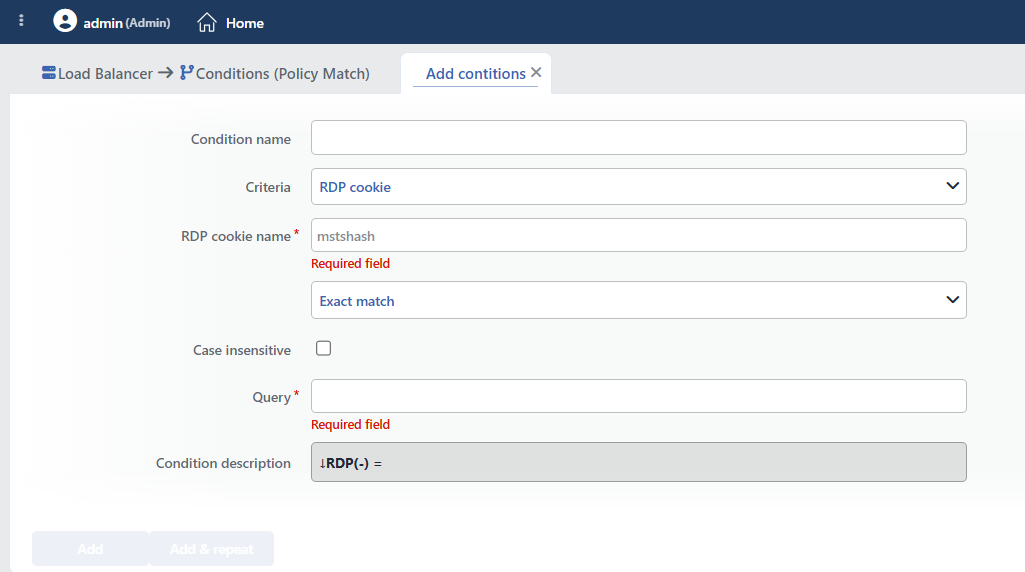 RDP Cookie Condition Add Form
INFO
Condition Name
An optional name can be entered for the condition to be created.
This field is especially important in the following scenarios:
- When many conditions are defined under the same vService,
- When conditions with similar criteria need to be distinguished,
- When it is necessary to quickly understand which business rule the condition represents.
When this field is left empty, TR7 analyzes the content of the related condition and creates an automatic, descriptive name in the Condition Description field. This generated description is used as the name in condition lists.
INFO
Criteria Required
The field that determines the type of the condition; RDP cookie is selected from the searchable dropdown list. This selection determines the fields displayed in the form. The criterion cannot be changed after the condition is saved: if a different criterion is needed, a new condition is defined. For all criteria in the list and their scopes, the criteria catalog on the Conditions page can be referred to.
INFO
RDP Cookie Name Required
The RDP cookie name to be checked is entered. The field opens empty; mstshash is shown in the box as an example (it is not selected by default).
TIP
In most RDP load balancing scenarios, the mstshash cookie is used. This cookie is sent automatically by the Windows Remote Desktop Client.
INFO
Content Matching Method Default: Exact match
Determines how the content is matched. The field appears in the form as an unlabeled dropdown list right below Criteria and opens with Exact match selected.
| Option | Code | Description |
|---|---|---|
| Exact match | exactMatch | The value must match exactly. |
| Start | start | The value must start with the specified text. |
| End | end | The value must end with the specified text. |
| Includes | sub | The value must contain the specified text. |
| Regex | regex | The value must match the regular expression. |
| Is present | found | Only a presence check is performed. (the value does not matter) |
Recommendations for RDP Cookie Matching:
| Method | Usage | Example |
|---|---|---|
| Exact Match | Specific user | admin |
| Start | User prefix | vdi- |
| Includes | Content check | server1 |
| Is present | Cookie presence | (is the cookie present?) |
| Regex | Pattern | ^admin[0-9]+$ |
INFO
Case Insensitive Default: Off
Controls case sensitivity.
- Active:
example,EXAMPLE,Exampleare considered the same - Not Active: An exact match is required (default)
Since Windows usernames are case-insensitive, enabling this option is recommended.
INFO
Query Required
The value to be matched is entered in this field. According to the selected matching method:
- Exact match: Checks for an exact match of the value.
- Start: Checks the beginning of the text to be searched for.
- End: Checks the end of the text to be searched for.
- Includes: Checks whether the text to be searched for is contained.
- Regex: Checks with a regular expression pattern (Regex).
Sample values:
| Value | Description |
|---|---|
admin | admin user |
vdi-user | VDI user prefix |
DOMAIN\user | Domain user |
WARNING
Windows usernames are case-insensitive. Enabling the Case Insensitive option is recommended.
INFO
Condition Description
It is created automatically by TR7 in line with the entered criteria and values.
This description:
- which value the condition applies to,
- which criterion it works on,
- the quick understanding of the condition on listing screens
is produced dynamically by the system so as to provide these.
TIP
The RDP cookie value can be used in actions and TCP log formats with the RDP cookie smart variable, by giving the cookie name.
INFO
Form Buttons
Add
The condition adding process is completed by clicking the Add button.
Add & Repeat
With the Add & Repeat button, the condition adding process is completed, and another new condition can be added with different configurations without leaving the related window.
 Condition Added
Operational Usage Recommendations
- Session Affinity Should Be Provided. Session continuity should be provided by always routing users to the same terminal server.
- Case Insensitive Should Be Used. Since Windows usernames are case-insensitive, this should be taken into account in matching.
- TCP vService Should Be Used. A TCP vService (port 3389) should be used for RDP connections.
- Backup Server Plan. Routing to a backup server should be planned when the user's target server is down.
Common Usage Scenarios in Live Environments
The examples below show how the related condition is applied in the most frequently encountered use cases in real systems. These scenarios are based on practices that are widely preferred in live environments and rest on experience gained in the field.
Scenario 1: Terminal Server Routing for Admin Users
Purpose: To provide a high-security RDP environment by routing admin users to a specially hardened and isolated terminal server.
Configuration:
- RDP Cookie Name:
mstshash - Content Matching Method: Start
- Query:
admin - Case Insensitive: checked
Scenario 2: VDI User Segmentation
Purpose: To provide resource optimization by routing VDI users to persistent VDI desktop servers and normal users to shared RDS servers.
Configuration:
- RDP Cookie Name:
mstshash - Content Matching Method: Start
- Query:
vdi- - Case Insensitive: checked
Scenario 3: Group Distinction by RDP Cookie Presence
Purpose: To separate clients that send an RDP cookie (standard Remote Desktop Client) from clients that do not, and to route them to different Backend Service groups.
Configuration:
- RDP Cookie Name:
mstshash - Content Matching Method: Is present
→ Conditional Backend Services
TIP
Sticking a user to the same server on every connection (session persistence) is the job not of this condition but of the load balancing algorithm of the vService: the RDP Cookie algorithm in the L7 TCP vService is used for this. There is also no need to define a condition just for an "is the cookie present" check: the ready-made If RDP cookie is present condition is offered in the condition selection lists.
