
Smarter by Design.Simpler for Business
Manual Formats (HTTP)
About the Format
Manual Formats are the customizable log formats that make it possible for the user to define their own log structure.
TR7 offers three different manual format types; with their option names in the Line Format list:
- Manual JSON Format: a custom JSON structure.
- Manual CEF Format: custom CEF extension fields.
- Manual Log Line Format: a completely custom log line.
These formats work integrated with the Smart Variable system and support hundreds of different variables.
Use cases
- Custom SIEM integrations.
- Adaptation to the existing log formats.
- Minimal log structure requirements.
- Custom analytics needs.
Supported Features
HTTP vService
L7 TCP vService (some variables)
WAF Information
SSL Information
Manual JSON Format
The Manual JSON format makes it possible for a custom JSON structure to be created by defining key-value pairs.
Configuration
- Manual JSON Format is selected in the Line Format field in the log profile.
- The fields are defined in the Manual Log Entries table.
| Field | Description |
|---|---|
| Key | The JSON key name. It cannot be left empty and must be unique within the table. |
| Value | A Smart Variable, a fixed text or a mixture of the two |
INFO
The keys whose value remains empty (for example the ones that contain a variable that the vService protocol does not support) are kept with an empty value in the output; in this way the field schema on the SIEM side remains fixed. The fields in which a protocol incompatibility is detected are reported with a notification.
If the table is saved without containing any row, the output becomes an empty JSON object ({}).
All the values are written as text
In the Manual JSON output every value is printed in double quotes. The fields that look numeric (port, status code, byte count, duration) are of the text type as well; if a numeric comparison is going to be made on the SIEM side, the type conversion of the field must be defined in the collector.
Exception: on HTTP vServices a row whose Value cell contains only %THREAT_INFO is written not in quotes but as a nested JSON object (null when the variable was not produced); the numbers inside the object come as JSON numbers and the flags as true/false. The details are on the SIEM Integration page.
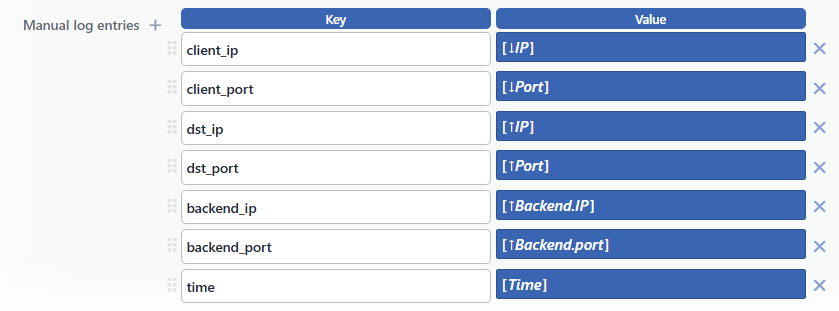 Manual JSON Example Configuration
Output Example
The configuration above produces the following line:
json
{
  "client_ip": "172.16.101.42",
  "client_port": "49602",
  "dst_ip": "172.16.102.85",
  "dst_port": "8080",
  "backend_ip": "172.16.102.168",
  "backend_port": "80",
  "time": "09/Sep/2026:20:37:06 +0300"
}
Manual CEF Format
The Manual CEF format makes it possible for custom extension fields to be added to the standard CEF header.
Configuration
- Manual CEF Format is selected in the Line Format field in the log profile.
- The fields are defined in the Manual Log Entries table.
INFO
Unlike JSON, the extension fields whose value remains empty are removed completely from the CEF line (an empty key= entry misleads the CEF parsers); the removed fields are reported with a notification. On the L7 TCP vServices, the status code and the response source fields in the header are written as TCP|TCP.
CEF Header Structure (Automatic)
text
CEF:Version|Device Vendor|Device Product|Device Version|Signature ID|Name|Severity|Extension| Field | Value | Description |
|---|---|---|
| Version | 0 | The CEF format version |
| Device Vendor | TR7 | The manufacturer name |
| Device Product | TR7 ASP | The product name |
| Device Version | v1.9 | The format version. It is fixed; it does not change with the installed TR7 version. |
| Signature ID | 200 · 418 | The HTTP response status code. In a WAF block, the blocking code in the WAF profile is written (default 418). |
| Name | DBE · TR7 | The source of the response; the full list of the values is on the CEF (HTTP) page |
| Severity | 5 | It is fixed; TR7 does not change this value according to the severity of the event. The 0–10 range that CEF defines is only formal information. |
The Manual Log Entries Table (it is the same in JSON and CEF)
Output Example
text
CEF:0|TR7|TR7 ASP|v1.9|200|DBE|5|name=LOGTEST-H client_ip=172.16.101.42 client_port=49602 dst_ip=172.16.102.85 dst_port=8080 backend_ip=172.16.102.168 backend_port=80 time=09/Sep/2026:20:37:06 +0300Manual Log Line Format
The advanced log line format makes it possible for a completely custom log line to be defined by using the Smart Content Builder.
Configuration
- Manual Log Line Format is selected in the Line Format field in the log profile.
- A format string that contains Smart Variables is written in the Manual Log Line Format field.
The protocol check does not work in this type
In the Manual JSON and Manual CEF types the variables that the vService protocol does not support are emptied and reported with a notification. In the Manual Log Line Format type this check is not applied: the variable is written into the configuration as it is even if the protocol is not suitable. When a variable that is valid only in HTTP (for example the status code or the request method) is used on an L7 TCP vService, the line format cannot be resolved and the load balancing engine cannot be started. In this type, only the variables that are independent of the protocol are used for the L7 TCP vServices.
 Advanced Log Line Example Format
Output Example
The format above produces the following line:
text
client_ip: 172.16.101.42 > client_port: 49602 > req_method: GETExample Use Scenarios
Minimal Access Log
text
%TIME %SRCIP %HTTPMETHOD %PATH %STATUS %DOWNLOADEDBYTEThe output:
text
09/Sep/2026:20:37:06 +0300 172.16.101.42 GET /login.php 200 1011Security-Focused Log
json
{"ip":"%SRCIP","country":"%COUNTRY","path":"%PATH","waf":"%ISWAFBLOCKED","score":"%WAFSCORE"}Performance Monitoring Log
json
{"path":"%PATH","status":"%STATUS","tq":"%TIMEREQ","tc":"%TIMESERVERCON","tr":"%TIMESERVERRES","tt":"%TIMETOT"}