
Smarter by Design.Simpler for Business
TCP Connection Management
What Is the TCP Connection Management Action?
The TCP Connection Management action provides connection control at the TCP level. This action is used for the operations of rejecting TCP connections, dropping them silently or waiting for content.
This action can work both at the request and at the response stage and can be used only on L7 TCP vServices.
Reject
Client: SYN →
TR7: ← SYN-ACK
Client: ACK →
TR7: ← RST
TR7: ← SYN-ACK
Client: ACK →
TR7: ← RST
After the connection is established, it is closed with an RST.
Silent Drop
Client: SYN →
TR7: ← SYN-ACK
Client: ACK →
TR7: (no notification)
Client: Timeout
TR7: ← SYN-ACK
Client: ACK →
TR7: (no notification)
Client: Timeout
After the connection is established, it is dropped silently without a notification being sent to the client.
Wait for Content
Client: SYN →
TR7: ← SYN-ACK
Client: ACK + DATA →
TR7: ← SYN-ACK
Client: ACK + DATA →
Content analysis is performed for the specified period.
Why Is TCP Connection Management Necessary?
Traffic control at the TCP protocol level provides security and performance optimization before the HTTP layer.
TCP Level vs HTTP Level:
| Layer | Control Time | Advantage |
|---|---|---|
| TCP | After the connection is established, while the first data is awaited | Low resource consumption |
| HTTP | After the request is parsed | Detailed content control |
Blocking at the TCP level protects the system resources by stopping malicious traffic at an early stage.
The Importance of the TCP Connection Management Action
Traffic control at the TCP layer is critically important in terms of performance and security.
The TCP Connection Management action;
- provides IP-based access control,
- gives the possibility of early intervention in DDoS attacks,
- blocks certain IP/port combinations,
- defines a waiting period for content analysis,
- does not give information to attackers with silent blocking.
For this reason, the TCP Connection Management action is a critical tool for security and performance on TCP vServices.
The connection handshake is completed in every case
All three options of this action are evaluated after the TCP connection is established (while the first data is awaited from the client). There is no intervention at the connection establishment stage (while the SYN packet is being answered).
The practical results of this:
- When Reject is selected, the client establishes the connection; if Wait for Content is not defined, the rule is evaluated without waiting for data from the client and the connection is closed.
- When Silent Drop is selected, the connection has also been established; the client continues to think that the connection is open and falls into a timeout while waiting for a response.
- A client that performs a port scan sees the port as open, independently of this action.
If blocking is needed before the connection is established, firewall rules or IP reputation lists must be used.
Supported vService Types
HTTP
L7 TCP
Network
Execution Timing
On Request
On Response
How to Add?
A new TCP Connection Management Action can be added through the TR7 web management interface by following the steps below:
- The Configuration Menu is opened by clicking the TR7 logo at the bottom left.
- The Load Balancer → Actions → Add steps are followed.
- A unique and descriptive name is entered for the action.
- TCP Connection Management is selected as Action Type.
- The related configurations of the action are made.
- In the Conditions tab, the condition/conditions under which the action takes effect are determined.
- The action is added by clicking the
Addbutton.
TCP Connection Management Action Add Form
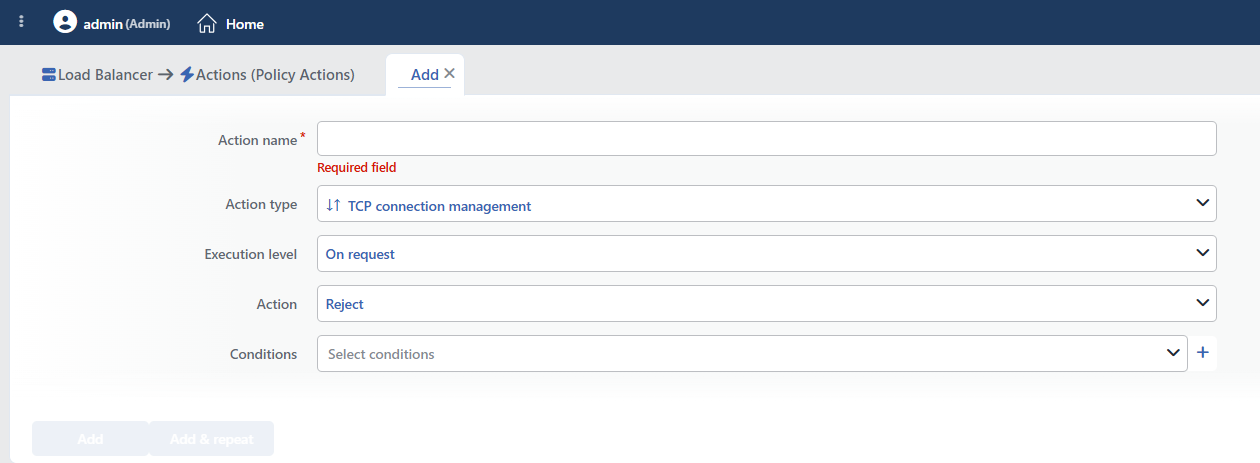 TCP Connection Management Action Add Form
INFO
Execution Level
Determines at which stage the action is run.
Since the action is specific to L7 TCP vServices, the Rule Protocol field is not located in the form; since a counter is not supported either, the Hit Counter and Set Variable on Hit fields are not present. It can be added to the same vService more than once; however, more than one Wait for content definition leads to unexpected behavior.
- On Request: The action is applied before the request is forwarded to the related Backend Service. This level is used in cases where changes need to be made to the request or additional information needs to be passed to the Backend Service.
- On Response: The action is applied before the response is forwarded to the client. This level is used in cases where edits or additions need to be made to the response sent to the client.
The Recommended Option
On Request should be preferred for most security scenarios. This stops the bad traffic before it reaches the Backend Service.
INFO
Action Default: Reject
Determines the operation to be performed on the TCP connection.
Reject → Closes the established connection with an RST packet.
Client: SYN →
TR7: ← SYN-ACK
Client: ACK →
TR7: ← RST (the connection is closed)
Silent Drop → Drops the established connection without sending a notification to the client; the client falls into a timeout.
Client: SYN →
TR7: ← SYN-ACK
Client: ACK →
TR7: (no notification)
Client: Timeout
Wait for Content → Waits for content for the specified period. It continues after the waiting.
Client: SYN →
TR7: ← SYN-ACK
Client: ACK + DATA →
TR7: (analyzes the content for the specified period)
Silent Drop Usage
Silent drop does not notify the client that the connection has been closed; it does not prevent a port scan and it can cause the legitimate clients to wait until a timeout as well.
INFO
Delay Time Default: 5 seconds
WARNING
Wait for content by itself does not perform content analysis or routing; it only waits for the content to arrive. In order for a decision to be made according to the content, content conditions and conditional distribution must also be defined.
This option must be used unconditionally; when it is bound to a condition, a valid configuration is not produced.
It is visible when Wait for content is selected and determines the longest period for which the content will be awaited. The value is entered as a number and a unit (second/minute); the smallest value is 1 second.
Sample values:
5s: wait at most 5 seconds10s: wait at most 10 seconds30s: wait at most 30 seconds
Purpose of Use
- Content analysis for protocol detection
- Tolerance for slow clients
- Giving time for deep packet inspection
INFO
Conditions
In this field, it is defined under which condition or conditions the related action takes effect.
By adding one or more conditions, the behavior can be applied in a targeted and controlled way with the and/or structure.
Detailed information about conditions is on the Conditions page.
WARNING
If no condition is defined in this field, the related action runs unconditionally (Always). In this case, the action is applied to all traffic coming to the related vService.
In live environments, using an action without defining a condition can lead to unexpected situations (service outages). For this reason, it is recommended that at least one condition always be defined when an action is created.
INFO
Form Buttons
Add
The action adding process is completed by clicking the Add button.
Add & Repeat
With the Add & Repeat button, the action adding process is completed, and another new action can be added with different configurations without leaving the related window.
 Action Added
Operational and Safe Usage Recommendations
- The choice between Reject and Silent drop. Reject is preferred for legitimate clients; it provides a fast error return. Silent Drop is preferred in attack scenarios; no closing notification is sent to the client and the client waits until a timeout. Neither option prevents a port scan.
- Targeted use with conditions. An unconditional TCP reject/drop affects all the traffic; the action must be used together with an IP list or a GeoIP condition.
- The Wait for content period is set. Too short a period affects legitimate traffic, too long a period consumes resources; a value suitable for the related protocol is selected.
- It is used together with logging. While blocking is done at the TCP level, a log is kept; this makes it possible to detect false positives.
- This action is not relied on for blocking before the handshake. Since the action runs after the connection is established, it does not protect the connection table in intense connection attempts; in this case L4 DDoS Protection and IP reputation lists are used.
Common Usage Scenarios in Live Environments
The examples below show how the related action is applied in the most frequently encountered use cases in real systems. These scenarios are based on practices that are widely preferred in live environments and rest on experience gained in the field.
Scenario 1: Silent Drop of the Known Attacker (Blacklist) IPs
Problem: The scanner and botnet IPs detected from the threat intelligence feeds open connections to the L7 TCP service and send data. It is wanted that these connections do not reach the Backend Service and that the client is not given the information that the connection has been closed.
Solution: The TCP connections coming from the known attacker IP list are dropped with a silent drop, no closing notification is sent to the client and the client is forced into a timeout.
Configuration:
- Execution Level: On Request
- Action: Silent Drop
- Conditions:
- Source IP is in the Threat Intelligent (Blacklist) List
Result:
- ✅ The Backend Service is protected → The connection is not forwarded to the Backend Service.
- ✅ Slowing down → The client has to wait for the timeout on every connection.
- ✅ No closing notification → No RST packet is sent.
- ⚠️ The port status → Since the handshake is completed, the port appears open; hiding the port status is provided with firewall rules.
The TCP Flow:
Scanner IP (threat list): SYN (port 8080) →
TR7: ← SYN-ACK
Scanner IP: ACK →
TR7: [Source IP match: Silent Drop, no notification]
Scanner: [Timeout while waiting for a response]
Threat Intelligence Integration:
- An IP list updated automatically with the AbuseIPDB feed
- Botnet C2 IPs
- Known port scanner sources
Scenario 2: GeoIP Blocking (High-Risk Countries)
Problem: The service serves customers only from Türkiye, but brute force, credential stuffing and DDoS attacks constantly come from high-risk countries such as China, Russia and North Korea. There are no legitimate users in the traffic coming from these countries, but the system resources are consumed.
Solution: The TCP connections coming from high-risk countries are rejected right after they are established and are blocked before reaching the Backend Service.
Configuration:
- Execution Level: On Request
- Action: Reject
- Conditions:
- Source (client) country equals China
ORSource (client) country equals RussiaORSource (client) country equals North Korea
Result:
- ✅ Perimeter defense → The high-risk countries are blocked at the TCP level.
- ✅ Brute force prevention → The credential stuffing attacks are stopped early.
- ✅ Compliance → Some regulations forbid access from certain countries.
- ✅ No false positives → Since no legitimate user comes from these countries, there is no effect.
Usage Note:
- The GeoIP database must be kept up to date
- The use of a VPN/proxy can bypass it (additional controls may be needed)
- Special IPs can be excluded with a whitelist mechanism
Scenario 3: Wait for Content for Protocol Detection
Problem: The L7 TCP vService accepts more than one protocol (e.g. a custom binary protocol, HTTP, MQTT). However, in order to perform protocol detection, the first bytes need to be read. If the connection is forwarded to the Backend Service immediately, routing to the wrong Backend Service can occur or a protocol parse error occurs.
Solution: The TCP connection is opened, but content is awaited for 5 seconds; the first payload is analyzed and the request is routed to the correct Backend Service.
Configuration:
- Execution Level: On Request
- Action: Wait for Content
- Delay Time: 5s
- Conditions:
- Unconditional (protocol detection on all the TCP connections)
Result:
- ✅ Protocol detection → The protocol is detected by reading the first bytes.
- ✅ Smart routing → If it is HTTP, it goes to the HTTP Backend Services, if it is MQTT, to the MQTT Backend Services.
- ✅ Error prevention → Routing to the wrong Backend Service is prevented.
- ✅ Deep packet inspection → The payload analysis is performed within 5 seconds.
Usage Example:
Client: SYN →
TR7: ← SYN-ACK
Client: ACK →
Client: [HTTP GET / HTTP/1.1] →
TR7: [5s content analysis]
TR7: [Protocol = HTTP] → HTTP Backend Services
Protocol Detection:
- If the first 4 bytes are "GET " → HTTP
- If the first 2 bytes are "0x10 0x**" → MQTT CONNECT
- If the first byte is "0x16" → TLS/SSL ClientHello
Scenario 4: Silent Drop with a DDoS Botnet IP List
Problem: A DDoS attack is being carried out and a high number of TCP connection attempts come from the known botnet IPs. These connections are forwarded to the Backend Services, consume the backend resources and start to affect the legitimate users.
Solution: The TCP connections coming from the known DDoS botnet IP list are dropped with a silent drop; the connection is dropped without a notification being sent to the client and the Backend Service resources are protected.
Configuration:
- Execution Level: On Request
- Action: Silent Drop
- Conditions:
- Blacklist IP Category is in the DDoS Botnet List
Result:
- ✅ The Backend Service is protected → The botnet connections are not forwarded to the Backend Service.
- ✅ No closing notification → No RST packet is sent to the botnet.
- ✅ The legitimate traffic is protected → Since the botnet IPs are dropped, the normal users can connect.
- ⚠️ The handshake → The SYN-ACK is still sent and a record is created in the connection table; L4 DDoS Protection is used in order to drop the connection attempts before the handshake.
The DDoS Mitigation Flow:
Botnet IP (DDoS list): SYN →
TR7: ← SYN-ACK
Botnet IP: ACK →
TR7: [IP check: Botnet list match]
TR7: [Silent Drop, no notification]

[Timeout while the botnet waits for a response]