
Smarter by Design.Simpler for Business
Cookie Based Connection Persistency
What Is the Cookie Based Connection Persistency Action?
The Cookie Based Connection Persistency action enables the clients to be routed always to the same Backend Service by using HTTP cookies. This action preserves the user experience in applications that require session consistency.
This action can be used in HTTP vServices and does not require a condition.
What Is Session Persistence?
Session persistence is the routing of the subsequent requests of a client to the same Backend Service to which the first request went.
TIP
When is it necessary?
- If the session data is kept in the server memory.
- In shopping cart applications.
- In WebSocket connections.
- In file upload operations.
The Importance of the Cookie Based Connection Persistency Action
Session consistency is critically important in environments where load balancing is performed.
The Cookie Based Connection Persistency action;
- provides backend-independent session management,
- does not require a change in the application,
- provides security with dynamic cookie creation,
- offers flexible timeout and life time control,
- provides secure cookie management with the HttpOnly and Secure flags.
For this reason, the Cookie Based Connection Persistency action is an indispensable component for highly available applications.
Supported vService Types
HTTP
L7 TCP
Network
Execution Timing
On Request
On Response
How to Add?
A new Cookie Based Connection Persistency Action can be added through the TR7 web management interface by following the steps below:
- The Configuration Menu is opened by clicking the TR7 logo at the bottom left.
- The Load Balancer → Actions → Add steps are followed.
- A unique and descriptive name is entered for the action.
- Cookie Based Connection Persistency is selected as Action Type.
- The related configurations of the action are made.
- The action is added by clicking the
Addbutton.
Cookie Based Connection Persistency Action Add Form
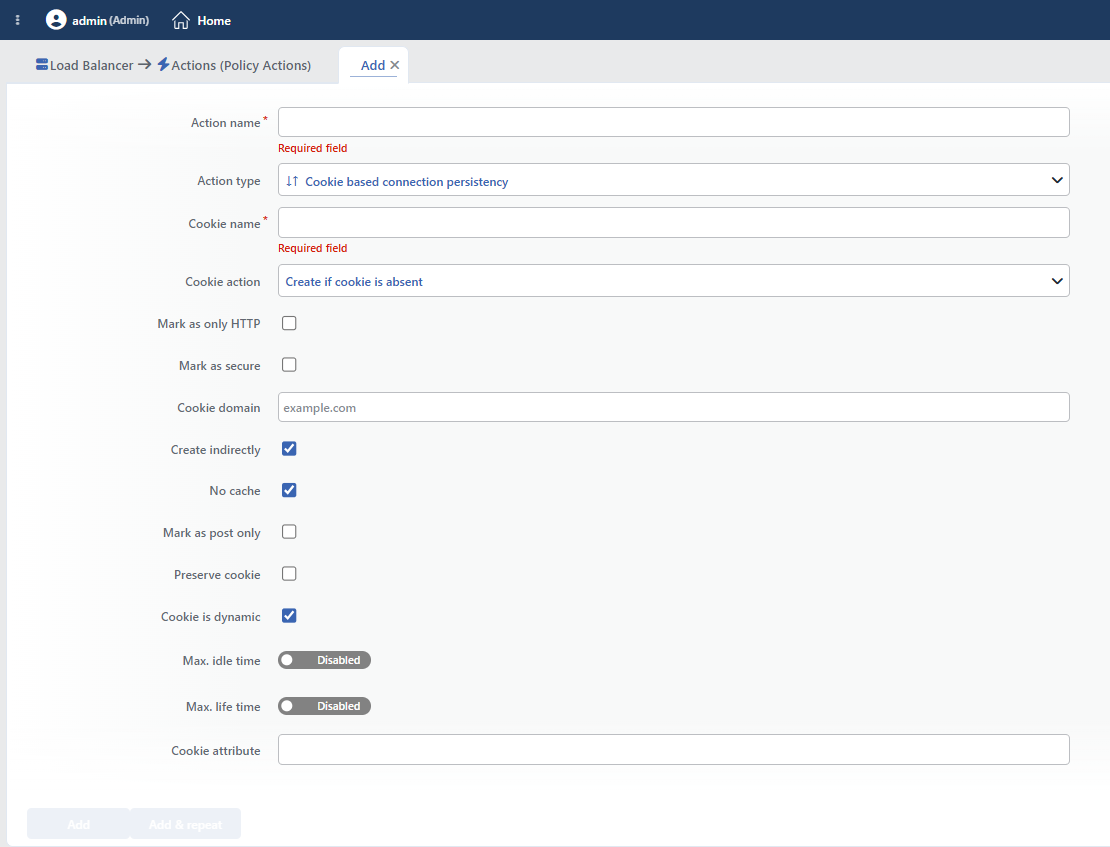 Cookie Based Connection Persistency Action Add Form
INFO
Cookie Name Required
The name of the cookie to be used for session persistence is entered. This cookie will be sent to the client and will be used for determining the Backend Service in the subsequent requests.
Recommendations:
- A meaningful and unique name is used (e.g.
TR7_SESSION,SERVERID). - A name that does not conflict with the application cookies is selected.
- The name is kept short and concise.
INFO
Cookie Action Default: Create if cookie is absent
How the cookie will be created is determined.
- Create if Cookie is Absent: Creates a new one if there is no cookie. The most common use.
- Prepend to the Current Cookie: Adds it in front of the existing cookie value. Use together with the existing cookie.
- Rewrite the Current Cookie: Completely replaces the existing cookie. For updating the cookie value.
TIP
For most scenarios, the Create if cookie is absent (insert) option is recommended. This works without affecting the existing cookies.
INFO
Mark As Only HTTP Default: Off
Adds the HttpOnly flag to the cookie. This flag ensures that the cookie cannot be accessed by JavaScript.
TIP
It provides protection against XSS (Cross-Site Scripting) attacks. It is recommended to be enabled, especially for session cookies.
INFO
Mark As Secure Default: Off
Adds the Secure flag to the cookie. This flag ensures that the cookie is sent only over HTTPS.
WARNING
If this option is enabled, the cookie is not sent over HTTP connections. In environments that do not use HTTPS, session persistence is broken.
INFO
Cookie Domain
The domain information for which the cookie will be valid is entered.
In the scenario where it is left empty, the cookie is valid only for the domain on which the request is made (subdomains excluded).
Sample values:
| Value | The Domains for Which It Is Valid |
|---|---|
| (empty) | www.example.com (only) |
.example.com | example.com, www.example.com, api.example.com |
shop.example.com | shop.example.com (only) |
INFO
Create Indirectly Default: On
If the client already has a valid cookie, a new cookie is not sent. This prevents an unnecessary Set-Cookie header.
TIP
- It provides bandwidth saving.
- It prevents unnecessary cookie traffic.
- It preserves the browser cookie limits.
INFO
No Cache Default: On
Adds the Cache-Control: private or no-cache header so that the responses containing a cookie are not cached.
WARNING
When it is turned off, CDN or proxy caches can transmit the session cookie to other users. It is recommended to be kept on for security.
INFO
Mark As Post Only Default: Off
The cookie is added only to the responses given to POST requests. GET requests do not receive a cookie.
WARNING
This option is effective only while No cache is off; as long as No cache is on (the default), it is not written to the configuration and has no effect.
INFO
Preserve Cookie Default: Off
If the Backend Service sends its own session cookie, TR7 does not touch this cookie.
TIP
If the Backend Service does its own session management and this cookie needs to be preserved, it is recommended to be activated.
INFO
Cookie Is Dynamic Default: On
Creates a unique cookie value for each Backend Service. A dynamic value is produced based on the Backend Service IP and port information.
If this option is turned off, the cookie value is not produced automatically; in this case, the Cookie content field must be filled in for each Backend Service definition, otherwise session continuity does not work.
TIP
Dynamic cookies hide the Backend Service information. In static cookies, the server ID can be directly visible.
INFO
Max. Idle Time Default: Disabled
The idle time of the cookie (the time for which it remains valid without activity) is determined. Seconds, Minutes or Hours can be selected as the unit.
- Disabled: There is no idle time limit. The cookie is valid until the browser is closed.
- Enabled: If there is no activity during the specified period, the cookie is considered invalid.
Example: 10 minutes: if there is no activity for 10 minutes, the client can be routed to a different server.
INFO
Max. Life Time Default: Disabled
The maximum life time of the cookie is determined. When this period expires, the cookie becomes invalid even if there is activity. Seconds, Minutes or Hours can be selected as the unit.
- Disabled: There is no life time limit.
- Enabled: At the end of the specified period, the cookie is definitely renewed.
Example: 10 hours: after 10 hours, the user can be routed to a different server.
INFO
Cookie Attribute
The custom attributes to be added to the cookie can be defined in this field. More than one attribute separated by a space can be added.
Sample values:
| Attribute | Description |
|---|---|
SameSite=Strict | CSRF protection (the same site is mandatory) |
SameSite=Lax | CSRF protection (GET allowed) |
SameSite=None | Cross-site requests are allowed (together with Secure) |
TIP
Modern browsers accept the cookies that do not have the SameSite attribute as SameSite=Lax. It is recommended to state it explicitly for cross-site scenarios.
Conflict with the vService Persistence Setting
This action writes the session continuity definition to all the Backend Service lists. If the Persistence setting of the vService uses a cookie-based method (a new cookie or the existing cookie), a second cookie definition is written to the same pool and which one will be valid is unpredictable.
This action should be defined only when the vService persistence is off or when a method that is not cookie-based (e.g. hash-based) is used. Adding more than one cookie-based continuity action to the same vService creates the same conflict as well.
INFO
Form Buttons
Add
The action adding process is completed by clicking the Add button.
Add & Repeat
With the Add & Repeat button, the action adding process is completed, and another new action can be added with different configurations without leaving the related window.
 Action Added
WARNING
The Cookie Based Connection Persistency action does not require a condition and is applied unconditionally (Always) on the vService on which it is defined.
Actions that run unconditionally directly affect all traffic or behavior on the related vService, without an evaluation based on traffic content.
In live environments, it is recommended that target service behaviors and possible effects be evaluated carefully before such actions are enabled. Otherwise, unexpected service behaviors or operational problems can occur.
Operational and Safe Usage Recommendations
- The security flags are enabled. In production environments, the HttpOnly and Secure (for HTTPS) flags are enabled; this reduces the risk of cookie theft.
- A dynamic cookie is used. The Cookie Is Dynamic option is kept enabled; this provides security by hiding the Backend Service information.
- Appropriate Timeout Values Should Be Determined. Max. idle time: according to the user activity (usually 15-30 minutes). Max. life time: according to the security policy (usually 8-24 hours).
- The No cache option is kept on. In order to prevent the session cookies from being cached, the No Cache option is left on.
- The SameSite attribute is added. For CSRF protection,
SameSite=StrictorSameSite=Laxis written in the Cookie Attribute field.
