
Smarter by Design.Simpler for Business
UDP Signatures
What Is UDP Signatures?
UDP Signatures recognizes two known attack forms by name in the UDP band and looks only at them. The other box of the band puts a general rate ceiling on all the UDP traffic; here, on the other hand, two specific forms are looked for.
The first is the UDP packets that carry no data inside. The legitimate counterpart of such a packet is next to none; since it carries no information, its only function is to consume the processing power of the target. The second is an old but still encountered attack directed at the 135-139 ports used by the file sharing services and aiming to crash the service.
Although the name of the box is "signature", both rules carry a threshold; their difference is where the threshold comes from. The threshold of the empty packet rule is fixed and cannot be changed from the interface; the threshold of the SMB rule, on the other hand, is adjustable.
2
Rules
One is the packets with an empty payload, one is the attack directed at the 135-139 ports
3/s
Fixed Threshold
The threshold of the empty packet rule; it cannot be changed from the interface
10/s
Default SMB Ceiling
The number of SMB packets per second per source
2
Exempt from the Promotion Permission
Both of them can promote into enforcement while the Mode Promotion permission is off
2
Able to Send to Quarantine
Both of them can take the source into quarantine
IPv4 Only
The Scope of the Empty Packet Rule
For IPv6 traffic this rule is never written
The UDP Signatures Box on L4 DDoS Management
The box is the second box in the body of the UDP band. In its header there are its name and the number of rules it carries, and in its body two rule rows.
 UDP - The UDP Signatures Box
| Row | Rule | What it catches |
|---|---|---|
| 1 | Zero-byte UDP | The UDP packets that carry no data inside. |
| 2 | SMBnuke (135-139) | The SMB attack directed at the 135-139 ports. |
Zero-byte UDP
Catches the UDP packets that carry no data inside. The point where it differs from the other three UDP rules is that there is no limit field in its edit window: its threshold is 3 packets per second per source and this value is fixed in the definition of the rule.
The sentence in the row writes the threshold explicitly in parentheses. Its definition in the information band is as follows: Zero Byte UDP protection.
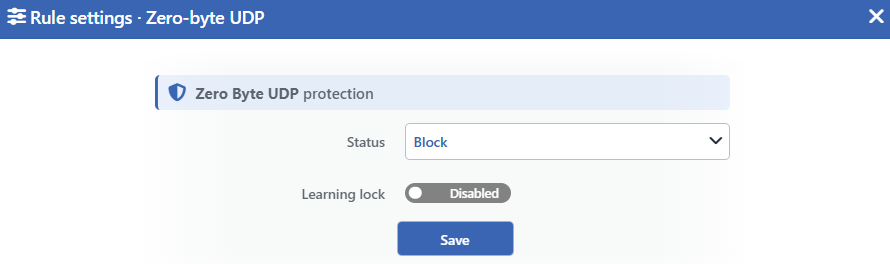 Zero-byte UDP Edit Screen
INFO
Status
Selects the rule's operating mode. Four values are offered, and the selected value also determines the sentence on the row:
| Value | The sentence in the row |
|---|---|
| Disabled | Zero-byte UDP packets are not monitored |
| Monitor | Zero-byte UDP packets are only monitored (fixed threshold: 3/s) |
| Block | Zero-byte UDP packets are dropped (fixed threshold: 3/s) |
| Quarantine | Zero-byte UDP packets are dropped and their sources are quarantined (fixed threshold: 3/s) |
The parenthesized note stating the threshold is not written only in the Disabled value; because while the rule is off there is no applied threshold either.
INFO
Learning Lock Default: Off
Closes the rule to the learning engine. When the switch is turned on, the engine cannot change the mode of this rule; the rule is changed only manually from this window.
It is off by default. While the lock is on, an unlabeled padlock icon is displayed on the row, to the left of the pencil.
INFO
Save
Saves the change made and puts it into force immediately. Only the changed fields are updated.
This rule works only on the IPv4 traffic directed at the device
The scope of the rule is narrower than the other three rules of the band at three points:
| Limit | Its result |
|---|---|
| Only the traffic directed at the device | It is not applied to the UDP traffic passed through the device; the empty packets carried to the backend are not caught by this rule. |
| Only IPv4 | For IPv6 traffic the rule is never produced. The interface does not state this; the row shows the same sentence for both versions. |
| Only new flows | The packets that come as part of an already established flow are accepted before the check. |
In the other three rules of the band the first two limits are not found: all three cover the traffic passed through the device and are written for IPv6 as well. The third limit, on the other hand, is not specific to this rule; both rules of the UDP Flood box also measure only the packets of new flows, and only the SMBnuke (135-139) rule counts the packets of established flows.
The learning engine cannot change the limit of this rule, but it can promote its mode
Before promoting a rule from monitoring into enforcement, the engine looks for the limit of the rule to have settled. Since this rule has no limit field in the interface, a limit recommendation is not counted as applicable. On the other hand the engine reads the fixed threshold as the limit in force of the rule and, as long as the measurement stays around this threshold, counts the limit as settled.
The practical result of this is as follows: when the rule is left in the monitoring mode, the engine can recommend a promotion to the Quarantine mode; when the learning mode is Automatic, it applies the recommendation on its own. When the stopping of the promotion is wanted, the Learning Lock switch of the rule is turned on.
The threat status and the enforcement do not use the same threshold
The rule drops the traffic above 3 packets per second per source. On the other hand the threat status calculation on the status card evaluates this measurement according to a much higher base.
For this reason, even while the rule is regularly dropping packets, the threat status can look calm. How much work the rule really does is read from the Floods and Dropped Traffic tabs of the dashboard.
SMBnuke (135-139)
Meets the attack directed at the 135-139 ports. Its definition in the information band is as follows: SMBnuke Port 135-139 attack protection.
Although its name and its box suggest a signature check, the rule is a rate limiter: it does not look at the form of the packet, it only measures the rate of the traffic going to these ports per source.
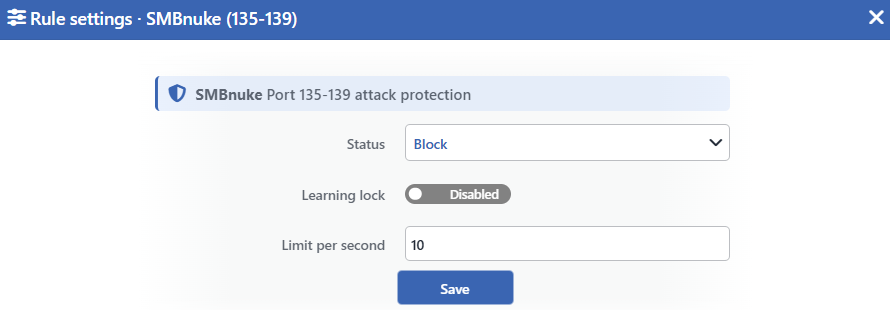 SMBnuke (135-139) Edit Screen
INFO
Status
Selects the rule's operating mode. Four values are offered, and the selected value also determines the sentence on the row:
| Value | The sentence in the row |
|---|---|
| Disabled | A limit of <limit> SMB packets per second is configured, but the rule is off |
| Monitor | A source may send at most <limit> SMB packets per second; anything beyond is only monitored |
| Block | A source may send at most <limit> SMB packets per second; anything beyond is dropped |
| Quarantine | A source may send at most <limit> SMB packets per second; a source that exceeds it is quarantined |
INFO
Learning Lock Default: Off
Closes the rule to the learning engine. When the switch is turned on, the engine cannot change the limit and the mode of this rule; the rule is changed only manually from this window.
It is off by default. While the lock is on, an unlabeled padlock icon is displayed on the row, to the left of the pencil.
INFO
Limit per Second Default: 10
Determines the number of SMB packets per second per source. The default value is 10. Only an integer of 1 and above is accepted.
The lowest value the learning engine can recommend for this rule is 5; the values entered manually are not subject to this lower bound.
INFO
Save
Saves the change made and puts it into force immediately. Only the changed fields are updated. While there is a validation error, the button is inactive.
The rule stands in the UDP band but counts TCP traffic as well
Since the 135-139 ports can be used over both TCP and UDP, the rule covers both protocols together. Because the name of the box and the name of the band point only to UDP, this cannot be understood by looking at the row.
The measurement is therefore read from two separate stores as well. The peak and the p95 values are written by taking the highest of the stores, and the number of sources as the sum of the stores. If the same source sends over both TCP and UDP, it can be counted twice; the number of sources in the counter can come out higher than the real number of sources.
Being exempt from the promotion permission does not mean that the promotion will happen immediately
Both rules of this box are outside the Mode Promotion permission: they can take a promotion recommendation from the learning engine while the permission is off as well.
However the exemption opens only that gate. For the engine to be able to recommend a promotion, the limit of the rule has to have settled, the back-test has to give a clean result and the confidence value has to exceed the threshold. As long as these conditions are not met, a promotion recommendation is not produced. The badge in the row, on the other hand, changes according to the missing condition: when the observation history has not matured yet Learning is displayed, and when the history has matured but one of the conditions is not met Verified is displayed. In the empty packet rule the Learning badge is never displayed; since its limit is not counted as applicable, the row carries either the Verified badge or the recommendation badge.
Measurement and Dashboard
Although the name of the box is signature, both rules measure a rate per source; their measurements are displayed on the Floods tab of the dashboard, in a separate L4 DDoS Rate — <rule> panel per rule. On the Suspicious Packets tab there is no panel belonging to this box.
| Rule | Panel tab | What is measured | Quarantine panel | Dropped Traffic |
|---|---|---|---|---|
| Zero-byte UDP | Floods | The empty UDP packets per second per source: the highest source rate, the p95 value and the number of active sources; the limit line is displayed at 3, which is the fixed threshold | Yes | Yes; it produces a value only in the Block and Quarantine modes |
| SMBnuke (135-139) | Floods | The SMB packets per second per source: the highest source rate, the p95 value, the number of active sources and the configured limit line; the TCP and UDP measurements merge | Yes | Yes; it produces a value only in the Block and Quarantine modes |
The two rules are on different cards in the live view
The measurement is produced in the monitoring mode as well; when the rule is made Disabled, the measurement stops and its panel falls out of the list on the Floods tab. On the Zero-byte UDP panel there is only IPv4 traffic; on the SMBnuke (135-139) panel IPv4 and IPv6 merge into a single series.
On the L4 DDoS Live View screen SMBnuke (135-139) is on the Floods / Rate card, and Zero-byte UDP, which has no limit field, is on the Signatures & Malformed card. Since the fixed threshold comes filled, a pressure bar and a peak/threshold value are displayed in the empty packet row as well.
The packets other rules drop do not enter these measurements
The Zero-byte UDP counter works after all the entry checks of the route table. The packets the UDP Flood box drops in the Block mode and the packets of the sources in quarantine do not reach this counter; a source that this rule takes into quarantine is not seen on the panel during the quarantine period either.
Before the SMBnuke (135-139) counter, the Port Scan rule in the Malformed Flags & Scans box works. While this rule is in the Block mode, it drops all the traffic the source that touches the trap sends during 60 seconds; since the trap target is also in the 135-139 range, in the default configuration the TCP traffic going to this target is not seen on the SMB panel. The packets of the sources in quarantine, on the other hand, continue to reach the SMB counter.
Scope and Limits
INFO
- The name of the box says signature, but both rules carry a threshold. The threshold of the empty packet rule is a fixed 3/s, and the one of the SMB rule is adjustable.
- There is no limit field in the edit window of the empty packet rule; its threshold is in the definition of the rule.
- The empty packet rule works only on the IPv4 traffic directed at the device and is not applied to the packets of established flows.
- The learning engine can promote the mode of the empty packet rule; if the promotion is not wanted, the
Learning Lockswitch is turned on. - The SMB rule counts TCP traffic as well and can come out high because the number of sources is written as the sum of the two stores.
- Both of them are exempt from the Mode Promotion permission, but the exemption does not remove the learning conditions.
- Both of them can send a source to quarantine.
- In an untouched route table both of them are born with the catalog default, that is, they are in the Block mode.
- The sources in the exemption list are not caught by any of these rules and are not written to their counters either.
- Editing requires modify permission in the Network area.
