
Smarter by Design.Simpler for Business
Keep Header Names
What Is the Keep Header Names Action?
The Keep Header Names action enables the HTTP header names to be transmitted to the Backend Services with their original upper/lower case structure preserved.
In normal operation, the header names are reduced to lowercase. Some old or special applications, on the other hand, expect the original upper/lower case structure of the header names; this action enables that structure to be preserved.
This action turns off HTTP/2 and HTTP/3
The upper/lower case form of the header names can be preserved only over HTTP/1.1. For this reason, when the action is enabled, in the related vService:
- HTTP/2 is disabled on the client side (it is removed from the protocol negotiation),
- the HTTP/3 (QUIC) listener is not opened at all,
- HTTP/2 is not used in the encrypted connections going to the Backend Service either.
All the clients return to HTTP/1.1. The cost of this is the loss of the multiplexing, header compression and QUIC gains: the number of connections and the handshake cost increase. The action should be used only if there is a Backend Service that really depends on the header spelling, and preferably on a vService specific to that service.
When the change is applied, an information line stating which protocols have been turned off is displayed in the vService status; this is not an error but information.
The Importance of the Keep Header Names Action
Modern HTTP protocols reduce the header names to lowercase. Some systems cannot tolerate this conversion and compatibility problems are experienced; this action enables the original spelling to be preserved by fixing the protocol to HTTP/1.1.
The Keep Header Names action;
- provides compatibility when the Backend Service expects case sensitivity in the header names,
- solves the integration problems with legacy systems,
- makes communication with special protocols or APIs possible,
- enables the old services that depend on the header spelling to work without a change being made on the application side.
For this reason, the Keep Header Names action is a critical compatibility tool in protocol transitions and legacy system integrations.
Supported vService Types
HTTP
L7 TCP
Network
Execution Timing
On Request
On Response
How to Add?
A new Keep Header Names Action can be added through the TR7 web management interface by following the steps below:
- The Configuration Menu is opened by clicking the TR7 logo at the bottom left.
- The Load Balancer → Actions → Add steps are followed.
- A unique and descriptive name is entered for the action.
- Keep Header Names is selected as Action Type.
- The related configurations of the action are made.
- The action is added by clicking the
Addbutton.
Keep Header Names Action Add Form
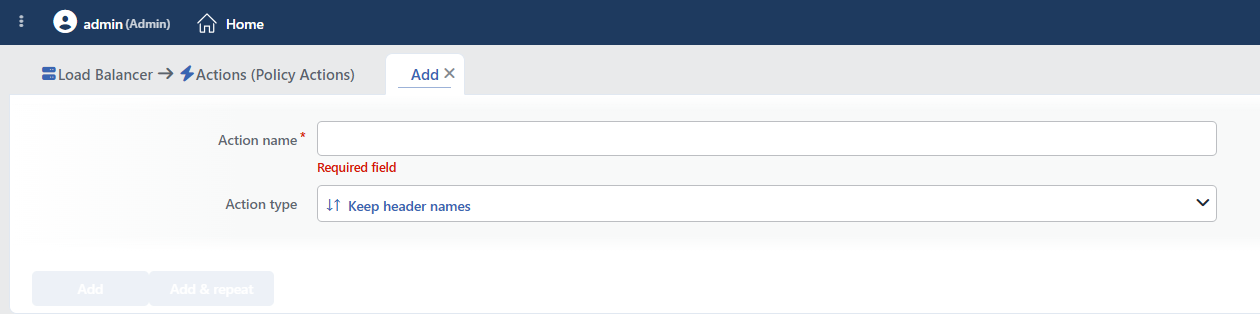 Keep Header Names Action Add Form
INFO
Action Type
Keep header names is selected as the action type.
The action type cannot be changed after it is saved. The action does not have any configuration field specific to the action; the Execution Level, Rule Protocol, Conditions, Hit Counter and Set Variable on Hit fields are not present either.
Core engine support is required
This feature works only in current core engine versions. In a version that does not support it, the action has no effect at all (HTTP/2 is not turned off either) and the notification "The selected core engine does not support the following features" is displayed in the interface.
INFO
Form Buttons
Add
The action adding process is completed by clicking the Add button.
Add & Repeat
With the Add & Repeat button, the action adding process is completed, and another new action can be added with different configurations without leaving the related window.
 Action Added
WARNING
The Keep Header Names action does not require a condition and is applied unconditionally (Always) on the vService on which it is defined.
Actions that run unconditionally directly affect all traffic or behavior on the related vService, without an evaluation based on traffic content.
In live environments, it is recommended that target service behaviors and possible effects be evaluated carefully before such actions are enabled. Otherwise, unexpected service behaviors or operational problems can occur.
Operational and Safe Usage Recommendations
- Use It When It Is Really Necessary. This action should be used only when the Backend Services expect case sensitivity in the header names. It is generally not necessary in standard HTTP applications.
- Verify It in a Test Environment. Before taking it to the live environment, how the Backend Service reacts to this change should be verified in a test environment.
- A Single Use per vService. This action can be added only once per vService.
Common Usage Scenarios in Live Environments
The examples below show how the related action is applied in the most frequently encountered use cases in real systems. These scenarios are based on practices that are widely preferred in live environments and rest on experience gained in the field.
Scenario 1: Header Case Sensitivity of a Legacy Java Servlet
Problem: An old Java servlet application (Tomcat 5.x) reads the HTTP header names case-sensitively. TR7 converts the headers to lowercase (X-Custom-ID → x-custom-id) and the application cannot find this header and gives an error.
Solution: By enabling the Keep Header Names action, the original upper/lower case structure of the header names is preserved.
Configuration: This action does not have a configuration field, it is activated simply by being added to the vService.
Result:
- ✅ The header format →
X-Custom-IDis transmitted to the Backend Service in its original form. - ✅ The Java servlet → Reads the header correctly and does not give an error.
- ✅ Compatibility → Since the header spelling is preserved, the old Java application finds the header.
- ❌ Protocol → The vService is fixed to HTTP/1.1; HTTP/2 and HTTP/3 cannot be used.
Scenario 2: Header Requirements of a Custom Middleware API Gateway
Problem: The API gateway middleware developed in-house expects the X-API-Key and X-Request-ID headers exactly in this format. It does not recognize their lowercase versions (x-api-key) and rejects the requests.
Solution: By using the Keep Header Names action, the original form of the custom headers is preserved.
Configuration: This action does not have a configuration field, it is activated simply by being added to the vService.
Result:
- ✅ The custom headers →
X-API-KeyandX-Request-IDare transmitted in their original format. - ✅ The middleware → Recognizes the headers and accepts the requests.
- ✅ The API gateway → The custom logic and the security checks work correctly.
- ❌ Protocol → The vService is fixed to HTTP/1.1; the special system requirement is met but the HTTP/2 gains are lost.
Scenario 3: An ASP.NET Framework 4.5 Compatibility Problem
Problem: An old ASP.NET Framework 4.5 application tries to read the header with HttpContext.Request.Headers["X-Custom-Header"]. When TR7 converts the headers to lowercase (x-custom-header), ASP.NET cannot find this header.
Solution: By enabling the Keep Header Names action, the header form expected by ASP.NET is preserved.
Configuration: This action does not have a configuration field, it is activated simply by being added to the vService.
Result:
- ✅ ASP.NET header reading →
X-Custom-Headeris read in its original format. - ✅ HttpContext → The Request.Headers collection works correctly.
- ✅ The custom HttpModule → Processes the headers correctly and does not give an error.
- ❌ Protocol → The vService is fixed to HTTP/1.1; ASP.NET compatibility is provided but HTTP/2 cannot be used.
Scenario 4: The Header Format of a SOAP Web Service
Problem: A SOAP web service expects the SOAPAction header exactly in this format (case-sensitive). TR7 transmits this header to the Backend Service as soapaction and the SOAP parser gives an error.
Solution: By using the Keep Header Names action, the header form of the SOAP protocol is preserved.
Configuration: This action does not have a configuration field, it is activated simply by being added to the vService.
Result:
- ✅ The SOAP headers →
SOAPActionandContent-Typeare transmitted in their original format. - ✅ The SOAP parser → Recognizes the headers and processes the messages correctly.
- ✅ The web service → The WSDL requirements are met and no error is given.
- ❌ Protocol → The vService is fixed to HTTP/1.1; SOAP compatibility is preserved but HTTP/2 cannot be used.
