
Smarter by Design.Simpler for Business
SYN Flood
What Is SYN Flood?
SYN Flood meets the attacks that target the handshake itself in the TCP band and deals with the stage before a connection is established: at what rate the source tries to open new connections, whether the packet it sends obeys the handshake rule and in which stance the kernel is against the accumulation of half-open connections.
The box carries four rules and these work with three different methods: one measures a threshold, two check a signature, and one writes the stance of the system.
4
Rules
One with a threshold, two signature checks, one on/off stance setting
500/s
Default Rate Limit
How many new TCP packets per second are allowed per source
4,096
Default SYN Backlog
The kernel SYN cookie engages above this number
3
Able to Send to Quarantine
The three rules other than the SYN cookie setting can take a source into quarantine
3
Requiring the Promotion Permission
The three rules that use the enforcement levels are not promoted into enforcement without the Mode Promotion permission
Born Enabled
SYN Cookies
The catalog default is Enabled; it is on in an untouched route table as well
The SYN Flood Box on L4 DDoS Management
The box is the first box in the body of the TCP band. In its header there are its name and the number of rules it carries, and in its body four rule rows.
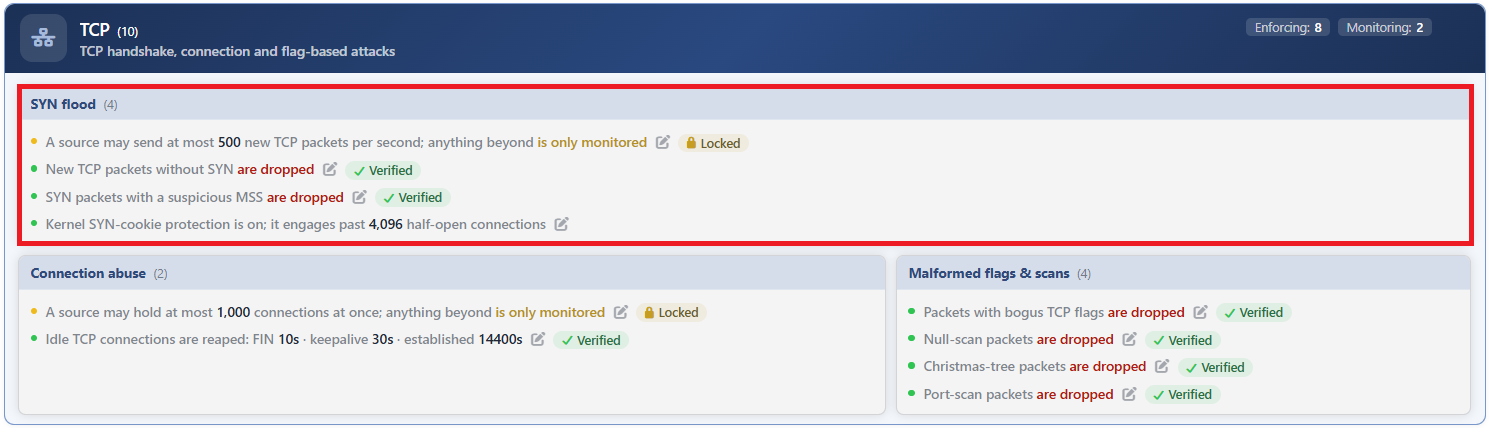 TCP - The SYN Flood Box
| Row | Rule | Its method |
|---|---|---|
| 1 | SYN Flood: New-TCP Rate | The rate of new TCP packets per second per source. |
| 2 | SYN Flood: Not-SYN | The new TCP packets that come without opening a handshake. |
| 3 | SYN Flood: Bad MSS | The SYN packets that carry a suspicious MSS value. |
| 4 | SYN Cookies | The half-open connection stance of the kernel. |
SYN Flood: New-TCP Rate
Determines how many new TCP packets per second will be allowed per source. The measurement is address based: every source carries its own counter, and one address exceeding the threshold does not affect the others.
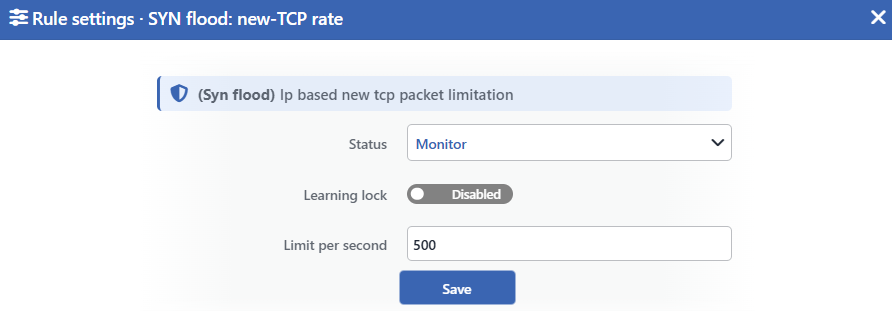 SYN Flood: New-TCP Rate Edit Screen
INFO
Status
Selects the rule's operating mode. Four values are offered, and the selected value also determines the sentence on the row:
| Value | The sentence in the row |
|---|---|
| Disabled | A limit of <limit> new TCP packets per second is configured, but the rule is off |
| Monitor | A source may send at most <limit> new TCP packets per second; anything beyond is only monitored |
| Block | A source may send at most <limit> new TCP packets per second; anything beyond is dropped |
| Quarantine | A source may send at most <limit> new TCP packets per second; a source that exceeds it is quarantined |
INFO
Learning Lock Default: Off
Closes the rule to the learning engine. When the switch is turned on, the engine cannot change the limit and the mode of this rule; the rule is changed only manually from this window.
It is off by default. While the lock is on, an unlabeled padlock icon is displayed on the row, to the left of the pencil.
INFO
Limit per Second Default: 500
Determines the number of new TCP packets per second per source. The default value is 500. Only an integer of 1 and above is accepted.
If the field is left empty, the validation is skipped and the rule works with the default value.
INFO
Save
Saves the change made and puts it into force immediately. Only the changed fields are updated. While there is a validation error, the button is inactive.
Pulling the limit to 1 turns the rule into a blanket block
When the limit is made 1, the threshold comparison falls out of the rule completely. In the enforcement mode the rule is applied to all the handshakes and all of them are dropped; in the monitoring mode, on the other hand, since the rate counter is not set up, a real measurement is not produced, but the panel continues to be displayed and the series is displayed with a zero value.
Since the form accepts the value 1, this situation does not give an error message. The same behavior is valid in the other rate-limiting rules as well.
This rule produces a measurement in the monitoring mode as well
In the monitoring mode the rule is in force; only it has no result. The rate of new TCP packets per second of every source is measured; the highest source rate, the p95 value and the number of sources are graphed together with the configured limit line on the Floods tab of the dashboard, but the traffic is not touched.
SYN Flood: Not-SYN
Catches the new TCP packets that come without opening a handshake. A legitimate connection always starts with a SYN packet; if the first packet of the connection does not carry SYN, it is either a scan attempt or an invalid flow.
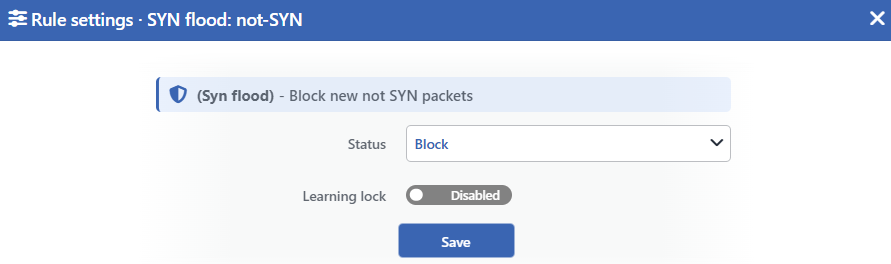 SYN Flood: Not-SYN Edit Screen
INFO
Status
Selects the rule's operating mode. Four values are offered:
| Value | The sentence in the row |
|---|---|
| Disabled | New TCP packets without SYN are not monitored |
| Monitor | New TCP packets without SYN are only monitored |
| Block | New TCP packets without SYN are dropped |
| Quarantine | New TCP packets without SYN are dropped and their sources are quarantined |
INFO
Learning Lock Default: Off
Closes the rule to the learning engine. Since this rule has no adjustable value, the lock prevents only the mode change.
The rule has no adjustable value; the matching criterion is in the rule's own definition and cannot be changed from the interface.
SYN Flood: Bad MSS
Checks the maximum segment size that the SYN packets opening a handshake carry. If the value is outside the reasonable range, the packet is counted as suspicious: an excessively small segment size is the sign of an exhaustion attack that aims to occupy the other side with a large number of small pieces.
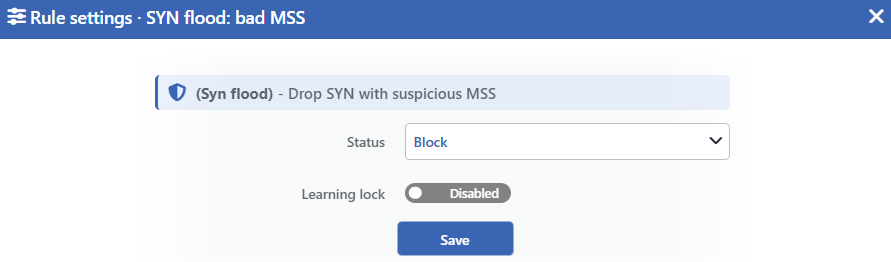 SYN Flood: Bad MSS Edit Screen
INFO
Status
Selects the rule's operating mode. Four values are offered:
| Value | The sentence in the row |
|---|---|
| Disabled | SYN packets with a suspicious MSS are not monitored |
| Monitor | SYN packets with a suspicious MSS are only monitored |
| Block | SYN packets with a suspicious MSS are dropped |
| Quarantine | SYN packets with a suspicious MSS are dropped and their sources are quarantined |
INFO
Learning Lock Default: Off
Closes the rule to the learning engine. Since this rule has no adjustable value, the lock prevents only the mode change.
This rule has no adjustable value either; the range counted as reasonable is in the rule's own definition and cannot be changed from the interface.
SYN Cookies
It is the only rule that differs structurally from the other three: it does not write a firewall rule, it adjusts the stance of the kernel.
The SYN cookie is a defense that engages when the half-open connection queue fills up. As long as the queue does not fill up it has no cost; when it fills up, the server, instead of allocating space in memory for the waiting connections, answers the incoming request with a verifiable value and accepts the source only if it really returns.
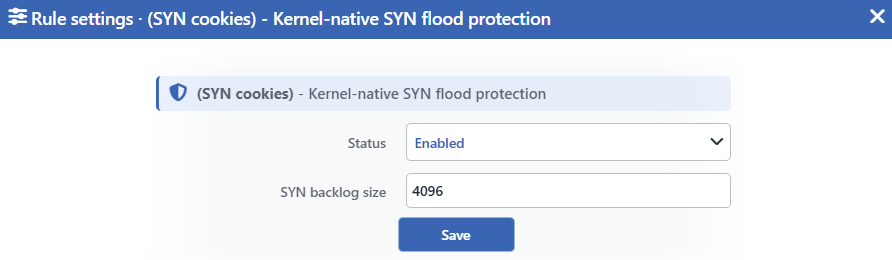 SYN Cookies Edit Screen
INFO
Status
Determines whether the rule is on or not. Unlike the other three rules, only two values are offered:
| Value | The sentence in the row |
|---|---|
| Enabled | Kernel SYN-cookie protection is on; it engages past <backlog> half-open connections |
| Disabled | Kernel SYN-cookie protection is off |
The sentence in the Disabled state is displayed in the warning tone, amber; the whole row also fades.
INFO
SYN Backlog Size Default: 4096
Determines the size of the half-open connection queue; the SYN cookie engages above this number. The default value is 4096 and only an integer of 1 and above is accepted.
There is no Learning Lock switch in this window; the reason is explained below.
This rule differs from the other three at four points
- There are no mode levels. The
Statusfield offers only Enabled and Disabled. - It cannot send a source to quarantine. There is not an actor to be held but a stance that is adjusted.
- It produces no measurement. Since it does not write a firewall rule, it has no packet to be counted either; it has no panel of its own on the dashboard. The SYN pressure itself is followed on the Floods tab, in the graph of the rate-limiting rule.
- There is no
Learning Lockswitch. Since the learning engine does not evaluate a rule that produces no measurement, there is nothing to be locked either.
Turning it off does not take the backlog value back
While the rule is on, the queue size is pulled to the value here. When it is turned off, on the other hand, a new queue value is not written to the kernel: the system stays at the value last written while the rule was on.
For this reason, turning the rule off does not return the system to its state before it was turned off.
Measurement and Dashboard
The three rules of the box that produce measurements are displayed on two separate tabs of the dashboard: the rate rule on the Floods tab in an L4 DDoS Rate — <rule> panel, and the two signature rules on the Suspicious Packets tab, each in an L4 DDoS Packet Class — <rule> panel.
| Rule | Panel tab | What is measured | Quarantine panel | Dropped Traffic |
|---|---|---|---|---|
| SYN Flood: New-TCP Rate | Floods | The connection opening (SYN) packets per second per source: the highest source rate, the p95 value, the number of active sources and the configured limit line | Yes | Yes; it produces a value only in the Block and Quarantine modes |
| SYN Flood: Not-SYN | Suspicious Packets | The number of packets per second that start a new connection without carrying the connection opening flag | Yes | Yes; it produces a value only in the Block and Quarantine modes |
| SYN Flood: Bad MSS | Suspicious Packets | The number of packets per second that start a new connection with a suspicious MSS value | Yes | Yes; it produces a value only in the Block and Quarantine modes |
| SYN Cookies | None | Produces no measurement | None | None |
The measurement works while the rule is on
The counter of the three rules is not set up in the Disabled mode and their cards are not offered in the panel list; in the Monitor mode, on the other hand, the graphs fill. The counting covers the traffic directed at the device and the traffic passed through the device together; the IPv4 and IPv6 traffic merges into a single series. The sources in the exemption list are not counted.
On the L4 DDoS Live View screen the rate rule is on the Floods / Rate card, and the two signature rules on the Signatures & Malformed card.
The drop counter is fed only in the enforcement modes
The volume of packets the rules drop is kept in a separate counter and this counter occurs only in the Block and Quarantine modes; in the rate rule this value is the part of the source that exceeds the limit. For this reason a zero value on the Dropped Traffic tab may show not only that there is no attack but also that the rule is in the monitoring mode.
Since the counter of the rate rule works before the quarantine check, the connection opening packets of a source in quarantine also continue to be counted in the SYN Flood: New-TCP Rate panel.
Scope and Limits
INFO
- None of the three rules that use the enforcement levels is exempt from the mode promotion permission. Since the rate limit measures a threshold, and the other two look at packets that a healthy network can also produce, they are not promoted into enforcement without the Mode Promotion permission. SYN Cookies has no level to be promoted to. Detail: AI Learning Settings.
- All four are born with the catalog default in an untouched route table: the rate limit Monitor, the other two rules Block, and the SYN cookie setting Enabled.
- Pulling the rate limit to 1 turns the rule into a blanket block and this situation does not give an error.
- SYN Cookies cannot send to quarantine, produces no measurement and does not carry a learning lock.
- The measurements do not separate the IP versions. The counter of a rule counts the IPv4 and IPv6 traffic together.
- The sources in the exemption list are not caught by the first three rules and are not written to their counters; since SYN Cookies is a kernel setting, it does not recognize the exemption list.
- Editing requires modify permission in the Network area.
