
Smarter by Design.Simpler for Business
Redirect to HTTPS
What Is the Redirect to HTTPS Action?
The Redirect to HTTPS action automatically redirects the requests coming over HTTP to HTTPS. This action provides data security by converting insecure connections into encrypted connections.
The redirection to HTTPS does not require an action definition under normal conditions. The related HTTP vService settings can be used for automatic HTTP → HTTPS redirection on the vService.
This action works only at the request stage and can be used on HTTP vServices.
1 · HTTP request (insecure)
http://example.com/login ↓
2 · TR7 redirects
HTTP/1.1 301 Moved PermanentlyLocation: https://example.com/login
↓
3 · Secure HTTPS connection
https://example.com/login The Importance of HTTPS Redirection
The use of HTTPS has become a necessity in modern web security.
HTTP vs HTTPS:
| Feature | HTTP | HTTPS |
|---|---|---|
| Encryption | None | Encrypted with TLS/SSL |
| Data Privacy | Readable in the traffic | Encrypted, unreadable |
| Authentication | None | With a certificate |
| SEO | Disadvantageous | Preferred by Google |
| Browser Warning | "Not secure" | Lock icon |
WARNING
Since HTTP traffic is not encrypted:
- It is open to man-in-the-middle attacks.
- Session cookies can be stolen.
- Form data can be read.
- The content can be changed with DNS spoofing.
The Importance of the Redirect to HTTPS Action
Central redirection is critically important for the HTTPS requirement.
The Redirect to HTTPS action;
- automatically converts all the HTTP traffic to HTTPS,
- does not require a change in the application,
- uses a 301 permanent redirect for SEO,
- can make selective redirection with conditions,
- preserves the URL structure (path, query).
For this reason, the Redirect to HTTPS action is a basic component for secure web delivery.
Supported vService Types
HTTP
L7 TCP
Network
Execution Timing
On Request
On Response
How to Add?
A new Redirect to HTTPS Action can be added through the TR7 web management interface by following the steps below:
- The Configuration Menu is opened by clicking the TR7 logo at the bottom left.
- The Load Balancer → Actions → Add steps are followed.
- A unique and descriptive name is entered for the action.
- Redirect to HTTPS is selected as Action Type.
- The related configurations of the action are made.
- In the Conditions tab, the condition/conditions under which the action takes effect are determined.
- The action is added by clicking the
Addbutton.
Redirect to HTTPS Action Add Form
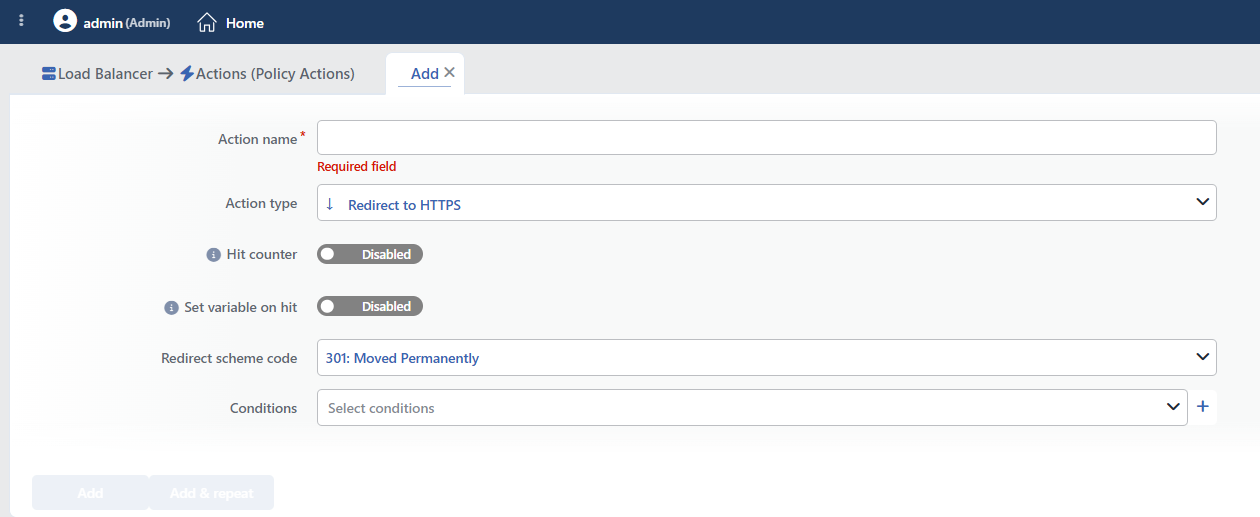 Redirect to HTTPS Action Add Form
INFO
Action Type
Redirect to HTTPS is selected as the action type.
Since the action works only at the request stage, the Execution Level and Rule Protocol fields are not located in the form. It can be added to the same vService more than once.
INFO
Hit Counter Default: Off
Hit Counter counts every run of the action (it is evaluated together with the action's own condition; the count is not lost even in terminating actions such as Deny). Action-based rates and totals are displayed in the Action Hits tab of the vService dashboard and on the live statistics screen; they do not appear as a separate column in the lists. The counter is cumulative; there is no interface for resetting it manually: it starts from zero when the set of counted actions changes or when the vService is reloaded, while the history is preserved on the dashboard as a rate (hit/s).
INFO
Set Variable on Hit
A variable name whose value is assigned each time the action runs can be entered (optional; empty by default). The name can consist of letters, digits and underscores (at most 32 characters). When the action is triggered, the variable is set to 1, and chained behaviors can be built by reading it with the %TR7VAR(name) smart variable in other conditions and actions on the same vService.
INFO
Redirect Scheme Code Default: 301
The HTTP redirection status code to be sent to the client is selected.
Options:
| Code | Name | Description | Area of Use |
|---|---|---|---|
| 301 | Moved Permanently | Permanent redirect | Recommended for the HTTPS requirement |
| 302 | Found | Temporary redirect | A temporary HTTPS requirement |
| 303 | See Other | Redirection with GET | Redirection after a POST |
| 307 | Temporary Redirect | Temporary (the method is preserved) | In order to preserve the POST method |
| 308 | Permanent Redirect | Permanent (the method is preserved) | Permanent HTTPS with POST |
Some of the codes in the list cannot be used
The dropdown list offers the whole 300–308 range; however, only 301, 302, 303, 307 and 308 are valid for redirection.
If 300, 304, 305 and 306 are selected, the produced configuration becomes invalid and cannot be loaded: the vService does not come up when it is restarted. These codes must not be selected.
TIP
301 is used for the HTTPS requirement. The search engines accept 301 as permanent and transfer the page value.
WARNING
The 301 and 302 codes turn POST requests into GET. 307 or 308 is used in order to preserve the POST method.
INFO
Conditions
In this field, it is defined under which condition or conditions the related action takes effect.
By adding one or more conditions, the behavior can be applied in a targeted and controlled way with the and/or structure.
Detailed information about conditions is on the Conditions page.
WARNING
If no condition is defined in this field, the related action runs unconditionally (Always). In this case, the action is applied to all traffic coming to the related vService.
In live environments, using an action without defining a condition can lead to unexpected situations (service outages). For this reason, it is recommended that at least one condition always be defined when an action is created.
INFO
Form Buttons
Add
The action adding process is completed by clicking the Add button.
Add & Repeat
With the Add & Repeat button, the action adding process is completed, and another new action can be added with different configurations without leaving the related window.
 Action Added
Avoiding a Redirection Loop
The redirection to HTTPS action can create a loop depending on the vService configuration.
The problem scenario:
HTTP request → redirect to HTTPS → HTTPS request → (if the condition is wrong) → Redirect again → LoopPrecautions:
- Configure the SSL Termination / Offloading point correctly.
- A condition is added: The If SSL is NOT terminated condition offered ready in the condition list is used; this condition is met only on the requests that come unencrypted.
TIP
After the configuration is completed, it is tested in the browser both with HTTP and with HTTPS.
The loop protection is not automatic
The action does not check by itself whether the request already comes encrypted. When it is defined unconditionally, the requests coming over HTTPS are also redirected to HTTPS again and the browser enters an infinite redirection loop.
For this reason, the action must always be defined together with the If SSL is NOT terminated condition.
If Redirect is selected as the SSL option in the listening address of the vService, the redirection is already made in a protected way; in this case the action is not needed, and if the two are used together, two separate redirection definitions occur.
Operational and Safe Usage Recommendations
- A 301 permanent redirect is used. 301 is selected so that the SEO value is preserved and the browsers cache the redirection.
- It is used together with HSTS. The action is applied together with the HTTP Strict Transport Security (HSTS) header; this makes the browser send the subsequent requests directly to HTTPS.
- All the subdomains are covered. It is verified that all the subdomains, including
www.example.comandexample.com, are redirected to HTTPS. - Care is taken with API requests. API clients may not follow the redirection automatically; for the API, 307/308 or direct HTTPS use is preferred instead of 301.
- Check the Mixed Content Problems. If there are HTTP resources (images, scripts) on the HTTPS pages, the browser gives a warning. All the resources are updated to HTTPS.
Common Usage Scenarios in Live Environments
The examples below show how the related action is applied in the most frequently encountered use cases in real systems. These scenarios are based on practices that are widely preferred in live environments and rest on experience gained in the field.
Scenario 1: The HTTPS Requirement for the Login and Sensitive Pages
Problem: The login page (/login.php) and the user profile pages of the web site can be accessed over HTTP. The user passwords and the session information are sent over an unencrypted network, there is a man-in-the-middle attack risk.
Solution: The login and sensitive pages are compulsorily redirected to HTTPS and data security is provided.
Configuration:
- Redirect Scheme Code: 301 Moved Permanently
- Conditions:
- Path contains
/login.php ANDIf SSL is NOT terminated
- Path contains
Result:
- ✅ Secure communication → The login forms and the sensitive data are sent encrypted over HTTPS.
- ✅ SEO value → The 301 permanent redirect preserves the search engine value.
- ✅ Session security → The session cookies are transmitted over the encrypted connection.
- ✅ User trust → The browser shows the lock icon, the user feels confident.
Sample redirection:
- Request:
http://example.com/login.php - Redirection:
https://example.com/login.php(301)
WARNING
In order for this configuration to work properly, on the vService:
- Port 80: None
- Port 443: Terminate / HTTP/2.0
must be set. Otherwise an infinite redirection loop can occur.
