
Smarter by Design.Simpler for Business
CORS
What Is CORS?
In browser-based applications, CORS is a critical security mechanism that determines which external resources the JavaScript code running on the client side can access. By default, browsers allow a web application to access only the resources that are on the same origin as itself. The CORS mechanism, instead of removing this restriction completely, relaxes it within the framework of the rules explicitly defined by the server.
Within the scope of CORS, the server tells the browser which requests are considered safe by explicitly declaring the allowed origins, HTTP methods and headers. The browser, according to this information, allows the request to be sent or the response to be read by JavaScript. In this way, controlled data sharing between different domains is provided without creating an additional security vulnerability on the client side.
In summary, CORS is a standard access control mechanism that makes it possible for modern web applications to communicate smoothly with APIs, microservices and third-party services while preserving browser security.
What Is the CORS Action?
The CORS (Cross-Origin Resource Sharing) action manages the policies for allowing the HTTP requests coming from different origins (domain, protocol or port). This action makes it possible to relax the security policies of the browsers (the Same-Origin Policy) in a controlled manner.
This action works both at the request and at the response stage. It automatically processes the OPTIONS preflight requests and adds the necessary CORS headers to the responses.
The Importance of the CORS Action
Modern web applications generally make API calls from different domains. Browsers block these requests by default for security reasons. CORS makes it possible to remove this restriction in a controlled manner.
The CORS action;
- enables the frontend applications to access the APIs on a different domain,
- automatically processes the preflight (OPTIONS) requests,
- manages the allowed origins, methods and headers centrally,
- defines cross-origin access policies securely,
- provides the CORS configuration for the whole vService from a single point.
For this reason, the CORS action is a critical component for modern web APIs and SPA (Single Page Application) applications.
How Does CORS Work?
The CORS mechanism works with two types of requests:
Simple Requests
They are the requests made with the GET, HEAD or POST methods that do not contain a custom header. The browser sends the request directly and checks the Access-Control-Allow-Origin header in the response.
Preflight Requests
Before the requests that contain methods such as PUT and DELETE or custom headers, the browser sends an OPTIONS request. This request checks whether the service allows the actual request.
Browser → TR7:
OPTIONS preflight request↓
TR7 → Browser: The
Access-Control-Allow-* headers are returned (without going to the Backend)↓
Browser → TR7: If permission is given, the actual request is sent
| Header | Description |
|---|---|
| Access-Control-Allow-Origin | The allowed origin(s) |
| Access-Control-Allow-Methods (only in the preflight response) | The allowed HTTP methods |
| Access-Control-Allow-Headers (only in the preflight response) | The allowed custom headers |
TIP
The CORS action of TR7 answers the preflight requests directly without sending them to the Backend Service. This eliminates the unnecessary Backend Service load and shortens the response time.
Supported vService Types
HTTP
L7 TCP
Network
Execution Timing
On Request
On Response
How to Add?
A new CORS Action can be added through the TR7 web management interface by following the steps below:
- The Configuration Menu is opened by clicking the TR7 logo at the bottom left.
- The Load Balancer → Actions → Add steps are followed.
- A unique and descriptive name is entered for the action.
- CORS is selected as Action Type.
- The related configurations of the action are made.
- The action is added by clicking the
Addbutton.
CORS Action Add Form
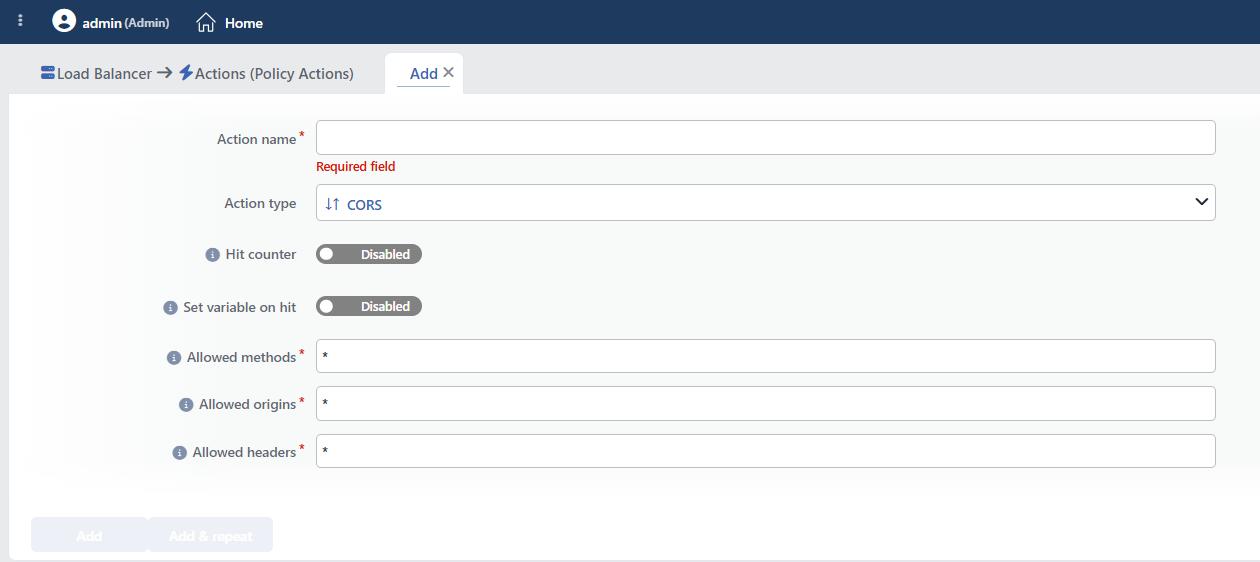 CORS Action Add Form
INFO
Hit Counter Default: Off
Since this action does not take a condition, the counter increases on every HTTP request, including the requests that do not carry an Origin header; it shows the number of runs of the action, not the number of "CORS header added".
Hit Counter counts every run of the action (it is evaluated together with the action's own condition; the count is not lost even in terminating actions such as Deny). Action-based rates and totals are displayed in the Action Hits tab of the vService dashboard and on the live statistics screen; they do not appear as a separate column in the lists. The counter is cumulative; there is no interface for resetting it manually: it starts from zero when the set of counted actions changes or when the vService is reloaded, while the history is preserved on the dashboard as a rate (hit/s).
INFO
Set Variable on Hit
A variable name whose value is assigned each time the action runs can be entered (optional; empty by default). The name can consist of letters, digits and underscores (at most 32 characters). When the action is triggered, the variable is set to 1, and chained behaviors can be built by reading it with the %TR7VAR(name) smart variable in other conditions and actions on the same vService.
INFO
Allowed Methods Required Default: *
The HTTP methods allowed in cross-origin requests are entered in this field. They are entered as a comma-separated list.
The field cannot be left empty; its default value is * and an example in the form Ex: GET,PUT,POST is shown below the field. The values are separated with commas: no space must be placed between them (in the spelling a.com, *, * is not recognized as a wildcard). These fields do not support smart variables (fx).
Common values:
| Value | Description |
|---|---|
* | Allow all the HTTP methods |
GET,POST | Allow only the GET and POST methods |
GET,POST,PUT,DELETE | The typical methods for a RESTful API |
GET,POST,PUT,DELETE,PATCH,OPTIONS | Full RESTful API support |
INFO
Allowed Origins Required Default: *
The source domains allowed for cross-origin requests are entered in this field. They are entered as a comma-separated list.
The field cannot be left empty; its default value is * and an example in the form Ex: example.com,localhost,localhost:8080 is shown below the field. The values are separated with commas: no space must be placed between them (in the spelling a.com, *, * is not recognized as a wildcard). These fields do not support smart variables (fx).
Supported formats:
| Format | Example | Description |
|---|---|---|
| Wildcard | * | Allow all the origins |
| Full URL | https://example.com | Allow only this origin |
| Without protocol | example.com | Allow HTTP and HTTPS |
| Subdomain wildcard | .example.com | Allow all the subdomains |
| With a port | https://example.com:8080 | Allow a specific port |
| Port wildcard | https://example.com:* | Allow all the ports |
Sample configurations:
*: Allow all the origins (for the development environment)https://app.example.com: Only the production frontendhttps://app.example.com,https://staging.example.com: Production and staging.example.com: All the example.com subdomains
WARNING
The use of * is avoided in the production environment; only the trusted origins are stated explicitly.
INFO
Allowed Headers Required Default: *
The custom HTTP headers allowed in cross-origin requests are entered in this field. They are entered as a comma-separated list.
The field cannot be left empty; its default value is * and an example in the form Ex: X-Custom-Header1,X-Custom-Header2 is shown below the field. The values are separated with commas: no space must be placed between them (in the spelling a.com, *, * is not recognized as a wildcard). These fields do not support smart variables (fx).
Common headers:
| Header | Area of Use |
|---|---|
Content-Type | Sending JSON, form data |
Authorization | Bearer token, API key |
X-Requested-With | Identifying AJAX requests |
Accept | The accepted content types |
Access-Control-Request-Method | Method declaration for preflight |
Example: Content-Type,Authorization,X-Requested-With,Accept
Behavior Details
- If there is no
Originheader in the request, the action does nothing; health checks and server-to-server calls are not affected. - The preflight (OPTIONS) requests are answered with 204 No Content without going to the Backend Service. If the origin is not in the allowed list, the response is still 204; only the
Access-Control-Allow-Originheader is not added and the browser blocks the request. - The
Access-Control-Max-Agevalue is 600 seconds and cannot be changed. - If the origin is not
*, theVary: Accept-Encoding,Originheader is added to the response (this is important for the cache/CDN behavior). - The
Access-Control-Allow-CredentialsandAccess-Control-Expose-Headersheaders are not produced. If they are needed, the Add HTTP Header action is used; in scenarios where credentials are sent, theAllow-Originvalue cannot be*. - The spelling
.example.comin the origin list covers the subdomains; the apex domain (example.com) is not covered: if both are needed, they are written separately.
INFO
Form Buttons
Add
The action adding process is completed by clicking the Add button.
Add & Repeat
With the Add & Repeat button, the action adding process is completed, and another new action can be added with different configurations without leaving the related window.
 Action Added
WARNING
The CORS action does not require a condition and is applied unconditionally (Always) on the vService on which it is defined.
Actions that run unconditionally directly affect all traffic or behavior on the related vService, without an evaluation based on traffic content.
In live environments, it is recommended that target service behaviors and possible effects be evaluated carefully before such actions are enabled. Otherwise, unexpected service behaviors or operational problems can occur.
Operational and Safe Usage Recommendations
- A wildcard is not used in production. The value
*is suitable for the development environment, but it creates a security risk in production; the allowed origins are stated explicitly. - Credentials Support. TR7 does not produce the
Access-Control-Allow-Credentialsheader; in requests that carry credentials, this header must be added with Add HTTP Header and the full origin must be written in the Allowed Origins field instead of*. - The principle of minimum permission is applied. Permission is given only to the methods, origins and headers that are really necessary; unnecessarily broad permissions can create a security vulnerability.
- The subdomain wildcard is used carefully.
.example.comallows all the subdomains; if the subdomains are at different security levels, each of them is stated separately. - API and Frontend Distinction. CORS should be activated for API vServices, but it is generally not necessary for frontend servers.
Common Usage Scenarios in Live Environments
The examples below show how the related action is applied in the most frequently encountered use cases in real systems. These scenarios are based on practices that are widely preferred in live environments and rest on experience gained in the field.
Scenario 1: API Integration with a React/Vue SPA
Problem: The React frontend application runs at https://app.example.com and the API at https://api.example.com. The AJAX requests made from the frontend are blocked by the browser with a "CORS policy" error.
Solution: By adding a CORS action to the API vService, cross-origin access permission is given to the frontend application.
Configuration:
- Allowed Methods:
GET,POST,PUT,DELETE,PATCH - Allowed Origins:
https://app.example.com - Allowed Headers:
Content-Type,Authorization
Result:
- ✅ The requests coming from app.example.com → Access to the API is provided, and no CORS error is received.
- ✅ The Authorization header → Authentication with a JWT token works.
- ✅ The RESTful methods → GET, POST, PUT, DELETE and PATCH are supported.
- ❌ The requests coming from the other domains → Are blocked by the browser.
Scenario 2: Multi-Environment API Access (Production, Staging, Dev)
Problem: The same API is used from the production, staging and development environments. Each environment runs on a different domain and the developers test from localhost. Changing the CORS setting every time creates an operational load.
Solution: Provide flexible and secure access by defining all the environments in a single CORS action.
Configuration:
- Allowed Methods:
GET,POST,PUT,DELETE - Allowed Origins:
https://app.example.com,https://staging.example.com,http://localhost:3000 - Allowed Headers:
Content-Type,Authorization,X-Requested-With
Result:
- ✅ Production (app.example.com) → Accesses the API.
- ✅ Staging (staging.example.com) → Accesses the API.
- ✅ Development (localhost:3000) → The developers can test locally.
- ❌ The other domains → Are blocked by the browser.
Scenario 3: Public Read-Only API (Weather, Exchange Rate)
Problem: The weather API is a public service that everyone can use, but only read (GET) permission must be given. No domain must access the write methods (POST, PUT, DELETE).
Solution: By allowing all the origins only in the GET method, the public API is opened securely.
Configuration:
- Allowed Methods:
GET,HEAD,OPTIONS - Allowed Origins:
* - Allowed Headers:
Content-Type,Accept
Result:
- ✅ Any web site → Can read data from the API (GET).
- ✅ Public access → Public data such as the weather/exchange rate is shared.
- ❌ The POST, PUT and DELETE methods → Are blocked by the browser.
- ❌ Writing data → There is only read permission, writing cannot be done.
Scenario 4: Cross-Origin Communication of Internal Microservices
Problem: In a microservice architecture, the services running on different subdomains (auth.internal.example.com, users.internal.example.com, orders.internal.example.com) communicate with each other. When AJAX requests are made to these services from the browser-based admin panel, a CORS error is received.
Solution: Enable the microservices to communicate with each other freely by giving wildcard CORS permission to the internal subdomains.
Configuration:
- Allowed Methods:
* - Allowed Origins:
.internal.example.com - Allowed Headers:
*
Result:
- ✅ auth.internal.example.com → Can access users.internal.example.com.
- ✅ orders.internal.example.com → Can access all the internal services.
- ✅ All the methods and headers → There is no restriction between the internal services.
- ❌ The external domains → The domains outside .internal.example.com are blocked.
