
Smarter by Design.Simpler for Business
Manual Action
What Is Manual Action?
The Manual Action action makes it possible to add advanced configuration rules for the special requirements of TR7 that cannot be met with the standard action options. This action is used by the TR7 Support Team in order to create custom configurations.
This action can work both at the request and at the response stage and can add rules to different levels of the configuration.
DANGER
For Expert Users
Manual Action uses the internal configuration format of TR7 and, when it is used incorrectly, it can affect the operation of the vService.
Before using this action:
- It is recommended to contact the TR7 Support Team.
- Verification should be performed in a test environment.
- The configuration syntax should be known.
Support: support@tr7.com
When Is Manual Action Used?
Manual Action is designed for the special scenarios that the built-in actions of TR7 cannot meet.
Manual Action is generally used in the following situations;
- in order to define custom behaviors that are not present in the standard actions of TR7,
- in order to create advanced traffic management rules,
- for special protocol processing requirements,
- For special solutions provided by the TR7 Support Team.
For most use cases, the standard actions of TR7 are sufficient. Manual Action should be preferred only for special requirements.
Supported vService Types
HTTP
L7 TCP
Network
Execution Timing
On Request
On Response
How to Add?
A new Manual Action can be added through the TR7 web management interface by following the steps below:
- The Configuration Menu is opened by clicking the TR7 logo at the bottom left.
- The Load Balancer → Actions → Add steps are followed.
- A unique and descriptive name is entered for the action.
- Manual Action is selected as Action Type.
- The related configurations of the action are made.
- The action is added by clicking the
Addbutton.
Manual Action Add Form
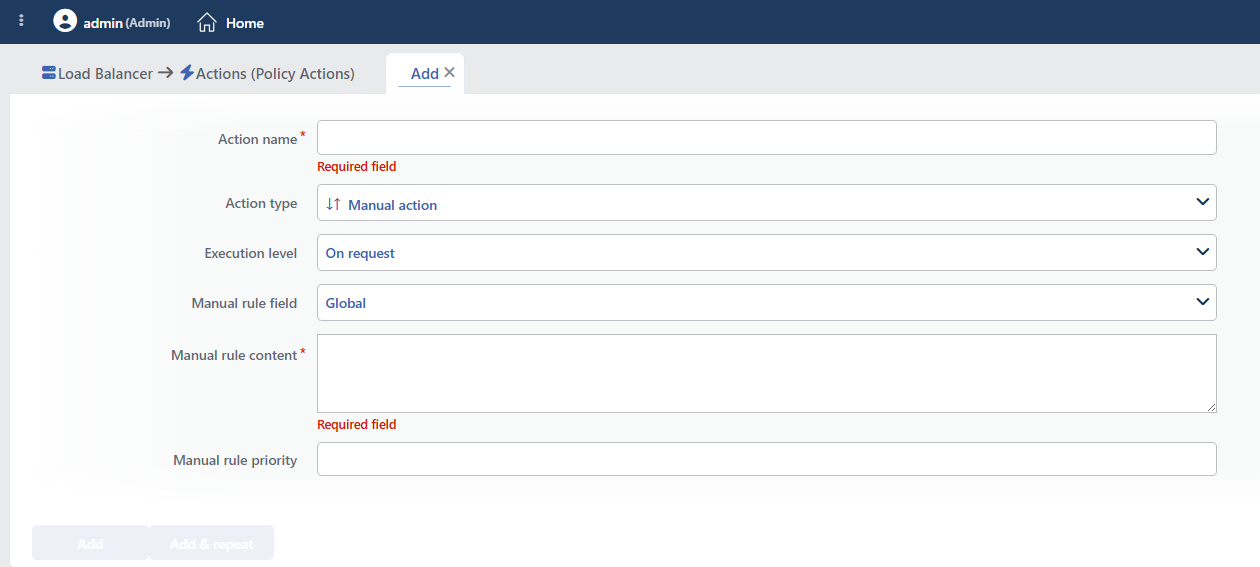 Manual Action Add Form
INFO
Action Type
Manual action is selected as the action type.
Since the action does not take a condition and does not support a counter, the Conditions, Hit Counter and Set Variable on Hit fields are not located in the form. Only the target section is displayed in the action list; the line content entered is not shown in the list.
INFO
Execution Level
Determines at which stage the action is run.
- On Request: The action is applied before the request is forwarded to the related Backend Service. This level is used in cases where changes need to be made to the request or additional information needs to be passed to the Backend Service.
- On Response: The action is applied before the response is forwarded to the client. This level is used in cases where edits or additions need to be made to the response sent to the client.
In this action, the selection has no effect on the configuration
Where the manual rule will be written is determined by the Manual Rule Field field. The Execution Level selection does not change the configuration produced; it is only a label that affects the display of the action in the lists. The request/response distinction is made in the syntax of the entered line itself (http-request / http-response).
This field cannot be changed after saving.
INFO
Manual Rule Field Default: Global
Determines the configuration section to which the rule will be added. Each option is effective in a different scope:
| Option | Where the rule is written |
|---|---|
| Global | The general configuration section; system-level settings valid for the whole vService |
| Defaults | The common defaults section; basic behaviors such as timeout, log and mode |
| Frontend | The section of the vService that meets the client |
| Default backend | Only the default Backend Service list (Default Backend Services) |
| Conditional backend | All the conditional Backend Service branches outside the default list (Conditional Backend Services) |
WARNING
The form opens with Global selected; this is the section with the widest scope and a wrong line affects the whole vService. The selection must be made consciously according to the type of the line to be entered.
When Conditional backend is selected, if conditional distribution is not defined in the vService, the line is not written anywhere and no warning is given either.
The lines written to the Defaults section can override the settings produced by the other actions; for example, the connection mode directives overwrite the setting of the HTTP TCP Multiplexing action.
INFO
Manual Rule Content Required
The rule content written in the load balancer configuration syntax is entered in this field. The content consists of the lines provided by the TR7 Support Team.
More than one line can be entered; each line is added as a separate configuration line and all of them are written to the same target section with the same priority.
The entered content does not go through any check
The field is transferred directly to the configuration; no syntax check, format validation or security filter is applied.
When a faulty line is entered, the result is not visible immediately: the line is rejected while the configuration is being refreshed, but since the running service stays up with the old configuration, no error is displayed in the interface and the rule appears to have been applied. The service does not come up at its next restart.
For this reason, every manual rule must be verified in a test environment before it is taken live, and the expected behavior must be checked in the live traffic after it is applied.
WARNING
This field does not support smart variables; TR7 variables such as %SRCIP pass to the configuration as they are written and do not work. The expressions of the configuration syntax itself can be used.
Since the action does not offer a condition field, if a condition is needed it is written within the line itself (e.g. with an if expression added at the end of the line). The Condition objects defined on TR7 cannot be referenced from this line.
INFO
Manual Rule Priority
Determines the order of the line within the target section. A higher value is written first; if no value is entered, the line is accepted as 0.
The priority is valid not only among the manual rules but among all the lines of the target section. Most of the rule lines produced by TR7 itself have a positive priority; for this reason, a manual line that is not given a priority runs after them. If the manual line needs to run before the TR7 rules, a sufficiently high value must be given.
WARNING
The field accepts negative and decimal values; a negative priority can drop the line even below the routing and server definitions. The value must be entered as stated by the Support Team.
INFO
Form Buttons
Add
The action adding process is completed by clicking the Add button.
Add & Repeat
With the Add & Repeat button, the action adding process is completed, and another new action can be added with different configurations without leaving the related window.
 Action Added
WARNING
Manual Action does not require a condition and is applied unconditionally (Always) on the vService on which it is defined.
Actions that run unconditionally directly affect all traffic or behavior on the related vService, without an evaluation based on traffic content.
In live environments, it is recommended that target service behaviors and possible effects be evaluated carefully before such actions are enabled. Otherwise, unexpected service behaviors or operational problems can occur.
Some lines restart the service
Some system-level settings written to the Global section (such as the number of threads, buffer sizes, processor mapping and per-second connection/SSL limits) cannot be applied with an uninterrupted refresh and make the restart of the load balancer service mandatory. Such lines should be added in a maintenance window; if there is a syntax error at the same time, the service does not come back.
Operational and Safe Usage Recommendations
- Work with the TR7 Support Team. Contact the TR7 Support Team before using Manual Action. The team will provide the rules suitable for the requirements and help to make the correct configuration.
- It is verified in a test environment. The added rules are first applied in a test environment and it is verified that the vService works correctly; wrong rules can cause a service outage.
- The rules are documented. What the added manual rules do and why they are necessary are documented; this is critical for maintenance and troubleshooting in the future.
- The standard actions are tried first. Before Manual Action is used, it is checked whether the standard actions of TR7 meet the requirement; the standard actions are safer and easier to manage.
