
Smarter by Design.Simpler for Business
Manual Condition
What Is Manual Condition?
Manual Condition enables advanced configuration expressions to be added for special requirements that cannot be met with the standard condition options of TR7. This condition is used by the TR7 Support Team or expert users to create custom conditions.
This condition can work in both the HTTP and TCP protocols, at both the request and response stages.
WARNING
For Expert Users: Manual Condition uses the internal configuration format of TR7 and can lead to unexpected results when used incorrectly.
Before using this condition:
- Contacting the TR7 Support Team is recommended,
- Verification should be performed in a test environment,
- The configuration syntax should be known.
Support: support@tr7.com
When Is Manual Condition Used?
Manual Condition is designed for special scenarios that the built-in conditions of TR7 cannot meet.
Manual Condition is usually used in the following cases:
- To define special checks not found in the standard conditions of TR7,
- To create advanced traffic analysis rules,
- To check special protocol features,
- For special solutions provided by the TR7 Support Team.
The standard conditions of TR7 are sufficient for most usage scenarios. Manual Condition should be preferred only for special requirements.
Supported vService Types
HTTP
L7 TCP
Network
How to Add?
A new Manual Condition can be added through the TR7 web management interface by following the steps below:
- The Configuration Menu is opened by clicking the TR7 logo at the bottom left.
- The Load Balancer → Conditions → Add steps are followed.
- Manual condition is selected as Criteria.
- The related configurations of the condition are made.
- The condition is added by clicking the
Addbutton.
Manual Condition Add Form
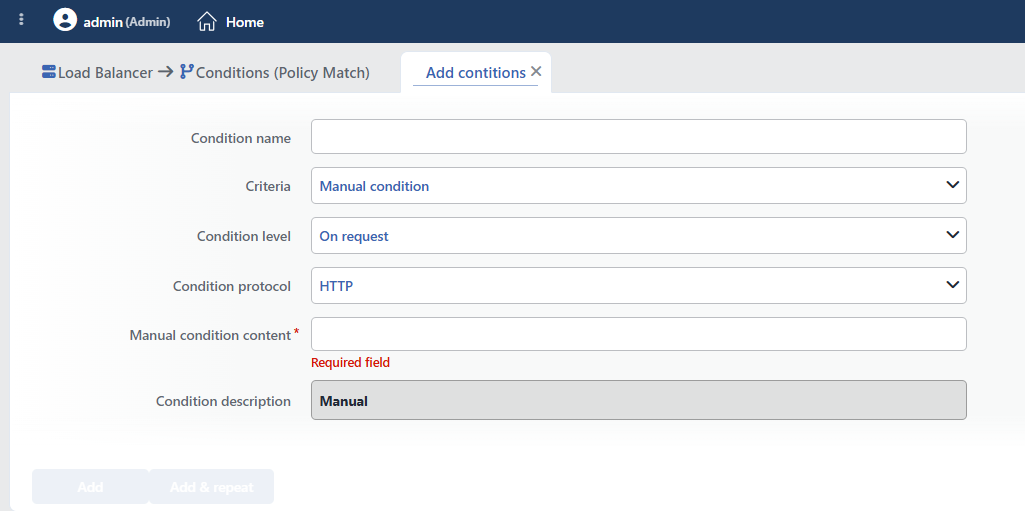 Manual Condition Add Form
INFO
Condition Name
An optional name can be entered for the condition to be created.
This field is especially important in the following scenarios:
- When many conditions are defined under the same vService,
- When conditions with similar criteria need to be distinguished,
- When it is necessary to quickly understand which business rule the condition represents.
When this field is left empty, TR7 analyzes the content of the related condition and creates an automatic, descriptive name in the Condition Description field. This generated description is used as the name in condition lists.
INFO
Criteria Required
The field that determines the type of the condition; Manual condition is selected from the searchable dropdown list. This selection determines the fields displayed in the form. The criterion cannot be changed after the condition is saved: if a different criterion is needed, a new condition is defined. For all criteria in the list and their scopes, the criteria catalog on the Conditions page can be referred to.
INFO
Condition Level
Determines in which phase the condition is evaluated; it cannot be changed after saving.
- On request: Evaluated when the request is received.
- On response: Evaluated when the response is received.
TIP
The selected level and protocol do not transform the entered expression; they only determine with which rule phase and vService type the condition can be used. Writing the expression appropriately for the selected phase is the responsibility of the user: the TR7 Support Team will specify the required level.
INFO
Condition Protocol
Determines in which protocol the condition works; it cannot be changed after saving.
- HTTP: Selected when it will be used in HTTP vServices.
- TCP: Selected when it will be used in L7 TCP vServices.
INFO
Manual Condition Content Required
The condition expression is written in the raw ACL syntax (HAProxy ACL) of the TR7 load balancing engine and is transferred to the configuration as is. This field contains the expressions provided by the TR7 Support Team or specified in the documentation; the field is a single-line text box.
DANGER
No syntax validation is performed on the entered expression, and the content is written to the configuration as it is. A faulty expression can lead not only to the condition not working but also to the configuration not being applied and the vService going out of service. The expression must be verified in a test environment; this field should be used only by expert users or under the guidance of the TR7 Support Team.
TIP
The predefined conditions offered in the condition selection lists are product-defined examples of the same mechanism; for common needs, the predefined conditions should be checked first.
INFO
Condition Description
It is created automatically by TR7. In this criterion, the description does not include the entered expression: a fixed text is produced ("IF manual condition is satisfied"); its short display in lists is also in the Manual format. For this reason, if more than one manual condition is used, giving a descriptive name in the Condition Name field is recommended so that they can be distinguished.
INFO
Form Buttons
Add
The condition adding process is completed by clicking the Add button.
Add & Repeat
With the Add & Repeat button, the condition adding process is completed, and another new condition can be added with different configurations without leaving the related window.
 Condition Added
Operational and Safe Usage Recommendations
- The TR7 Support Team Should Be Consulted. The TR7 Support Team should be contacted before Manual Condition is used. The team will provide condition expressions suitable for the requirements and help with the correct configuration.
- Verification Should Be Done in a Test Environment. Added conditions should first be applied in a test environment, and it should be verified that they show the expected behavior. Wrong conditions can cause traffic to be routed incorrectly.
- Conditions Should Be Documented. What the added manual conditions do and why they are needed should be documented. This is critical for future maintenance and troubleshooting.
- Standard Conditions Should Be Tried First. Before Manual Condition is used, it should be checked whether the standard conditions of TR7 meet the requirement. Standard conditions are safer and easier to manage.
- Regular Reviews Should Be Made. Manual conditions should be reviewed regularly. New standard conditions may have been added with TR7 updates, and manual conditions may be replaceable with standard conditions.
