
Smarter by Design.Simpler for Business
Learning
What Is Learning?
Learning is the strip located right below the status card on the L4 DDoS Management screen. Its name in the interface is AI Learning.
The strip is the face of the engine that monitors the traffic coming to the route table and calculates the correct threshold for every protection rule itself. The engine does not give a decision, it produces a recommendation: it says which rule's limit should change, which one can be promoted in mode and which one can be left as it is. The application decision belongs to the administrator; only when the automatic mode is switched to does the engine apply its own recommendations itself.
This strip is not a protection layer
On the strip there is no setting that stops or lets through traffic. The engine only measures and recommends; no number it produces affects the traffic before it is applied.
The recommendations produced by the strip are also seen as badges in the individual rule rows. What a rule really does is always read from the sentence in its own band, not from the strip.
Learning Off
"Learning is off — no suggestions are produced for this route table."
The periodic evaluation of the engine is not made at all for this route table: no recommendation notification is produced and nothing is applied by itself. When the screen is opened, an instant evaluation over the settings in force is still made.
Smart Advisor
It learns, it recommends, it applies nothing by itself
It is the default mode. The engine learns hourly and submits every change for approval; the last word belongs to the administrator.
Automatic
It applies itself what it has learned
The engine learns in the defined period and puts into force itself the changes it finds applicable: it adjusts the limits and passes the matured rules into enforcement. There are two things it does not do by itself: it does not turn on a disabled rule and it does not enable the trust in one's own servers.
The Learning Strip in L4 DDoS Management
The strip is the second element of the screen: it stands below the status card and above the protocol bands. At the top there is a dark counter band, below it the introduction sentence and at the very bottom three cards.
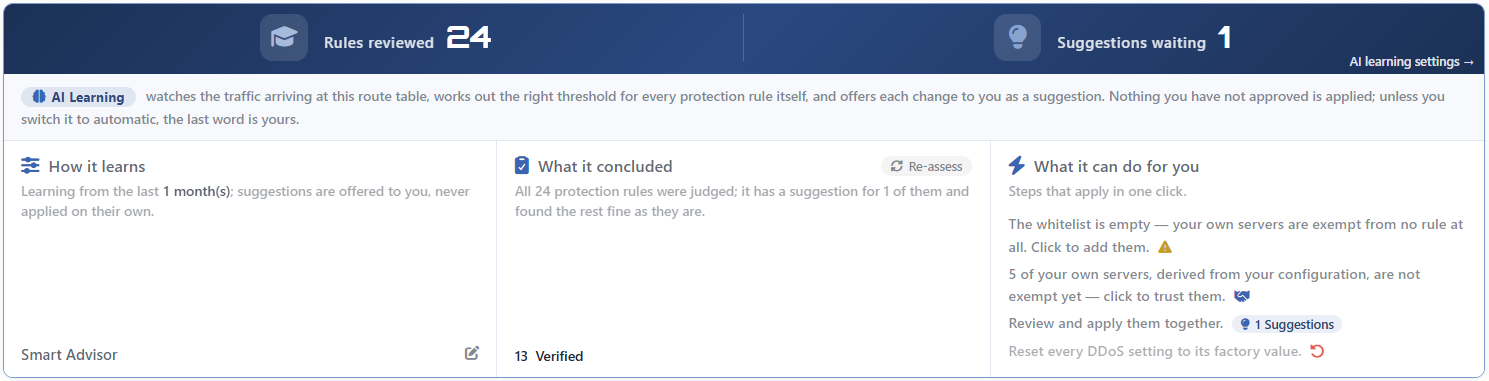 The L4 DDoS Learning Strip
| Element | Meaning |
|---|---|
| Rules Reviewed | The number of rules the engine examined in the last evaluation. |
| Suggestions Waiting | For how many of these rules there is a recommendation ready to be applied. |
AI Learning Settings → | Opens the editing window of the learning settings. |
| The introduction sentence | The fixed text read as the continuation of the AI Learning badge at its left beginning: it tells what the engine does and that nothing is applied without approval being received. |
| The three cards | How It Learns · What It Concluded · What It Can Do for You |
When the screen is narrow, the three cards are arranged one under the other.
The strip is seen in every mode
Even if learning has been turned off, the strip stays in place and continues to show the real numbers. The reason for this is that the evaluation that runs at the opening of the screen and at every setting change does not look at the mode.
The off mode stops the engine from working in the background: no periodic evaluation is made, no notification is produced and no recommendation is applied by itself. To the administrator who opens the screen, the current evaluation is still shown.
How Are the Counters Calculated?
The two counters are two different cross-sections of the same evaluation:
| Counter | What it counts |
|---|---|
| Rules Reviewed | All the rows returning from the evaluation. The engine returns a row for every rule that produces a measurement; whatever the result is, the row always comes. |
| Suggestions Waiting | The ones among these rows that are ready to be applied. For a row to enter here, the limit or the mode transition it recommends must really be applicable. |
Rules Reviewed is not the number of rules on the page
This counter counts all the rules of the engine that have a measurement definition (even if the measurement file has not been formed yet) and it also includes the rules hidden on the screen: the three rules that protect the device's own management ports are displayed only in the DEFAULT route table of the main device, but they are included in the counter in every table.
For this reason Rules Reviewed and the number on the status card do not have to match: the card counts only the rules that can apply enforcement, while this counter counts all the rules that have a measurement.
When Does Learning Run?
The engine runs in five separate situations and only two of them depend on the mode:
| Trigger | Does it depend on the mode? |
|---|---|
| The opening of the screen | No. An evaluation is made every time the page is opened. |
| A setting change | No. When a rule, the exemption list or a learning setting changes, the evaluation is refreshed. |
The Re-assess button | No. The evaluation started manually by the administrator. |
| The periodic evaluation | Yes. In Smart Advisor mode it runs once an hour and this period cannot be adjusted. While Mute Suggestion Notifications is on, this run is not made at all. |
| The automatic application | Yes. Only in Automatic mode, it runs according to the period that is set. In addition, if a rule applying enforcement starts to drop packets continuously, an early run can be triggered without waiting for the period. |
A second evaluation is not started at the same time: while an evaluation is in progress, an incoming request is marked and is repeated once when the current evaluation finishes.
The recommendations are not stored
The result of the evaluation is not kept anywhere; it is calculated from scratch at every trigger. For this reason closing and opening the screen or a setting changing refreshes the recommendation list.
One consequence of this is also seen in a cluster: since the two devices read their own measurements, they can show different recommendations for the same route table.
The Default Settings
In a route table that has never been touched, learning runs with the following values:
| Setting | Default |
|---|---|
| Learning Mode | Smart Advisor |
| Learning Lookback | 1 month |
| Mode Promotion | Off |
| Mute Suggestion Notifications | Off |
| Learning Interval | Daily (used only in the automatic mode) |
A route table that has not been touched also learns
In a route table whose learning settings have not been saved, the mode is counted as Smart Advisor. That is, the engine runs from day one, produces its recommendations and makes its hourly evaluation; only it does not apply anything by itself.
AI Learning Settings
How learning will work is managed from a single editing window. The window gathers the working mode, which history the engine will look at, the permission to promote from monitoring into enforcement, the period of the automatic mode and the muting of the recommendation notifications. The fields are seen according to the mode: Learning Interval is in the form only in Automatic and Mute Suggestion Notifications only in Smart Advisor mode; the remaining three fields stay editable in every mode, and while learning is off as well.
The text of the link and the title of the window are not the same: the link is AI Learning Settings and the title of the window that opens is only Learning Settings.
| Entry point | Its place |
|---|---|
AI Learning Settings → | The link at the bottom right corner of the counter band. |
| The How It Learns card | When anywhere on the card is clicked, the same window opens; the pencil icon at the bottom right corner states this. |
| A recommendation obstacle | If a recommendation has been stopped because of the mode promotion permission, the Open the setting → link in the evaluation window also leads here. |
Details: AI Learning Settings.
Saving a learning setting reapplies the configuration
When the window is saved, only the learning fields change, but the save goes through the path that rewrites the whole L4 DDoS configuration of the route table and the firewall configuration is produced again. The values do not change; the operation is nevertheless a configuration write.
This save does not drop a separate record into the user log.
The Cards on the Strip
The three cards in the body of the strip answer three separate questions of the engine: how it is learning, what conclusion it has reached and what can be done now.
| Card | The question it answers |
|---|---|
| How It Learns | In which mode and looking at which history is learning working? |
| What It Concluded | In the last evaluation, how many rules were judged and for how many of them is there a recommendation? |
| What It Can Do for You | How are the waiting jobs applied with a single click? |
The cards read the same evaluation
The second and the third card show the result of a single evaluation; they do not collect data separately. The same evaluation also feeds the result badges at the end of the rule rows and the review window opened through What It Can Do for You. For this reason no surface can show an answer older than another.
The first card is outside this run: since it reads its content from the configuration, Re-assess does not refresh it and it is full even if no evaluation has been made at all.
If no evaluation has been made at all or if none has ever succeeded, the second card says Preparing suggestions…, and the action list of the third card stays empty; its title and introduction sentence stay in place.
How It Learns
Summarizes the definition of learning in force in a single sentence: which history is looked at and whether the result is presented as a recommendation or applied by itself is written. In the automatic mode the sentence also contains the period. At the bottom right of the card there are the name of the mode in force and a pencil icon; when anywhere on the card is clicked, the editing window of the learning settings opens.
The history window written in the sentence is the value entered into the settings window. Since the engine rounds this value to a grid with five steps, the window that is actually read can be both shorter and longer than the value entered; the card does not show this difference.
Details: How It Learns.
What It Concluded
Gives the result of the last evaluation in a single sentence: how many rules were judged, for how many of them there is a recommendation and that the rest were found suitable as they are. Below the card, the number of rules for which no touching was found necessary is shown with the Verified label. The sum of this number and the number of recommendations may not give the number of rules judged: the rules whose data has not accumulated yet, that could not separate the attack from the normal, or that were stopped because of a permission or a lock stay outside both of them.
The Re-assess button on the right of the title runs the engine again over the settings in force and the traffic learned up to that moment; while the evaluation is in progress, the icon turns and the button does not take clicks. The operation is read-only, it changes no setting.
Details: What It Concluded.
What It Can Do for You
Lists the waiting jobs as steps that can be applied with a single click. The list goes up to four rows depending on the situation: the warning that the exemption list is empty, the offer that turns on the trust in one's own servers derived from the configuration, the recommendations that can be reviewed together and applied, and the reset step that returns the configuration to its default state. The first three rows are seen only while there is a counterpart for them; the reset step, on the other hand, is always in the list after the evaluation is completed.
The recommendation row shows a number badge that carries the same icon as the Suggestion badge in the rule rows, and when it is clicked it opens the window in which all the ready recommendations are reviewed one by one and applied together.
Details: What It Can Do for You.
Scope and Limits
INFO
- The strip is per route table. The learning settings and the recommendations belong only to that table.
- The engine applies nothing by itself, it applies only in Automatic mode. The default mode is the recommendation mode.
- The recommendations are not stored; they are recalculated at every trigger and can be different on the two cluster members.
- Rules Reviewed is not the number of rules on the page: it counts all the rules that have a measurement and also includes the management access rules hidden on the screen.
- While learning is off, the strip continues to be seen and shows the current evaluation; the off mode stops only the work in the background, the notification and the automatic application.
- The duration of the periodic evaluation cannot be adjusted. In the recommendation mode it is hourly; the period field in the settings concerns only the automatic mode.
- All the learning operations require change authorization in the Network area. The evaluation itself also requires this authorization; on a screen opened with monitoring-only authorization the strip is seen but the counters stay zero and the second card says Preparing suggestions….
- In a cluster the periodic learning runs only on the first device. The applied configuration is carried to the other device with the synchronization; the evaluation started manually from the screen, on the other hand, runs on the device that is connected to.
- Applying a recommendation and returning to the default are written to the user log; saving the learning settings is not written.
