
Smarter by Design.Simpler for Business
Path + Query
What Is the Path + Query Condition?
Path + Query is a condition type used to make traffic routing and manipulation decisions by evaluating both the path and the query string sections in the URL of the HTTP request together.
Path + Query covers the entire part of the URL after the domain.
https://example.com/api/users?id=123&active=true
Path + Query
This condition is used when the path and the query string need to be handled together instead of being evaluated separately.
URL Structure
 Full URL Structure
| Component | Description |
|---|---|
| Scheme | Expresses the protocol used (http/https). |
| Domain Name | Specifies the server address to which the request is sent. |
| Port | Defines the service port on which the server listens. |
| Path to the File | Specifies the path of the resource to be accessed on the server. |
| Parameters (Query) | Contains the query string parameters sent with the request. |
| Anchor | Expresses the in-page location; it is not sent to the server. |
The Importance of the Path + Query Condition
In some scenarios, the path and the query string are meaningful together. For example, requests coming to the same path with different query parameters can be processed differently.
With the Path + Query condition:
- Full URL matching can be performed (excluding the domain),
- Specific path and parameter combinations can be targeted,
- URL patterns can be defined more flexibly,
- It can be used in cache key determination scenarios.
Path + Query vs Path vs URL:
| Criterion | Scope | Example |
|---|---|---|
| Path + Query | Path and query string | /api/users?id=123 |
| Path | Path only | /api/users |
| URL | Protocol, host, path, query | http://www.tr7.com/api/users?id=123 |
Supported vService Types
HTTP
L7 TCP
Network
The condition can be used at both the request (At Request) and response (At Response) stages; the value is detected at the time of the request.
How to Add?
A new Path + Query Condition can be added through the TR7 web management interface by following the steps below:
- The Configuration Menu is opened by clicking the TR7 logo at the bottom left.
- The Load Balancer → Conditions → Add steps are followed.
- Path + query is selected as Criteria.
- The related configurations of the condition are made.
- The condition is added by clicking the
Addbutton.
Path + Query Condition Add Form
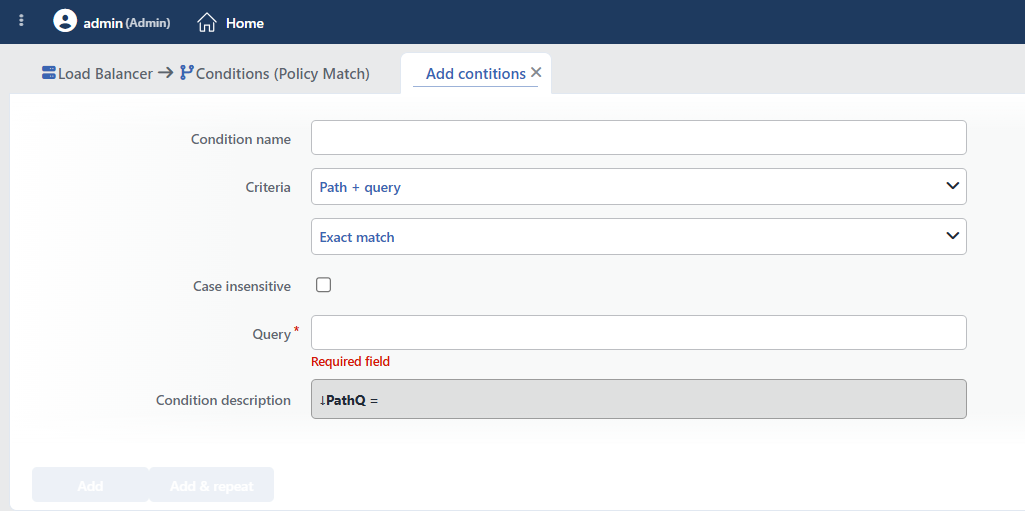 Path + Query Condition Add Form
INFO
Condition Name
An optional name can be entered for the condition to be created.
This field is especially important in the following scenarios:
- When many conditions are defined under the same vService,
- When conditions with similar criteria need to be distinguished,
- When it is necessary to quickly understand which business rule the condition represents.
When this field is left empty, TR7 analyzes the content of the related condition and creates an automatic, descriptive name in the Condition Description field. This generated description is used as the name in condition lists.
INFO
Criteria Required
The field that determines the type of the condition; Path + query is selected from the searchable dropdown list. This selection determines the fields displayed in the form. The criterion cannot be changed after the condition is saved: if a different criterion is needed, a new condition is defined. For all criteria in the list and their scopes, the criteria catalog on the Conditions page can be referred to.
INFO
Content Matching Method Default: Exact match
Determines how the content is matched. The field appears in the form as an unlabeled dropdown list right below Criteria and opens with Exact match selected. The Is present option is not offered in this criterion.
| Option | Code | Description |
|---|---|---|
| Exact match | exactMatch | The value must match exactly. |
| Start | start | The value must start with the specified text. |
| End | end | The value must end with the specified text. |
| Includes | sub | The value must contain the specified text. |
| Regex | regex | The value must match the regular expression. |
Sample matches:
| Method | Query | Matching URLs |
|---|---|---|
| Exact Match | /users?id=123 | /users?id=123 |
| Start | /api/v1/ | /api/v1/users?active=true |
| Includes | debug=true | /any/path?debug=true |
| Regex | \?.*token= | /api?token=abc, /login?token=xyz |
INFO
Case Insensitive Default: Off
Controls case sensitivity.
- Active:
example,EXAMPLE,Exampleare considered the same - Not Active: An exact match is required (default)
TIP
The path section is case-sensitive on most servers; if case-insensitive matching is needed for parameter values, this option is checked.
INFO
Query Required
The value to be matched is entered in this field. The exact value the condition sees is the path + query string including the ? sign: in the /admin?x=1 request, the evaluated text is /admin?x=1. In this way, a pattern such as /admin? can be targeted with the Start method, and the end of the query with the End method. According to the selected matching method:
- Exact match: Checks for an exact match of the value.
- Start: Checks the beginning of the text to be searched for.
- End: Checks the end of the text to be searched for.
- Includes: Checks whether the text to be searched for is contained.
- Regex: Checks with a regular expression pattern (Regex).
Sample values:
/login?redirect=/dashboard: Full URL matching/api/: start for API pathsutm_source=: URLs with marketing parameters
INFO
Condition Description
It is created automatically by TR7 in line with the entered criteria and values.
This description:
- which value the condition applies to,
- which criterion it works on,
- the quick understanding of the condition on listing screens
is produced dynamically by the system so as to provide these.
TIP
The path + query value can be used in actions with the Path + query of the request smart variable (e.g. as the value of an HTTP header, a log field or a redirect target).
INFO
Form Buttons
Add
The condition adding process is completed by clicking the Add button.
Add & Repeat
With the Add & Repeat button, the condition adding process is completed, and another new condition can be added with different configurations without leaving the related window.
 Condition Added
Operational Usage Recommendations
- Attention to Query String Order.
?a=1&b=2and?b=2&a=1are different strings; Exact match sees these two as different. To check the value of a single parameter regardless of order, the Query Parameter condition should be used. - Attention to URL Encoding. Special characters in the query string may be encoded (
%20,%3D, etc.). - The Path Condition Should Be Used If Path-Only Is Enough. If the query string is not needed, the Path condition should be preferred; patterns are not affected by query variations.
Common Usage Scenarios in Live Environments
The examples below show how the related condition is applied in the most frequently encountered use cases in real systems. These scenarios are based on practices that are widely preferred in live environments and rest on experience gained in the field.
Scenario 1: Debug Mode Detection and Blocking
Purpose: To detect and block requests containing a debug parameter in the URL in the production environment, and to inform users.
Configuration: Content Matching Method → Includes · Query → debug=true
Action Recommendations:
- ✅ Block → Requests coming with the debug parameter in the production environment are blocked with 403 Forbidden.
- ✅ Show Content → In debug mode attempts, the information page "Debug mode is disabled in production environment" is shown.
Scenario 2: Campaign and UTM Parameter Tracking
Purpose: To detect marketing campaign parameters (utm_campaign, utm_source), analyze the traffic source and add custom headers.
Configuration: Content Matching Method → Includes · Query → utm_campaign=
Action Recommendations:
- ✅ Add HTTP Header → The
X-Campaign-Tracked: trueandX-Traffic-Source: campaignheaders are added to campaign traffic. - ✅ Advanced Traffic Inspection → Detailed logging is performed for marketing attribution analysis and campaign performance tracking.
Scenario 3: Pagination and Sorting Control
Purpose: To detect and block bots that perform automated scraping with abnormally high page numbers.
Configuration: Content Matching Method → Regex · Query → /products\?page=[0-9]{3,}
Action Recommendations:
- ✅ Quarantine → IPs that try more than 50 different page numbers per minute are quarantined for 30 minutes.
- ✅ Advanced Traffic Inspection → Pagination traffic is logged for scraping pattern analysis and anomaly detection.
Scenario 4: Search Query Security Check
Purpose: To detect and block XSS attack patterns in search query strings, and to quarantine attacker IPs.
Configuration: Content Matching Method → Regex · Query → /search\?q=.*(<script|javascript:)
Action Recommendations:
- ✅ Block → When an XSS pattern is detected in the search query, the request is blocked with 400 Bad Request.
- ✅ Quarantine → IPs that make more than 3 XSS attempts are quarantined for 60 minutes, and repeated attacks are prevented.
