
Smarter by Design.Simpler for Business
Localization
What Is Localization?
Localization is the screen that manages TR7's brand identity and default interface language. From this screen, the Company Name and the Logo that appear in the web interface of the device, the Server Name (the system hostname) that is the name of the device on the network, and the startup language of the panel (Default Language) are defined.
There are four fields on the screen; of these, Server Name is required:
Company Name
Brand name
Appears in the Configuration Menu · optional
Server Name
Hostname
The system hostname of the device · required
Default Language
Interface language
Turkish or English
Logo
Brand image
PNG · at most 1 MB
Cluster Behavior
In the TR7 installations running as a cluster (two devices), when Company Name, Default Language and Logo are changed on one device, they are automatically synchronized with the other TR7 device; there is no need to set them separately. The one exception is Server Name: in the configuration coming from the peer device this field is preserved with its local value, that is, it is not synchronized and it is set separately on the other TR7 device.
What Is It For?
The Localization screen adapts the corporate identity and the interface language of the device to the organization. This provides:
- Brand consistency: the Company Name and the Logo appear in the brand area of the Configuration Menu; the Logo is also printed on the WAF and vService reports, integrating the device with the corporate identity,
- Multilingual access: the default language of the panel (Turkish or English) is determined according to the organization,
- Distinguishing the devices: a meaningful Server Name clarifies which device the logs and the notifications come from, especially in cluster and multi-device environments.
Where Do the Settings Take Effect?
The fields on this screen affect not only this page but also different points of the system:
| Field | Where it appears / its effect |
|---|---|
| Company Name | The brand area in the left column of the Configuration Menu |
| Logo | The brand image in the Configuration Menu; it is also printed on the WAF and vService reports |
| Server Name | The system hostname of the device; it appears on the Host line of the notification emails and at the end of the SMS notifications, in the log records, in the File Forwarding remote directory subfolder name in cluster setups and on the SSH/CLI session line (user@servername) |
| Default Language | The startup (default) language of the panel: Turkish or English |
The effect of changing the Server Name
When the Server Name is changed, the notifications, the log records and, in cluster setups, the File Forwarding folder names are updated according to the new name. This field is not synchronized in a cluster; it is set separately on each device.
How to Edit?
The Localization settings are edited via the TR7 web management interface with the steps below:
- The Configuration Menu is opened by clicking the TR7 logo at the bottom left.
- The steps Settings → General Settings → Localization are followed.
- The Edit Localization Settings editing tab is opened by clicking the Edit button.
- The related fields are updated according to the requirements.
- The changes are saved by clicking the
Savebutton.
TIP
Reaching the page via quick search
Instead of navigating the menu step by step, the related page is reached directly by using the search bar in the bottom left corner of the screen. The search bar opens with the Alt + T shortcut on Windows and Opt + T on macOS; typing the name of the feature being searched for is then sufficient.
The Localization Screen
By following the path Settings → General Settings → Localization, the localization information belonging to the TR7 device is displayed. The screen is read-only; the Company Name, Server Name, Default Language and Logo rows are listed one under the other, and the Edit entry at the top opens the editing tab.
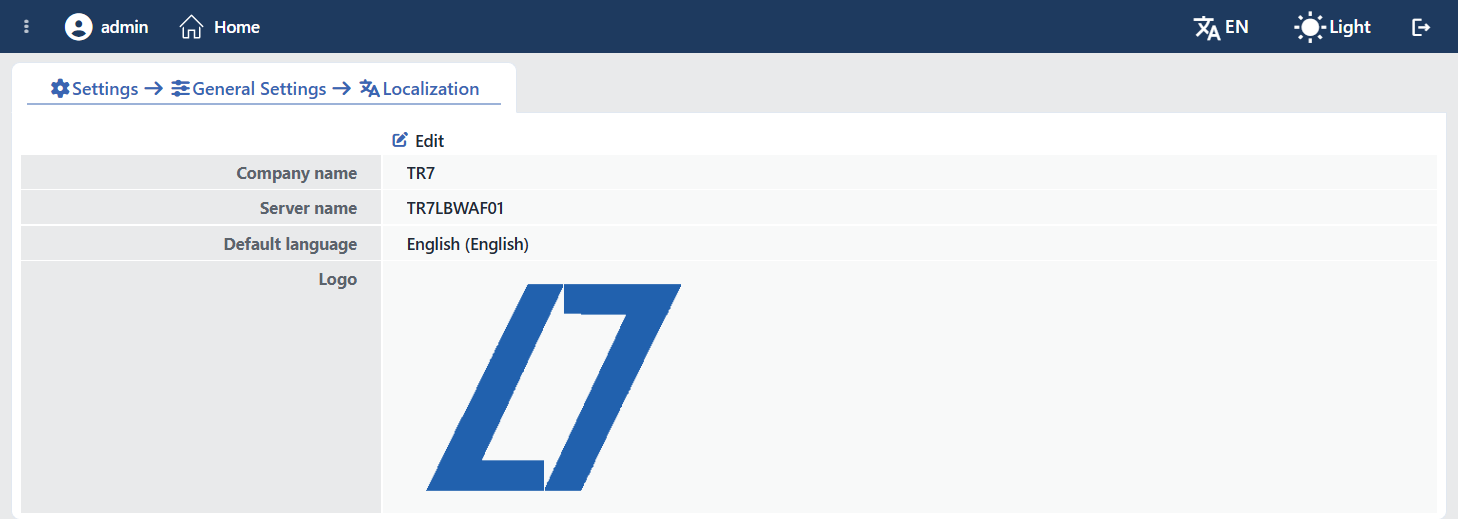 The Localization Screen
Button Details
The Edit Localization Settings tab, in which the localization settings are edited, is opened by clicking the Edit button; the logo upload field is also found in this form.
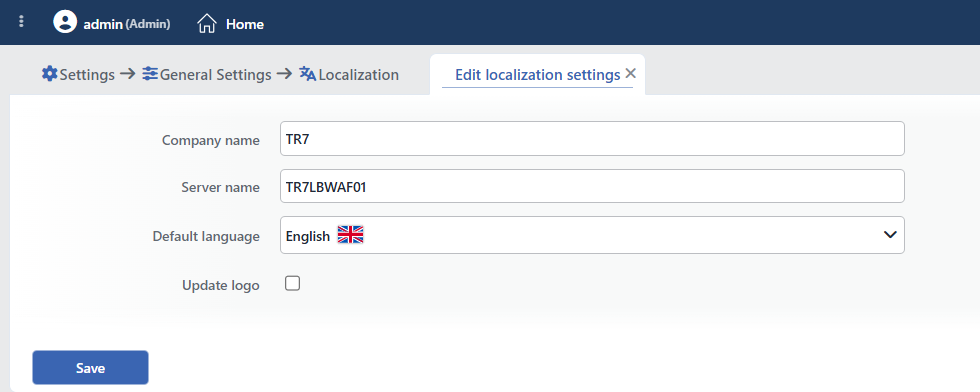 The Edit Localization Settings Form
INFO
Company Name Optional
It is used for printing the organization name in the TR7 web interface. The entered name is shown in the brand area in the left column of the Configuration Menu (next to the logo). When the field is left blank, the default TR7 tagline (SMARTER BY DESIGN · SIMPLER FOR BUSINESS) is displayed in the brand area. It is free text; there is no format restriction.
INFO
Server Name (Hostname) Required
It is the setting that identifies the device on the network and is saved as the local hostname of the system. It is shown next to the signed-in user in the Configuration Menu in the form user@servername and is used especially in cluster setups to distinguish between the two TR7 devices.
It is the only required field on the screen; it cannot be saved by being left blank. Since the value is carried to the operating system as it is, a name that consists of letters and digits and that contains no space must be used.
Warning
During saving, TR7 runs the hostnamectl set-hostname command at the operating system level; that is, this field is not merely an interface label but the device's actual system hostname. It is not synchronized in a cluster; the other TR7 device is given its own Server Name value separately.
INFO
Default Language Default: English
Determines which language the TR7 web interface opens in. The list consists of the interface languages installed on the device; TR7 comes with its Turkish and English dictionaries. In the editing form every option is listed together with the flag of its language.
On the display screen the value is written together with its name in the current language of the interface and the name of the language in its own language:
| Selection | While the interface is English | While the interface is Turkish |
|---|---|---|
| English | English (English) | İngilizce (English) |
| Türkçe | Turkish (Türkçe) | Türkçe (Türkçe) |
This setting is the system-wide default: for the users who have not separately set their own language preference, the interface opens in this language. The personal language preference selected via My Preferences → User Language takes precedence over the system default.
INFO
Update Logo PNG · at most 1 MB
It is a checkbox located at the very bottom of the editing form. While the box is not checked, the logo file field is not displayed at all in the form and is not included in the submission; the existing logo is preserved as it is. When the box is checked, the Logo file selection field appears below it and the selected file is uploaded as the new organization logo. The uploaded logo is shown in place of the default TR7 logo in the brand area of the Configuration Menu.
Removing the logo
If saving is done without a file being selected while Update Logo is checked, the existing logo is removed and it returns to the default TR7 logo.
Logo requirements
- Format: only PNG (
image/png). - Size: at most 1 MB; when it is exceeded, the error "Logo boyutu en fazla 1 olabilir" is given.
- The uploaded image is automatically scaled to a 240-pixel height while its aspect ratio is preserved, and is stored on the device.
