
Smarter by Design.Simpler for Business
Frontend Number of HTTP Requests /s
What Is the Frontend Number of HTTP Requests /s Condition?
Frontend Number of HTTP Requests /s is a condition type used to make traffic routing and manipulation decisions by evaluating the number of HTTP requests per second coming to the vService (frontend).
vService · web-frontend (HTTP/HTTPS)
GET / POST requests450Requests / s
With this condition, dynamic decisions can be made according to the HTTP traffic density.
The Importance of the Frontend Number of HTTP Requests /s Condition
The HTTP request rate is the metric that most accurately shows the load that web applications are exposed to.
With the Frontend Number of HTTP Requests /s condition:
- HTTP flood attacks can be detected,
- Dynamic rate limiting can be applied to API endpoints,
- Different cache policies can be applied during peak hours,
- Bot traffic can be detected and blocked,
- Application performance can be optimized.
Comparison of Similar Conditions:
| Metric | Checked Information | Usage |
|---|---|---|
| Frontend Number of HTTP Requests /s | HTTP requests per second | HTTP traffic density |
| Frontend Connection | Total active connections | Instantaneous load |
| Frontend Number of New Sessions /s | New sessions per second | Traffic flow rate |
TIP
Keep-Alive Effect
With HTTP/1.1 keep-alive and HTTP/2 multiplexing, many HTTP requests can be sent over a single TCP connection. For this reason, the HTTP request rate is usually higher than the session rate.
Supported vService Types
HTTP
L7 TCP
Network
The condition can be used only at the request (At Request) stage. The rate is read from the engine's internal counter as the number of HTTP requests per second of the related vService; there is no configurable measurement window on the TR7 side.
How to Add?
A new Frontend Number of HTTP Requests /s Condition can be added through the TR7 web management interface by following the steps below:
- The Configuration Menu is opened by clicking the TR7 logo at the bottom left.
- The Load Balancer → Conditions → Add steps are followed.
- Frontend number of HTTP requests/s is selected as Criteria.
- The related configurations of the condition are made.
- The condition is added by clicking the
Addbutton.
Frontend Number of HTTP Requests /s Condition Add Form
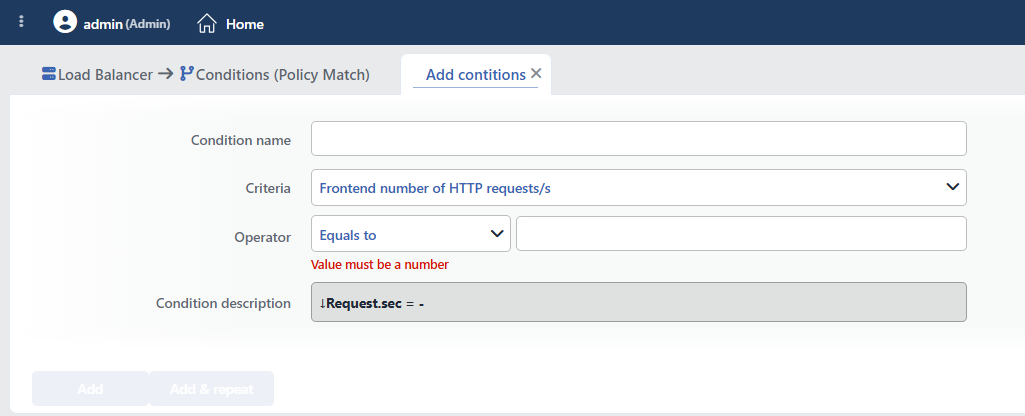 Frontend Number of HTTP Requests /s Condition Add Form
INFO
Condition Name
An optional name can be entered for the condition to be created.
This field is especially important in the following scenarios:
- When many conditions are defined under the same vService,
- When conditions with similar criteria need to be distinguished,
- When it is necessary to quickly understand which business rule the condition represents.
When this field is left empty, TR7 analyzes the content of the related condition and creates an automatic, descriptive name in the Condition Description field. This generated description is used as the name in condition lists.
INFO
Criteria Required
The field that determines the type of the condition; Frontend number of HTTP requests/s is selected from the searchable dropdown list. This selection determines the fields displayed in the form. The criterion cannot be changed after the condition is saved: if a different criterion is needed, a new condition is defined. For all criteria in the list and their scopes, the criteria catalog on the Conditions page can be referred to.
INFO
Operator
The numeric comparison operator and value are entered. The form opens with the operator Equals to (=) selected and the value empty; the entered value must be an integer.
| Operator | Symbol | Description |
|---|---|---|
| Less than | < | The value must be less |
| Equals to | = | The value must match exactly |
| Greater than | > | The value must be greater |
| Range | - | The value must be between two values; when selected, a second value field opens; both boundaries are included in the range |
TIP
The instantaneous request rate can be used in actions with the HTTP requests per second smart variable (e.g. as the value of an HTTP header or a log field).
WARNING
The normal request rate varies according to the application type:
- Static Site: 50-200 req/s
- Web Application: 100-500 req/s
- API Service: 500-5000 req/s
INFO
Condition Description
It is created automatically by TR7 in line with the entered criteria and values.
This description:
- which value the condition applies to,
- which criterion it works on,
- the quick understanding of the condition on listing screens
is produced dynamically by the system so as to provide these.
INFO
Form Buttons
Add
The condition adding process is completed by clicking the Add button.
Add & Repeat
With the Add & Repeat button, the condition adding process is completed, and another new condition can be added with different configurations without leaving the related window.
 Condition Added
Operational Usage Recommendations
- HTTP Flood Protection. An abnormally high HTTP request rate is an indicator of a Layer 7 DDoS attack.
- API Rate Limiting. Dynamic rate limiting should be applied to API endpoints according to the request rate.
- Bot Traffic Detection. High request rates that normal users cannot produce may indicate bot traffic.
- Combination with Path. Request rate checks should be performed for specific endpoints (e.g.
/api/login).
Common Usage Scenarios in Live Environments
The examples below show how the related condition is applied in the most frequently encountered use cases in real systems. These scenarios are based on practices that are widely preferred in live environments and rest on experience gained in the field.
Scenario 1: HTTP Flood (Layer 7 DDoS) Attack Detection
Purpose: To detect a Layer 7 DDoS attack when an abnormally high number of HTTP requests per second comes to the vService, take automatic protection measures and keep the system up.
Configuration: Operator → Greater than (>) 5000
Action Recommendations:
- ✅ Block → Traffic above 5000 req/s is blocked; 429 Too Many Requests can be selected as the response code (default 403 Forbidden). The HTTP flood attack is stopped.
Scenario 2: API Endpoint Overuse Protection
Purpose: To prevent overuse by controlling the request rate coming to API endpoints and keep the API service running healthily.
Configuration: Operator → Range (-) 1500-5000
Action Recommendations:
- ✅ Bandwidth Limitation → In the overuse band, bandwidth limitation is applied for API requests and throttling is provided (together with the Path condition:
/api/*); traffic that goes above the band is caught by the blocking in Scenario 1. - ✅ Add HTTP Header → The
X-RateLimit-Warning: trueheader is added, and API clients are warned to slow down.
Scenario 3: Allowing Background Traffic During Quiet Periods
Purpose: To mark that crawler, report and batch traffic is allowed while the request rate is low (night hours, off-peak periods), and to make it possible to restrict this traffic when density increases.
Configuration: Operator → Less than (<) 500
Action Recommendations:
- ✅ Add HTTP Header → The
X-Offpeak: trueheader is added; the Backend Service processes background requests according to this marker. - ✅ Advanced Traffic Inspection → The quiet-period traffic profile and background task distribution are reported.
