
Smarter by Design.Simpler for Business
Traffic Mirroring
What Is the Traffic Mirroring Action?
The Traffic Mirroring action sends a copy of the HTTP requests that come to a vService and match the conditions to a selected second Backend Service (the mirror target) out-of-band. While the main request is forwarded to the live Backend Service as usual, a copy of the same request is delivered to the mirror target at the same time.
The response returned from the mirror target is ignored; it is not sent back to the client and does not affect the main traffic in any way. In this way, the real production traffic can be examined in a second environment (a new version, a test infrastructure, a security analysis service, etc.) without disrupting the user experience.
This action works only at the request stage and only on HTTP (L7) vServices.
Client → TR7 (vService)
The Live Path
The main request → Backend Service
Response → Client
Response → Client
The traffic continues to flow normally.
The Mirror Path
The request copy ⇢ Mirror Target
Response (ignored)
Response (ignored)
An out-of-band copy; it does not delay the live traffic.
Why Is Traffic Mirroring Necessary?
Before a new application version, infrastructure or security tool is put into service, it needs to be tried with real traffic. Synthetic (artificial) test traffic often does not reflect the complexity of the production environment, its edge cases and the real request distribution.
Traffic Mirroring solves this problem by carrying an exact copy of the production traffic to a second environment. Testing, verification and analysis can be performed on real requests without the actual users being affected:
| Need | Its equivalent with mirroring |
|---|---|
| Testing a new version with real traffic | The request copies are sent to the new version; the user is not affected at all |
| Feeding a security/analysis tool | A copy of the traffic is streamed to an inspection service |
| Measuring a new infrastructure for capacity | A percentage of the traffic is sampled to the new environment and observed under load |
| Troubleshooting | The requests that match a certain condition are copied to a debugging environment |
The Importance of the Traffic Mirroring Action
Traffic Mirroring is a critical tool in terms of risk-free verification and observability.
The Traffic Mirroring action;
- makes the production traffic usable in a second environment without touching the user,
- makes it possible to test new versions and infrastructures with real traffic (shadow testing),
- offers a live traffic copy to security analysis and audit tools,
- makes it possible to copy only a part of the traffic with sampling,
- isolates the live traffic from the health and the slowness of the mirror target.
For this reason, the Traffic Mirroring action is a powerful method for verifying innovations under real conditions without putting the production environment at risk.
Supported vService Types
HTTP
L7 TCP
Network
Execution Timing
On Request
On Response
Traffic Mirroring works only at the request stage; the copy is created while the request is being forwarded to the Backend Service. For this reason, there is no separate Execution Level selection in the action.
How to Add?
A new Traffic Mirroring Action can be added through the TR7 web management interface by following the steps below:
- The Configuration Menu is opened by clicking the TR7 logo at the bottom left.
- The Load Balancer → Actions → Add steps are followed.
- A unique and descriptive name is entered for the action.
- Traffic Mirroring is selected as Action Type.
- The mirror target and the related configurations are made.
- In the Conditions tab, the condition/conditions under which the action takes effect are determined.
- The action is added by clicking the
Addbutton.
Prerequisite: The mirror target
The Backend Service (Backend Service) to be selected as the mirror target must have been defined beforehand. The SSL, SNI and connection settings of the mirror target are taken from the configuration of that Backend Service; they are not defined separately in the action.
Traffic Mirroring Action Add Form
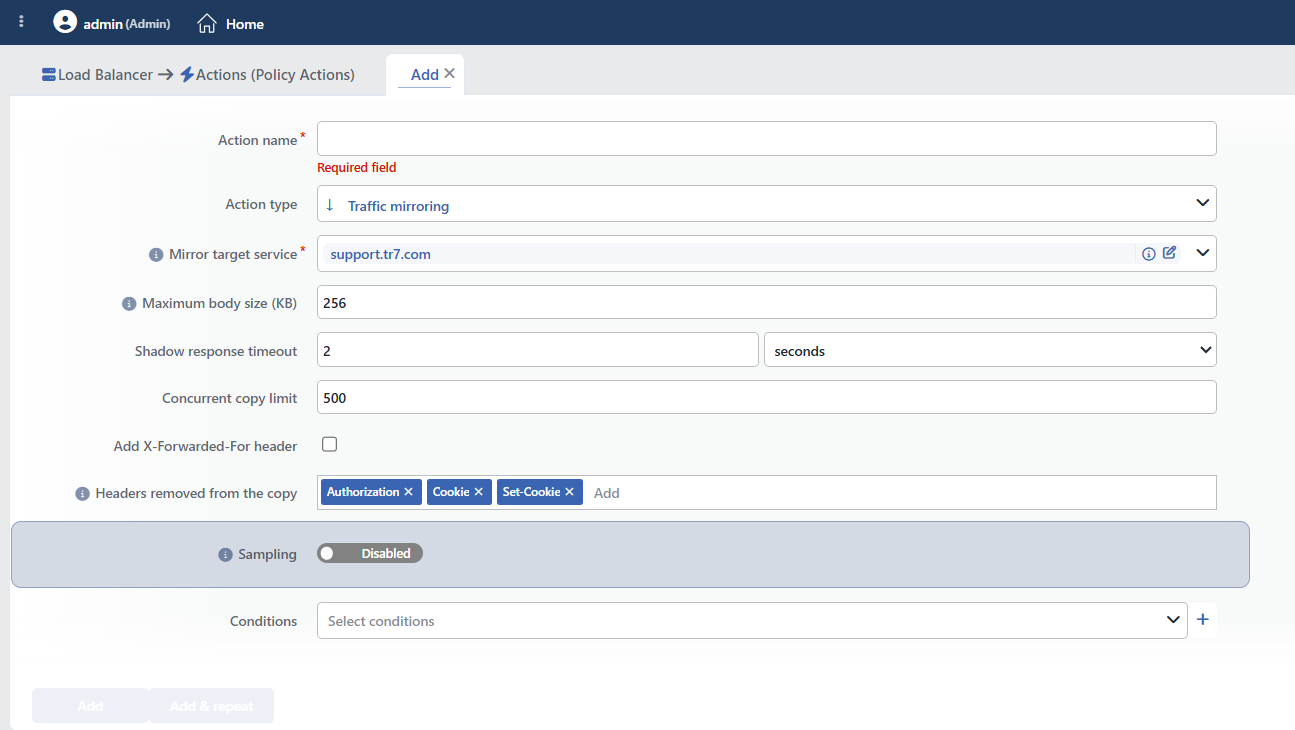 Traffic Mirroring Action Add Form
INFO
Mirror Target Service Required
Determines the target Backend Service to which the mirrored request copies will be sent. It is selected from the previously defined Backend Service list and this field is required.
The address, port, SSL and SNI settings of the selected Backend Service are inherited directly; the mirror traffic is forwarded with the configuration of this target itself.
WARNING
The mirror target must be an environment that is separate from the Backend Service that carries the live traffic. The mirrored requests are real requests; sending a copy to a target that writes to the same production database can create double processing (duplicate records, double e-mails, etc.).
INFO
Maximum Body Size (KB) Default: 256
Determines the largest body size of the request to be mirrored in KB. It is entered as an integer in the range 1–32768 (default 256).
The requests that have a body larger than this size are not mirrored; only the requests within the limit are copied. It prevents large uploads from tiring the mirror target and the network unnecessarily.
INFO
Shadow Response Timeout Default: 2 seconds
Determines the period to be waited for the response of the mirror target. It is entered in the range 1s–1m (default 2s).
Since the mirror response is ignored, this period limits how long the copy will wait before releasing the resources; it prevents the slowness of the mirror target from accumulating resources.
INFO
Concurrent Copy Limit Default: 500
Determines the maximum number of mirror copies that can be processed at the same time. It is entered as an integer in the range 1–65535 (default 500).
This limit preserves the isolation of the live traffic by limiting the number of open copies when the mirror target slows down or the traffic rises suddenly.
INFO
Add X-Forwarded-For Header Default: Off
When it is enabled, the X-Forwarded-For header is added to the mirrored copy; in this way the mirror target can see the real client IP address of the request (off by default).
INFO
Headers Removed from the Copy
Determines the HTTP headers to be removed from the mirrored copy. For security and privacy purposes, it prevents sensitive headers from being sent to the mirror target.
By default, the Authorization, Cookie and Set-Cookie headers are removed. At most 16 headers can be defined.
INFO
Sampling
Determines whether the mirroring will be done with sampling or in full scope.
- Off (default) → Every request that matches the condition is mirrored.
- On → Only the determined percentage of the requests that match the condition is mirrored.
In high-traffic environments, sampling can be turned on in order to protect the mirror target and the network resources. When sampling is turned on, the two subfields below become visible.
Sampling Percentage (%)
Determines the percentage of requests to be copied. It is entered as an integer in the range 0–100 (default 10).
10→ Approximately 10% of the requests that match the condition are mirrored.100→ All the requests that match the condition are mirrored (the same effect as without sampling).0→ The mirroring is paused; the action and its configuration are temporarily disabled without being deleted.
Sampling Key
Determines how the sampling decision will be made.
- Random (default / empty) → The decision is made independently for every request; the requests to be copied are selected randomly.
- Keyed (when a key is selected) → The same value of the selected key (e.g. the client IP address) always gets the same decision. In this way, all the sessions of a certain client subset are mirrored as a whole or are not mirrored at all.
This field can be filled with a smart variable (Smart Variable).
Smart Variables
The button to the left of the field switches between the Random and Keyed positions. When it is set to the Keyed position, the field is filled automatically with the Client IP address variable; when the variable chip is clicked, the smart variable selection window opens; the key can be derived from a dynamic value of the request such as the client IP address. Detailed information is on the Variables page.
INFO
While a test is being performed from a single source, keyed sampling behaves as all or nothing: since the same key value is fixed, either all the requests are mirrored or none of them are.
INFO
Conditions
In this field, it is defined under which condition or conditions the related action takes effect.
By adding one or more conditions, the behavior can be applied in a targeted and controlled way with the and/or structure.
Detailed information about conditions is on the Conditions page.
WARNING
If no condition is defined in this field, the related action runs unconditionally (Always). In this case, the mirroring is applied to all the traffic coming to the related vService and a copy of every request is produced.
INFO
Form Buttons
Add
The action adding process is completed by clicking the Add button.
Add & Repeat
With the Add & Repeat button, the action adding process is completed, and another new action can be added with different configurations without leaving the related window.
 Action Added
At most 8 mirrorings on the same vService
At most 8 Traffic Mirroring actions can be added to a vService. In this way, the same traffic can be copied to more than one mirror target with different conditions.
The copied body is not cleaned
The Headers removed from the copy field removes only the headers from the copy. The request body is sent to the mirror target as it is; the credentials, the personal data and the payment information in the form fields or in the JSON content are present in the copy.
For this reason, the mirror target must be positioned in a trusted environment and its access must be restricted. Since Set-Cookie is a response header, this entry in the default list has no equivalent in the request copy.
The condition may not always be applied
If the condition defined for the action cannot be evaluated in the context of the mirroring target, it cannot be written to the configuration and the action starts to mirror all the traffic. After the mirroring is put into effect, it must be verified from the Traffic Mirroring statistics screen that only the targeted requests are copied.
INFO
Monitoring the Mirroring
On the Traffic Mirroring tab of the vService dashboard, the copy flow, the dropped copies and the number of copies in flight are monitored. On the live statistics screen, the sampling percentage, the number of copies in flight and the mirrored/skipped/dropped copy values per second are displayed for every mirroring definition.
When the mirror target slows down or becomes unreachable, the copies are dropped; the live traffic is not affected, but the number of dropped copies must be followed from these screens.
The target service must carry a concrete address
The Backend Service selected as the mirror target must have its own IP and port information. If a service defined in such a way that it uses the listening port is selected, the action is not put into effect at all and no warning is given.
Operational and Safe Usage Recommendations
- A separate mirror target is used. The mirror target should not be an environment that writes to the live production data; otherwise the copied requests create duplicate processing (double records, double payments/e-mails).
- The sensitive headers are removed. The headers that carry identity and session information, such as Authorization, Cookie and Set-Cookie, are removed by default; if the reliability of the mirror target is not complete, the list is extended.
- Sampling is turned on in high traffic. Mirroring all the traffic tires the mirror target and the network; in order to preserve the real distribution, a low percentage (e.g. 5%–10%) is started with first.
- Keyed sampling is selected for session consistency. If the whole session of a user needs to be either mirrored completely or not mirrored at all, the sampling key is bound to the client IP address.
- It is targeted with conditions. By mirroring only the traffic of interest (a certain path, method or client group), the number of copies and the load of the mirror target are reduced.
- The body size is kept limited. If large file uploads do not need to be mirrored, the Maximum Body Size value is kept low and the network and target load is reduced.
Common Usage Scenarios in Live Environments
The examples below show how the related action is applied in the most frequently encountered use cases in real systems. These scenarios are based on practices that are widely preferred in live environments and rest on experience gained in the field.
Scenario 1: Testing a New Version with Real Traffic (Shadow Testing)
Problem: It is wanted that the new version of a web application be verified under real traffic before it is released. The synthetic test requests cannot catch the real request variety and the edge cases in production; taking the version directly to live, on the other hand, carries a risk.
Solution: A copy of the production traffic is mirrored to a separate Backend Service on which the new version runs. While the users still receive responses from the current version, the new version is tested silently with the same real requests.
Configuration:
- Mirror Target Service: new-version-backend (staging)
- Sampling: Off (all the traffic)
- Conditions:
- Unconditional (all the traffic of the application is mirrored)
Result:
- ✅ Risk-free verification → The new version is tested with real traffic, the user is not affected.
- ✅ The real request distribution → The edge cases missed in a synthetic test are caught.
- ✅ Isolation → Even if the new version slows down or gives an error, the live responses are not affected.
- ✅ Early detection → The version errors are seen before the release.
Scenario 2: A Traffic Copy to a Security Analysis Service
Problem: The incoming traffic needs to be examined by a security analysis/audit service (IDS, sandbox, log analysis) without slowing down the production flow. Adding the analysis tool to the live path creates latency and a single point of failure risk.
Solution: A copy of the requests coming to certain API paths is mirrored to the security analysis service. The identity and session headers are removed from the copy so that sensitive data is not carried to the analysis environment.
Configuration:
- Mirror Target Service: security-analysis-service
- Headers Removed from the Copy: Authorization, Cookie, Set-Cookie
- Conditions:
- Path starts with
/api/
- Path starts with
Result:
- ✅ Out-of-band analysis → The security inspection does not delay the live response.
- ✅ Privacy → The sensitive headers are not sent to the analysis environment.
- ✅ Targeted inspection → Only the related API traffic is copied.
- ✅ Risk isolation → Even if the analysis service crashes, production is not affected.
Scenario 3: Measuring the Capacity of a New Infrastructure with Sampling
Problem: It is wanted that the capacity of a new infrastructure/data center be measured under real traffic before it is put into service. Mirroring all the traffic can tire the new environment unnecessarily, and for a consistent result the sessions of the same users must be observed as a whole.
Solution: 20% of the traffic is mirrored to the new infrastructure, keyed by the client IP address. In this way, all the sessions of the selected clients fall to the new environment consistently.
Configuration:
- Mirror Target Service: new-infrastructure-backend
- Sampling: On
- Sampling Percentage (%): 20
- Sampling Key: The Keyed position: the Client IP address variable
- Conditions:
- Unconditional
Result:
- ✅ Controlled load → Only 20% of the traffic falls to the new environment.
- ✅ Consistent sessions → The same client always gets the same decision, the session integrity is preserved.
- ✅ A realistic measurement → The capacity is evaluated with the real traffic distribution.
- ✅ A safe transition → The new infrastructure is verified before it is taken live.
