
Smarter by Design.Simpler for Business
Delete HTTP Header
What Is the Delete HTTP Header Action?
The Delete HTTP Header action is used to remove a specific header from the HTTP traffic. The deleted header is removed from the request or response traffic and is not transmitted to the Backend Services or to the clients.
This action can work both at the request and at the response stage. According to the Execution Level selection, the header is removed from the request before it is sent to the Backend Service, or from the response before it is returned to the client.
The Importance of the Delete HTTP Header Action
The control of the HTTP headers is critically important in terms of security and privacy. Removing unnecessary or sensitive headers narrows the attack surface and prevents information leakage.
The Delete HTTP Header action;
- enables the server fingerprint information (Server, X-Powered-By, etc.) to be hidden,
- prevents sensitive internal headers from leaking to the outside world,
- prevents the untrusted headers coming from the client from being transmitted to the Backend Service,
- provides bandwidth saving by removing unnecessary headers,
- makes it possible to apply the application security policies.
For this reason, the Delete HTTP Header action is one of the basic components of security-oriented traffic management.
Supported vService Types
HTTP
L7 TCP
Network
Execution Timing
On Request
On Response
How to Add?
A new Delete HTTP Header Action can be added through the TR7 web management interface by following the steps below:
- The Configuration Menu is opened by clicking the TR7 logo at the bottom left.
- The Load Balancer → Actions → Add steps are followed.
- A unique and descriptive name is entered for the action.
- Delete HTTP Header is selected as Action Type.
- The related configurations of the action are made.
- In the Conditions tab, the condition/conditions under which the action takes effect are determined.
- The action is added by clicking the
Addbutton.
Delete HTTP Header Action Add Form
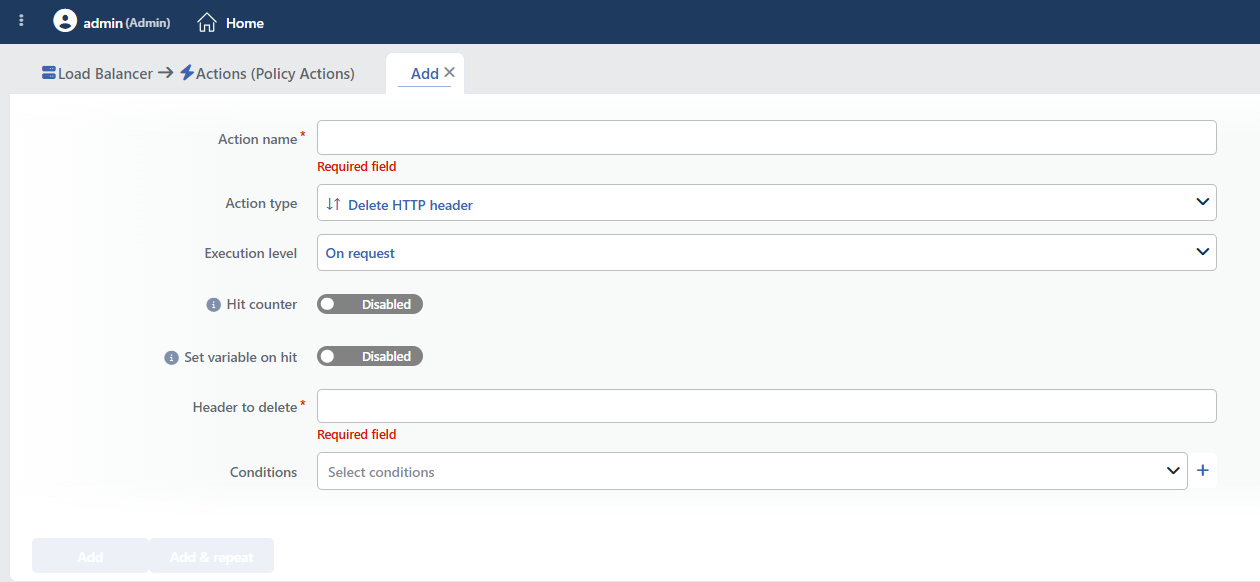 Delete HTTP Header Action Add Form
INFO
Execution Level
Determines at which stage the action is run.
- On Request: The action is applied before the request is forwarded to the related Backend Service. This level is used in cases where changes need to be made to the request or additional information needs to be passed to the Backend Service.
- On Response: The action is applied before the response is forwarded to the client. This level is used in cases where edits or additions need to be made to the response sent to the client.
INFO
Hit Counter Default: Off
Hit Counter counts every run of the action (it is evaluated together with the action's own condition; the count is not lost even in terminating actions such as Deny). Action-based rates and totals are displayed in the Action Hits tab of the vService dashboard and on the live statistics screen; they do not appear as a separate column in the lists. The counter is cumulative; there is no interface for resetting it manually: it starts from zero when the set of counted actions changes or when the vService is reloaded, while the history is preserved on the dashboard as a rate (hit/s).
INFO
Set Variable on Hit
A variable name whose value is assigned each time the action runs can be entered (optional; empty by default). The name can consist of letters, digits and underscores (at most 32 characters). When the action is triggered, the variable is set to 1, and chained behaviors can be built by reading it with the %TR7VAR(name) smart variable in other conditions and actions on the same vService.
INFO
Header to Delete Required
The name of the HTTP header to be deleted is entered in this field.
While the field is being written, TR7 suggests common header names as auto-completion; the suggestion list changes according to the selected Execution Level (request/response). Header names that are not in the list can be written manually.
WARNING
The header name matches exactly: wildcard expressions such as X-* and regular expressions (regex) are not supported: if an operation according to a pattern is needed, the Replace HTTP Header Content action is used. The matching is case-insensitive and all the repetitions of the header with the same name are deleted.
Do not delete protocol-critical headers
TR7 does not protect any header; the suggestion list also contains headers that are critical in terms of the protocol. Deleting headers such as Host, Content-Length, Transfer-Encoding, Connection, Content-Type, Location, Set-Cookie and WWW-Authenticate leads to a service outage, broken responses or session loss.
Header names are case-insensitive. For example, Server or server targets the same header.
TIP
Frequently deleted headers
The headers recommended to be deleted from the response:
Server: The web server informationX-Powered-By: The application framework informationX-AspNet-Version: The ASP.NET version informationX-AspNetMvc-Version: The ASP.NET MVC version information
The headers that can be considered for deletion from the request:
X-Forwarded-For: The proxy header that carries a spoofing riskX-Custom-Debug: Custom headers for debugging purposes
INFO
Conditions
In this field, it is defined under which condition or conditions the related action takes effect.
By adding one or more conditions, the behavior can be applied in a targeted and controlled way with the and/or structure.
Detailed information about conditions is on the Conditions page.
WARNING
If no condition is defined in this field, the related action runs unconditionally (Always). In this case, the action is applied to all traffic coming to the related vService.
In live environments, using an action without defining a condition can lead to unexpected situations (service outages). For this reason, it is recommended that at least one condition always be defined when an action is created.
INFO
Form Buttons
Add
The action adding process is completed by clicking the Add button.
Add & Repeat
With the Add & Repeat button, the action adding process is completed, and another new action can be added with different configurations without leaving the related window.
 Action Added
Operational and Safe Usage Recommendations
- The server fingerprints are removed. In order to make it harder for attackers to make a targeted attack, the
Server,X-Powered-By,X-AspNet-VersionandX-AspNetMvc-Versionheaders are removed from the response. Alternative: in order to manage more than one security header at once, the "Remove Server Fingerprints" option in the Manage HTTP Security Headers action is used. - The headers with a spoofing risk are cleaned. Headers such as
X-Forwarded-Forcoming from the clients carry a spoofing risk; these headers are deleted from the request and the trusted values added by TR7 itself are used. - The internal headers are not leaked. The internal headers used between the Backend Services (e.g.
X-Internal-User-ID,X-Debug-Info) should be removed from the response. - Separate actions are created for more than one header. A separate action needs to be defined for each header to be deleted; the actions that share the same conditions are added to the same vService.
Common Usage Scenarios in Live Environments
The examples below show how the related action is applied in the most frequently encountered use cases in real systems. These scenarios are based on practices that are widely preferred in live environments and rest on experience gained in the field.
Scenario 1: Hiding the Server Information on API Endpoints
Problem: On the API endpoints (the /api/ path), the Server: Apache/2.4.41 (Ubuntu) header is visible in the Backend Service responses. The third-party developers that use the API and potential attackers can learn the server version and prepare a targeted attack.
Solution: Hide the server information by deleting the Server header only on the API endpoints.
Configuration:
- Execution Level: On Response
- Header to Delete:
Server - Conditions: Path STARTS WITH
/api/
Result:
- ✅ The responses on the /api/ path → The Server header is removed, and the server type is hidden.
- ✅ Security → The server version cannot be learned through the API, and a targeted exploit becomes harder.
- ❌ The other paths (e.g. /web/, /) → The Server header is preserved (optional).
Scenario 2: Hiding the Framework Information on Error Pages
Problem: On the 4xx and 5xx error pages, the X-Powered-By: ASP.NET and X-AspNet-Version: 4.0.30319 headers are visible. Especially in error situations, the framework information gives important clues to attackers and is used for stack trace analysis.
Solution: Hide the technology stack by deleting the framework headers only in the error responses (status code >= 400).
Configuration:
- Execution Level: On Response
- Header to Delete:
X-Powered-By - Conditions: Status Code >=
400
Result:
- ✅ The 4xx and 5xx error responses → The X-Powered-By header is removed.
- ✅ Security → The framework version does not leak on the error pages, and attackers cannot gather information.
- ❌ The 2xx and 3xx successful responses → X-Powered-By is preserved (optional).
In order for the header to be removed in all the responses, Conditions is left empty; a separate action can also be created for X-AspNet-Version.
Scenario 3: Preventing Client IP Spoofing
Problem: Clients can appear to come from a different IP address by adding the X-Forwarded-For header themselves. The Backend Service trusts this header and writes the wrong IP to the logs, and the IP-based security rules can be bypassed.
Solution: The untrusted X-Forwarded-For header coming from the client is deleted and the trusted value added by TR7 is used.
Configuration:
- Execution Level: On Request
- Header to Delete:
X-Forwarded-For - Conditions: Unconditional (applied to all requests)
Result:
- ✅ The requests coming from the client → The fake X-Forwarded-For header is removed.
- ✅ TR7 → Adds the real client IP reliably. (The Add HTTP Header action can be used to add XFF with an action; the related HTTP vService setting can be used to add XFF within the vService.)
- ✅ The Backend Service → Receives the correct IP address, and spoofing is prevented.
- ❌ The IP-based security rules → Can no longer be bypassed.
Scenario 4: Cleaning the Internal Debug Headers
Problem: The debug headers used in the development environment, such as X-Debug-Token and X-Internal-User-ID, are also added to the responses in the production environment. These headers contain sensitive information and create a security risk.
Solution: In the production environment, the debug headers are deleted from the responses and information leakage is prevented.
Configuration:
- Execution Level: On Response
- Header to Delete:
X-Debug-Token - Conditions: Unconditional (applied to all the responses in the production environment)
Result:
- ✅ The production responses → The X-Debug-Token header is removed.
- ✅ Sensitive information → The internal user ID and the debug token do not leak.
- ✅ Security → The development information is not visible in production.
Separate actions can also be added for the other internal headers, such as X-Internal-User-ID and X-Backend-Server.
