
Smarter by Design.Simpler for Business
Status Code
What Is the Status Code Condition?
Status Code is a condition type used to make traffic manipulation decisions by evaluating the status code of the HTTP response returned from the Backend Service.
The HTTP status code is located in the first line of the response.
HTTP/1.1200OK
HTTP/1.1301Moved Permanently
HTTP/1.1404Not Found
Status Code
This condition can be evaluated only at the response stage.
WARNING
The Status Code condition works only at the Response stage. This condition cannot be evaluated before the Backend Service responds.
The Importance of the Status Code Condition
HTTP status codes are standard codes that state the result of the request and are critically important for response processing.
With the Status Code condition:
- Error responses (4xx, 5xx) can be detected and custom pages can be shown,
- Redirects (3xx) can be monitored or changed,
- Cache rules can be applied for successful responses (2xx),
- Logging can be performed according to specific status codes,
- The backend health status can be monitored.
HTTP Status Code Categories:
| Range | Category | Description |
|---|---|---|
| 1xx | Informational | Information |
| 2xx | Success | Successful |
| 3xx | Redirection | Redirect |
| 4xx | Client Error | Client error |
| 5xx | Server Error | Server error |
Supported vService Types
HTTP
L7 TCP
Network
How to Add?
A new Status Code Condition can be added through the TR7 web management interface by following the steps below:
- The Configuration Menu is opened by clicking the TR7 logo at the bottom left.
- The Load Balancer → Conditions → Add steps are followed.
- Status Code is selected as Criteria.
- The related configurations of the condition are made.
- The condition is added by clicking the
Addbutton.
Status Code Condition Add Form
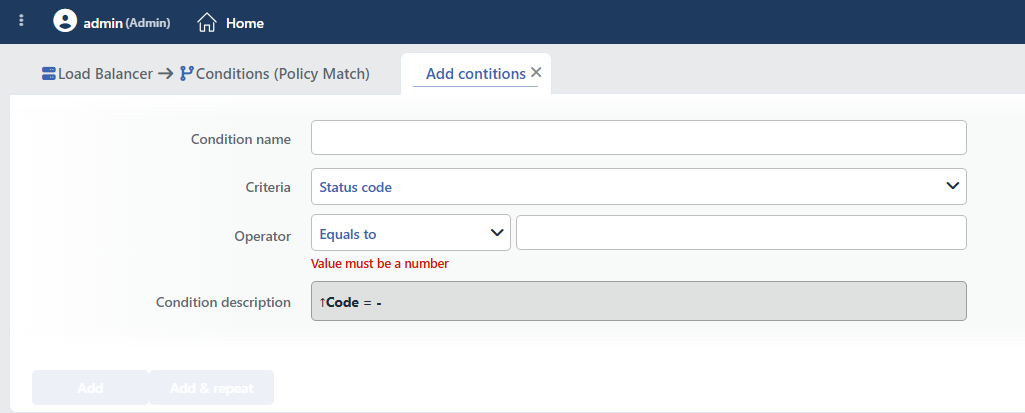 Status Code Condition Add Form
INFO
Condition Name
An optional name can be entered for the condition to be created.
This field is especially important in the following scenarios:
- When many conditions are defined under the same vService,
- When conditions with similar criteria need to be distinguished,
- When it is necessary to quickly understand which business rule the condition represents.
When this field is left empty, TR7 analyzes the content of the related condition and creates an automatic, descriptive name in the Condition Description field. This generated description is used as the name in condition lists.
INFO
Criteria Required
The field that determines the type of the condition; Status Code is selected from the searchable dropdown list. This selection determines the fields displayed in the form. The criterion cannot be changed after the condition is saved: if a different criterion is needed, a new condition is defined. For all criteria in the list and their scopes, the criteria catalog on the Conditions page can be referred to.
INFO
Operator
The numeric comparison operator and value are entered. The form opens with Equals to (=) 200 selected; the entered value must be an integer (the 100-599 range is not enforced: entering a valid HTTP status code is the responsibility of the user). When Range (-) is selected, both boundaries are included in the range.
| Operator | Symbol | Description |
|---|---|---|
| Less than | < | The value must be less |
| Equals to | = | The value must match exactly |
| Greater than | > | The value must be greater |
| Range | - | The value must be between two values |
The HTTP status code to be used for the comparison is entered manually.
Common HTTP Status Codes:
| Code | Meaning |
|---|---|
200 | OK |
201 | Created |
204 | No Content |
301 | Moved Permanently |
302 | Found |
304 | Not Modified |
400 | Bad Request |
401 | Unauthorized |
403 | Forbidden |
404 | Not Found |
429 | Too Many Requests |
500 | Internal Server Error |
502 | Bad Gateway |
503 | Service Unavailable |
504 | Gateway Timeout |
TIP
In order to catch all 5xx errors, 500-599 can be used with the Range operator.
INFO
Condition Description
It is created automatically by TR7 in line with the entered criteria and values.
This description:
- which value the condition applies to,
- which criterion it works on,
- the quick understanding of the condition on listing screens
is produced dynamically by the system so as to provide these.
TIP
The returned status code can be used in the actions at the response stage and in log formats with the Status smart variable.
INFO
Form Buttons
Add
The condition adding process is completed by clicking the Add button.
Add & Repeat
With the Add & Repeat button, the condition adding process is completed, and another new condition can be added with different configurations without leaving the related window.
 Condition Added
Operational Usage Recommendations
- Custom Error Pages. 404 and 500 errors should be caught and user-friendly error pages should be shown.
- Backend Health Monitoring. The Backend Service health status should be tracked by monitoring 5xx errors.
- Cache Strategy. Only 200 OK responses should be cached. Error responses should not be cached.
- Redirect Management. Redirect chains should be checked by monitoring 3xx responses.
Common Usage Scenarios in Live Environments
The examples below show how the related condition is applied in the most frequently encountered use cases in real systems. These scenarios are based on practices that are widely preferred in live environments and rest on experience gained in the field.
Scenario 1: 404 Not Found Custom Error Page
Purpose: To show a user-friendly custom page for 404 errors.
Configuration: Operator → Equals to (=) 404
Action Recommendations:
- ✅ Show Content → A specially designed 404 page is shown and helpful links are offered to the user. (For a fixed code mapping that does not require a condition, the Show Content for Backend Service Errors action can also be used: that action takes its own code list and is not bound to this condition.)
Scenario 2: Management of Server Errors (5xx)
Purpose: To catch all 5xx server errors, monitor the Backend Service health status and show a custom error page.
Configuration: Operator → Range (-) 500-599
Action Recommendations:
- ✅ Show Content → The maintenance page "The service is temporarily unavailable" is shown.
Scenario 3: Adding Cache Headers to Successful Responses
Purpose: To add cache headers only to successful (2xx) responses and to increase performance.
Configuration: Operator → Range (-) 200-299
Action Recommendations:
- ✅ Add HTTP Header → The
Cache-Control: public, max-age=3600header is added, and the CDN and browser cache are enabled. - ✅ Set HTTP Header → The
ETagandLast-Modifiedheaders are edited, and cache validation is provided.
Scenario 4: Monitoring Authorization Errors (401)
Purpose: To mark the 401 responses returned from the Backend Service and to monitor session/authorization problems. (A redirect cannot be performed before the 401 response reaches the client: the redirect actions work only at the request stage; the need to force a session is solved on the application side or with AGS.)
Configuration: Operator → Equals to (=) 401
Action Recommendations:
- ✅ Add HTTP Header → The
X-Auth-Required: trueheader is added; with this mark, the front-end application redirects to the login page. - ✅ Advanced Traffic Inspection → The 401 ratio and the source distribution are reported.
Scenario 5: Adding CORS Headers for 403 Forbidden
Purpose: To add custom headers in order to solve CORS problems for 403 errors.
Configuration: Operator → Equals to (=) 403
Action Recommendations:
- ✅ Add HTTP Header → The
Access-Control-Allow-Originheader and information headers are added to 403 responses for diagnostic purposes. (The CORS and HTTP Security Headers actions are not bound to a condition: they work across the vService.) - ✅ Show Content → The "Access denied" page is shown and the user is informed.
