
Smarter by Design.Simpler for Business
Replace HTTP Header Content
What Is the Replace HTTP Header Content Action?
The Replace HTTP Header Content action is used to match the content of a header in the HTTP traffic with a REGEX (regular expression) and rewrite it.
When a match is achieved, the WHOLE of the header is rewritten
This action does not "change the matching part and leave the rest". If the regular expression matches anywhere in the header value, the whole of that value is replaced with the new content.
The parts that are wanted to be preserved must be taken with a capture group in the regular expression and rewritten in the new content with references such as \1, \2.
Example: In order to change only the protocol in the Location: http://example.com/dashboard header:
- The regular expression:
^http://(.*)$: the remaining part is taken into group 1 - The new content:
https://\1: the group is written back
If a capture group is not used, the rest of the header is lost.
This action can work both at the request and at the response stage. According to the Execution Level selection, the header content is changed in the request before it is sent to the Backend Service or in the response before it is returned to the client.
1 · The original header
Location: http://example.com/dashboard REGEX
http://(.+) → Replacement https://\12 · The changed header
Location: https://example.com/dashboard Capture group
(.+) → \1 preserves the domain and the path, only the protocol changes.The Difference from Set HTTP Header
The Set HTTP Header action writes a fixed value to the header; if the header does not exist, it creates it and it supports the use of smart variables.
This action, on the other hand, rewrites the existing value of the header by matching it with a regular expression; if the header does not exist, it does not create it and it does not support smart variables. This action is used when a part of the existing value needs to be preserved.
The Importance of the Replace HTTP Header Content Action
In some scenarios, the header needs to be rewritten by looking at its existing value. Regular expression based replacement, together with capture groups, is a powerful tool for such conversions.
The Replace HTTP Header Content action;
- makes it possible to rewrite header values while a part of them is preserved,
- can be used for URL rewriting operations (e.g. the Location header),
- makes domain or protocol changes easier,
- makes it possible to change cookie domains dynamically,
- makes it possible to make selective changes in headers that contain more than one value.
For this reason, the Replace HTTP Header Content action is an indispensable tool for complex header manipulations.
Matching Modes
This action offers two different matching modes:
| Mode | Description |
|---|---|
| Replace whole header | Handles the whole header value as a single piece. If the regular expression matches anywhere within the value, the whole of the value is replaced with the new content. |
| Replace values separated by comma | Splits the header value into pieces separated only by a comma and matches each piece separately. The whole of the matching piece is replaced with the new content; the other pieces are preserved. |
Mode Comparison: an example
The header: Accept-Language: en-US, tr-TR, de-DE
REGEX: tr-TR · Replacement: en-GB
The Replace whole header mode:
- The
tr-TRexpression is found within the value → the match is achieved - The whole of the value is replaced with the new content
- The result:
Accept-Language: en-GB: the other languages are lost
The Replace values separated by comma mode:
- Each value is checked separately:
en-US,tr-TR,de-DE tr-TRmatches and is changed toen-GB- The result:
Accept-Language: en-US, en-GB, de-DE
Supported vService Types
HTTP
L7 TCP
Network
Execution Timing
On Request
On Response
How to Add?
A new Replace HTTP Header Content Action can be added through the TR7 web management interface by following the steps below:
- The Configuration Menu is opened by clicking the TR7 logo at the bottom left.
- The Load Balancer → Actions → Add steps are followed.
- A unique and descriptive name is entered for the action.
- Replace HTTP Header Content is selected as Action Type.
- The related configurations of the action are made.
- In the Conditions tab, the condition/conditions under which the action takes effect are determined.
- The action is added by clicking the
Addbutton.
Replace HTTP Header Content Action Add Form
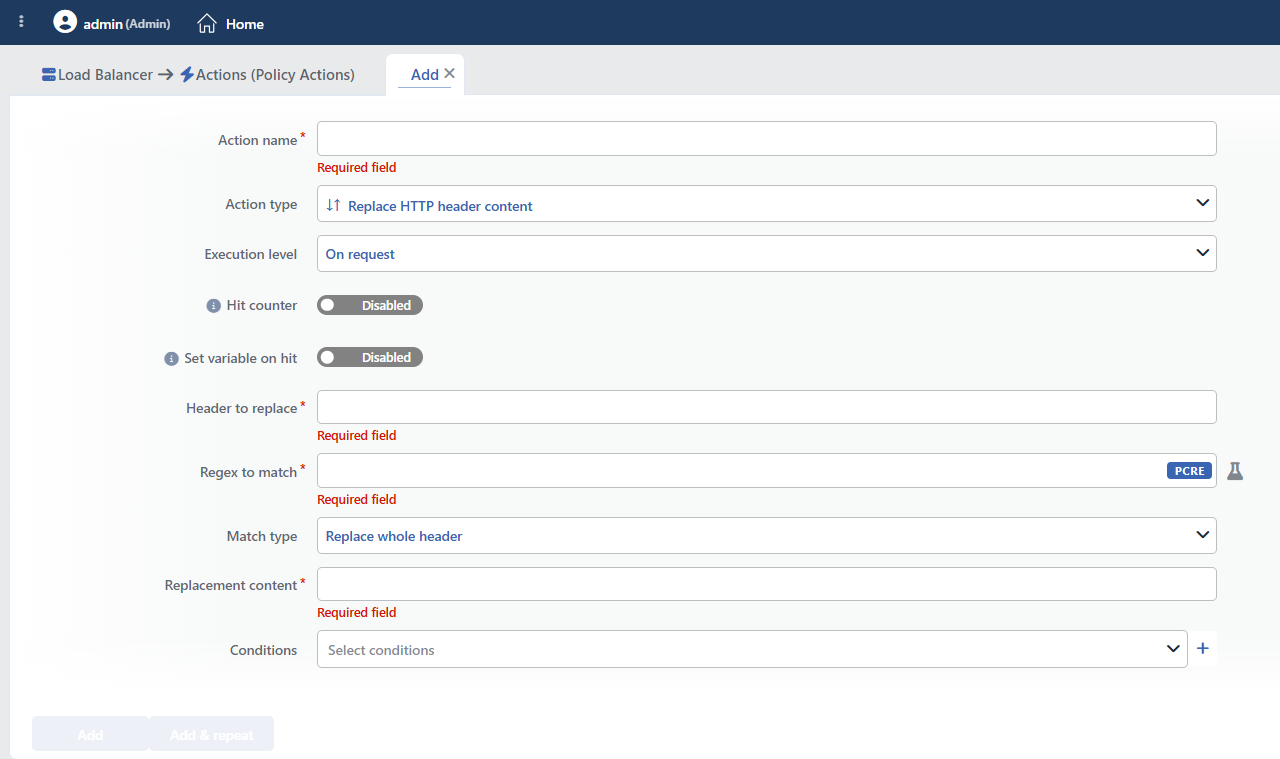 Replace HTTP Header Content Action Add Form
INFO
Execution Level
Determines at which stage the action is run.
- On Request: The action is applied before the request is forwarded to the related Backend Service. This level is used in cases where changes need to be made to the request or additional information needs to be passed to the Backend Service.
- On Response: The action is applied before the response is forwarded to the client. This level is used in cases where edits or additions need to be made to the response sent to the client.
INFO
Hit Counter Default: Off
Hit Counter counts every run of the action (it is evaluated together with the action's own condition; the count is not lost even in terminating actions such as Deny). Action-based rates and totals are displayed in the Action Hits tab of the vService dashboard and on the live statistics screen; they do not appear as a separate column in the lists. The counter is cumulative; there is no interface for resetting it manually: it starts from zero when the set of counted actions changes or when the vService is reloaded, while the history is preserved on the dashboard as a rate (hit/s).
The counter increases when the condition of the action is met; it does not look at whether the regular expression actually matches.
INFO
Set Variable on Hit
A variable name whose value is assigned each time the action runs can be entered (optional; empty by default). The name can consist of letters, digits and underscores (at most 32 characters). When the action is triggered, the variable is set to 1, and chained behaviors can be built by reading it with the %TR7VAR(name) smart variable in other conditions and actions on the same vService.
INFO
Header to Replace Required
The name of the HTTP header to be changed is entered in this field.
Header names are case insensitive.
Frequently Changed Headers
Location: Redirect URLsSet-Cookie: Cookie domain/path valuesHost: Changing the host nameRefresh: Redirection URLs
INFO
Regex to Match Required
The match is case sensitive
The regular expression works case sensitive and there is no option in the form that turns this off. If a case insensitive match is needed, (?i) must be written at the beginning of the expression.
With the test button next to the field, the expression can be tried on a sample input; the capture groups are listed and the \1, \2 references to be used in the new content can be seen here.
The REGEX (regular expression) pattern to be searched for in the header value is entered in this field.
REGEX supports the PCRE (Perl Compatible Regular Expressions) syntax.
Common REGEX Patterns
| Pattern | Description |
|---|---|
http:// | Protocol matching |
\.example\.com | Domain matching (the dots must be escaped) |
^(.*)$ | Capture the whole value (capture group) |
domain=([^;]+) | Capture the cookie domain value |
WARNING
- Special characters (
.,*,?,+, etc.) must be escaped:\.,\* - Capture groups can be referenced as
\1,\2
INFO
Match Type Default: Replace whole header
It is the field in which the matching mode is selected.
- Replace whole header → Matches the whole header value with the REGEX. If the regular expression matches anywhere in the value, the whole of the value is replaced with the new content.
- Replace values separated by comma → If the header contains more than one value (separated by commas), it matches each value separately with the REGEX. This mode is used in order to make selective changes in headers that contain multiple values.
INFO
Replacement Content Required
WARNING
This field does not support smart variables; only fixed text and the \1–\9 capture group references can be used. The group references are written not as $1 but in the form \1.
The new value to be written in place of the whole header value when a match is achieved is entered in this field.
The values captured from the capture groups can be used as \1, \2.
Capture Group Usage: an example
REGEX: http://(.+) · Replacement: https://\1
This pattern changes the URLs that begin with http:// to https:// and preserves the domain part.
- Input:
http://example.com/path - Output:
https://example.com/path
INFO
Conditions
In this field, it is defined under which condition or conditions the related action takes effect.
By adding one or more conditions, the behavior can be applied in a targeted and controlled way with the and/or structure.
Detailed information about conditions is on the Conditions page.
WARNING
If no condition is defined in this field, the related action runs unconditionally (Always). In this case, the action is applied to all traffic coming to the related vService.
In live environments, using an action without defining a condition can lead to unexpected situations (service outages). For this reason, it is recommended that at least one condition always be defined when an action is created.
INFO
Form Buttons
Add
The action adding process is completed by clicking the Add button.
Add & Repeat
With the Add & Repeat button, the action adding process is completed, and another new action can be added with different configurations without leaving the related window.
 Action Added
Behavior Details
- If the header does not exist, it is not created; the action is silently skipped.
- If the regular expression does not match, the header is left as it is; no error is produced.
- All the header repetitions with the same name are processed separately.
- The action is applied to the responses returning from the Backend Service; the responses produced by TR7 itself (redirection, blocking, error pages) are not affected.
- The action has no number limit per vService.
Anchor the regular expression
In order to prevent unexpected matches, the expression must be anchored with ^ and $ as much as possible. An unanchored expression can match a similar text occurring in the middle of the value and rewrite the whole header.
Operational and Safe Usage Recommendations
Select the Correct Mode.
Scenario Recommended Mode Headers with a single value (Location, Host) Replace whole header Headers with multiple values (Accept-Language, Cookie) Replace values separated by comma Changing the whole value Replace whole header Changing a certain value Replace values separated by comma Test the REGEX. Complex REGEX patterns can produce unexpected results. They are verified in a test environment before they are taken to the live environment.
Escape the Special Characters. The characters that carry a special meaning in REGEX (
.,*,?,+,[,],(,),^,$,|,\) must be escaped with a backslash:example.com→example\.com,path?query→path\?query.Capture groups are used. When a part of the value needs to be preserved, the related part is captured with
()and referenced in the replacement field with\1,\2.Consider Set Header. If the whole header value is to be changed with a known value, the Set HTTP Header action can be simpler and more performant.
Common Usage Scenarios in Live Environments
The examples below show how the related action is applied in the most frequently encountered use cases in real systems. These scenarios are based on practices that are widely preferred in live environments and rest on experience gained in the field.
Scenario 1: Converting the Redirect URL from HTTP to HTTPS
Problem: The Backend Service does not know that SSL termination is done and still returns the redirect URLs with the http:// protocol. When the user comes with HTTPS and gets an HTTP redirect, the browser gives a "Mixed Content" warning and a security problem occurs.
Solution: The HTTP URLs in the Location header are converted to HTTPS with REGEX and the protocol inconsistency is corrected.
Configuration:
- Execution Level: On Response
- Header to Replace:
Location - Regex to Match:
http://(.+) - Match Type: Replace whole header
- Replacement Content:
https://\1 - Conditions:
- Status Code starts with
3xx ANDHTTP HeaderLocationexists
- Status Code starts with
Result:
- ✅ Protocol compatibility → All the redirect URLs become HTTPS.
- ✅ Mixed content solution → The browser warning disappears.
- ✅ Capture group → With
(.+), the domain and the path are preserved, only the protocol changes. - ✅ SEO protection → The use of HTTPS is provided in the 301/302 redirects.
Example transformation:
- Backend Service:
Location: http://example.com/dashboard - TR7 replacement:
Location: https://example.com/dashboard
Scenario 2: Cookie Domain Adjustment
Problem: The Backend Service sets the cookie with the internal domain (internal.example.com). However, the external domain of TR7 is different (example.com). The users log in from the external domain, but since the cookie belongs to the internal domain, the browser does not accept the cookie and the session cannot be opened.
Solution: The internal domain name in the Set-Cookie header is converted to the general domain name while the rest of the cookie is preserved with capture groups.
Configuration:
- Execution Level: On Response
- Header to Replace:
Set-Cookie - Regex to Match:
(.*)domain=internal\.example\.com(.*) - Match Type: Replace whole header
- Replacement Content:
\1domain=.example.com\2 - Conditions:
- HTTP Header
Set-Cookieexists
- HTTP Header
Result:
- ✅ Cookie access → With the wildcard domain, all the subdomains can use the cookie.
- ✅ Session continuity → There is no session drop in the internal-external transitions.
- ✅ SSO compatibility → Single sign-on works between more than one subdomain.
- ⚠️ The capture groups are compulsory → The name, the value and the other attributes of the cookie are preserved with
\1and\2; if the groups are not used, the cookie content is completely lost and the session drops.
Example transformation:
- Backend Service:
Set-Cookie: session=abc123; domain=internal.example.com; Secure - TR7 replacement:
Set-Cookie: session=abc123; domain=.example.com; Secure
Scenario 3: Mapping the Internal URLs to the External URLs
Problem: The Backend Service uses an internal hostname (internal-server:8080) while redirecting and this URL returns to the client. Since the client cannot resolve this internal hostname, the redirect fails and a 404 error is received. In addition, the internal port number creates a security vulnerability.
Solution: The internal URLs in the Location header are captured with REGEX and converted to the external public URL, and the internal infrastructure is hidden.
Configuration:
- Execution Level: On Response
- Header to Replace:
Location - Regex to Match:
http://internal-server:8080/(.+) - Match Type: Replace whole header
- Replacement Content:
https://api.example.com/\1 - Conditions:
- Status Code starts with
3xx ANDHTTP HeaderLocationcontainsinternal
- Status Code starts with
Result:
- ✅ URL mapping → The internal URLs never leak outside.
- ✅ Security → The internal infrastructure information is protected, the port and the hostname are hidden.
- ✅ User experience → The redirects direct to the correct URL, the 404 error disappears.
- ✅ The path is preserved → With the
(.+)capture group, the path part is preserved as\1.
Example transformation:
- Backend Service:
Location: http://internal-server:8080/api/v1/status - TR7 replacement:
Location: https://api.example.com/api/v1/status
Scenario 4: Removing the Port Number
Problem: The Backend Service uses unnecessary port numbers (https://example.com:443/path or http://example.com:80/path) in the redirect URLs. These non-standard URLs cause problems in some clients and the URLs look bad aesthetically. The analytics tools perceive them as a different URL.
Solution: The standard port numbers (:80, :443) in the Location header are cleaned with REGEX and a clean URL format is provided.
Configuration:
- Execution Level: On Response
- Header to Replace:
Location - Regex to Match:
(https?://[^/:]+):\d+(/.*)? - Match Type: Replace whole header
- Replacement Content:
\1\2 - Conditions:
- Status Code starts with
3xx
- Status Code starts with
Result:
- ✅ URL cleanliness → The standard ports (
:80,:443) are removed automatically. - ✅ Analytics accuracy → The same page is not logged as a different URL.
- ✅ Browser compatibility → The port problems in some old browsers disappear.
- ✅ Two capture groups →
\1preserves the protocol+domain,\2preserves the path part.
Example transformation:
- Backend Service:
Location: https://example.com:443/dashboard?user=123 - TR7 replacement:
Location: https://example.com/dashboard?user=123
Scenario 5: Host Header Subdomain Conversion
Problem: The Backend Service does not accept the www.* subdomains, it understands only the docs.* subdomains. However, the users come with www.tr7.com. When the request is sent to the Backend Service, since the Host header is www, a 404 is returned.
Solution: The www. prefix in the Host header is changed to docs. with REGEX and converted to the format expected by the Backend Service.
Configuration:
- Execution Level: On Request
- Header to Replace:
Host - Regex to Match:
www\.(.*)\.com - Match Type: Replace whole header
- Replacement Content:
docs.\1.com.tr - Conditions:
- HTTP Header
Hostcontainswww ANDPath starts with/docs/
- HTTP Header
Result:
- ✅ Host transformation → The
wwwsubdomain is converted todocs. - ✅ TLD change → The
.comextension is changed to.com.tr. - ✅ Capture group → With
(.*), the domain base part is preserved. - ✅ Conditional application → It is active only for the
/docs/paths, it does not interfere with the other traffic.
Example transformation:
- The client request:
Host: www.tr7.com - TR7 replacement:
Host: docs.tr7.com.tr - The Backend Service accepts this and returns the correct content
