
Smarter by Design.Simpler for Business
Network vService
What Is Network vService?
Network vService is the service type on TR7 that provides load balancing for TCP, UDP and IP traffic at the Layer 3/4 level. It is designed for UDP services such as DNS, SIP, NTP and Syslog, raw TCP connections and IP-level traffic management.
Network vService distributes traffic at the connection (flow) level without looking at application layer content; this approach keeps the processing load low. The distribution decision is made on the first packet of the flow, and subsequent packets of the same flow are forwarded to the same Backend Service. The application layer features of the HTTP and L7 TCP types (SSL termination, conditional routing, WAF, cache) do not exist in this type.
Network vService offers three different load balancing modes: Direct Server Return, Route Mode and SNAT. Each mode is suitable for different network topologies and requirements.
What can be done with Network vService?
- Load balancing of UDP services such as DNS, SIP, NTP and Syslog,
- Connection-level distribution with low processing load,
- Asymmetric traffic flow with the Direct Server Return mode (responses bypass TR7),
- Adaptation to different network topologies with the Route Mode and SNAT modes,
- Managing a port range with a single vService with Port Range,
- Distribution of non-TCP/UDP IP protocols such as ICMP and GRE with ANY - L3.
L3/L4
Operating layer
Connection-level load balancing
TCP · UDP · ANY
Protocol support
TCP - L4 · UDP - L4 · ANY - L3
3 Modes
Load balancing modes
Direct Server Return · Route Mode · SNAT
DSR
Asymmetric flow
Response traffic bypasses TR7
7
Load balancing algorithms
From Round-Robin to Destination Hash
Port range
Port range
Managing a port range with a single vService
SIP
Session persistence
L4 persistence and SIP persistence
Route table
Network segmentation
A separate route table per segment
Why Network vService?
Some services require direct Layer 3/4 load balancing instead of an application layer proxy. Network vService is designed to meet this need with low processing load.
High Availability
By distributing traffic among multiple Backend Services, the single point of failure (SPOF) is eliminated. With health checks, faulty servers are automatically taken out of service and traffic is directed to the remaining healthy servers; when a server becomes healthy again, it is automatically put back into traffic.
The health status is reflected in the distribution in TCP - L4 and UDP - L4 vServices with Port Range off; it is not taken into account in ANY - L3 vServices and vServices with Port Range enabled. A Backend Service with no health check defined is always considered reachable.
UDP Services
Many critical services such as DNS, NTP, Syslog and SNMP run over UDP. These services are not supported in the HTTP/L7 TCP types; Network vService provides both performance and redundancy by distributing UDP traffic among multiple servers.
Low Processing Load
Since packets are processed without being parsed at the application layer, the processing load is low. In the Direct Server Return mode, since the response traffic bypasses TR7, the load on TR7 decreases for latency-sensitive services. Direct Server Return is applied only in TCP - L4 / UDP - L4 vServices with Port Range off; for servers that require a port range, traffic is routed through TR7.
Flexible Network Topology
Thanks to three different LB modes (Direct Server Return, Route Mode, SNAT), Network vService adapts to scenarios where the servers are in the same L2 segment, are located in different subnets or where no change can be made on the server side.
Protocols Without Port Separation
In the ANY - L3 protocol, no port separation is done; non-TCP/UDP IP protocols such as ICMP and GRE are also forwarded by translating the destination address to the Backend Service. Protocols that verify address integrity (e.g. IPsec AH) cannot be carried with this method. For multiple flows of the same client (e.g. IKE and ESP) to go to the same Backend Service, L4 Persistence is turned on.
Supported Features
Network vService offers the following features for Layer 3/4 load balancing; application layer features do not exist in this type.
| Category | Features |
|---|---|
| Protocol | TCP - L4, UDP - L4, ANY - L3 (IP protocols without port separation) |
| LB Modes | Direct Server Return, Route Mode, SNAT |
| Algorithms | Round-Robin, Weighted Round-Robin, Least-Connection, Locality-Based Least-Connection, Weighted Least-Connection, Source Hash, Destination Hash |
| Session Persistence | L4 persistence, SIP persistence |
| Flexibility | Port range, Route table selection |
| Backend Service | Weight and connection limit (connection limit in TCP - L4 / UDP - L4 with Port Range off) |
| Monitoring | Health Check |
The algorithms other than Round-Robin and Weighted Round-Robin, LB Mode, SIP Persistence and the health status are applied only in TCP - L4 / UDP - L4 vServices with Port Range off.
Use Cases
🌐 DNS Load Balancing
DNS runs over UDP 53. Network vService distributes DNS traffic among multiple servers; thanks to connection-level processing, the processing load stays low.
📞 VoIP and SIP
SIP is the foundation of the VoIP infrastructure. Network vService provides load balancing for SIP servers on UDP 5060; SIP Persistence, turned on together with L4 Persistence, directs the messages of the same call (Call-ID) to the same Backend Service. SIP Persistence is not applied in vServices with Port Range enabled.
⏱️ NTP, Syslog, SNMP
High availability and load balancing are provided for the critical UDP services of the infrastructure. Since distribution is done per flow, the traffic of a client that sends continuously from a fixed source port stays on the same Backend Service.
🎮 Gaming and Media Streaming
Real-time game servers and media streaming require low latency. In the Direct Server Return mode, since responses go directly to the client, the load on TR7 decreases. Direct Server Return is applied only in vServices with Port Range off; for servers that require a port range, traffic is routed through TR7.
🔌 Network Layer Protocols
Non-TCP/UDP IP protocols such as ICMP and GRE are load balanced without port separation in the ANY - L3 protocol. The destination address is always translated to the Backend Service's address; if a SNAT IP is selected, the source address is also translated.
Supported Protocols
Network vService works at Layer 3/4 and supports the following protocol groups:
TCP - L4: TCP-based protocols that work over a single connection; custom port numbers and port ranges. SIP over TLS (5061) is carried with TCP - L4; SIP Persistence is not used in this traffic.
UDP - L4:
- DNS (53)
- NTP (123)
- SNMP (161 / 162)
- Syslog (514)
- TFTP (69; only with Direct Server Return)
- SIP (5060)
- RADIUS (1812 / 1813)
- DHCP relay traffic (67)
- Custom UDP protocols
ANY - L3: ICMP, GRE and other IP protocols without the concept of ports (except IPsec AH).
Best Practices
- The mode suited to the scenario is selected. Direct Server Return is preferred in scenarios where responses should bypass TR7; SNAT if no change can be made on the server side; and Route Mode in topologies where the return traffic flows through TR7. In ANY - L3 vServices and vServices with Port Range enabled, the mode selection is not applied; traffic is routed through TR7, and the source address is translated only if a SNAT IP is selected.
- Round-Robin is used for DNS. DNS queries are short and independent; Round-Robin provides simple and effective distribution, and persistence is usually not needed.
- For SIP, SIP persistence is turned on together with L4 persistence. SIP persistence works only while L4 persistence is enabled and is turned on only in UDP - L4 vServices; it should not be turned on in a vService that carries non-SIP UDP traffic, because UDP packets that cannot be parsed as SIP are dropped.
- L4 persistence is turned on according to the application. In services that require session consistency, the switch is turned on (the duration field comes filled with 5 minutes) and the duration is adjusted according to the application; in stateless services (DNS, NTP) where each new flow should be distributed according to the selected algorithm, the switch is left off.
- The server side is prepared for DSR. In the Direct Server Return mode, the destination address and port of the packet are not changed: the Backend Services are in the same L2 segment as TR7, accept the vService frontend address as a local address but do not answer ARP for this address on the network, and listen on the frontend port. If this preparation is not made, packets stay unanswered; TR7 does not check the server-side configuration.
- Port range is turned on only when needed. In vServices with port range enabled, distribution is done only with Round-Robin / Weighted Round-Robin (if another algorithm is selected, Round-Robin is applied), LB Mode and SIP Persistence are not applied, the Backend Service health status is not reflected in the distribution, and the client's destination port is used instead of the Backend Service's port. If no SNAT IP is selected, the return traffic of the Backend Services must flow through TR7.
- Health checks are configured. Application-level checks are defined for UDP services (the DNS type for DNS, and a UDP Scenario of the UDP type for other UDP services). The health status is reflected in the distribution only in TCP - L4 / UDP - L4 vServices with Port Range off.
How to Add?
A new Network vService is added through the TR7 web management interface with the following steps:
- The Configuration Menu is opened by clicking the TR7 logo at the bottom left.
- The Load Balancer → Load Balancer vService List → Add steps are followed.
- Network is selected in the Type field.
- A unique Name is entered for the vService, and the vDevice it will run on is selected.
- The Route Table and Protocol are selected; if needed, Port Range is enabled.
- The Frontend IP and Port are configured.
- The Backend Services to which the traffic will be directed are selected from the Default Backend Services field.
- The LB Mode is selected (Direct Server Return / Route Mode / SNAT); with SNAT, the SNAT IP is determined.
- If needed, the LB Algorithm (algorithm, L4 Persistence, SIP Persistence) is configured from the
Detailspanel. - The vService is added by clicking the
Savebutton.
The vService listing screen and general vService management are located on the vService page; the add form of the Network type is described below with all its fields.
Network vService Add Form
A new vService is added by following the Load Balancer → Load Balancer vService List → Add steps. When Network is selected in the Type field, the following form is displayed.
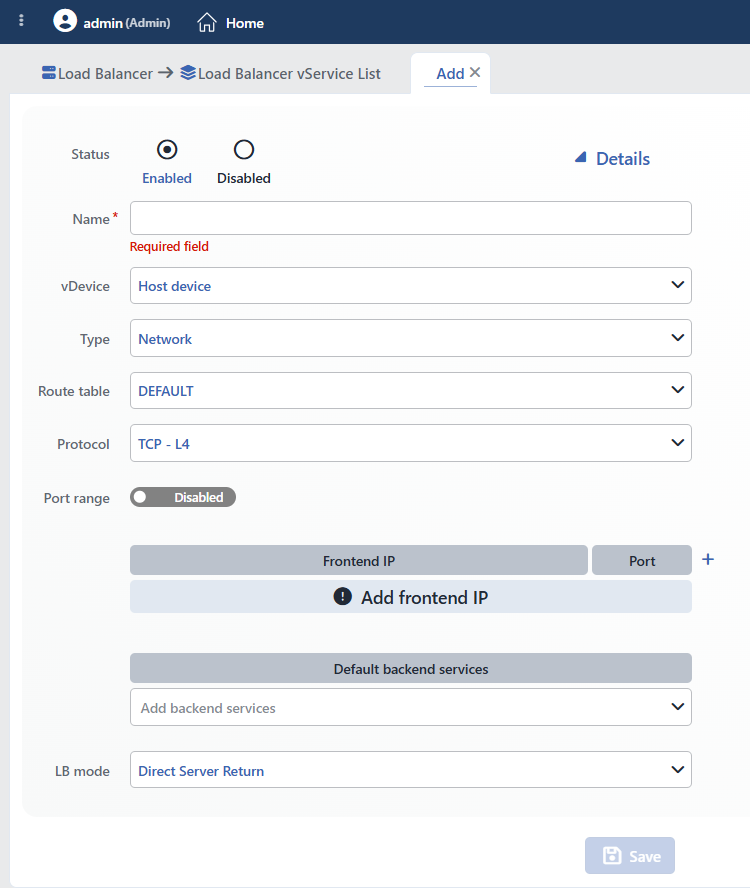 Network vService Add Form
INFO
Status
Determines the initial status of the vService after it is created.
| Option | Description |
|---|---|
| Enabled | The vService starts as active. It starts receiving traffic as soon as the configuration is applied. It is the standard selection for production environments. |
| Disabled | The vService is created but marked as Disabled and is not listed on the status monitoring screens. It is used before the configuration is completed or during maintenance processes. It needs to be switched to Enable manually. |
Disabling and the Frontend IP
On TR7, IP addresses are device-level network resources that live independently of the vService; the vService uses this address only as a listening point (see Profile-Based IP Model). For this reason, when the vService is set to Disabled, the Frontend IP addresses (Interface IP / VIP) defined on it are not disabled automatically; depending on the interface, they continue to respond at the network layer.
If the Frontend IP address also needs to be turned off, the related IP is managed from the Interfaces List screen with the Disable (temporary) or Delete IP (permanent) operation.
Debug (conditional logging) only in HTTP
A separate Debug mode status and conditional debug logging exist only in HTTP-type vServices; in the Network type, Status offers only the Enabled / Disabled options.
INFO
Type Required
Network is selected as the vService type. Type is the discriminator field of the form: the selected type determines which fields/modules appear in the rest of the form and in the Details panel. Network is the type with the leanest feature set, optimized for Layer 3/4 packet-level distribution.
| Type | Layer | Description | Use Area |
|---|---|---|---|
| HTTP | Application (L7) | Full HTTP awareness; HTTP/1.1, HTTP/2, HTTP/3 (QUIC); SSL termination and content-based routing. | Websites, APIs, web applications |
| L7 TCP | Application (L7) | L7 processing for non-HTTP TCP protocols; SSL termination (TCP + TLS) support. | RDP, SQL, LDAP, SMTP, MQTT, custom TCP protocols |
| Network | Network (L3/L4) | Packet-level distribution; TCP / UDP / ANY protocol, DSR / Route (NAT) / SNAT modes. | DNS, UDP services, SIP, NTP, raw TCP/IP |
Fields specific to the Network type and common fields
Present only in the Network type: the Route Table and SNAT IP fields, the Protocol selection (TCP / UDP / ANY), Port Range, LB Mode (Direct Server Return / Route Mode / SNAT) and UDP / ANY protocol support.
In the Details panel, Network contains only the Report and LB Algorithm (including L4 persistence / SIP persistence) rows; since reporting is produced only in HTTP vServices, the Report box yields no result in this type.
Not present in Network (only in the L7 types): SSL termination and Certificate · conditional routing (Conditional Backend Services / Content Switching) · SNI-based routing · WAF · AGS · L7 DDoS & Threat Protection · IP Reputation · Cache · Compression · Trusted proxy · X-Forwarded-For · Virtual hosting · HTTP/3 (QUIC) · Actions · SSL security · LOG · Notification · QOS · Bandwidth · vService limits · Timeout.
WARNING
Type is the most decisive choice of creation: while an existing vService is being edited, the Type and vDevice fields are locked and cannot be changed. The correct type must be determined from the start: L3/L4 packet-level distribution, UDP services and raw IP traffic are of the Network type.
For the other vService types and the full comparison: vService · HTTP (L7) · L7 TCP
INFO
Route Table
The route table (network segment) to which the vService will be bound is selected. Each route table has its own IP addresses and routing rules; Network vService listens for and routes traffic over the selected route table. By default, the system's DEFAULT route table is selected.
The route table selection directly determines the options in the form:
- Only the addresses belonging to the selected route table are displayed in the Frontend IP list.
- When LB mode = SNAT is selected, the SNAT IP list is also limited to the same route table.
- Only the Backend Services in the same route table are listed in the Backend Services selector.
- When the route table is changed, the selected Frontend IPs, the SNAT IP and the Backend Services are cleared.
If separate route tables are defined for different network segments, the vService is run in that segment by selecting the appropriate one.
Route table configuration is located on the Route Tables page.
INFO
Protocol
Determines at which protocol level the vService will work. The default is TCP - L4 (the first option in the list). The selected protocol affects the load balancing behavior and the available algorithms and modes.
| Protocol | Layer | Description | Use Area |
|---|---|---|---|
| TCP - L4 (default) | Layer 4 | Load balancing for TCP connections | General TCP services, port-based distribution |
| UDP - L4 | Layer 4 | Load balancing for UDP packets | DNS, NTP, Syslog, SIP, SNMP |
| ANY - L3 | Layer 3 | Transparent distribution of all IP protocols without port separation | ICMP, GRE, IPsec, custom IP protocols |
Effects of selecting ANY (L3)
When ANY is selected, the vService transparently routes all IP protocols and ports without being bound to a specific port. For this reason, the form is restricted as follows:
- The Port value of all frontend rows is set to 0 and the field becomes disabled (all ports are processed); rows added later also open with 0,
- The Port Range and SIP Persistence fields are hidden,
- Only Direct Server Return and SNAT can be selected in LB Mode (Route Mode cannot be used),
- LB Algorithm is switched to Round-Robin; only Round-Robin and Weighted Round-Robin can be selected.
INFO
Port Range
An on/off switch used to manage a port range with a single vService (default Disabled). It appears only while Protocol = TCP - L4 or UDP - L4; it is hidden when ANY - L3 is selected (all ports are already processed).
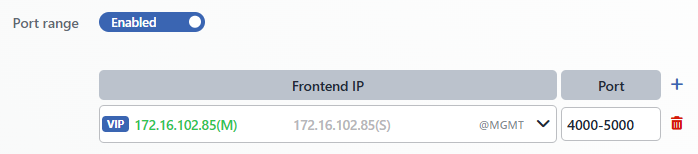 Port Range Configuration
- Disabled (default): Only a single port is entered in the Port field (e.g.
53). - Enabled: A single port range is entered in the Port field (e.g.
4000-5000; the start port must be smaller than the end port). A comma-separated list is not accepted; for multiple ports or ranges, each is added as a separate Frontend row.
| Scenario | Port |
|---|---|
| SIP and RTP | 5060-5080 |
| Game servers | 27000-27050 |
Distribution while port range is enabled
In vServices with port range on, distribution is done only with Round-Robin / Weighted Round-Robin, the LB Mode selection is not applied (traffic is routed through TR7; if a SNAT IP is selected, the source address is translated) and the Backend Service health status is not reflected in the distribution. The same behavior also applies in the ANY - L3 protocol.
INFO
Frontend (Frontend IP · Port)
Defines the IP address and port number the vService will listen on; the table consists only of the Frontend IP and Port columns, and there is no Protocol column in this type. The selected Frontend IP represents the endpoint at which the traffic coming from clients is received on TR7. A new frontend row is added with the (+) icon in the Port header (it opens with port 80, or 0 in the ANY protocol); each row creates an independent listening point. The form does not prevent saving with an empty list; however, a vService with no frontend address never becomes active.
Frontend IP
Only the IP addresses belonging to the selected Route Table are displayed in the list. One of these addresses is selected:
| IP Type | Description |
|---|---|
| Interface IP | An IP assigned to a physical or virtual interface; it appears in the list in the Interface IP (interface) address format. It is the only option in a single-device (standalone) setup. |
| VIP (Virtual IP) | Used for high availability; it is defined with a Master/Slave role and can be created only in a cluster setup. It appears in the list in the VIP (interface) address format. Details are located on the Add IP Address (Cluster) page. |
Port
The port number to be listened on is entered. If Port Range is enabled, a range is entered instead of a single port.
| Port | Protocol | Use |
|---|---|---|
| 53 | DNS | Domain Name System |
| 123 | NTP | Network Time Protocol |
| 514 | Syslog | Log collection |
| 5060 | SIP | VoIP signaling |
| 161 | SNMP | Network management |
Port in the ANY protocol
When ANY is selected as the Protocol, the Port field becomes disabled; traffic on all ports is processed by the vService.
INFO
Backend Services
It is the target to which the traffic will be directed; the label of the form row is Backend Services, and the title of the table is Default Backend Services. In Network vService, conditional routing (Conditional backend services) is not supported: the + Conditional backend services button in the table header does not appear in this type, and all traffic is directed to the targets here.
Existing targets are selected from the drop-down list; multiple Backend Services and/or Backend Groups can be selected together. When more than one target is selected, the traffic is distributed among them according to the vService's LB Mode, LB Algorithm and L4 Persistence settings; the weight and connection limit of the Backend Service are used in the distribution. With the Backend service and Backend group buttons in the selector, a new Backend Service or Backend Group can be defined without leaving this screen. While the list is empty, the text Add backend services appears.
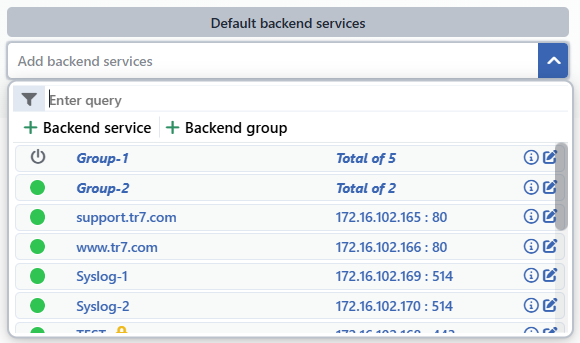 Backend Service Selection
Without a Backend Service
If Backend services is left empty, the vService cannot process traffic.
INFO
LB Mode
Determines the load balancing mode; it affects the traffic flow and the network configuration requirements. The default is Direct Server Return. The selection is applied only in TCP - L4 / UDP - L4 vServices with Port Range off; in ANY - L3 vServices and vServices with Port Range enabled, traffic is routed through TR7 in every case (if a SNAT IP is selected, the source address is translated).
Direct Server Return
Incoming traffic is forwarded to the Backend Services; responses are sent directly to the client, bypassing TR7 (asymmetric flow). Since TR7 is not on the return path, the processing load is minimized and the highest performance is achieved. The client IP address reaches the Backend Service as is.
Traffic flow: Client → TR7 → Backend Service · Backend Service ⟶ (directly) ⟶ Client
Requirement: The Backend Services must be prepared on the server side to accept packets coming to the vService's frontend address.
Route Mode
TR7 works as a gateway; packets pass through TR7, and the return traffic also flows through TR7 (symmetric). The source (client) IP address is preserved, and the Backend Services see the real client IP.
Traffic flow: Client → TR7 → Backend Service · Backend Service → TR7 → Client
Requirement: The return traffic must flow through TR7. This mode cannot be used when Protocol = ANY - L3 is selected.
SNAT
While forwarding traffic to the Backend Services, TR7 replaces the source IP address with the selected SNAT IP (symmetric flow). In this way, the Backend Services return the response through TR7, and no special configuration is required on the server side; however, the original client IP address is not forwarded to the Backend Service.
Traffic flow: Client → TR7 (source IP → SNAT IP) → Backend Service · Backend Service → TR7 → Client
SNAT IP Required
It is the required field that appears when SNAT is selected. The address to be used as the source IP is selected from among the IPs belonging to the selected Route Table.
Mode comparison:
| Mode | Advantage | Disadvantage |
|---|---|---|
| Direct Server Return | Responses bypass TR7; the client IP is preserved | Server-side preparation is required |
| Route Mode | The client IP is preserved | The return traffic must flow through TR7; cannot be used in the ANY protocol |
| SNAT | Simple setup, no server change required | The original client IP is lost |
INFO
Save
The vService adding operation is completed by clicking the Save button. While there is an invalid field in the form, the button is disabled; no separate confirmation window opens for saving and the save returns immediately, while the configuration is applied in the background within a short time. After saving:
- The vService is added to the vServices list.
- If Status is Enabled, the vService becomes active and starts receiving traffic.
- In a cluster setup, if automatic synchronization is on, the configuration is transferred to the peer device; in manual synchronization mode, it is transferred with Sync All.
- The vService status becomes visible on the monitoring screens.
Saving restarts the vService
In Network vService, every save (including a name change) restarts the vService; open connections are dropped. In HTTP and L7 TCP vServices, reloading is uninterrupted.
Details
The Details switch is at the top right of the general section; when it is turned on, the side panel appears. For Network vService, this panel contains only the Report and LB Algorithm rows. When an existing vService whose algorithm or persistence differs from the default is opened, the LB Algorithm box comes open by itself; when the box is turned off, the algorithm returns to Round-Robin and L4 persistence is turned off.
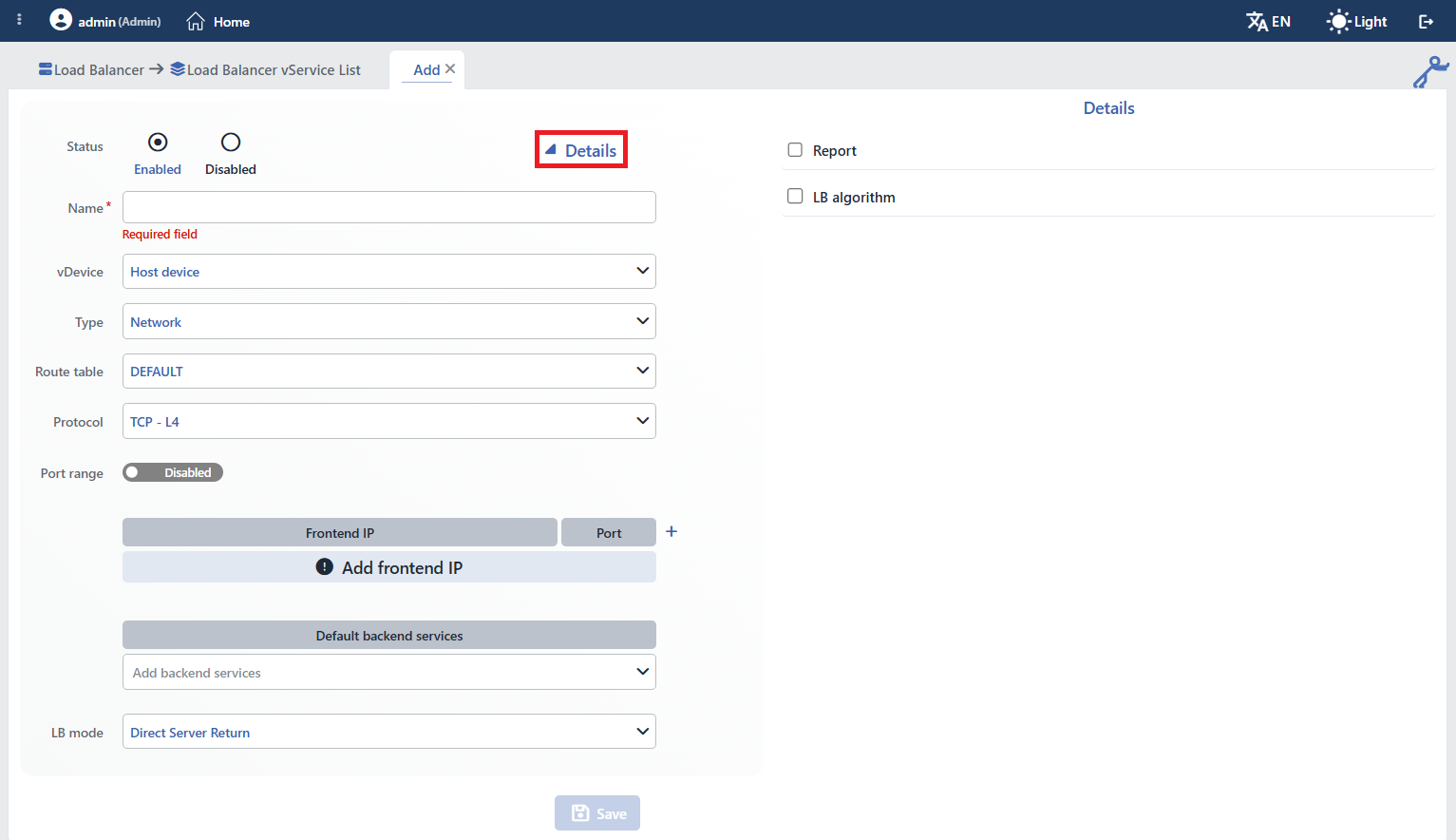 Network vService Details panel
INFO
Report
The report profile selector is also listed in this type and can be checked; however, reporting is produced only in HTTP vServices. A report profile attached to a Network vService is not saved and no report is created; all report sections are derived from HTTP access records. For Network vService, connection, packet and traffic statistics are followed on the vService monitoring screens.
Report profile management is located on the Reports page.
INFO
LB Algorithm
The load balancing algorithm that determines according to which rule the packets are distributed to the Backend Services, and the session persistence settings, are configured in this section. The box contains, in order, the algorithm selector, the information line showing the description of the selected algorithm, L4 Persistence and SIP Persistence.
Algorithms
Network vService offers the following algorithms for packet-level distribution, in the order of the selector. The default is Round-Robin.
| Algorithm | Description | Recommended Scenario |
|---|---|---|
| Round-Robin | Distributes packets to the servers in turn and equally. | Stateless services such as DNS and NTP |
| Weighted Round-Robin | Performs proportional distribution according to server weights. | Servers with different capacities |
| Least-Connection | Directs to the server with the fewest active connections. | TCP-based services |
| Locality-Based Least-Connection | Directs the same client IP to the same server as much as possible; under overload, it switches to the one with the fewest connections. | Mixed scenarios |
| Weighted Least-Connection | Prefers the server with the fewest connections per weight. | TCP servers with different capacities |
| Source Hash | Selects the server according to the source IP hash value; the same client always goes to the same server. | Cases that require session persistence |
| Destination Hash | Selects the server according to the destination IP hash value. | Cache optimization |
Protocol restriction: Round-Robin and Weighted Round-Robin can be used in all protocols; the other five algorithms are applied only in the TCP - L4 and UDP - L4 protocols while Port Range is off. When Protocol = ANY - L3 is selected, only Round-Robin and Weighted Round-Robin can be selected; while Port Range is enabled, distribution is also done only with these two algorithms.
UDP and Least-Connection
The Least-Connection family is based on the concept of connections; its effect is limited in connectionless protocols such as UDP. Round-Robin or Source Hash is more suitable for UDP services.
L4 Persistence
The Enabled / Disabled switch that turns Layer 4 session persistence on and off (default Disabled). When it is turned on, the duration field (value + unit) comes filled with 5 minutes; during this time, packets coming from the same source IP are directed to the same Backend Service. The duration is at least 1 unit; persistence is disabled by turning off the switch, and each new flow is evaluated independently according to the selected algorithm.
UDP and Persistence
UDP is a connectionless protocol. L4 persistence ensures that the same source IP goes to the same server but does not perform real session tracking; for SIP traffic, SIP Persistence is additionally turned on.
SIP Persistence
The Enabled / Disabled switch that provides session persistence for SIP (Session Initiation Protocol) traffic (default Disabled). It takes effect only while L4 Persistence is on; when enabled, packets are parsed as SIP and the messages belonging to a call are directed to the same Backend Service. Since UDP packets that cannot be parsed as SIP are dropped, it should be turned on only in real SIP vServices. This field is hidden when Protocol = ANY - L3 is selected.
SIP and UDP
SIP persistence is designed for UDP services, over which SIP/VoIP traffic usually flows. In scenarios that carry SIP over TCP and require application layer processing, L7 TCP vService can be considered.
Health status and distribution
In TCP / UDP vServices with Port Range off, Backend Services with a defined health check are taken into or out of distribution according to TR7's central health check result; a Backend Service with no health check defined is always considered reachable. In ANY - L3 vServices and vServices with Port Range enabled, distribution does not take the health status into account.
Related
- vService: common fields and general operating logic
- HTTP (L7) vService · L7 TCP vService: the other types
- Backend Services · Backend Groups: routing targets
- Profiles: report and other profiles
