
Smarter by Design.Simpler for Business
Source IP Connection Protection
What Is Source IP Connection Protection?
Source IP Connection Protection limits the number of connections that a single source address opens in a certain time window. Since connections and not requests are counted, the block catches not the clients that send many requests over a single connection but the clients that consume resources by opening many connections.
The block is present on the vServices of both the HTTP and the L7 TCP type.
Source-Based
A Counter Per Address
Every source address carries its own counter; when one exceeds it, only that one is penalized
100
Default Limit
The number of connections that a single address can open in a 10-second window
Silent Drop
Default Action
The only enforcement that is valid on both vService types is selected as the default
Two Tiers
Limit and Hard Ceiling
When the ceiling is turned on, the range between the limit and the ceiling takes a separate enforcement from the one above the ceiling
Quarantine
The Hard Ceiling Enforcement
The action of the ceiling cannot be selected; the source that exceeds it is taken directly into the penalty box
In Every Type
vService Type
HTTP and L7 TCP; on TCP the action set is limited to Silent Drop
The Source IP Connection Protection Card on L7 DDoS Protection
The block in the body of the L7 DDoS Protection card reduces its setting to a single sentence: if traffic from any single IP exceeds <limit> connections in <window>, <action>. The limit value is written in bold, the time window faded, and the action in its own color. If a hard ceiling is defined, a second tier is added to the end of the sentence with a semicolon.
When the pencil icon at the top right of the card is clicked, the edit screen opens.
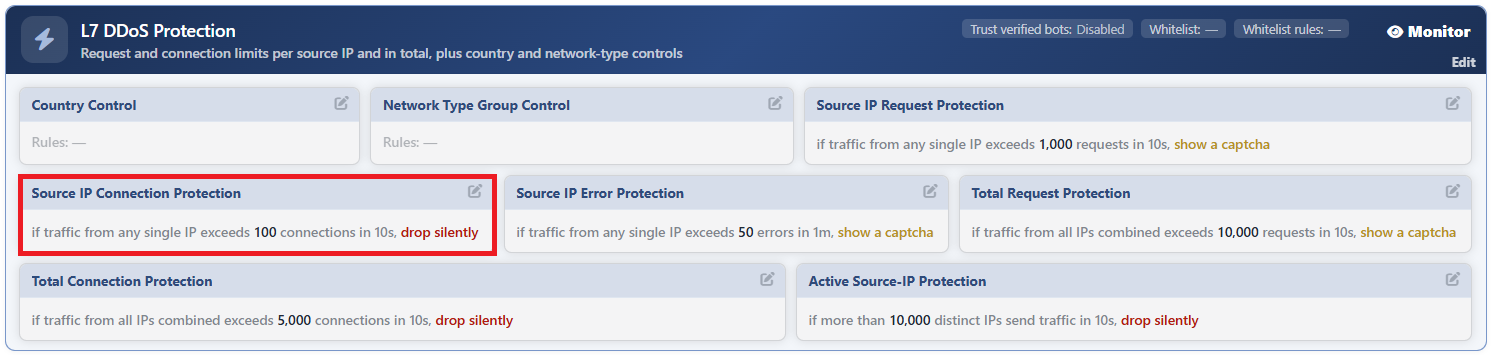 L7 DDoS Protection - The Source IP Connection Protection Card
The Source IP Connection Protection Edit Screen
- The Bot/DDoS Management tab is opened.
- The pencil icon at the top right of the Source IP Connection Protection block in the body of the L7 DDoS Protection card is clicked; the edit window titled Edit - Source IP Connection Protection opens.
- The following fields are edited and confirmed with the
Editbutton.
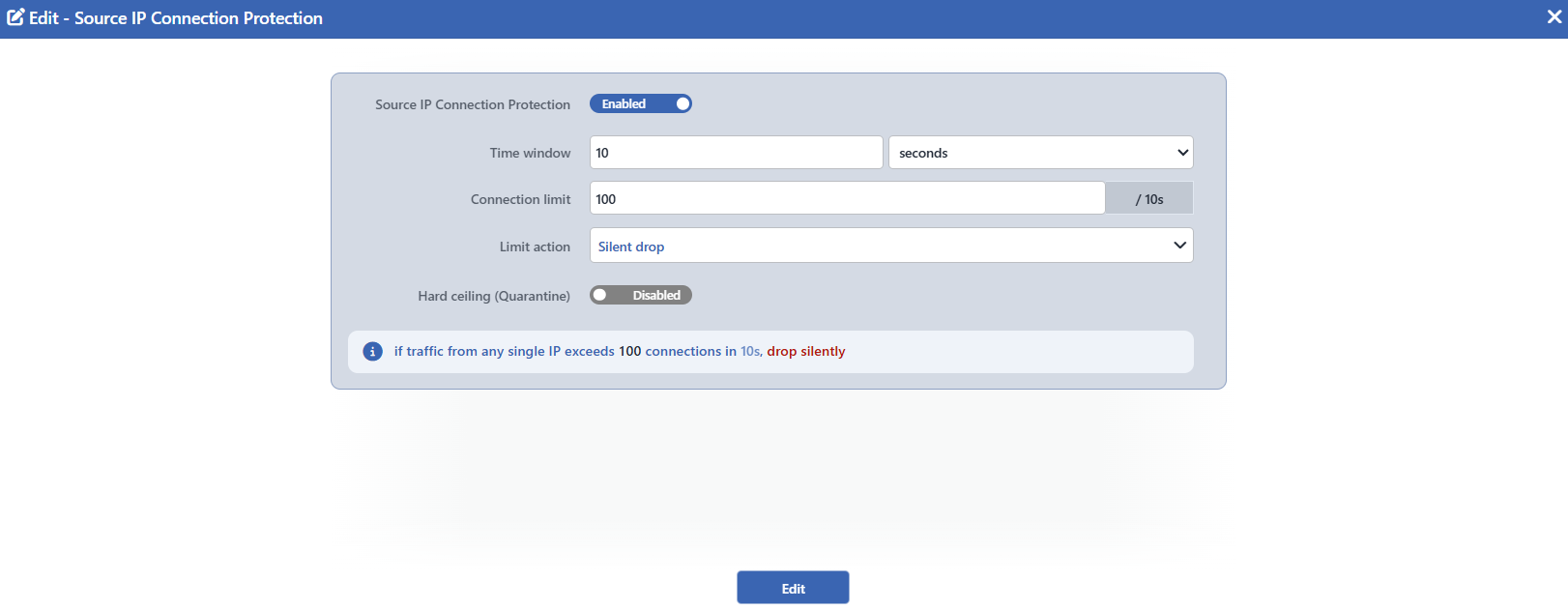 The Source IP Connection Protection Edit Screen
INFO
Source IP Connection Protection Default: On
It determines whether the block is on or not; its default value is on and this value is written to the configuration record created when the protection is enabled. While it is on, the block makes measurements and produces events even while the protection is in the Monitor mode; for it to be off, the switch must be turned off manually.
When it is turned off, all the other fields in the form (the time window, the limit, the action and the hard ceiling if there is one) are hidden.
When it is turned off, the block card does not leave the screen: it fades and the Disabled badge appears on it, and the values written continue to be read.
INFO
Time Window Default: 10 seconds
For how long the counter will be accumulated is defined. The value is entered with a number and unit pair; seconds, minutes or hours can be selected as the unit. Its default value is 10 seconds; at least 1 second and at most 1 hour can be defined.
The window is repeated in the suffix on the right of the limit field as well: with a label such as / 10s the field shows to which period the limit belongs.
INFO
Connection Limit Default: 100
How many connections a single source address can produce within the window is defined; its default value is 100. Only an integer, at least 1, can be entered in the field. When the counter exceeds this value, the block is triggered.
INFO
Limit Action Default: Silent Drop
The enforcement to be applied when the limit is exceeded is selected; its default value is Silent Drop.
| Option | What it does |
|---|---|
| Silent Drop | The request is left unanswered, the connection is silently dropped. |
| Block | It is blocked with the defined status code. |
| Tarpit | The request is slowed down by being kept waiting. |
| Redirect | It is redirected to the defined address. |
| Show Content | A page from the selected content profile and a status code are returned. |
| Show Captcha | The source is directed to the shared challenge. |
In this block Tarpit can also be selected; the Quarantine option is not present.
On L7 TCP vServices this set is limited to Silent Drop: the blocking page, the redirection and the challenge are responses specific to HTTP.
According to the selected action, additional fields appear in the form: Block status code (default 403) for Block, Redirect location (default /robots.txt) and Redirect code (default 302) for Redirect, and Content page and Status code (default 403) for Show Content. Show Captcha does not carry an additional field in this form: the appearance of the challenge is managed from the Captcha card.
INFO
Hard Ceiling (Quarantine) Default: Undefined
It is the second and harder tier; it is not defined by default. When it is turned on, the field is filled with twice the default limit of the block (200); the current value written in the limit field does not change this pre-filling, and the value needed is written manually. The enforcement of the ceiling cannot be selected: in this block it is always Quarantine and this name is written in the label of the field as well.
While the ceiling is on, Limit Action works only in the region between the limit and the ceiling; when the counter exceeds the ceiling, the decision passes to the enforcement of the ceiling. This two-tier distinction is set up only in the Active mode: in the Monitor mode the ceiling does not work as a separate tier. This second tier is added to the card sentence with a semicolon: …; over <ceiling> connections, <action>.
INFO
Edit
Changes in the form are saved by clicking the Edit button. There is no additional confirmation window or deploy step; the Load Balancer configuration is regenerated and applied automatically. The operation is written to the user log with a change summary.
The sentence below the form is live
The information box below the fields builds the sentence that will appear on the card while it is being written: as the limit, the window and the action change, the sentence is updated instantly. Before saving, how the setting will be read on the screen is seen from here.
Why is the default action Silent Drop?
The challenge, the blocking page and the redirection are responses specific to HTTP. Since this block also works on L7 TCP vServices, Silent Drop, which is valid on both types, has been selected as the default action. If a softer enforcement is to be preferred on HTTP vServices, the action can be changed manually.
The verified bots can be exempted from this block
While the Trust Verified Bots setting of the L7 DDoS Protection card is on, the verified search engine bots are not caught by the limit of this block. The exemption is specific to the source-based blocks; the total limits are not affected by this setting.
Scope and Limits
INFO
- It is present on both vService types. On L7 TCP the action set is limited to Silent Drop.
- The block is on by default. When the configuration is saved, the switch is written as on; turning it off is the decision of the operator.
- The enforcement is applied only in the Active mode. While L7 DDoS Protection is in the Monitor mode, the counters work, events are produced and the card sentence is read; however no request is stopped.
- The first match wins. If a request has been decided in a block further above, this block does not produce an enforcement for that request. The quarantine stamp of the hard ceiling is the exception to this: a source that exceeds the ceiling is taken into the penalty box even if another block has decided the request.
- The pencil icon depends on the permission. The block card is displayed with read-only permission; the pencil icon that opens the edit window is displayed only on the users that have edit permission.
- The enforcement of the hard ceiling is fixed. When the ceiling is exceeded, the source is always taken into quarantine; the action cannot be selected.
