
Smarter by Design.Simpler for Business
Country Control
What Is Country Control?
Country Control is the block that evaluates the traffic according to the country it comes from. While the other blocks carry a single threshold, this block keeps a rule list: every row defines within itself which countries it covers, what it counts, its limit and what will be done when the limit is exceeded.
The block can do two different jobs at once. When a limit is written in a row, a country-based rate limit is set up; when the limit is left empty, the row turns into a membership rule and the action is applied directly the moment the country matches. In this way "block the traffic coming from outside Turkey" and "every country can send at most 2,000 requests per minute" can be defined in the same list.
The rows work according to the first match: they are evaluated from top to bottom and the first row that matches gives the decision.
Rule List
Not a Single Threshold
The block keeps a list; every row carries its own scope, its own limit and its own action
First Match
Evaluation Model
The rows are tried in order, and the first row that matches gives the decision
3
Match Forms
Each Remaining (a counter per member) · In Set and Not in Set (a single shared counter)
Without a Limit
Membership Rule
When the limit is left empty, no counter is kept and the action is applied directly
1 Minute
Default Window
It is common for all the rule rows
Block-Local
Exemption
The exempt members skip only this block; the source and total limits continue to be applied
The country list also contains the local networks
The country picker, at the very top, carries the Local networks entry besides the countries: the private and unidentifiable address spaces are selected with this entry. In this way the traffic coming from the internal network can also be handled as if it were a country rule.
The Country Control Card on L7 DDoS Protection
The block in the body of the L7 DDoS Protection card lists the rule rows instead of a single sentence. Every row is turned into its own sentence and the flags of the countries it covers are added to the beginning of the In Set and Not in Set rows; if there are more than five countries, the rest are folded into a +N chip. Since there is no country selection in the Each Remaining (Individually) row, the flag strip is not displayed either. If no rule is defined, the card writes Rules: —.
When the pencil icon at the top right of the card is clicked, the edit screen opens.
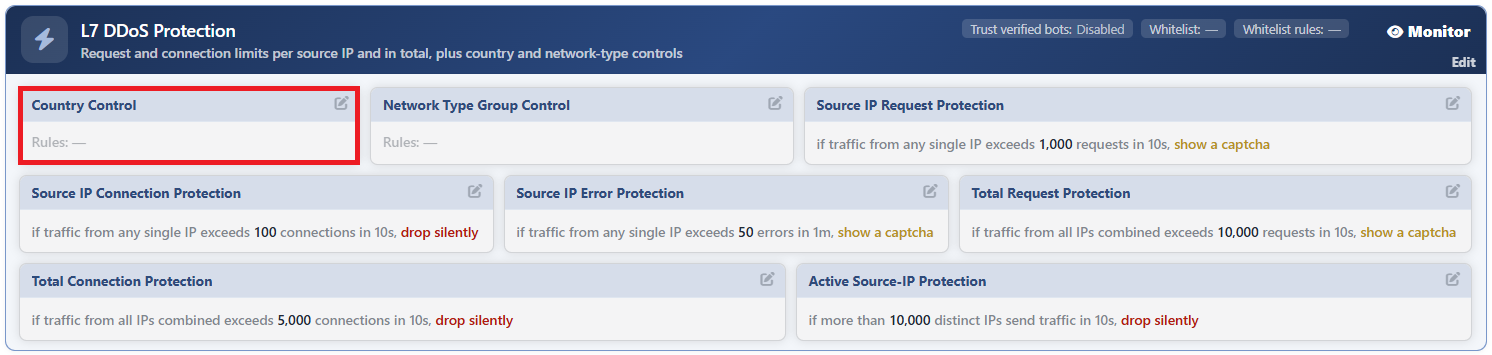 L7 DDoS Protection - The Country Control Card
The way the rows are turned into a sentence:
| Row | Sentence |
|---|---|
| With a limit, Each Remaining (Individually) | if traffic from any single country exceeds <limit> <metric> in <window>, <action> |
| With a limit, In Set | if traffic from country <countries> exceeds <limit> <metric> in <window>, <action> |
| With a limit, Not in Set | if traffic from outside country <countries> exceeds <limit> <metric> in <window>, <action> |
| Without a limit (membership rule) | traffic from country <countries>: <action> |
If the action has a parameter, it is added to the sentence: the status code in blocking and in showing content, the redirection code in redirection, and the Mbit value in bandwidth limiting. The redirection address is not written in the sentence; it appears as a tooltip when the sentence is hovered over.
The Country Control Edit Screen
- The Bot/DDoS Management tab is opened.
- The pencil icon at the top right of the Country Control block in the body of the L7 DDoS Protection card is clicked; the edit window titled Edit - Country Control opens.
- The following fields are edited and confirmed with the
Editbutton.
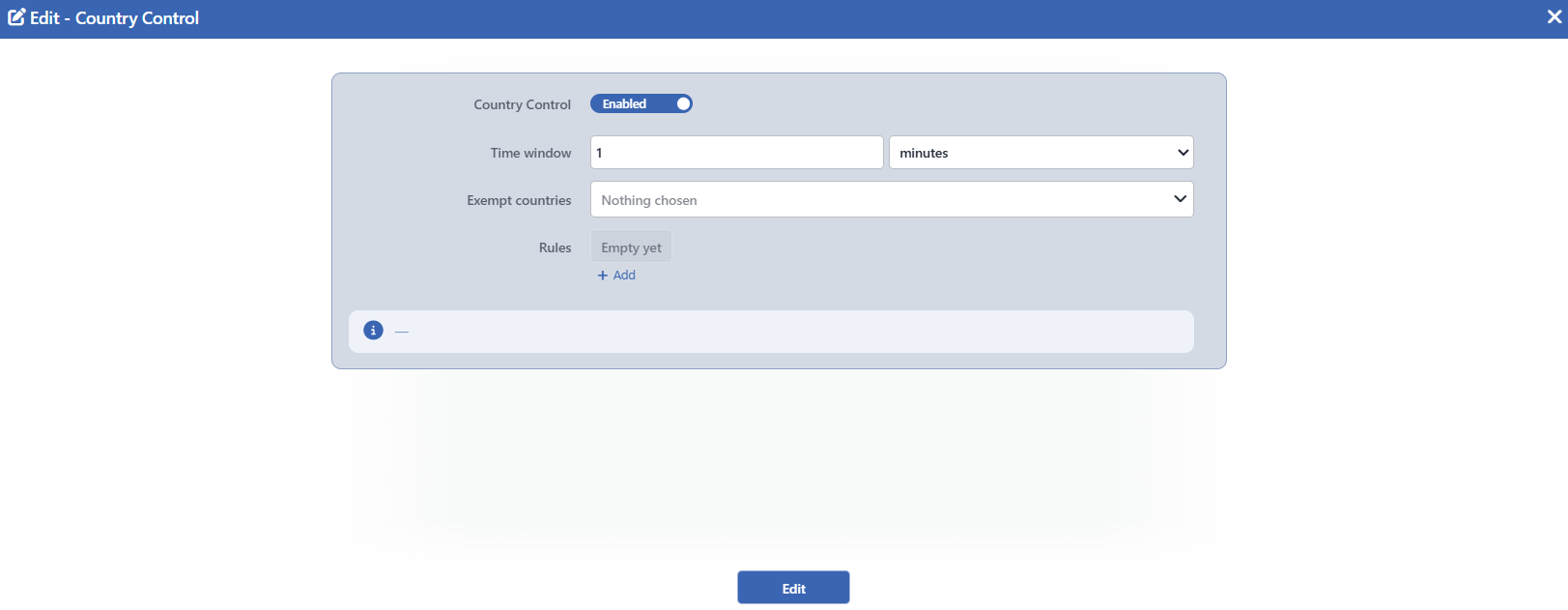 The Country Control Edit Screen
INFO
Country Control Default: On
It determines whether the block is on or not; it is on by default: when the configuration is saved, the switch is written as on. While the rule list is empty, even if the block is on, it does nothing: an empty list is a legitimate state and is the way of leaving the block to the learning engine.
When it is turned off, the block card does not leave the screen: it fades and the Disabled badge appears on it.
INFO
Time Window Default: 1 minute
For how long the counters in the rule rows will be accumulated is defined; it is common for all the rows. The value is entered with a number and unit pair; seconds, minutes or hours can be selected as the unit. Its default value is 1 minute; at least 1 second and at most 1 hour can be defined.
INFO
Exempt Countries Default: Empty
The countries to be exempted from the rules of this block are checked; it is empty by default. The traffic of the exempt countries does not enter the rule rows at all and does not feed the counters of the rows either.
The exemption works only on this block: the countries listed continue to be subject to the source-based limits, the total limits and the hard ceilings. To exempt from the whole of the protection, the own whitelist setting of the card is used; details: Edit.
INFO
Rules
It is the list of the country rules. A new row is added with the + Add button, and it is deleted with the cross icon at the top right of the row. The list can be left empty; while it is empty, the text Empty yet appears in the place of the list. On the card side, on the other hand, Rules: — is written.
The rows are evaluated in order and the first row that matches gives the decision. For this reason the rows with a narrow scope must be kept above the rows with a broad scope.
The fields of the row are explained separately below.
The Fields of the Rule Row
When the + Add button in the Rules field is clicked, a new rule row is added to the list and the fields of the row open as below. The button adds one more row at every click; as many rules as wanted can be written into the list. The rows are evaluated according to their order in the list; when a second row is added, a handle icon appears on the left of the rows and the rows can be reordered by dragging. The ordering is not a display preference, it is the decision itself. A row is removed from the list with the cross icon at its top right.
A new row opens with ready values: the match is Each Remaining (Individually), the metric Request, the limit 2000 and the action Block. On L7 TCP vServices the metric field is not present and a new row opens with the Silent Drop action.
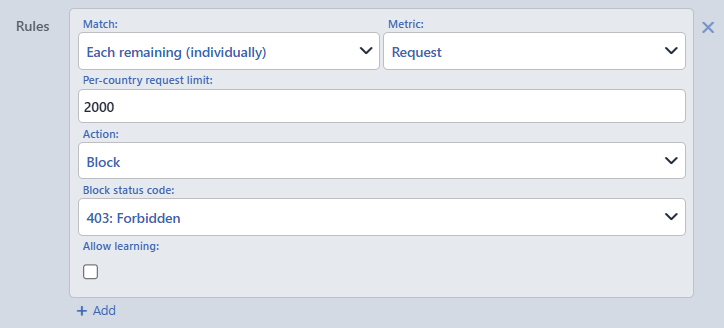 The Country Control Rule Row
INFO
Match Default: Each Remaining (Individually)
It determines which countries the row covers; its default value is Each Remaining (Individually).
| Option | Meaning |
|---|---|
| Each Remaining (Individually) | There is no specific country list: every remaining country is evaluated separately with its own counter. The countries owned by the limited set rows before it do not enter the counter of this row at all. For the set rows without a limit no separate exclusion is written; since they already give the decision with the order priority, the row below is not reached. |
| In Set | Only the selected countries are covered and all of them share a single common counter. |
| Not in Set | The traffic that stays outside the selected countries is covered; this is also counted with a single common counter. |
The distinction changes the meaning of the limit: in an Each Remaining row the limit is valid per country, and in the In Set and Not in Set rows for the whole of the list.
Countries
It is displayed when In Set or Not in Set is selected in the Match field. The countries that the row covers are selected; in an Each Remaining row a country selection is not made.
INFO
Metric Default: Request
What the row will count is selected: Request or Connection; its default value is Request. The field is seen only on HTTP vServices; on L7 TCP vServices the metric is necessarily the connection.
INFO
Limit
The threshold of the row is defined. Only an integer, at least 1, can be entered in the field; it can be left empty.
The label of the field changes according to the state of the row and says to whom the limit belongs:
| State | Label |
|---|---|
| Empty | Limit (empty = direct action on every match) |
| Each Remaining | Per-country <metric> limit |
| In Set / Not in Set | Set-total <metric> limit (one shared counter) |
When the limit is left empty, the row turns into a membership rule: no counter is kept and the action is applied directly to every matching request.
INFO
Action
The enforcement to be applied when the row is triggered is selected; its default value is Block on HTTP vServices and Silent Drop on L7 TCP vServices.
| Option | What it does |
|---|---|
| Silent Drop | The request is left unanswered. |
| Block | It is blocked with the defined status code. |
| Redirect | It is redirected to the defined address. |
| Show Content | A page from the selected content profile and a status code are returned. |
| Show Captcha | The source is directed to the shared challenge. |
| Bandwidth Limit | The traffic is not blocked, the bandwidth is limited. |
In the set of the geo blocks Tarpit and Quarantine are not present: a set limit covers not a single source but a community. On L7 TCP vServices the set is limited to Silent Drop and Bandwidth Limit.
According to the selected action, additional fields appear in the row: Block status code (default 403) for Block, Redirect location (default /robots.txt) and Redirect code (default 302) for Redirect, Content page and Status code (default 403) for Show Content, and Bandwidth limit (Mbit/s) (default 10) for Bandwidth Limit.
INFO
Allow Learning Default: Off
It determines the ownership of the row; it is off by default.
- While it is off, the row belongs to the operator: the learning engine does not touch the structure of the row and does not change its scope and its action.
- While it is on, the engine can transform the row structurally: it can change its scope, merge it with another row or remove it. The rows that the engine sets up itself are born with this switch on.
While the switch is off, the engine continues to produce a recommendation for the number of the row as well and the recommendation continues to appear on the card; the operator applies it manually if it wishes. In the automatic mode, on the other hand, a row that is off is frozen together with its number: the engine does not change it by itself.
INFO
Edit
Changes in the form are saved by clicking the Edit button. There is no additional confirmation window or deploy step; the Load Balancer configuration is regenerated and applied automatically. The operation is written to the user log with a change summary.
The sentences below the form are live
The information box below the fields builds the sentences that will appear on the card while they are being written: a sentence is produced for every rule row and it is updated instantly as the fields change. While there is no rule at all, — is written in the box.
Scope and Limits
INFO
- It is present on both vService types. On L7 TCP the metric picker is removed and the action set goes down to Silent Drop and Bandwidth Limit.
- The block is on by default. Its being on while the rule list is empty is not a problem: an empty list leaves the block to the learning engine.
- The rows work according to the first match. The ordering is not a preference, it is the decision itself.
- Bandwidth limiting does not cut the chain. A row that limits the bandwidth does not terminate the request and does not enter the first match chain at all: it stops neither the rows below it in the same list nor the blocks below.
- The exemption works only on this block. The exempt countries continue to be subject to the source and total limits and to the hard ceilings.
- The enforcement is applied only in the Active mode. In the monitor mode the counters work and events are produced, but no request is stopped.
- The pencil icon depends on the permission. The block card is displayed with read-only permission; the pencil icon that opens the edit window is displayed only on the users that have edit permission. While the L7 DDoS Protection protection in the upper layer is Off, the pencil icon is not seen either.
- A set row without members does not work. A row in which In Set or Not in Set has been selected but in which no country has been checked is written to the configuration and its sentence appears on the card, but it is not applied to the traffic at all. In the set rows the countries field must be filled.
- When a structural recommendation is applied, the block switch is also turned on. When the rule rows recommended by the learning engine are applied, if the block is off, it is turned on and the members that the engine counts as trusted are added to the exemption list.
- The metric selection changes the unit of the counting. Request counts every request separately; Connection counts per connection and in HTTP the counter increases only on the first request of the connection. On the clients that use persistent connections the two metrics give very different results.
