
Smarter by Design.Simpler for Business
L7 TCP vService
What Is L7 TCP vService?
L7 TCP vService is the service type on TR7 that provides load balancing at the Layer 7 (Application Layer) level for TCP-based protocols other than HTTP. It is designed for TCP services such as RDP, LDAP, SQL, SMTP and MQTT, and for custom TCP applications.
L7 TCP vService receives TCP connections from clients, terminates the SSL/TLS session on TR7 or forwards it encrypted when necessary, performs routing according to connection attributes (source IP, SNI, port) and forwards the traffic to the appropriate Backend Services. The modules specific to the HTTP protocol (WAF, cache, compression, Virtual Hosting) do not exist in this type; in return, advanced capabilities such as TCP-level SSL termination, SNI-based routing, conditional distribution and RDP session pinning are offered.
In the TR7 architecture, L7 TCP vService shares the same L7 processing infrastructure with HTTP (L7) vService; the difference is that the TCP stream is evaluated at the connection level instead of HTTP-specific content processing.
What can be done with L7 TCP vService?
- Protocol-independent, connection-level load balancing in TCP-based protocols other than HTTP,
- Reducing the Backend Service load and centralizing certificate management with SSL/TLS termination,
- Routing to different Backend Services according to the SNI information on a frontend where SSL is not terminated,
- TCP-level conditional distribution (Content Switching),
- Session pinning in terminal services with the RDP Cookie algorithm,
- Optimizing long-lived connections such as LDAP, SQL and SMTP with timeout and resource management.
L7
Operating layer
Works as a TCP proxy at the application layer
10
Load balancing algorithms
From round robin to RDP Cookie
RDP Cookie
Terminal session pinning
Built-in persistence for terminal server farms
TLS 1.3
SSL/TLS termination
TCP + TLS · SNI · centralized certificate management
SNI
SNI-based routing
Domain-based distribution on a single IP:port
Content Switching
Conditional distribution
Smart routing with TCP-level criteria
Hash
Session persistence
Consistent routing based on source IP / SNI
QOS
Resource isolation
CPU and memory control per vService
Why L7 TCP vService?
In modern infrastructures, many critical services other than HTTP run over TCP: databases, directory services, terminal servers, e-mail and messaging systems. These services also have high availability, load balancing, security and session management requirements. L7 TCP vService meets these requirements under the same management surface as HTTP vService.
High Availability and Load Balancing
It is unacceptable for a single server failure to affect the entire service. L7 TCP vService eliminates the single point of failure (SPOF) by distributing TCP connections among multiple Backend Services. With the health checks assigned to the Backend Services, faulty servers are automatically taken out of service; when a server becomes healthy again, it is automatically put back into traffic. In services that require long-lived connections (SQL, LDAP), the load is distributed in a balanced way with the Least Connection algorithm.
SSL/TLS Termination
When the SSL/TLS session is terminated on TR7 (TCP + TLS), the Backend Services are relieved of the encryption load, and the traffic continues with unencrypted TCP by default; if encryption is also required on the Backend Service side, SSL Service is enabled on the related Backend Service and TR7 connects to the back end again with TLS. When TCP is selected on the frontend, on the other hand, the TLS traffic is not opened on TR7 and is forwarded encrypted to the Backend Service (SSL passthrough); the certificate is located on the Backend Service. When termination is performed, certificates are managed at a single point; thanks to SNI support, multiple domains are served on the same frontend, each with its own certificate. This model is especially valuable for back-end services that do not support SSL or that are CPU-intensive.
Session Persistence
Some TCP services require communicating with the same server throughout the user session. L7 TCP vService offers two approaches: for terminal services, the RDP Cookie algorithm ensures that user sessions (including reconnections) stay on the same server; for other scenarios, the Hash method performs consistent routing with a key derived from connection attributes such as the source IP or SNI (the SNI key produces a value only on a frontend where SSL is terminated on TR7).
Content Awareness (SNI and Content Switching)
Since it works at L7, L7 TCP vService evaluates traffic not only at the IP and port level but also at the level of connection attributes. On a frontend where SSL is not terminated (TCP), the SSL SNI Info condition reads the SNI value in the TLS handshake without decryption; in this way, multiple domains on a single IP:port are directed to the related Backend Service without opening the encrypted traffic. On a frontend where SSL is terminated on TR7 (TCP + TLS), on the other hand, the SSL Version and SSL Cipher conditions are used; in this case, the SNI value is evaluated with the SNI Received from Client smart variable in a Dynamic Condition. With Conditional Backend Services, these criteria are combined in conditional routing rules and the traffic is distributed to different Backend Services.
Resource Management and Monitoring
With QOS, the CPU and memory resources allocated to each vService are controlled; excessive resource consumption and connection overflows are prevented with Bandwidth and vService limits. Operational visibility is provided with the access log, notifications and reports.
Supported Features
L7 TCP vService offers the following features for TCP-based protocols; the modules specific to the HTTP protocol do not exist in this type.
| Category | Features |
|---|---|
| Protocol | TCP (protocol-independent TCP proxy) |
| SSL/TLS | SSL termination (TCP + TLS), SSL passthrough (TCP), SNI, multiple certificates, TLS Security Profiles, re-encryption to the Backend Service (SSL Service) |
| Routing | SNI-based routing (SSL SNI Info on a frontend where SSL is not terminated; Dynamic Condition with SNI Received from Client on a TCP + TLS frontend), source IP-based routing, conditional / default Backend Service, TCP-level Content Switching |
| Algorithms | Round robin (default), Weighted Round Robin, Least Connection, Least Response Time¹, Least Bandwidth¹, First, Random, Fastest, Fastest+, RDP Cookie |
| Session Persistence | None, Hash (built-in persistence with RDP Cookie) |
| Security | Bot/DDoS protection (L7 DDoS Protection, IP Reputation Protection; Bot Protection Off by default), Blacklist IP Category condition |
| Traffic Manipulation | Actions (TCP-level rules) |
| Resource Management | QOS resource isolation, Bandwidth control, vService limits, Timeout |
| Monitoring & Reporting | Access Log, Reports, Notifications (SNMP / e-mail / SMS / interface), Log Forwarding |
¹ Least Response Time and Least Bandwidth are applied as Least Connection when the selected Core Engine version does not support them.
Use Cases
L7 TCP vService is designed for the load balancing of non-HTTP TCP-based services. Common use cases are summarized below.
🖥️ RDP Terminal Farm Management
In corporate environments, there are many terminal servers. Users access all terminal servers over a single VIP address; session continuity is provided with the RDP Cookie algorithm. When a server fails, users are automatically directed to other servers; to preserve the existing mappings when servers are added and removed, the Hash Consistency option is enabled.
🗄️ Database Load Balancing
In databases with a read-replica structure, read connections are distributed among multiple replicas. The distribution is at the connection level; to separate read and write traffic, the application directs read connections to a separate vService address. With the Least Connection algorithm, long-lived connections are shared in a balanced way; replicas with a defined health check are automatically taken out of service when they fail.
🔀 SNI-Based Routing
On a single IP:port where SSL is not terminated (TCP), routing to different Backend Services is performed according to the SNI information with the SSL SNI Info condition: mail.example.com → e-mail servers (SMTPS/IMAPS), ldap.example.com → LDAPS servers. In protocols that do not open the connection directly with TLS (MySQL, PostgreSQL, MSSQL), the SNI cannot be read; these services are served over a separate port or IP.
🔒 Secure Connection Proxy
In cases where the back-end servers do not support SSL, SSL/TLS is terminated on TR7; an unencrypted TCP connection is established to the back end. Certificates are managed centrally.
Supported Protocols
L7 TCP vService works as a protocol-independent TCP proxy at Layer 7; the following protocols are the main examples served with this type:
- RDP (Remote Desktop Protocol)
- LDAP / LDAPS
- Microsoft SQL Server (TDS)
- MySQL / MariaDB
- PostgreSQL
- Oracle TNS
- SMTP / SMTPS
- IMAP / IMAPS
- POP3 / POP3S
- FTP (control channel)
- SSH
- MQTT
- AMQP (RabbitMQ)
- Memcached
- Redis
- Custom TCP protocols
Protocol-dependent limits
- In FTP, only the control channel is balanced; the data channel requires a separate configuration.
- In protocols that start TLS later within the connection (SMTP/IMAP STARTTLS, LDAP StartTLS, MySQL, PostgreSQL, MSSQL), TCP + TLS termination and SNI-based routing are not applied; this traffic is forwarded to the Backend Service with a TCP frontend.
- In a vService where the SSL SNI Info condition is used, the connection setup is delayed by up to 10 seconds in protocols where the server sends data first when the connection is opened (SMTP, IMAP, POP3, FTP, MySQL).
Best Practices
- Timeout values should be adjusted for long connections. In services that require long-lived connections, such as LDAP and SQL, the default timeouts may be insufficient; the Tunnel(Websocket) Timeout (the idle time of an established connection) and Server Timeout values are increased according to the characteristics of the application.
- RDP Cookie should be used in RDP scenarios. In terminal server farms, the RDP Cookie algorithm ensures that user sessions stay on the same server; it provides a seamless experience on reconnections.
- Least Connection should be preferred for databases. For database connections that stay open for a long time, Least Connection distributes the current load in a more balanced way.
- SSL termination should be considered. SSL termination on TR7 is used to relieve the back-end servers of the encryption load; certificates are managed at a single point.
- Health checks should be configured appropriately. Instead of a port check only, a health check suited to the application protocol (LDAP, SMTP, Oracle or TCP with a send/expect scenario) is defined whenever possible and assigned to the Backend Service.
- vService limits should be determined. Connection and session limits are set according to the capacity of the back-end servers; overloading is prevented.
- Critical vServices should be isolated with QOS. By allocating separate CPU and memory resources to high-priority services with QOS, stable performance is achieved even under load.
How to Add?
A new L7 TCP vService is added through the TR7 web management interface with the following steps:
- The Configuration Menu is opened by clicking the TR7 logo at the bottom left.
- The Load Balancer → Load Balancer vService List → Add steps are followed.
- L7 TCP is selected in the Type field; the vService is configured for the TCP protocol.
- A unique name for the vService, the vDevice it will run on and the Frontend IP / Port / Protocol information it will listen on are entered.
- The Backend Services to which the traffic will be directed are selected from the Default Backend Services table; if conditional routing is needed, a rule is added with + Conditional Backend Services.
- If needed, advanced settings (SSL Security, QOS, Timeout, LB Algorithm, etc.) are configured from the
Detailspanel; SSL Security is listed only while there is a frontend row with TCP + TLS selected. - The vService is added by clicking the
Savebutton.
TIP
Reaching the page via quick search
Instead of navigating the menu step by step, the related page is reached directly by using the search bar in the bottom left corner of the screen. The search bar opens with the Alt + T shortcut on Windows and Opt + T on macOS; typing the name of the feature being searched for is then sufficient.
The vService listing screen and general vService management are located on the vService page; this page covers the add form and the Details panel of an L7 TCP-type vService.
L7 TCP vService Add Form
A new vService is added to the TR7 device by following the Load Balancer → Load Balancer vService List → Add steps. When L7 TCP is selected in the Type field, the following form is displayed.
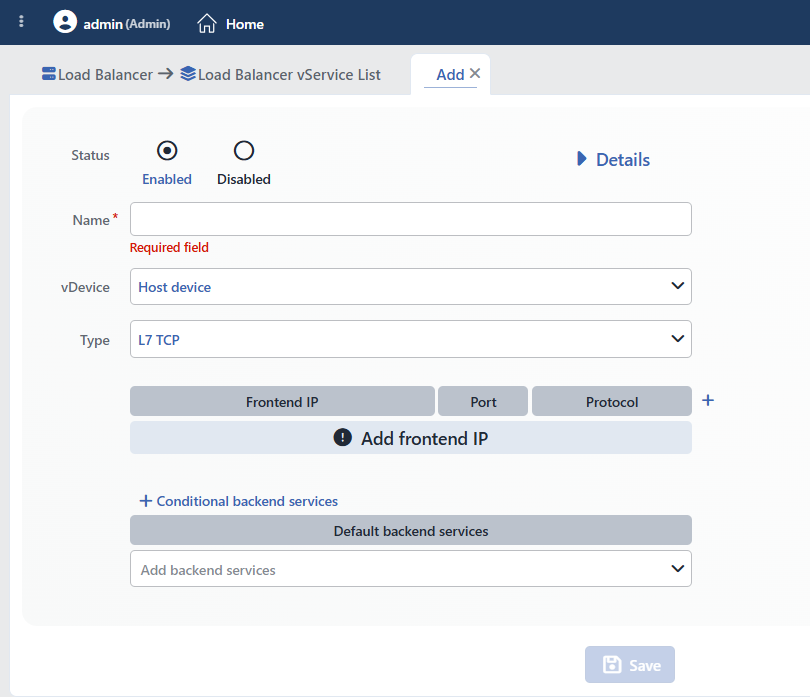 L7 TCP vService Add Form
INFO
Status
Determines the initial status of the vService after it is created.
| Option | Description |
|---|---|
| Enabled | The vService starts as active. It starts receiving traffic as soon as the configuration is applied. It is the standard selection for production environments. |
| Disabled | The vService is created but stays disabled. It does not receive traffic. It is used before the configuration is completed or during maintenance processes. It needs to be switched to Enable manually. |
Disabling and the Frontend IP
On TR7, IP addresses are device-level network resources that live independently of the vService; the vService uses this address only as a listening point (see Profile-Based IP Model). For this reason, when the vService is set to Disabled, the Frontend IP addresses (Interface IP / VIP) defined on it are not disabled automatically; depending on the interface, they continue to respond at the network layer.
If the Frontend IP address also needs to be turned off, the related IP is managed from the Interfaces List screen with the Disable (temporary) or Delete IP (permanent) operation.
Debug (conditional logging) only in HTTP
A separate Debug mode status and conditional debug logging exist only in HTTP-type vServices; in the L7 TCP type, Status offers only the Enabled / Disabled options.
INFO
Type Required
L7 TCP is selected as the vService type. Type is the discriminator field of the form: the selected type determines which fields/modules appear in the rest of the form and in the Details panel.
| Type | Layer | Description | Use Area |
|---|---|---|---|
| HTTP | Application (L7) | Full HTTP awareness; HTTP/1.1, HTTP/2, HTTP/3 (QUIC); SSL termination and content-based routing. | Websites, APIs, web applications |
| L7 TCP | Application (L7) | L7 processing for non-HTTP TCP protocols; SSL termination (TCP + TLS) support. | RDP, SQL, LDAP, SMTP, MQTT, custom TCP protocols |
| Network | Network (L3/L4) | High-performance packet-level distribution; TCP / UDP / ANY protocol, DSR / Route (NAT) / SNAT modes. | DNS, UDP services, raw TCP/IP |
Fields specific to the L7 TCP type and common fields
Present only in the L7 TCP type: the RDP Cookie algorithm, the RDP cookie condition and the TCP connection management action.
Details fields that exist in both HTTP and L7 TCP (in order): L7 DDoS & Threat Protection · Actions · LOG · SSL security · Notification · Report · QOS · Bandwidth · vService limits · Timeout · LB algorithm. The SSL Security row is listed only while TCP + TLS is selected in at least one frontend row. In addition, TLS termination, certificate and conditional / default Backend Service routing are also valid in both L7 types.
Not present in L7 TCP (only HTTP): Virtual hosting · HTTP/3 (QUIC) · WAF · AGS · Trusted proxy · Cache · Compression · X-Forwarded-For · Debug (conditional) · Cookie-based Persistence (New cookie / Current cookie) · Session Affinity Manager (SAM) · HTTP-level conditions (path, header, cookie, etc.).
WARNING
Type is the most decisive choice of creation: while an existing vService is being edited, the Type and vDevice fields are locked and cannot be changed. When the type is changed in a new record, the Frontend list, modules and actions are reset; when switching to L7 TCP while an HTTP-specific algorithm is selected, the algorithm returns to Weighted Round Robin. The correct type must be determined from the start: TCP protocols other than HTTP are of the L7 TCP type.
For the other vService types and the full comparison: vService · HTTP (L7) · Network
INFO
Frontend (Frontend IP · Port · Protocol)
The IP address, port number and SSL behavior the vService will listen on are defined. A new frontend address is added with the (+) icon; each row creates an independent listening point and opens with the 80 / TCP values. The form does not prevent saving a vService whose list is left empty; however, if no IP is selected in an added row, saving is prevented.
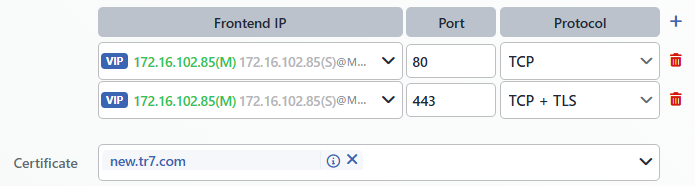 Frontend IP/Port/Protocol Configuration
Frontend IP
The IP address to be listened on in the vService is selected. The selected Frontend IP represents the endpoint at which the traffic coming from clients is received on TR7.
| IP Type | Description |
|---|---|
| Interface IP | An IP assigned to a physical or virtual interface; it appears in the list in the Interface IP (interface) address format. |
| VIP (Virtual IP) | Used for high availability; it is defined in cluster setups and appears in the list in the VIP (interface) address format. Details are located on the Add IP Address (Cluster) page. |
Port
The TCP port number to be listened on is entered; it refers to the service port on which clients will connect to TR7. A single port or a port range can be entered.
| Port | Protocol | Use |
|---|---|---|
| 3389 | RDP | Remote Desktop |
| 389 | LDAP | Directory services |
| 636 | LDAPS | Encrypted LDAP |
| 1433 | MSSQL | Microsoft SQL Server |
| 3306 | MySQL | MySQL / MariaDB |
| 5432 | PostgreSQL | PostgreSQL |
| 1521 | Oracle | Oracle TNS |
Protocol
Determines the protocol and SSL/TLS behavior of the frontend: it defines whether the client connection will be accepted unencrypted or encrypted (with SSL termination). In the encrypted option, the TLS session is terminated on TR7 (SSL Termination / Offloading); decryption is done on TR7, and traffic is forwarded to the back end as unencrypted TCP. Two options are offered in the L7 TCP type:
| Group | Option | Description | Use Case |
|---|---|---|---|
| Unencrypted | TCP | SSL is not used; traffic is received as unencrypted TCP. | Internal networks, protocols that do not require SSL, scenarios in which encryption is done at another layer. |
| Encrypted (TLS) | TCP + TLS | The SSL/TLS session is terminated on TR7; traffic is forwarded to the back end as unencrypted TCP. | Back ends that do not support SSL, centralized certificate management. |
Certificate requirement
When TCP + TLS is selected in a frontend row, the Certificate field appears, and at least one SSL certificate must be selected for TLS termination. The form does not make this field required: a TCP + TLS row saved without selecting a certificate listens as unencrypted TCP.
Typical configuration: LDAPS
The recommended configuration for encrypted LDAP (LDAPS):
| Frontend IP | Port | Protocol |
|---|---|---|
| VIP 192.168.1.100 | 636 | TCP + TLS |
TLS connections arriving at port 636 are terminated on TR7 and forwarded to the LDAP servers as unencrypted TCP.
INFO
Certificate
When TCP + TLS is selected on the frontend, the SSL certificates to be used for TLS termination are selected. Certificates are added with multiple selection: more than one certificate can be defined in the same vService.
- More than one certificate can be selected; each can belong to a different domain (SNI).
- Wildcard certificates (
*.example.com) are supported.
The selected certificates are matched automatically according to the domain the client specifies with SNI. In this way, multiple domains can be served, each with its own certificate, on a single frontend.
Certificate creation and management are located on the SSL/TLS Certificates page. Security parameters such as the allowed TLS versions and cipher suites are determined with the SSL Security profile (see TLS Security Profiles).
INFO
Conditional Backend Services
Allows incoming traffic to be directed to different Backend Services according to specific conditions; it is known in the industry as Content Switching (content-based routing). In the L7 TCP type, the conditions differ from HTTP conditions: only information accessible at the TCP / connection level can be used.
This field does not appear in the form until the first rule is added: when the first rule is created with the + Conditional backend services button in the header of the Backend Services table, the field appears above the table; subsequent rules are added with the same button. Each rule consists of two components:
- Condition: The criterion(s) that determine which connections will match this rule. Multiple criteria can be combined with
AND/OR. - Backend Services: The target(s) to which the traffic will be directed when the condition is met. Multiple Backend Services and/or Backend Groups can be selected together.
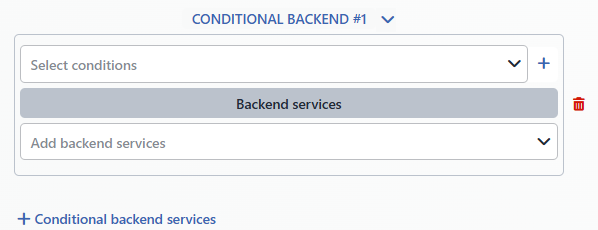 Conditional Backend Service Definition
Conditions that can be used at the L7 TCP level:
| Condition | Description |
|---|---|
| Blacklist IP category | Routing according to the IP intelligence / blacklist category. |
| Destination IP | Routing according to the frontend IP address. |
| Destination port | Routing according to the frontend port number. |
| Dynamic condition | Creates a dynamic condition by comparing two Smart Variables. |
| Dynamic list | Searches for the value obtained with a Smart Variable in a predefined list. |
| Frontend connection | According to the current number of frontend connections. |
| Frontend number of new sessions/s | According to the number of new sessions received per second. |
| Manual condition | An advanced (manual) condition expression for situations that cannot be met with the standard conditions. |
| Network type category | Routing according to the type category of the client network. |
| Network type group | Routing according to the type group of the client network. |
| Number of active servers | According to the number of healthy Backend Services in the target. |
| Quarantine condition | Compares the client metrics collected by the Quarantine action with a threshold value. |
| RDP cookie | Routing according to the RDP session cookie (L7 TCP only). |
| Source IP | Routing according to the client's source IP address. |
| SSL cipher | Routing according to the cipher suite used. |
| SSL SNI info | According to the SNI value in the TLS handshake; it matches only on a frontend where SSL is not terminated (TCP). |
| SSL version | Routing according to the TLS version. |
| Tracking condition | Compares the metrics in the tracking table of the Advanced traffic inspection action with a threshold value. |
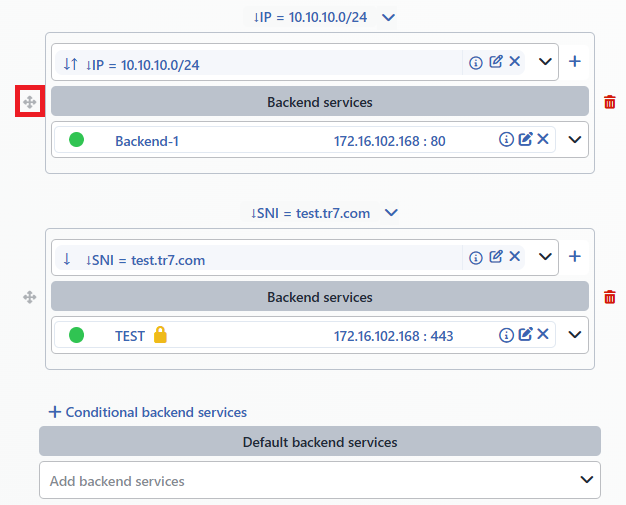 Conditional Routing Order
Evaluation order
Conditional routings are evaluated in order from top to bottom: the first matching condition is applied and the evaluation stops. The order is changed by drag and drop. If no rule matches, the traffic falls to Default Backend Services.
Common use cases:
| Scenario | Condition | Target |
|---|---|---|
| SNI-based routing | SNI db.example.com | Database servers |
| Internal / external separation | Source IP 10.0.0.0/8 | Internal servers |
| Port-based separation | Destination Port 3389 | RDP servers |
All condition types are described on the Conditions page.
INFO
Default Backend Services
The label of the form row is Backend Services, and the title of the table is Default Backend Services. It is the primary target of the vService: when Conditional backend services is not used, all traffic is directed here, and when conditional routing is used, the traffic that matches no rule is directed here. In this way, a safe and controlled Fallback (default) target is provided for connections that fall outside the defined conditions. It exists in every vService type (HTTP / L7 TCP / Network).
Existing targets are selected from the drop-down list; multiple Backend Services and/or Backend Groups can be selected together. When more than one target is selected, the traffic is distributed among them according to the vService's LB Algorithm and Session Persistence settings.
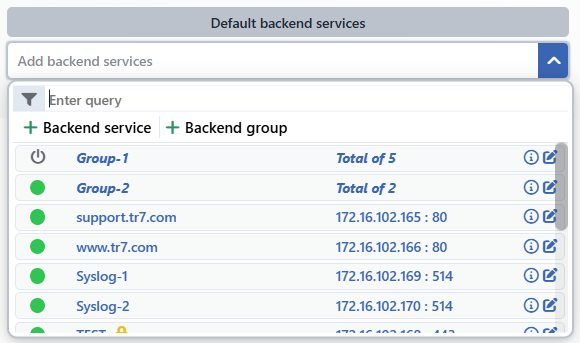 Backend Service Selection
With the Backend service and Backend group buttons in the selector, a new Backend Service or Backend Group can be defined without leaving this screen. While the list is empty, the text Add backend services appears; if the same Backend Service is added to the list twice, the form prevents saving with the Duplicated backend services error.
Without a default Backend Service
If Default backend services is left empty and no conditional routing matches, the connection is rejected.
INFO
Save
The vService adding operation is completed by clicking the Save button. While there is an invalid field in the form, the button is disabled; no separate confirmation window opens for saving. After saving:
- The vService is added to the vServices list.
- If Status is Enabled, the vService becomes active immediately and starts receiving connections.
- The vService status becomes visible on the monitoring screens.
Details
Advanced configuration options are accessed by activating the Details button. In an L7 TCP vService, this panel controls security (L7 DDoS & Threat Protection), traffic manipulation, SSL security, logging, resource management (QOS, bandwidth), timeout and load balancing behavior.
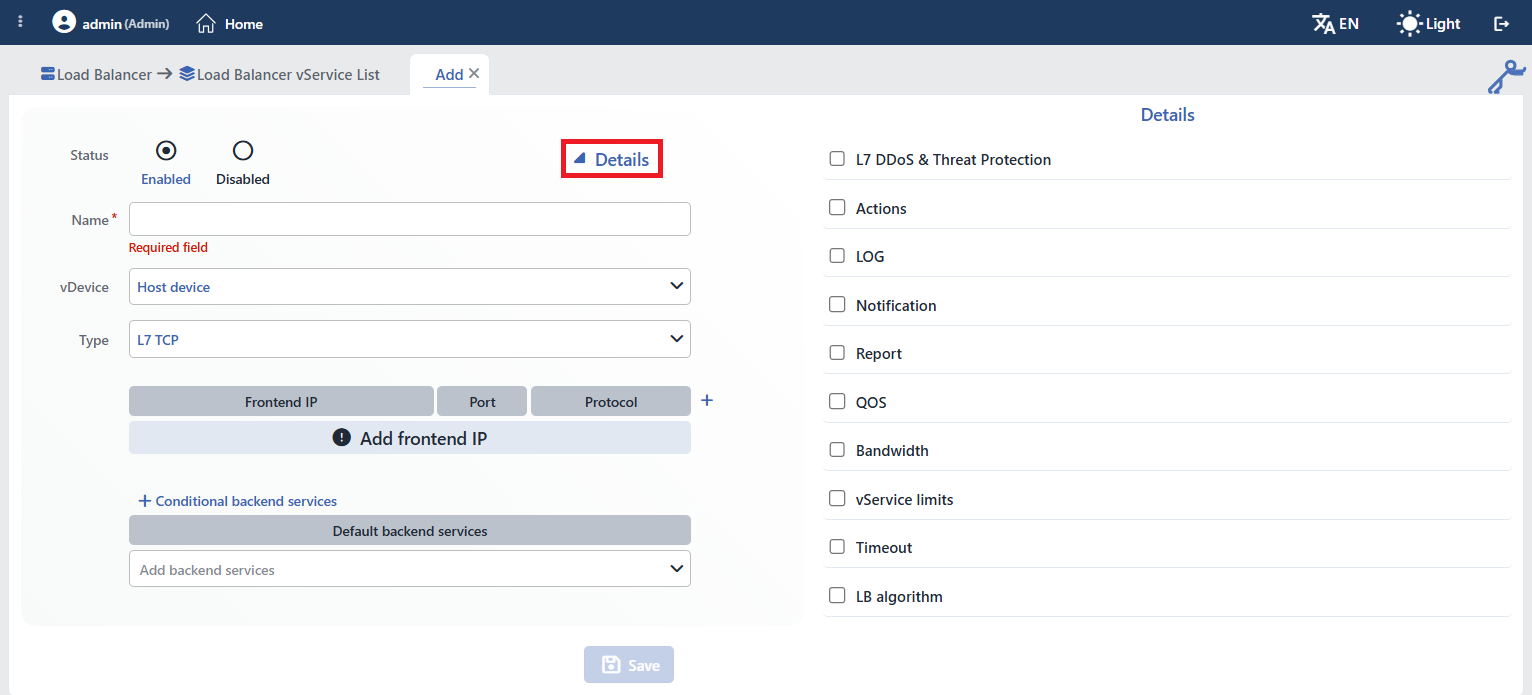 L7 TCP vService Details panel
Panel behavior and permission
The Details switch is at the top right of the general section; when it is turned off, the side panel is hidden. When an existing vService with any module enabled is opened, the panel comes open by itself. The QOS box and the Certificate selector in the main form appear disabled if the user does not have the related module permission. When the LB Algorithm box is turned off, the algorithm returns to the default and Persistence is cleared.
INFO
L7 DDoS & Threat Protection
Used to enable the L7 DDoS & Threat Protection feature.
The management of this protection layer is located on the Bot/DDoS Protection page.
INFO
Actions
Actions are reusable traffic manipulation components (GUI-based, no-code) that operate on TR7 traffic. They define "what to do when a condition is met". In an L7 TCP vService, TCP / connection-level actions can be used; actions that work at the HTTP header, URL or cookie level do not exist in this type.
Defined first, then selected in the vService: An action is defined centrally, once on the Actions screen; for it to be applied to live traffic, the related vService must select that action from its Details › Actions field. The same action can be attached to multiple vServices.
- Execution timing: On the request (On Request) or on the response (On Response).
- With conditions: It works unconditionally (all traffic) or limited by Conditions.
- Order: Multiple actions in a vService are processed from top to bottom according to the order of addition; an action that blocks/redirects overrides the subsequent ones.
- Upper limit: When the upper limit defined per vService for an action type is exceeded, the form prevents saving with the Max. number for … rule is exceeded error.
Actions that can be used in L7 TCP:
| Action | Description |
|---|---|
| Advanced traffic inspection | Monitors the traffic over the specified keys (source IP, etc.) and records it statistically; it does not perform manipulation on its own and is used together with tracking conditions. |
| Create traffic variable | Defines a variable on the traffic that subsequent conditions and actions can use. |
| Manual action | Adds advanced configuration rules for special requirements that cannot be met with the standard actions (expert use / TR7 Support Team). |
| Quarantine | Quarantines the client when client metrics (requests, errors, bandwidth, connections) exceed a threshold. |
| TCP connection management | Rejecting (Reject), silently dropping (Silent Drop) or holding for content (Wait for content) TCP connections; L7 TCP only. |
Action management and all action types are described on the Actions page.
INFO
LOG
Used to enable the sending of vService Access logs to Syslog-SIEM servers. With the Log profile, which information will be sent, in which format and where is defined.
The line format selector is not filtered by vService type; all nine formats are listed. In an L7 TCP vService, the three Apache variants produce the same TCP line:
| Format | Description |
|---|---|
| Standard Log Format (L7 TCP) | Basic format containing TCP connection information |
| Apache Combined · Apache VHost | The same line as the Standard log format in TCP |
| CEF Format (L7 TCP) | Common Event Format; SIEM integration |
| TR7 JSON Format (L7 TCP) | Detailed JSON format |
| TR7 WAF Log | WAF event information (specific to HTTP) |
| Manual JSON Format · Manual CEF Format · Manual Log Line Format | Customizable line formats |
Log profile management is located on the Logs page.
INFO
SSL Security
Determines the security policy of the SSL/TLS traffic on the vService: the allowed TLS version range, encryption algorithms (ciphers) and elliptic curve (ECDHE) parameters are defined with this profile. The certificate itself is selected in the Certificate field; this profile manages how that TLS session is established. This row is listed, together with the Certificate field in the main form, only while TCP + TLS is selected in at least one frontend row; the Details list of an unencrypted L7 TCP vService has ten rows.
Default behavior when the profile is enabled:
| Parameter | Default |
|---|---|
| Min. SSL Version | TLSv1.1 |
| Max. SSL Version | - (unlimited) |
| Cipher algorithms | Only secure (HIGH:!aNULL:!MD5) |
| Curve / ECDHE | System recommendation (automatic) |
Advanced settings such as mTLS (client certificate verification), OCSP stapling, HSTS, post-quantum key exchange and SSL hardware acceleration are also configured in the profile.
SSL security profile management is located on the TLS Security Profiles page.
INFO
Notification
Monitors the status, performance and certificate metrics of the vService and automatically sends notifications to administrators when thresholds are exceeded or the status changes.
Monitored metrics and default thresholds:
| Metric | Default |
|---|---|
| Backend Service / vService status (UP/DOWN) | On status change |
| Bandwidth | 128 Mbps |
| Number of new connections | 1000 conn/s |
| Request rate | 2500 req/s |
| Current session | 1000 |
| Certificate expiry | 30 days before expiry |
Channels (off by default): SNMP notification · E-mail · SMS · UI notification (in-interface notification). With the Silent at night option, notifications are muted during night hours.
Notification profile management is located on the Notifications page.
INFO
Report
Turns vService traffic into detailed reports: the report is viewed on the screen as HTML and exported as PDF and Excel (XLSX). Traffic is analyzed in specific sections; reports can be sent automatically by e-mail at specific periods (daily / weekly / monthly / annual) as PDF or XLSX attachments.
Custom (manual) report fields
In addition to the standard sections, custom report tables can be created with Smart Variable support. In this way, connection information can be categorized according to custom business rules, and desired information outside the default sections can be reported.
Report profile management is located on the Reports page.
INFO
QOS
Used to enable the Quality of Service settings. It provides resource isolation and prioritization for the vService.
QOS makes it possible to limit or guarantee the CPU cores, memory (RAM) and processing resources to be allocated to the vService. In this way, each vService runs in isolation within the defined resources (a separate QOS setting is required for each vService) and maintains its performance independently of the other services. Thanks to prioritization, critical vServices can run with higher processing priority even under system load.
Inline Mode
On/off (off by default). When enabled, automatic inline DNAT rules that map the vService's Backend Services to the frontend addresses are generated at the firewall layer. It is used in setups where TR7 is positioned directly in the traffic path (inline).
Route Table
The route table the vService will use is selected. By default, the system's default route table is used; if separate route tables are defined for different network segments, the appropriate one can be selected. This field appears only when more than one route table is defined.
Memory Limit
The upper limit of the memory (RAM) to be allocated to the vService. Options: 1, 2, 3, 4, 6, 8, 12, 16, 24, 32, 48, 64, 128, 256 GB. The default is 2 GB.
Cores
The processor cores on which the vService will run are selected. One or more cores, each different, can be assigned only from among the available cores (not reserved for the system) on the device. The selector is opened with the Automatic / Manual switch; with Automatic, the assignment is made by itself, and with Manual, at least one core must be checked (At least one core must be selected). When Manual is selected, the CPU Priority and Cpu Usage Limit (%) fields below become visible.
CPU Priority
The processing priority of the vService: Low · Normal · High. The default is Normal. High priority gives critical vServices a processor advantage under system load.
Cpu Usage Limit (%)
The upper limit of the CPU percentage the vService can use (1–100; a decimal value can be entered). It has no default value; if not specified, no percentage limit is applied.
Core Engine
The version of the load balancing core on which the vService will run is selected. Supported capabilities may vary by version; by default, the version recommended by the system is used.
INFO
Bandwidth
Used to limit the bandwidth that the vService sends to the client (in the download direction) (on/off; off by default). When enabled, a single Total limit value is entered; the unit selector next to it offers Kbps (default), Mbps and Gbps, and the upper limit is 32 Gbps. The limit is applied to the vService's total traffic flowing from the Backend Service to the client; there is no separate limit for the incoming direction.
In this way, a vService is prevented from negatively affecting the performance of other services with excessive traffic. It is used especially to ensure fair resource usage in shared environments, to guarantee capacity for critical services and to limit the impact of sudden traffic increases.
INFO
vService Limits
Keeps connection and session traffic under control with upper limits; it protects the vService and the system against overload and connection overflows. Even if no vService Limit profile is selected, it works with the default values below (when a profile is selected, these values are replaced with those in the profile):
| Limit | Default | Description |
|---|---|---|
| Max. total connections | 20,000 | Total concurrent connections |
| Max. failed connection retries | 3 | Backend Service connection error retries |
| Max. new connecions/s | 5,000 | New connections per second |
| Max. connections/s | 10,000 | Total connections per second |
| Max. session rate/s | 10,000 | Sessions per second |
| Max. total SSL connections | 5,000 | Concurrent SSL connections |
| Max. SSL connections/s | 2,000 | SSL connections per second |
| Buffer size(kB) | 128 | Connection buffer size |
vService limit profile management is located on the vService Limits page.
INFO
Timeout
Used to control the connection timeout behaviors between the client and TR7 and between TR7 and the Backend Services. In TCP services, timeout values are important, especially for long-lived connections. If no profile is selected, the following defaults apply:
| Timeout | Default | Description |
|---|---|---|
| Connect timeout | 20 s | The time to establish a TCP connection with the Backend Service |
| Server timeout | 90 s | The time to wait before data is received from the Backend Service |
| Client timeout | 90 s | The time the connection is kept open before data comes from the client |
| Queue timeout | 60 s | The time a request can wait in the Backend Service queue |
| Tunnel(Websocket) timeout | 120 s | The idle wait time in long-lived connections |
| Client FIN | 3 s | The closing time after the client terminates the connection |
| Server FIN | 6 s | The closing time after the Backend Service terminates the connection |
Long-lived connections
In services that require long-lived connections, such as LDAP and SQL, the Tunnel(Websocket) timeout and Server timeout values are increased; the default values may be insufficient for such services.
Timeout profile management is located on the Timeouts page.
INFO
LB Algorithm
The load balancing algorithm is the method that determines according to which rule the incoming client traffic is distributed among multiple Backend Services. The goal is to increase performance, prevent a single server from being overloaded and provide high availability.
TIP
In scenarios with a single Backend Service behind the vService, the LB Algorithm and Persistence selection does not matter.
Algorithms
The 10 load balancing algorithms supported specifically for L7 TCP vServices are given in the table below, in the order of the selector. The Self-Persistent column shows whether the algorithm provides session persistence by itself. The default algorithm is Round robin. The information line below the box shows the description of the selected algorithm and persistence method.
| Algorithm | Self-Persistent | Description | Recommended Scenario |
|---|---|---|---|
| Round robin | ✗ | Distributes incoming connections to the servers in turn and equally. Each new connection goes to the next server, and when the end of the list is reached, it returns to the beginning. It does not take server capacities into account. | Homogeneous servers with the same hardware; short-lived, independent TCP connections. |
| Weighted Round Robin | ✗ | Adds a weight factor to Round Robin. Servers with a higher weight receive proportionally more connections. | Heterogeneous Backend Services with different processing power. |
| Least Connection | ✗ | Tracks the current number of active connections and directs each new connection to the server with the fewest connections. | Long-lived connections such as LDAP, SQL and file transfer. |
| Least Response Time | ✗ | Scores the servers according to the measured time and directs to the server with the lowest value. The Time metric field determines which time is taken as the basis: Total time (queue + connection + response; default) or Response time (response time only). | Services whose response time varies from server to server. |
| Least Bandwidth | ✗ | Averages the measured bandwidth usage of the servers over the Bandwidth window duration (default 10 s; 1 s – 1 h) and directs to the server using the least bandwidth. | Streaming and large file scenarios where bandwidth is the bottleneck. |
| First | ✗ | Evaluates the servers in the defined order; it directs all traffic to the first server until it reaches its maximum connection limit, and moves to the next one when the limit is exceeded. | Active-passive (failover) architectures; cases where minimum server usage is required. |
| Random | ✗ | Selects a random server among the Backend Services for each connection. If a weight is defined, the selection probability is proportional to the weight. | Many short-lived and independent connections; test/development environments. |
| Fastest | ✗ | Continuously measures the performance metrics of the servers and directs to the best-performing server. | Services where low latency is critical. |
| Fastest+ | ✗ | Extends Fastest; in addition to the primary metric, it evaluates a second metric. Two-dimensional optimization. | High-traffic environments where both speed and capacity balance are important. |
| RDP Cookie | ✓ | Selects the server according to the value in the RDP session cookie carried by each connection; the same user/session always goes to the same server. It is designed for terminal server farms. | RDP terminal server farms; scenarios that require session continuity. |
Fastest Metrics
The Fastest algorithm selects the server that performs best according to the specified metric. The routing criterion is determined by selecting one of the following metrics:
| Metric | Description |
|---|---|
| Least Response Time | Measures response times and directs to the server with the lowest average response time. |
| Least Connection Time | Measures the TCP connection establishment time (three-way handshake). It prefers the server with which the connection is established the fastest. |
| Least Queue Time | Measures the time requests wait in the queue before being forwarded to the back end. It directs to the server with the shortest queue waiting time. |
| Least Connections | Tracks the current number of active TCP connections and selects the server with the fewest connections. |
| Least Queues | Monitors the depth of the pending request queue per server. It directs to the server with the least queue depth. |
| Least Connection Error | Counts the connection errors (connection refused, timeout, reset) that occur within a specific time window. It prefers the server with the lowest error rate. |
| Least aborted connections | Monitors the number of connections terminated early (aborted) by the server. It is useful for detecting slow or unresponsive servers. |
| Least used connections | Evaluates the number of connections currently used by the server and prefers the least used server. |
Fastest+ Metrics
The Fastest+ algorithm provides multi-dimensional optimization by evaluating two different metrics together. The first metric (Opt-1) is used as the primary criterion, and the second metric (Opt-2) as the secondary criterion in case of a tie or in weighted calculation.
All Fastest metrics can be used for Opt-1 (Fastest Opt-1) and Opt-2 (Fastest Opt-2); the two metrics must be different. By default, Opt-1 comes with the Least Response Time value and Opt-2 with the Least Connection Time value.
RDP Cookie
RDP Cookie is an algorithm designed for terminal server farms that provides self-persistence. It reads the session cookie (a named cookie carrying the user/session ID) that the RDP client presents during the connection and directs all connections carrying this value always to the same Backend Service. In this way, the user's RDP session (including reconnections and additional channels) is pinned to a single server.
Since RDP Cookie provides persistence by itself, a separate Persistence setting is not used; routing and session pinning take place with the same mechanism.
Configuration
RDP Cookie Name Required: The name of the RDP session cookie to be read is specified.
Hash consistency: On/off (off by default); it appears in self-persistent algorithms. It prevents hash-based persistence from overloading the Backend Services: by using consistent hashing, most of the existing mappings are preserved when the server set changes.
Session Persistence
Persistence is the mechanism that ensures that successive connections from a client are directed to the same Backend Service. It is also called Session Affinity or Sticky Sessions. Two options are offered in an L7 TCP vService:
| Persistence Type | Description |
|---|---|
| None | Persistence is disabled. Each connection is evaluated independently according to the selected algorithm. Suitable for stateless services. |
| Hash | Provides session persistence by calculating a hash from a specified key (source IP, SNI, destination IP/port, etc.; defined with Smart Variables). The key → Backend Service mapping is kept in a table on TR7. |
Persistence ↔ Self-Persistent algorithm
When a self-persistent algorithm such as RDP Cookie is selected, the Persistence field is hidden; persistence is already provided by the algorithm itself. Cookie-based persistence (New cookie / Current cookie) and Session Affinity Manager (SAM) exist only in the HTTP type.
Hash configuration parameters:
| Parameter | Default | Description |
|---|---|---|
| Hash key | - | The key(s) to be used for the hash; defined with Smart Variables (at least 1; duplicate entries are not accepted). At the TCP level, connection attributes such as source IP, SNI and destination IP/port are used. |
| Hash key list size (required) | 3,000,000 | The capacity of the key → Backend Service table (10,000 – 100,000,000). |
| Hash key expire time | 7 days | The time a record in the table is kept without a request (10 min – 365 days). |
The mapping table is device-local; unlike SAM, it is not shared among cluster devices.
Common hash keys (TCP request variables):
- Client IP address: Persistence according to the client IP address
- SNI Received from Client: According to the TLS SNI value
- Destination IP address + Destination port number: Destination IP and port combination
- RDP cookie (
mstshash), JA4 TLS fingerprint, Client country, ASN: other connection attributes
RDP persistence
In RDP scenarios, the RDP Cookie algorithm is preferred instead of Hash persistence. RDP Cookie works according to the session information and directs the user to the same server even if the connection is dropped.
Smart Variables are described on the Smart Variables (fx) page.
Related
- vService: common fields and general operating logic
- HTTP (L7) vService · Network vService: the other types
- Backend Services · Backend Groups: routing targets
- Conditions · Actions: content switching and traffic manipulation
- Profiles: log, report, timeout, vService limits
- SSL/TLS Certificates · TLS Security Profiles
