
Smarter by Design.Simpler for Business
SSL Cipher
What Is the SSL Cipher Condition?
SSL Cipher is a condition type used to make traffic routing and manipulation decisions by evaluating the encryption algorithm (cipher suite) used in the TLS connection between the client and TR7.
During the TLS handshake, the client and the server agree on a common cipher suite.
This condition makes it possible to apply security policies by using the cipher suite information determined after the TLS handshake.
TIP
This condition can be used only in cases where SSL Offloading/Termination is performed by TR7 on the related vService.
The Importance of the SSL Cipher Condition
The TLS cipher suite selection directly affects the security level of the connection. Weak ciphers can create a security vulnerability.
With the SSL Cipher condition:
- Connections using a weak or insecure cipher can be detected,
- PCI DSS and security compliance requirements can be met,
- Compatibility policies can be applied for old clients,
- Cipher-based traffic statistics can be collected,
- Connections that do not comply with the security policies can be blocked.
Cipher Security Categories:
| Category | Examples | Security |
|---|---|---|
| Modern | TLS_AES_256_GCM_SHA384, TLS_CHACHA20_POLY1305_SHA256 | ✅ Secure |
| Acceptable | ECDHE-RSA-AES256-GCM-SHA384 | ✅ Secure |
| Old | AES256-SHA256 | ⚠️ Caution |
| Weak | DES-CBC3-SHA, RC4 | ❌ Insecure |
Supported vService Types
HTTP
L7 TCP
Network
The condition can be used only at the request (At Request) stage and produces a value only in vServices where SSL termination is performed: in a vService where SSL is not used, the condition silently does not match. For the "is there SSL on the connection" distinction, the ready-made If SSL is terminated condition is offered in the condition selection lists.
How to Add?
A new SSL Cipher Condition can be added through the TR7 web management interface by following the steps below:
- The Configuration Menu is opened by clicking the TR7 logo at the bottom left.
- The Load Balancer → Conditions → Add steps are followed.
- SSL cipher is selected as Criteria.
- The related configurations of the condition are made.
- The condition is added by clicking the
Addbutton.
SSL Cipher Condition Add Form
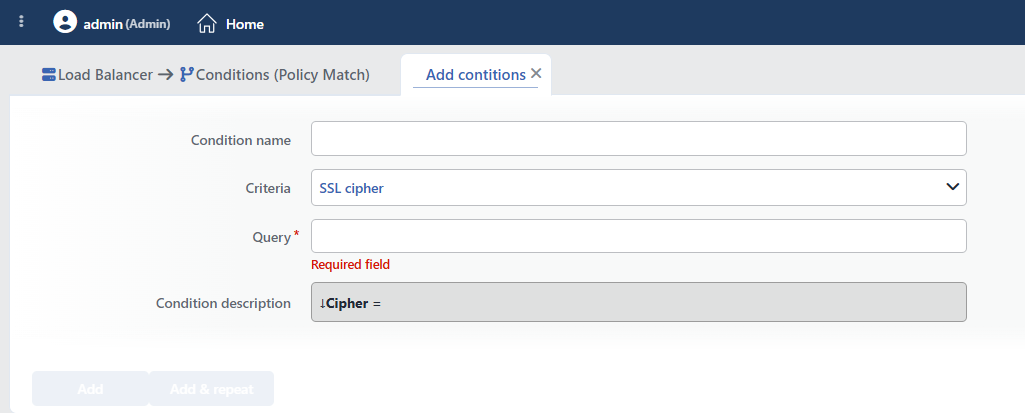 SSL Cipher Condition Add Form
INFO
Condition Name
An optional name can be entered for the condition to be created.
This field is especially important in the following scenarios:
- When many conditions are defined under the same vService,
- When conditions with similar criteria need to be distinguished,
- When it is necessary to quickly understand which business rule the condition represents.
When this field is left empty, TR7 analyzes the content of the related condition and creates an automatic, descriptive name in the Condition Description field. This generated description is used as the name in condition lists.
INFO
Criteria Required
The field that determines the type of the condition; SSL cipher is selected from the searchable dropdown list. This selection determines the fields displayed in the form. The criterion cannot be changed after the condition is saved: if a different criterion is needed, a new condition is defined. For all criteria in the list and their scopes, the criteria catalog on the Conditions page can be referred to.
INFO
Query Required
The full name of the cipher suite to be matched is entered. The matching is exact and case-sensitive: a partial name, a wildcard or a regular expression (regex) is not supported; parts such as RC4 or ECDHE- never match, a full name such as RC4-SHA must be written.
Common TLS 1.3 Cipher Suites:
| Cipher Suite | Security |
|---|---|
TLS_AES_256_GCM_SHA384 | ✅ High |
TLS_CHACHA20_POLY1305_SHA256 | ✅ High |
TLS_AES_128_GCM_SHA256 | ✅ Good |
Common TLS 1.2 Cipher Suites:
| Cipher Suite | Security |
|---|---|
ECDHE-RSA-AES256-GCM-SHA384 | ✅ High |
ECDHE-RSA-AES128-GCM-SHA256 | ✅ Good |
DHE-RSA-AES256-GCM-SHA384 | ✅ Good |
WARNING
The ciphers below can create a security vulnerability and should be blocked:
DES-CBC3-SHA(3DES - SWEET32 vulnerability)RC4-*(RC4 - known weaknesses)*-MD5(MD5 - collision attacks)*-NULL-*(no encryption)
INFO
Condition Description
It is created automatically by TR7 in line with the entered criteria and values.
This description:
- which value the condition applies to,
- which criterion it works on,
- the quick understanding of the condition on listing screens
is produced dynamically by the system so as to provide these.
INFO
Form Buttons
Add
The condition adding process is completed by clicking the Add button.
Add & Repeat
With the Add & Repeat button, the condition adding process is completed, and another new condition can be added with different configurations without leaving the related window.
 Condition Added
Operational Usage Recommendations
- Weak Ciphers Should Be Blocked. Ciphers containing RC4, 3DES or MD5 should be detected and blocked, or a warning should be shown.
- PCI DSS Compliance. TLS 1.2+ and strong ciphers should be made mandatory for the PCI DSS 3.2+ requirements.
- It Should Be Used for Monitoring. Clients using a weak cipher should be detected and logged, and the systems that require an update should be determined.
- Graceful Degradation. Showing a warning page instead of blocking old clients immediately should be considered.
Common Usage Scenarios in Live Environments
The examples below show how the related condition is applied in the most frequently encountered use cases in real systems. These scenarios are based on practices that are widely preferred in live environments and rest on experience gained in the field.
Scenario 1: Blocking Specific Weak Ciphers
Purpose: To provide protection against SWEET32 and similar attacks by detecting and blocking clients that use specific ciphers with a known security vulnerability.
Configuration: Query → DES-CBC3-SHA (for RC4, RC4-SHA with a separate condition: a separate condition is defined for each cipher)
Action Recommendations:
- ✅ Block → Connections using a weak cipher are blocked; 426 Upgrade Required can be selected as the response code (default 403 Forbidden).
- ✅ Show Content → A browser update warning page is shown.
TIP
If pattern-based weak cipher detection (the whole of the RC4/DES/MD5/NULL/EXPORT families) is needed instead of listing them name by name, the TLS fingerprint factors (weak cipher) in the Bot Protection protection of the vService should be used: the condition criterion matches only the full name.
Scenario 2: Marking TLS 1.3 Clients
Purpose: To detect and mark modern clients that use a TLS 1.3 cipher suite.
Configuration: Query → TLS_AES_256_GCM_SHA384 (separate conditions for the other TLS 1.3 ciphers: TLS_AES_128_GCM_SHA256, TLS_CHACHA20_POLY1305_SHA256)
Action Recommendations:
- ✅ Add HTTP Header → The
X-Cipher-Strength: highheader is added; the cipher used itself can also be written into the header with the Cipher Info Used in vService Certificate smart variable. - ✅ Advanced Traffic Inspection → The modern cipher usage distribution is reported.
TIP
If the aim is only the "is the client TLS 1.3" distinction, the SSL Version condition is more practical than the cipher names.
Scenario 3: Monitoring the Use of a Specific Cipher
Purpose: To mark the traffic using a specific cipher and to monitor its distribution (e.g. producing an inventory of old clients).
Configuration: Query → ECDHE-RSA-AES128-GCM-SHA256
Action Recommendations:
- ✅ Add HTTP Header → The
X-TLS-Cipherheader, whose value is taken from the Cipher Info Used in vService Certificate smart variable, is added; the Backend Service performs cipher-based analysis. - ✅ Advanced Traffic Inspection → The cipher distribution and the ratio of old clients are reported.
