
Smarter by Design.Simpler for Business
Location Redirection
What Is the Location Redirection Action?
The Location Redirection action redirects the incoming HTTP requests to a specified URL. This action redirects the client to the new location by sending an HTTP redirection response (3xx) to the browser.
This action works only at the request stage and requires a condition.
1 · The client request
GET /page HTTP/1.1Host: old-domain.com
↓
2 · The TR7 response (redirection)
HTTP/1.1 301 Moved PermanentlyLocation: https://new-domain.com/page
↓
3 · The browser is redirected automatically
https://new-domain.com/pageThe Importance of the Location Redirection Action
URL redirection is one of the basic components of modern web management. It is critically important for domain changes, URL structure updates and traffic management.
The Location Redirection action;
- redirects the traffic in domain or subdomain changes,
- preserves the old URLs in URL structure changes (SEO),
- provides geographic or device-based redirection,
- redirects to maintenance or temporary pages,
- creates dynamic redirection URLs with Smart Variables.
For this reason, the Location Redirection action is a critical component for flexible and powerful URL management.
HTTP Redirection Codes
The HTTP status codes that can be used during the redirection:
| Code | Name | Description | Area of Use |
|---|---|---|---|
| 301 | Moved Permanently | Permanent redirect | Domain change, URL structure change (recommended for SEO) |
| 302 | Found | Temporary redirect | Temporary redirects, A/B testing |
| 303 | See Other | Redirect with GET | Redirection to a GET page after a POST operation |
| 307 | Temporary Redirect | Temporary redirect (the method is preserved) | The cases where the POST/PUT method must be preserved |
| 308 | Permanent Redirect | Permanent redirect (the method is preserved) | Permanent redirect, preservation of the POST method |
TIP
In permanent URL changes, 301 is used. Search engines accept 301 redirects as permanent and transfer the page value (link juice).
Supported vService Types
HTTP
L7 TCP
Network
Execution Timing
On Request
On Response
How to Add?
A new Location Redirection Action can be added through the TR7 web management interface by following the steps below:
- The Configuration Menu is opened by clicking the TR7 logo at the bottom left.
- The Load Balancer → Actions → Add steps are followed.
- A unique and descriptive name is entered for the action.
- Location Redirection is selected as Action Type.
- The related configurations of the action are made.
- In the Conditions tab, the condition/conditions under which the action takes effect are determined.
- The action is added by clicking the
Addbutton.
Location Redirection Action Add Form
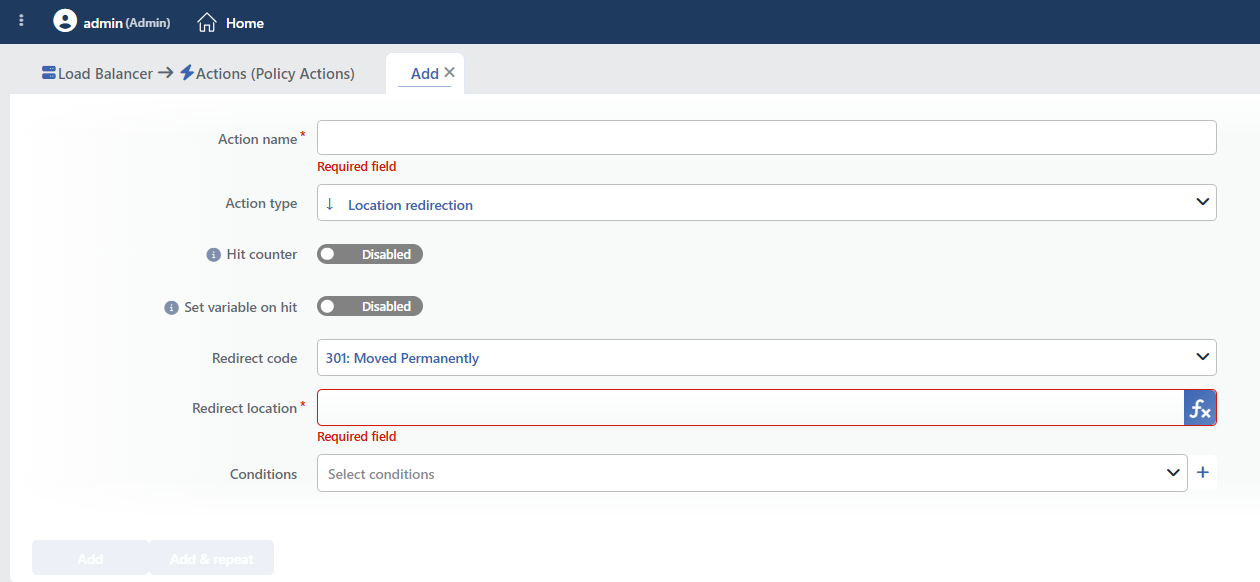 Location Redirection Action Add Form
INFO
Action Type
Location redirection is selected as the action type.
Since the action works only at the request stage, the Execution Level and Rule Protocol fields are not located in the form. More than one redirection action can be added to the same vService.
INFO
Hit Counter Default: Off
Hit Counter counts every run of the action (it is evaluated together with the action's own condition; the count is not lost even in terminating actions such as Deny). Action-based rates and totals are displayed in the Action Hits tab of the vService dashboard and on the live statistics screen; they do not appear as a separate column in the lists. The counter is cumulative; there is no interface for resetting it manually: it starts from zero when the set of counted actions changes or when the vService is reloaded, while the history is preserved on the dashboard as a rate (hit/s).
Although the redirection terminates the request, the count is not lost; the counter is processed before the action line.
INFO
Set Variable on Hit
A variable name whose value is assigned each time the action runs can be entered (optional; empty by default). The name can consist of letters, digits and underscores (at most 32 characters). When the action is triggered, the variable is set to 1, and chained behaviors can be built by reading it with the %TR7VAR(name) smart variable in other conditions and actions on the same vService.
INFO
Redirect Code Default: 301
The HTTP redirection status code to be sent to the client is selected.
The HTTP status codes that can be used during the redirection:
| Code | Name | Description | Area of Use |
|---|---|---|---|
| 301 | Moved Permanently | Permanent redirect | Domain change, URL structure change (recommended for SEO) |
| 302 | Found | Temporary redirect | Temporary redirects, A/B testing |
| 303 | See Other | Redirect with GET | Redirection to a GET page after a POST operation |
| 307 | Temporary Redirect | Temporary redirect (the method is preserved) | The cases where the POST/PUT method must be preserved |
| 308 | Permanent Redirect | Permanent redirect (the method is preserved) | Permanent redirect, preservation of the POST method |
INFO
Redirect Location Required
The target URL information to which the client will be redirected is entered. It can be a full URL (including the protocol) or a relative path.
TIP
This field supports Smart Variables. Existing variables can be accessed with the fx button and dynamic content can be created.
Sample variables: the request path (Path), the request path + parameters (PathQ), the parameters (Query) and the request header content. Fixed text values can also be entered; the two can be used together.
There is no separate "Host" variable; if the domain name is needed, the Request HTTP header content variable is used with the host header name. The variables added to the field appear as chips with short labels (e.g. ↓Path, ↓PathQ, ↓Query); when a chip is clicked, the Edit variable window opens.
Detailed information is on the Variables page.
 An example of Smart Variable use
Supported formats:
| Format | Example (Redirect Location) | Description |
|---|---|---|
| Full URL | https://newsite.com/page | Redirection to a different domain |
| Protocol-relative | //newsite.com/page | Redirection preserving the same protocol |
| Root-relative | /new-path | Redirection to a different path on the same domain |
| Dynamic | https://newsite.com[Path/page of the request [URI]] | Redirection preserving the original path |
Dynamic URL examples: Dynamic redirections are created with Smart Variables:
https://new-domain.com[Path/page of the request [URI]]: Redirect to the same path on a different domainhttps://example.com[Path/page of the request [URI]][Request query]: Preserve the path and the query stringhttps://+ Request HTTP header content (host) +/new-path: Redirects to a different path on the same domain name
INFO
Conditions
In this field, it is defined under which condition or conditions the related action takes effect.
By adding one or more conditions, the behavior can be applied in a targeted and controlled way with the and/or structure.
Detailed information about conditions is on the Conditions page.
WARNING
This action requires a condition. It can also be saved without a condition being defined; however, in this case the rule is written to the configuration in a way that it never runs and the redirection does not take place. The interface does not give a warning in this case, so it must be verified after saving that at least one condition has been defined.
INFO
Form Buttons
Add
The action adding process is completed by clicking the Add button.
Add & Repeat
With the Add & Repeat button, the action adding process is completed, and another new action can be added with different configurations without leaving the related window.
 Action Added
How the Redirection Works
The redirection terminates the request
When the condition is met, the request is not transmitted to the Backend Service at all; the response is produced directly by TR7. The actions that come after this action in the action list do not run and traffic distribution is not performed. For this reason, the redirection actions are generally positioned at the very end of the list.
The operation is displayed in the reports with the REDIRECT result.
The path and the parameters are not carried automatically
The target address is written to the Location header in the form in which it is entered. The path and the parameters of the request are not added by themselves; if it is wanted to preserve them, the PathQ or Query variables must be added manually to the target address.
The entered address is not validated formally. If the target falls to the same vService and the condition is met in the new request as well, an infinite redirection loop occurs; TR7 does not prevent this situation.
Operational and Safe Usage Recommendations
- Infinite loops are avoided. It is verified that the redirection target does not trigger the redirection condition again; otherwise an infinite redirection loop occurs and the browser gives an error.
- 301 is used for SEO. In permanent URL changes, 301 is selected; this enables the search engines to index the new URL and the page value to be transferred.
- Care is taken with POST requests. The 301 and 302 codes convert POST requests to GET; 307 or 308 is used in order to preserve the POST method.
- The conditions are kept specific. The redirection conditions are defined as narrowly as possible; broad conditions also affect unexpected traffic.
- Dynamic redirection with Smart Variables. Smart Variables are used in order to preserve the path, query string or host information; in this way, a domain change can be made while the URL structure is preserved.
Common Usage Scenarios in Live Environments
The examples below show how the related action is applied in the most frequently encountered use cases in real systems. These scenarios are based on practices that are widely preferred in live environments and rest on experience gained in the field.
Scenario 1: Redirecting the Traffic Coming without www to www
Problem: The web site works as www.example.com, but the users try to access it by typing example.com. The search engines see them as two different sites and the SEO value is divided.
Solution: With a 301 permanent redirect, the example.com traffic is redirected to the www.example.com address and the SEO value is combined.
Configuration:
- Redirect Code: 301 Moved Permanently
- Redirect Location:
https://www.example.com+ the Path and Query String variables are selected from the Smart Variables (fx) button - Conditions: HTTP Header Host =
example.com
Result:
- ✅ example.com/page?id=123 → www.example.com/page?id=123 (301 redirect).
- ✅ The SEO value → Is combined under www.example.com, and the search engine ranking improves.
- ✅ The URL structure → The path and the query string are preserved.
- ❌ www.example.com → Is not affected, it works normally.
Scenario 2: SEO Protection from the Old URL Structure to the New Structure
Problem: The URL structure has been changed from the /product.php?id=123 format to the /products/123 format. The old URLs still exist in the search engines and in the bookmarks, and they give a 404 error.
Solution: With a 301 redirect, the old URL structure is redirected to the new structure and the SEO value is preserved.
Configuration:
- Redirect Code: 301 Moved Permanently
- Redirect Location:
/products/+ the Query Parameter variable is selected from the Smart Variables (fx) button (the id parameter) - Conditions: Path =
/product.php
Result:
- ✅ /product.php?id=123 → /products/123 (301 redirect).
- ✅ The SEO value → The search engine value of the old URL is transferred to the new URL.
- ✅ The bookmarks → The old bookmarks of the users continue to work.
- ❌ The new URLs → Are not affected, they work normally.
Scenario 3: Redirecting Mobile Users to the Mobile Site
Problem: There are separate sites for desktop and mobile (www.example.com and m.example.com). When mobile users access the desktop site, they have a bad experience.
Solution: With a 302 temporary redirect, the traffic coming from mobile devices is redirected to the mobile site.
Configuration:
- Redirect Code: 302 Found
- Redirect Location:
https://m.example.com+ the Path and Query String variables are selected from the Smart Variables (fx) button - Conditions: Browser =
Mobile
Result:
- ✅ Mobile devices → Are redirected to m.example.com, and a mobile-optimized experience is offered.
- ✅ The URL structure → The path and the query string are preserved.
- ❌ Desktop users → Stay on www.example.com, they are not affected.
- ⚠️ SEO note → Since 302 is temporary, the desktop SEO is not affected.
Scenario 4: Geographic Redirection (Country-Based)
Problem: The company has different sites for the USA, the UK and TR, but when the users come to the main domain (example.com), they see the wrong site.
Solution: With a 302 redirect, the users are redirected to the related subdomain according to their country.
Configuration:
- Redirect Code: 302 Found
- Redirect Location:
https://tr.example.com(for Turkey) - Conditions: Source IP Country =
TR
Result:
- ✅ The users coming from Turkey → Are redirected to tr.example.com.
- ✅ Localization → The users see the content in their own language.
- ✅ The currency → The correct currency is shown.
- ❌ The other countries → Can be redirected to the USA (us.example.com) or UK (uk.example.com) sites.
Scenario 5: A Temporary Maintenance Page (Only for Normal Users)
Problem: The site is under maintenance, but the admin users need to continue testing. Redirecting all the users to the maintenance page blocks the admins as well.
Solution: With a 302 temporary redirect, all the users except the admin IPs are redirected to the maintenance page.
Configuration:
- Redirect Code: 302 Found
- Redirect Location:
/maintenance.html - Conditions: Source IP NOT IN
admin_whitelist(192.168.10.0/24)
Result:
- ✅ Normal users → Are redirected to the /maintenance.html page.
- ✅ The admin users (192.168.10.x) → Access the site normally and can test.
- ✅ Temporary → With the 302 code, the search engines perceive the maintenance as temporary.
- ❌ When the maintenance ends → The action is disabled and everyone accesses normally.
Scenario 6: Transition from the Old Subdomain to the New Subdomain
Problem: The blog used to be at the blog.old-site.com address, now it has been moved to blog.new-site.com. The old URLs have been shared in the search engines and on social media.
Solution: With a 301 permanent redirect, the old subdomain traffic is redirected to the new subdomain.
Configuration:
- Redirect Code: 301 Moved Permanently
- Redirect Location:
https://blog.new-site.com+ the Path and Query String variables are selected from the Smart Variables (fx) button - Conditions: HTTP Header Host =
blog.old-site.com
Result:
- ✅ blog.old-site.com/article/123 → blog.new-site.com/article/123 (301 redirect).
- ✅ The SEO value → The search engine value of the old blog posts is preserved.
- ✅ The social media links → The old shares continue to work.
- ❌ The new subdomain → Is not affected, it works normally.
Scenario 7: Trailing Slash Redirection (URL Standardization)
Problem: The users can access both /about and /about/. The search engines see these as different pages and the SEO value is divided.
Solution: With a 301 redirect, the URLs that do not contain a trailing slash are redirected to the version with a trailing slash.
Configuration:
- Redirect Code: 301 Moved Permanently
- Redirect Location: the Path variable is selected from the Smart Variables (fx) button +
/is added - Conditions:
Result:
- ✅ /about → /about/ (301 redirect).
- ✅ /products → /products/ (301 redirect).
- ✅ The SEO value → Is combined under a single canonical URL.
- ❌ /image.png → Is not affected (it has a file extension, it is not a path).
