
Smarter by Design.Simpler for Business
Redirect for Traffic Manager Errors
What Is the Redirect for Traffic Manager Errors Action?
The Redirect for Traffic Manager Errors action redirects the client to a specified URL on the HTTP error codes produced by TR7 itself. This action improves the user experience in the errors that occur before the Backend Service is reached.
In order to show content in the case of an error code, the Show Content for Traffic Manager Errors action is used.
This action works only at the request stage and does not require a condition.
1 · TR7 produces an error (the Backend Service could not be reached)
HTTP/1.1 503 Service Unavailable ↓
2 · TR7 redirects the client
Location: /maintenance.html↓
3 · The user goes to the maintenance/status page
A user-friendly page instead of a technical errorTraffic Manager Errors vs Backend Service Errors
In TR7, error redirection is separated according to two different sources:
| Error Source | Action | Execution Time |
|---|---|---|
| Traffic Manager | This action | Request (before reaching the Backend Service) |
| Backend Service | Redirect for Backend Service Errors | Response (after the Backend Service has responded) |
Examples of Traffic Manager errors:
- 503 Service Unavailable
- 502 Bad Gateway
- 504 Gateway Timeout
- 408 Request Timeout
- 429 Too Many Requests
The Importance of the Redirect for Traffic Manager Errors Action
Redirection is critically important in order to improve the user experience in error situations.
The Redirect for Traffic Manager Errors action;
- shows user-friendly pages instead of technical error messages,
- provides automatic redirection to maintenance pages,
- redirects to alternative services in error situations,
- provides error management that is suitable in terms of SEO.
For this reason, the Redirect for Traffic Manager Errors action is an important tool for professional error management.
Supported vService Types
HTTP
L7 TCP
Network
Execution Timing
On Request
On Response
How to Add?
A new Redirect for Traffic Manager Errors Action can be added through the TR7 web management interface by following the steps below:
- The Configuration Menu is opened by clicking the TR7 logo at the bottom left.
- The Load Balancer → Actions → Add steps are followed.
- A unique and descriptive name is entered for the action.
- Redirect for Traffic Manager Errors is selected as Action Type.
- The related configurations of the action are made.
- The action is added by clicking the
Addbutton.
Redirect for Traffic Manager Errors Action Add Form
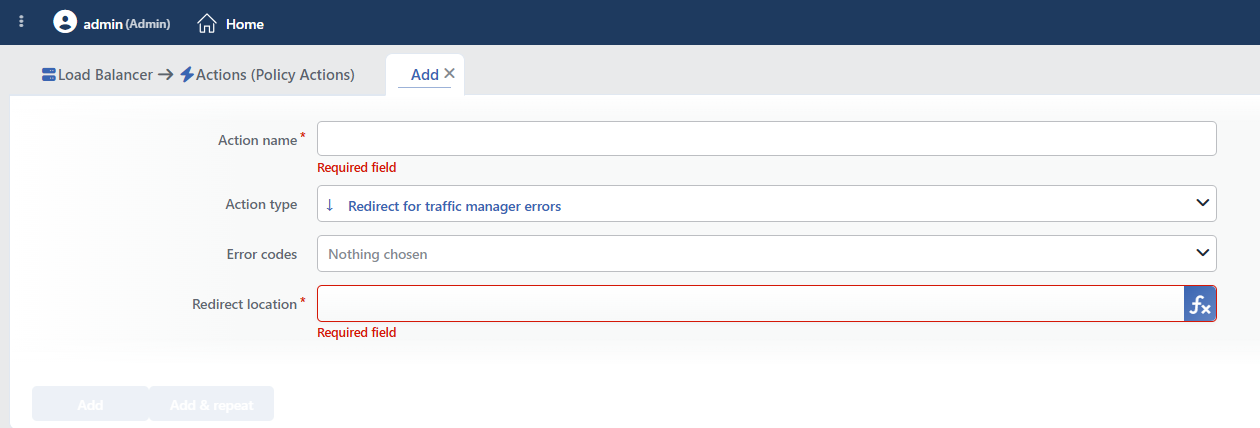 Redirect for Traffic Manager Errors Action Add Form
INFO
Action Type
Redirect for traffic manager errors is selected as the action type.
Since the action does not take a condition and does not support a counter, the Execution Level, Rule Protocol, Conditions, Hit Counter and Set Variable on Hit fields are not located in the form.
INFO
Error Codes
The HTTP error codes on which the redirection will be made are selected. More than one error code can be selected. The field is not required; however, if no code is selected, the action does not do anything and no warning is given.
The error codes that can be produced by TR7:
| Code | Status | Description |
|---|---|---|
| 400 | Bad Request | The request structure is faulty |
| 401 | Unauthorized | Authentication is required |
| 403 | Forbidden | Access is forbidden |
| 404 | Not Found | The resource was not found |
| 405 | Method Not Allowed | The HTTP method is not supported |
| 407 | Proxy Auth Required | Proxy authentication is required |
| 408 | Request Timeout | Request timeout |
| 410 | Gone | The resource was permanently removed |
| 413 | Payload Too Large | The request size is too large |
| 425 | Too Early | An early request |
| 429 | Too Many Requests | Too many requests (rate limiting) |
| 500 | Internal Server Error | Internal server error |
| 501 | Not Implemented | The feature is not supported |
| 502 | Bad Gateway | An invalid response from the Backend Service |
| 503 | Service Unavailable | The service is unavailable |
| 504 | Gateway Timeout | The Backend Service did not respond |
INFO
Redirect Location Required
The URL information to which the client will be redirected in the case of an error is entered. It can be a full URL or a relative path.
TIP
Smart variables do not work in this field
The fx button is displayed next to the field and adding variables is allowed; however, the redirection produced by this action accepts a fixed address. The added variables are not resolved and go to the client as the raw expression.
The target address must be written in this field as fixed text. If a redirection that preserves the path or the parameters of the request is needed, the Redirect for Backend Service Errors action is used; the variables work in that action.
The image below shows a variable added with fx; in this action such an expression is not resolved and goes to the client as it is.
Detailed information is on the Variables page.
 Example of an unresolved variable
Sample values:
| Value | Description |
|---|---|
https://example.com/error | A fixed error page |
https://status.example.com/ | A status page |
/maintenance.html | A relative path (the same domain) |
https://backup.example.com/maintenance | A fixed page on the backup server |
INFO
Form Buttons
Add
The action adding process is completed by clicking the Add button.
Add & Repeat
With the Add & Repeat button, the action adding process is completed, and another new action can be added with different configurations without leaving the related window.
 Action Added
WARNING
The Redirect for Traffic Manager Errors action does not require a condition and is applied unconditionally (Always) on the vService on which it is defined.
Actions that run unconditionally directly affect all traffic or behavior on the related vService, without an evaluation based on traffic content.
In live environments, it is recommended that target service behaviors and possible effects be evaluated carefully before such actions are enabled. Otherwise, unexpected service behaviors or operational problems can occur.
The redirection code is fixed
The redirection is always made as a temporary redirect (302); the status code cannot be selected. For this reason, POST requests are forwarded to the target as GET.
INFO
Which Errors Fall to This Action
The action covers the situations in which TR7 produces an internal error response: the Backend Service not being reachable (503), an invalid response (502), a timeout (504), a protocol error (400/408) and the Block action and the Traffic Protection blockings.
On the other hand, the responses that produce their own content are not affected: the WAF blocking page, the quarantine response, the CAPTCHA page and the contents returned by the Show Content actions are not redirected.
A single definition must be made for the same error code
The action has no number limit per vService. If more than one redirection is defined for the same error code (or one redirection together with one Show Content for Traffic Manager Errors), no warning is given; the definition that comes later in the action list becomes valid.
Operational and Safe Usage Recommendations
- Configure the 503 and 502 Errors with Priority. The situations of unreachability of the Backend Service are the most common scenario. These error codes must definitely be configured.
- The redirection target is kept independent. The redirection target should not depend on the same vService or on the Backend Service; a different server or a CDN is used.
- Write the Target as Fixed. Smart variables are not resolved in this action; the target address must be fixed text. If a redirection that preserves the path of the request is needed, Redirect for Backend Service Errors should be preferred.
- An infinite loop is avoided. If the redirection target also gives an error, a loop occurs; it is verified that the target URL is accessible.
- A custom page for 429 Rate Limiting. When rate limiting takes effect, a custom page that informs the user is shown.
Common Usage Scenarios in Live Environments
The examples below show how the related action is applied in the most frequently encountered use cases in real systems. These scenarios are based on practices that are widely preferred in live environments and rest on experience gained in the field.
Scenario 1: Redirecting 503 Service Unavailable to the Maintenance Page
Problem: The Backend Services are shut down for planned maintenance or they are temporarily unreachable during a deployment. When TR7 cannot reach the Backend Services, it produces a 503 Service Unavailable error. Instead of seeing a technical error message, the users should see a maintenance page.
Solution: On a 503 error, the users are redirected to a static maintenance page and it is announced when the maintenance will end.
Configuration:
- Error Codes: 503
- Redirect Location:
https://cdn.example.com/maintenance.html
Result:
- ✅ User information → The maintenance page shows the maintenance duration and when it will end.
- ✅ Independent hosting → As a static page on the CDN, it works independently of TR7 and the Backend Service.
- ✅ Professional appearance → A branded maintenance page is shown instead of a technical error.
- ✅ SEO protection → The temporary maintenance situation is conveyed to the search engines correctly.
The content of the maintenance page:
html
<!DOCTYPE html>
<html>
<head>
    <title>Site Under Maintenance</title>
    <meta http-equiv="refresh" content="60">
</head>
<body>
    <h1>Planned Maintenance</h1>
    <p>Our systems are currently under maintenance.</p>
    <p><strong>Estimated End:</strong> 15:00 (in 30 minutes)</p>
    <p>We are working for better service. Thank you!</p>
</body>
</html>
The usage flow:
User → TR7 → Backend Services (Down)
                  ↓
            TR7 (503 Error)
                  ↓
            Redirect (302)
                  ↓
User ← CDN/maintenance.html
Scenario 2: A 502 Bad Gateway Information Page
Problem: When the Backend Service returns an invalid response (502), the users see the raw error screen of the browser and cannot be directed to the support line.
Solution: On 502 errors, the users are redirected to an information page hosted outside TR7.
Configuration:
- Error Codes:
502 - Redirect Location:
https://durum.example.com/502(a fixed address)
Result:
- ✅ The 502 response → The user is redirected to the information page.
- ✅ Since the page is hosted outside TR7 → It opens even if the Backend Service is completely unreachable.
- ⚠️ The redirection is made as temporary (302) and the path of the request is not preserved; the target is a fixed address.
Scenario 3: Redirecting 504 Gateway Timeout to the Status Page
Problem: The Backend Services sometimes respond very slowly and TR7 gets a timeout (504 Gateway Timeout). When the user sees the "Gateway Timeout" message, they do not understand what has happened and refresh continuously, making the situation even worse.
Solution: On a 504 error, the users are redirected to the system status page and are informed about the current problems.
Configuration:
- Error Codes: 504
- Redirect Location:
https://status.example.com/incident
Result:
- ✅ User information → It is stated that there is slowness in the system and that work is being done for a solution.
- ✅ Decrease in retries → Since the user is informed on the status page, they stop refreshing continuously.
- ✅ Transparency → The system status is shown in real time, trust is built.
- ✅ The support load decreases → Since the users find information on the status page, they do not call support.
The content of the status page:
html
<!DOCTYPE html>
<html>
<head>
    <title>System Status</title>
</head>
<body>
    <h1>A Performance Problem Has Been Detected</h1>
    <div class="incident">
        <span class="status investigating">Investigating</span>
        <p><strong>Affected Services:</strong> Web Application, API</p>
        <p><strong>Start:</strong> 14:23</p>
        <p>Slowness is being experienced in our systems. Our team is investigating the problem.</p>
        <p><strong>Last Update (14:45):</strong> The database connection pool has been expanded, improvement is being observed.</p>
    </div>
    <button onclick="location.reload()">Try Again</button>
</body>
</html>