
Smarter by Design.Simpler for Business
Dynamic List
What Is Dynamic List?
Dynamic List is a powerful condition type that enables a dynamic value obtained by using Smart Variables (fx) to be searched in a predefined list.
Key to SearchClient IP address
IP/CIDR match
List192.168.1.0/24
10.0.0.0/8
172.16.0.0/12
10.0.0.0/8
172.16.0.0/12
If the client IP is in a range in the list → the condition returns TRUE
With this condition, flexible traffic management can be performed by comparing dynamic values with static lists.
The Importance of the Dynamic List Condition
The Dynamic List condition is one of the most flexible condition types of TR7. Thanks to Smart Variables (fx), any traffic information can be compared with a list.
With the Dynamic List condition:
- IP addresses can be checked with whitelists/blacklists,
- Specific paths or URLs can be matched with a list,
- Header values can be compared with allowed lists,
- User agents can be filtered,
- Geographic location-based access control can be performed.
Search Methods:
| Method | Description |
|---|---|
| Exact match | The value must exactly match a list element |
| Start | The value must start with a list element |
| End | The value must end with a list element |
| Includes | The value must contain a list element |
| Regex | The value must match one of the regex patterns |
| IP/cidr match | The IP address must be in one of the CIDR ranges |
Supported vService Types
HTTP
L7 TCP
Network
How to Add?
A new Dynamic List can be added through the TR7 web management interface by following the steps below:
- The Configuration Menu is opened by clicking the TR7 logo at the bottom left.
- The Load Balancer → Conditions → Add steps are followed.
- Dynamic list is selected as Criteria.
- The related configurations of the condition are made.
- The condition is added by clicking the
Addbutton.
Dynamic List Add Form
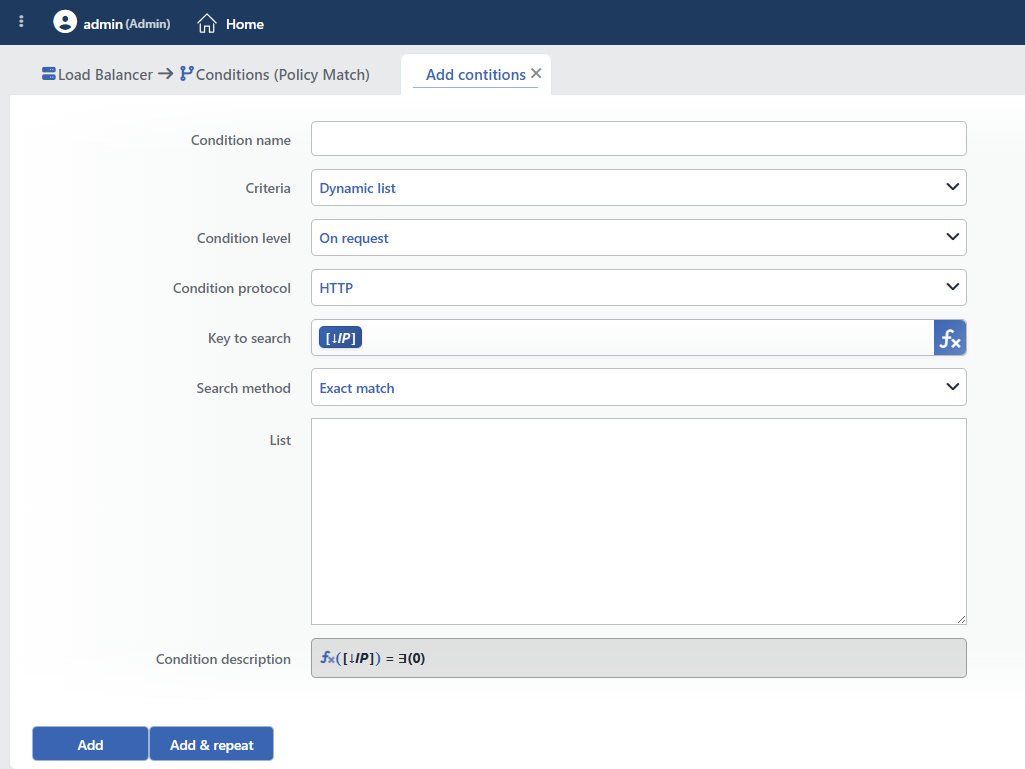 Dynamic List Add Form
INFO
Condition Name
An optional name can be entered for the condition to be created.
This field is especially important in the following scenarios:
- When many conditions are defined under the same vService,
- When conditions with similar criteria need to be distinguished,
- When it is necessary to quickly understand which business rule the condition represents.
When this field is left empty, TR7 analyzes the content of the related condition and creates an automatic, descriptive name in the Condition Description field. This generated description is used as the name in condition lists.
INFO
Criteria Required
The field that determines the type of the condition; Dynamic list is selected from the searchable dropdown list. This selection determines the fields displayed in the form. The criterion cannot be changed after the condition is saved: if a different criterion is needed, a new condition is defined. For all criteria in the list and their scopes, the criteria catalog on the Conditions page can be referred to.
INFO
Condition Level
Determines in which phase the condition is evaluated; it cannot be changed after saving.
- On request: Evaluated when the request is received.
- On response: Evaluated when the response is received.
INFO
Condition Protocol
Determines in which protocol the condition works; it cannot be changed after saving.
- HTTP: Used in HTTP vServices.
- TCP: Used in L7 TCP vServices. Since there are no variables belonging to the response stage in TCP, the variable list is offered from the request set even if On Response is selected.
INFO
Key to Search Required Default: Client IP address
The smart variable that produces the value to be searched in the list is entered in this field; fixed text and variables can be combined in the same field. The form opens with the Client IP address variable selected.
TIP
This field supports Smart Variables. Existing variables can be accessed with the fx button, and dynamic content can be created. For detailed information, the Variables document can be referred to.
The variable list changes according to the selected Condition Protocol and Condition Level values:
| Variable | Description | Availability |
|---|---|---|
| Client IP address | Client IP address | In every protocol and stage |
| Client country | Client country code | In every protocol and stage |
| Path/page of the request [URI] | Request path | HTTP only |
| Host | Host header value | HTTP only |
| Request cookie content | Request cookie value | HTTP only |
INFO
Search Method
How the value is searched in the list is selected. Searches are case-sensitive.
| Method | Description |
|---|---|
| Exact match | The value must exactly match a list element |
| Start | The value must start with a list element |
| End | The value must end with a list element |
| Includes | The value must contain a list element |
| Regex | The value must match one of the regex patterns |
| IP/cidr match | The IP address must match one of the IP/CIDR records in the list |
TIP
If IP variables such as Client IP address and Destination IP address are used, the IP/cidr match method is selected.
WARNING
This field is not marked as required in the form; however, if it is left empty, the condition produces no match (the condition does not take effect without a search method selected). It should be ensured that a method is selected before saving.
INFO
List
The list of values to be compared is entered. One value is written on each line.
List Usage Format:
| Format | Example | Description |
|---|---|---|
| Single IPv4 | 192.168.1.100 | A single IP address |
| Single IPv6 | 2001:db8::1 | A single IPv6 address |
| CIDR IPv4 | 10.20.0.0/24 | 256 IP addresses (10.20.0.0 - 10.20.0.255) |
| CIDR IPv6 | 2001:db8::/32 | IPv6 subnet |
| Multiple Entries | One entry per line | More than one entry |
| Comment Line | #10.10.10.100 | Lines starting with # are ignored |
In the IP/cidr match method, each line in the list goes through IP/CIDR validation; invalid lines (e.g. domain name, path) are silently ignored without an error.
Sample List Contents:
IP/CIDR
192.168.1.0/24
10.0.0.0/8
172.16.0.0/12
Path
/admin
/api/internal
/management
Domain
example.com
test.example.com
staging.example.com
INFO
Condition Description
It is created automatically by TR7 in line with the entered criteria and values.
This description:
- which value the condition applies to,
- which criterion it works on,
- the quick understanding of the condition on listing screens
is produced dynamically by the system so as to provide these.
INFO
Form Buttons
Add
The condition adding process is completed by clicking the Add button.
Add & Repeat
With the Add & Repeat button, the condition adding process is completed, and another new condition can be added with different configurations without leaving the related window.
 Condition Added
Operational Usage Recommendations
- IP Whitelist/Blacklist. Trusted IP addresses or IP addresses that must be blocked should be managed as a list.
- Path-Based Access Control. A path list should be used to control access to specific paths.
- Geographic Filtering. Country-based access control should be performed with the Client country variable.
- Dynamic Value Matching. Any traffic information should be compared with a list thanks to smart variables.
