
Smarter by Design.Simpler for Business
Set Path + Query
What Is the Set Path + Query Action?
The Set Path + Query action changes the URL path and query string parts of the incoming HTTP request together. This action rewrites both the path and the parameters before forwarding the request to the Backend Service.
This action works only at the request stage and changes the path + query string parts of the URL.
The URL Structure and the Path + Query
Understanding the components of the URL is important for choosing the correct action:
http://www.example.com:80/path/to/myfile.html?key1=value1&key2=value2#SomewhereInTheDocument
▢ Scheme▢ Domain▢ Port▣ Path: changes▣ Parameters: changes▢ Anchor
| Component | Is it affected? | Description |
|---|---|---|
| Scheme | No | The protocol is preserved |
| Domain Name | No | The server address is preserved |
| Port | No | The port number is preserved |
| Path | Yes | The resource path changes |
| Parameters | Yes | The query string changes |
| Anchor | No | The in-page reference (it is not sent to the server) |
Set Path + Query vs Set Path
- Set Path + Query: Changes both the path and the query string.
- Set Path: Changes only the path, the query string is preserved.
The Importance of the Set Path + Query Action
Full URL rewriting is used in the scenarios where the control of both the path and the parameters is needed.
The Set Path + Query action;
- rearranges the query string parameters,
- changes the path and the parameters together,
- converts the old URL formats into the new formats,
- performs parameter cleaning or adding,
- carries out complex URL conversions.
For this reason, the Set Path + Query action is a powerful tool for full URL control.
Supported vService Types
HTTP
L7 TCP
Network
Execution Timing
On Request
On Response
How to Add?
A new Set Path + Query Action can be added through the TR7 web management interface by following the steps below:
- The Configuration Menu is opened by clicking the TR7 logo at the bottom left.
- The Load Balancer → Actions → Add steps are followed.
- A unique and descriptive name is entered for the action.
- Set Path + Query is selected as Action Type.
- The related configurations of the action are made.
- In the Conditions tab, the condition/conditions under which the action takes effect are determined.
- The action is added by clicking the
Addbutton.
Set Path + Query Action Add Form
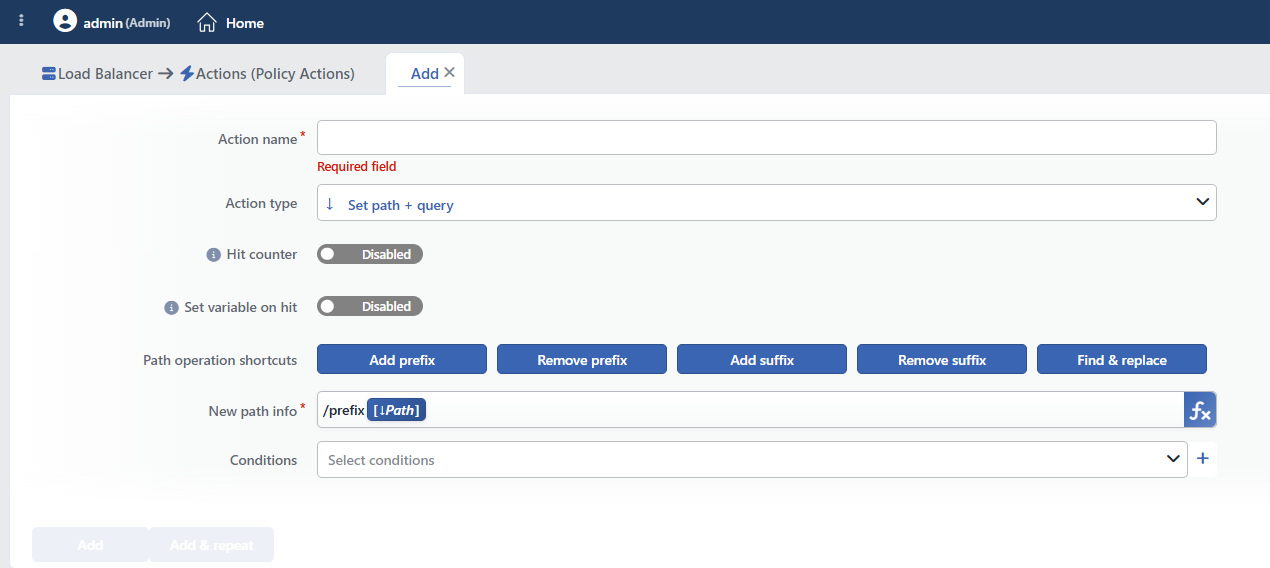 Set Path + Query Action Add Form
INFO
Hit Counter Default: Off
Hit Counter counts every run of the action (it is evaluated together with the action's own condition; the count is not lost even in terminating actions such as Deny). Action-based rates and totals are displayed in the Action Hits tab of the vService dashboard and on the live statistics screen; they do not appear as a separate column in the lists. The counter is cumulative; there is no interface for resetting it manually: it starts from zero when the set of counted actions changes or when the vService is reloaded, while the history is preserved on the dashboard as a rate (hit/s).
INFO
Set Variable on Hit
A variable name whose value is assigned each time the action runs can be entered (optional; empty by default). The name can consist of letters, digits and underscores (at most 32 characters). When the action is triggered, the variable is set to 1, and chained behaviors can be built by reading it with the %TR7VAR(name) smart variable in other conditions and actions on the same vService.
INFO
Path Operation Shortcuts
It offers shortcut buttons for the frequently used path editing operations. When a button is clicked, the necessary value is entered in the form that opens and the New Path Info field is filled automatically.
| Shortcut | Description | Popup Form | Result (New Path Info) |
|---|---|---|---|
| Add prefix | Adds a prefix to the beginning of the path | The prefix to be added (e.g. /api) | /api [↓Path] [↓Query] |
| Remove prefix | Removes the prefix at the beginning of the path | The prefix to be deleted (e.g. /api) | [↓Path⇒>REPLACE.first(^/api->)] [↓Query] |
| Add suffix | Adds a suffix to the end of the path | The suffix to be added (e.g. .html) | [↓Path] .html [↓Query] |
| Remove suffix | Removes the suffix at the end of the path | The suffix to be deleted (e.g. .html) | [↓Path⇒>REPLACE.first(\.html$->)] [↓Query] |
| Find & replace | Finds the text within the path and replaces it | The text to be found and the text to be written instead | [↓Path⇒REPLACE.all(/old->/new)] [↓Query] |
Preservation of the Query String
Unlike the Set Path action, in the Set Path + Query action the shortcuts add the [↓Query] variable automatically. In this way the original query string is preserved. If the query string is not wanted to be preserved, the [↓Query] variable can be removed manually from the New Path Info field.
INFO
New Path Info Required
The new path and query string value to be sent to the Backend Service is entered. The path must start with / and the query string must be separated with ?.
TIP
This field supports Smart Variables. Existing variables can be accessed with the fx button and dynamic content can be created.
Sample variables: the request path (Path/page of the request [URI]), all the parameters (Request query) and a single parameter (Query parameter). They can be used together with fixed text values.
WARNING
The Request query variable brings the parameters together with the leading ?. An additional ? must not be written before this variable; if it is written, a double ? occurs in the address.
Detailed information is on the Variables page.
Important notes:
- The path must start with
/(the form does not check this) ?is used in order to add a query string- The original query string is not preserved: it is completely changed
- Dynamic content can be created with Smart Variables
Format:
/yeni-path?param1=deger1¶m2=deger2Sample Values
| Incoming Request | New Path Info | Sent to the Backend Service |
|---|---|---|
/old?a=1&b=2 | /new?x=10 | /new?x=10 |
/search?q=test | /api/search?query=test&format=json | /api/search?query=test&format=json |
/page | [Path/page of the request [URI]]?source=tr7 | /page?source=tr7 |
INFO
Conditions
In this field, it is defined under which condition or conditions the related action takes effect.
By adding one or more conditions, the behavior can be applied in a targeted and controlled way with the and/or structure.
Detailed information about conditions is on the Conditions page.
WARNING
If no condition is defined in this field, the related action runs unconditionally (Always). In this case, the action is applied to all traffic coming to the related vService.
In live environments, using an action without defining a condition can lead to unexpected situations (service outages). For this reason, it is recommended that at least one condition always be defined when an action is created.
INFO
Form Buttons
Add
The action adding process is completed by clicking the Add button.
Add & Repeat
With the Add & Repeat button, the action adding process is completed, and another new action can be added with different configurations without leaving the related window.
 Action Added
Set Path vs Set Path + Query
The critical difference between the two actions:
| Feature | Set Path | Set Path + Query |
|---|---|---|
| Does the path change? | Yes | Yes |
| Does the query string change? | No (it is preserved) | Yes (it changes) |
| The original parameters | Preserved | Lost |
Comparison Example
The incoming request: /search?q=laptop&page=2
Set Path + Query (with the /api/search?format=json value):
- The result:
/api/search?format=json - The original query string was lost
Set Path (with the /api/search value):
- The result:
/api/search?q=laptop&page=2 - The query string was preserved
Which One Should Be Used?
- If only the path will be changed and the parameters will be preserved → Set Path
- If the parameters will also be changed or cleared → Set Path + Query
INFO
Rewriting, Not Redirection
This action does not send a redirection response to the client. The request is rewritten on TR7 and forwarded to the Backend Service; the address does not change in the client browser and no additional round trip occurs.
The action does not terminate the request; if the condition is not met, nothing is done and the request continues its usual flow. More than one path editing action can be added to the same vService; in this case the definition that comes later in the list changes the value written by the previous one.
Operational and Safe Usage Recommendations
- It must not be forgotten that the original parameters will be lost. This action changes the original query string completely; if the parameters need to be preserved, the Set Path action is used or the original query is included in the new value with Smart Variables.
- Smart Variables are used in order to preserve the parameters. In order to preserve the original query string, the
/new-path[Request query]form is used. - Pay Attention to URL Encoding. The query string parameters must be URL encoded. Special characters (space, &, =, etc.) must be encoded.
- Targeted application with conditions. An unconditional change affects all the requests; a condition is defined for certain paths or patterns.
- The Backend Service expectations are checked. It is verified that the new URL is in the format expected on the Backend Service side.
Common Usage Scenarios in Live Environments
The examples below show how the related action is applied in the most frequently encountered use cases in real systems. These scenarios are based on practices that are widely preferred in live environments and rest on experience gained in the field.
Scenario 1: Cleaning the Sensitive Query Parameters
Problem: In the requests coming to the public API endpoints, there are debug parameters, session tokens or internal tracking IDs. The writing of this sensitive information to the Backend Service logs creates a security risk.
Solution: With Set Path + Query, only the path is forwarded and all the query parameters are cleaned, preventing the sensitive information from reaching the Backend Service.
Configuration:
- New Path Info:
[Path/page of the request [URI]] - Conditions:
- Path starts with
/public/ ANDPath + Query containstoken
- Path starts with
Result:
- ✅
/public/api/data?token=secret123&debug=true→ Only/public/api/datais forwarded to the Backend Service, the sensitive parameters are cleaned. - ✅ The security logs stay clean, the debug/token information does not leak to the Backend Service.
Scenario 2: Automatic Tracking Parameter Injection
Problem: The source=tr7 and timestamp information needs to be added to all the API requests for analytics. The existing query parameters must be preserved, but the tracking information must be appended automatically.
Solution: With Set Path + Query, the original path and query are preserved and the tracking parameters are added at the end.
Configuration:
- New Path Info:
[Path/page of the request [URI]][Request query]&source=tr7 - Conditions:
- Path starts with
/api/ ANDPath + Query does not containsource=
- Path starts with
Result:
- ✅
/api/products?category=laptop&limit=10→ It is forwarded to the Backend Service as/api/products?category=laptop&limit=10&source=tr7&ts=1640995200. - ✅ The original parameters are preserved, the automatic tracking information is added, analytics works completely.
Scenario 3: Legacy API: Parameter Name and Format Conversion
Problem: The old API searches with the q parameter, the new Backend Service API expects the term parameter. In addition, instead of page/size, offset/limit must be used for pagination. The customers continue to use the old format.
Solution: With Set Path + Query, the old parameter names are converted into the new format and transformed into the structure expected by the Backend Service.
Configuration:
- New Path Info:
/api/v2/search?term=[Query parameter: q]&limit=20&format=json - Conditions:
- Path equals
/search ANDQuery Parameterqexists
- Path equals
Result:
- ✅
/search?q=laptop&page=2→ It is forwarded to the Backend Service as/api/v2/search?term=laptop&limit=20&format=json. - ✅ The old API customers use the new backend without changing their code, the parameter conversion is done transparently.
Scenario 4: Converting a RESTful Path into a Query String
Problem: The modern frontend uses a RESTful URL (/products/123/reviews), while the legacy PHP backend expects a query string (/product.php?id=123&action=reviews). The backend code cannot be changed.
Solution: With Set Path + Query, the RESTful path segments are parsed and converted into query parameters.
Configuration:
- New Path Info:
/product.php?action=reviews: if a value needs to be extracted from the path, the text splitting smart function is applied to the request path variable - Conditions:
- Path
^/products/[0-9]+/reviews$REGEX
- Path
Result:
- ✅
/products/123/reviews→ It is forwarded to the Backend Service as/product.php?id=123&action=reviews. - ✅ RESTful API → Legacy PHP transparent conversion, no code change is needed.
Scenario 5: Removing the Cache-Busting Parameters
Problem: The frontend adds cache-busting parameters for the static assets (/app.js?v=1.2.3, /style.css?_=timestamp). However, the Backend Service includes these parameters in the cache key and the cache hit rate decreases.
Solution: With Set Path + Query, all the query parameters are removed for the static assets and cache-friendly URLs are created.
Configuration:
Result:
- ✅
/app.js?v=1.2.3→ It is forwarded to the Backend Service as/app.js, the cache-busting parameter is removed. - ✅
/style.css?_=1640995200→ It is forwarded to the Backend Service as/style.css, the cache hit rate increases. - ✅ The cache efficiency is maximized for the static assets.
Scenario 6: Pagination Format Conversion
Problem: The old API uses the page and size parameters, the new Backend Service API expects offset and limit. The pagination format must be converted, the other parameters (filters, sorting) must be preserved.
Solution: With Set Path + Query, the pagination parameters are converted and the other parameters are preserved, providing compliance with the new API format.
Configuration:
- New Path Info:
/api/v2/products?limit=+ the size query parameter: if a numeric conversion is needed, the multiplication/subtraction smart functions are applied to the parameter variable - Conditions:
- Path starts with
/api/products ANDQuery Parameterpageexists
- Path starts with
Result:
- ✅
/api/products?page=3&size=20&category=electronics→ It is forwarded to the Backend Service as/api/v2/products?offset=40&limit=20&category=electronics. - ✅ The pagination format conversion is done, the filter parameters are preserved.
Scenario 7: Adding a Fixed Parameter to the Backend Service
Problem: The Backend Service wants to know from which channel the request comes; however, the client cannot be expected to send this information.
Solution: A fixed parameter is added to the request while the existing parameters are preserved.
Configuration:
- New Path Info:
[Path/page of the request [URI]][Request query]&channel=web - Conditions:
- Path starts with
/api/
- Path starts with
Result:
- ✅
/api/products?size=L→ It is forwarded to the Backend Service as/api/products?size=L&channel=web. - ✅ The existing parameters → They are preserved thanks to the variable.
- ⚠️ A request without parameters → The address is created in the form
/api/products&channel=web; in this scenario it must be guaranteed with a condition that the parameter always exists.
Scenario 8: Recreating the Query String Completely
Problem: There are too many unnecessary parameters coming to the public search endpoint. Only the q (search term) and limit parameters must be sent to the Backend Service API, all the other parameters must be cleaned.
Solution: With Set Path + Query, the original query is changed completely and a new query containing only the necessary parameters is created.
Configuration:
- New Path Info:
/api/search?q=[Query parameter: q]&limit=50 - Conditions:
- Path equals
/search
- Path equals
Result:
- ✅
/search?q=laptop&debug=1&internal_id=xyz&tracking=abc→ It is forwarded to the Backend Service as/api/search?q=laptop&limit=50. - ✅ The unnecessary/sensitive parameters are cleaned, only the search term and the limit are forwarded.
Scenario 9: Default Parameter Injection: Completing the Missing Parameters
Problem: Some old clients do not send the format parameter in the API requests, and the Backend Service API returns XML by default. All the clients must receive JSON.
Solution: With Set Path + Query, the original parameters are preserved and the missing format=json parameter is added.
Configuration:
- New Path Info:
[Path/page of the request [URI]][Request query]&format=json - Conditions:
- Path starts with
/api/ ANDPath + Query does not containformat=
- Path starts with
Result:
- ✅
/api/users?limit=10→ It is forwarded to the Backend Service as/api/users?limit=10&format=json. - ✅ The missing format parameter is added automatically, all the clients receive a JSON response, the default XML behavior of the Backend Service is overridden.
