
Smarter by Design.Simpler for Business
SIEM & Attack Details
What Is SIEM & Attack Details?
SIEM & Attack Details determines the content of the attack information (WAF info) that WAF produces for every attack it detects: whether the content that is the subject of the attack (the payload) will be sent or not, the fields to be carried per attack and the language of the texts in these fields.
The attack information is produced when the total risk score of the request reaches the blocking threshold (in all of the blocking, monitoring and teacher traffic) or when a rule that has been taken into monitoring matches; it is not produced for the isolated detections that stay below the threshold. It is not produced for the traffic processed in the learning mode either: that traffic is written into the learning record.
The attack information is a single-line JSON object; it carries the identity of the request, the total risk score, the verdict at the request level (blocked, monitored, teacher), the scanning duration and the attack list. Every attack in the list contains at least the rule identity; the identity field is always sent and cannot be selected.
Where the attack information is sent
This screen determines only the content of the attack information; where it will be sent is determined by the log profile assigned to the vService. The attack information is added to the log line according to the format of the log profile: in the TR7 JSON Format and CEF Format formats to every request line (as an empty object if there is no attack), and in the TR7 WAF Log format as the whole of the log line. In the formats defined manually the attack information is added with the %WAFINFO smart variable; the same variable can be used in the Blocking Page content as well. If no log profile is assigned to the vService, the attack information is produced but is not sent anywhere.
These settings have no relationship with the Log Forwarding screen; that one manages the forwarding of the system and audit records.
The scope
The SIEM & Attack Details settings are valid across the vService and are common in all the host groups. The settings are meaningful only in the WAF-protected HTTP vServices.
The SIEM & Attack Details Card on WAF Management
The SIEM & Attack Details card in the Learning & Reporting section of the WAF Management screen is summarized with three lines (with two lines when the field selection is emptied entirely). The first line reports the sending rule of the attack content: The attack payload is sent in sync with the detailed-log setting, The attack payload is always sent or The attack payload is never sent. The second line summarizes the selected fields: The attack detail carries 5 fields: Risk level, Attack area, Rule monitor state +2 (with the names of the first three fields, and the rest as a number). The third line reports the content language: Content language: English.
This card never goes dim and does not take the Disabled pill; since the attack information is always produced, only how the content is shaped is displayed on the card.
When the pencil icon at the top right of the card is clicked, the edit screen opens.
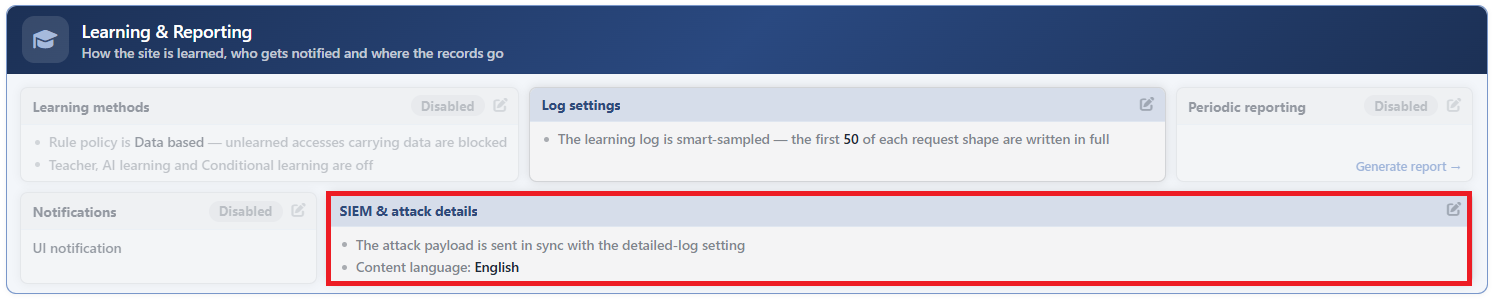 WAF Management - The SIEM & Attack Details Card
The SIEM & Attack Details Edit Screen
- The WAF Management tab is opened.
- The pencil icon at the top right of the SIEM & Attack Details card in the Learning & Reporting section is clicked; the editing window titled SIEM & Attack Details opens.
- The following fields are edited and confirmed with the
Editbutton.
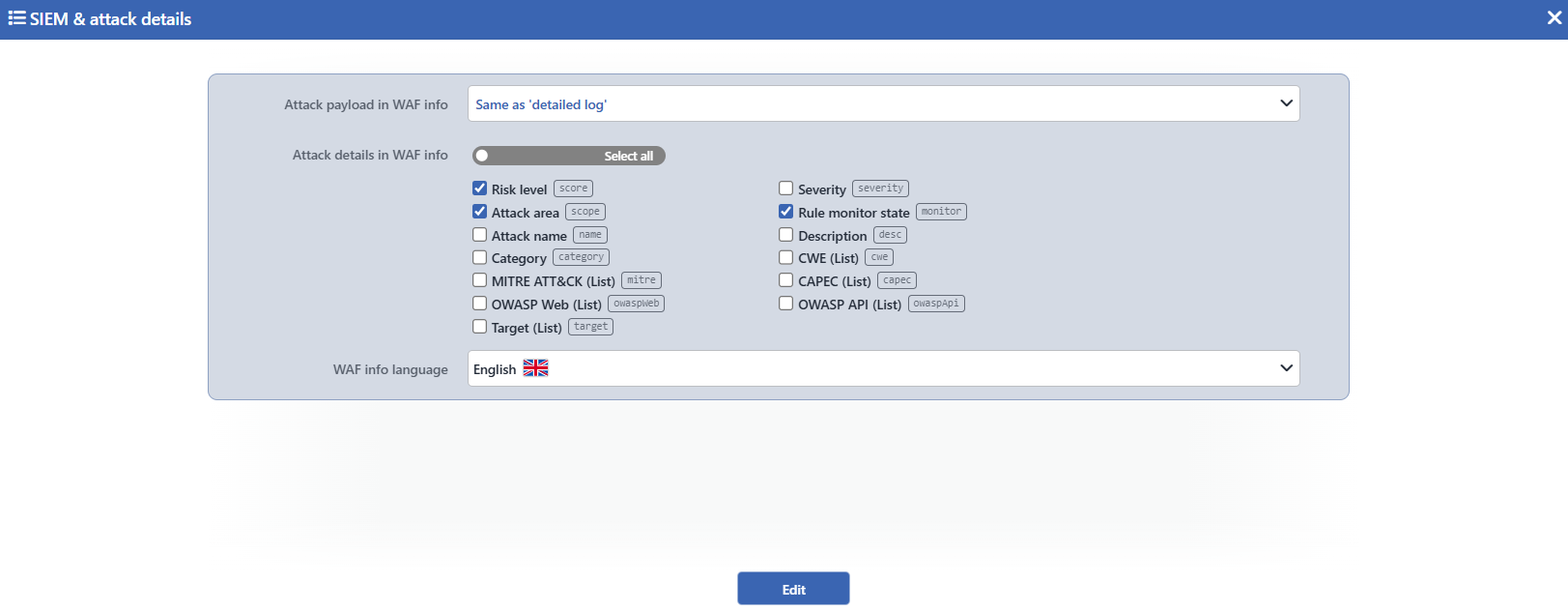 The SIEM & Attack Details Edit Screen
INFO
Attack Payload in WAF Info Default: Same as 'detailed log'
It is selected whether the content that is the subject of the attack will be added to the attack information or not; its default value is Same as 'detailed log':
| Option | Meaning |
|---|---|
| Same as 'detailed log' | The content is sent only while the Detailed Log setting of the inspection in which the match has occurred is on. |
| Always Send | The content is sent independently of the Detailed Log setting of the inspections. |
| Never Send | The content is never sent. |
The content sent consists of the matching slice itself and the short context around it; in the long entries only the near surroundings of the match are taken and the slice taken has an upper length limit. The explanations produced by the non-signature matches (such as the structural inspections and the blacklist), on the other hand, are sent in every case in the options other than Never Send; these explanations do not depend on the Detailed Log setting of the inspection.
INFO
Attack Details in WAF Info
The fields every attack record will carry are checked; by default Risk Level, Attack Area and Rule Monitor State are selected. Below the field there is the following explanation: The attack id is always included. The request-level verdict is sent as the top-level action key (block / monitor / fpc), and list fields are null when the rule carries no such classification.
| Option | The SIEM key | The information it carries |
|---|---|---|
| Risk Level | score | The numeric risk score of the attack; the severity label is derived from this score. |
| Severity | severity | The severity label derived from the risk score; it is sent in the selected language. |
| Attack Area | scope | The request section the attack has matched (the path, the query, the header, the body etc.). |
| Rule Monitor State | monitor | Whether the matching rule is in the monitoring state or not; it is always sent as true/false. The general verdict of the request is carried with a separate key. |
| Attack Name | name | The name of the matching rule; it is sent in the selected language. |
| Description | desc | The long explanation of the matching rule; it is sent in the selected language. |
| Category | category | The category label of the matching rule. |
| CWE (List) | cwe | The CWE identifiers of the rule; if the rule does not carry any, null is sent. |
| MITRE ATT&CK (List) | mitre | The MITRE ATT&CK technique identifiers of the rule; if the rule does not carry any, null is sent. |
| CAPEC (List) | capec | The CAPEC identifiers of the rule; if the rule does not carry any, null is sent. |
| OWASP Web (List) | owaspWeb | The OWASP Web Top 10 counterparts of the rule; if the rule does not carry any, null is sent. |
| OWASP API (List) | owaspApi | The OWASP API Top 10 counterparts of the rule; if the rule does not carry any, null is sent. |
| Target (List) | target | The component types the attack targets (such as the web application, the web server); if the rule does not carry any, null is sent. |
The fields that are not selected are not written into the attack record at all. The rule identity is always sent with the id key, and the content that is the subject of the attack (depending on the selection) with the payload key; the general verdict of the request, on the other hand, is carried outside the attack list, in the top-level action key. The record produced when the scanning times out is outside this: this record does not apply the field selection and does not carry the request identity and verdict keys.
The schema of the list fields is fixed: when they are full they are sent as a JSON array, and when the rule does not carry that classification with the value null; the field is not skipped in any case. When all of the fields are removed, the attack record carries only the rule identity (and, according to the selection, the content).
INFO
WAF Info Language Default: English
The language of the texts in the attack information is selected; its default value is English:
| Option | Meaning |
|---|---|
| English | The attack name, its explanation and the severity label are sent in English. |
| Türkçe | The attack name, its explanation and the severity label are sent in Turkish. |
The language selection affects only the texts of the Attack Name, Description and Severity fields; the risk score, the request section and the identifier lists are independent of the language. Since the category labels are defined in a single language, they do not change with the language selection.
This setting formats only the attack information sent outside; the Event Logs, Dashboard and report screens in the interface continue to use the own interface language of every user.
INFO
Edit
The changes in the form are saved by clicking the Edit button; the button becomes enabled when no error remains in the form. There is no additional confirmation window or deployment (deploy) step; the WAF configuration is automatically produced again and applied.
The Detailed Log settings while Always Send is being selected
The Always Send option requires that the Detailed Log settings of the related inspections be on as well. When a match occurs in an inspection whose Detailed Log is off, this option cannot produce the expected content and the scanning of the request is left halfway; while Block Unexpected Parser Errors is on, such a request is blocked. If it is wanted that the content be sent in every inspection, the Detailed Log settings of the inspections should be turned on, otherwise the Same as 'detailed log' option should be used.
The effect of the log profile format
In the TR7 WAF Log format only the line of the blocked requests is sent; a vService in the monitoring (Monitor) mode does not send attack information in this format. For the monitored attacks to reach SIEM as well, one of the TR7 JSON Format or CEF Format formats should be used.
