
Smarter by Design.Simpler for Business
WAF Attack ID
What Is the WAF Attack ID Condition?
WAF Attack ID is a condition type used to make traffic routing and manipulation decisions according to the specific attack rules marked by the TR7 Web Application Firewall (WAF).
The condition becomes evaluable when the request reaches the block threshold of the WAF or when a rule in monitor mode is triggered: single detections that remain below the threshold do not trigger the condition. If no WAF profile is bound to the vService, the condition does not produce an error, it silently does not match.
Incoming Request
↓
WAF Analysis (Attack Detection)
↓
Detected Attack IDs:
· 110045 (a rule from the SQL Injection category)
· 110045 (a rule from the SQL Injection category)
↓
Match: is the ID in the configured list?
[ the ID list of the selected rules ]
[ the ID list of the selected rules ]
↓
Result: A match was found (110045)
Thanks to this condition, actions specific to the attack types detected by the WAF can be applied.
TIP
This condition can be used only in vServices that are HTTP and have the WAF module active.
The Importance of the WAF Attack ID Condition
The WAF Attack ID condition is a powerful tool for creating security policies customized according to the attack type.
With the WAF Attack ID condition:
- Actions specific to certain attack types can be defined,
- Different attack types can be processed in different ways,
- Custom exception rules can be created in false positive situations,
- Additional security measures can be taken for critical attacks,
- The logging level can be adjusted according to the attack type.
WAF and Condition Integration:
| Component | Role |
|---|---|
| WAF Profile | Attack detection and scoring |
| Condition | Condition matching according to the detected attack |
| Action | The action to be applied when the condition is met |
Comparison of WAF Attack ID and WAF Attack Group
| Approach | Advantage | Usage |
|---|---|---|
| WAF Attack ID | Precise control | For specific rules |
| WAF Attack Group | Comprehensive control | For category-based policies |
Supported vService Types
HTTP (WAF Must Be Active)
L7 TCP
Network
The condition can be used at both the request (At Request) and response (At Response) stages.
How to Add?
A new WAF Attack ID Condition can be added through the TR7 web management interface by following the steps below:
- The Configuration Menu is opened by clicking the TR7 logo at the bottom left.
- The Load Balancer → Conditions → Add steps are followed.
- WAF attack ID is selected as Criteria.
- The related configurations of the condition are made.
- The condition is added by clicking the
Addbutton.
WAF Attack ID Condition Add Form
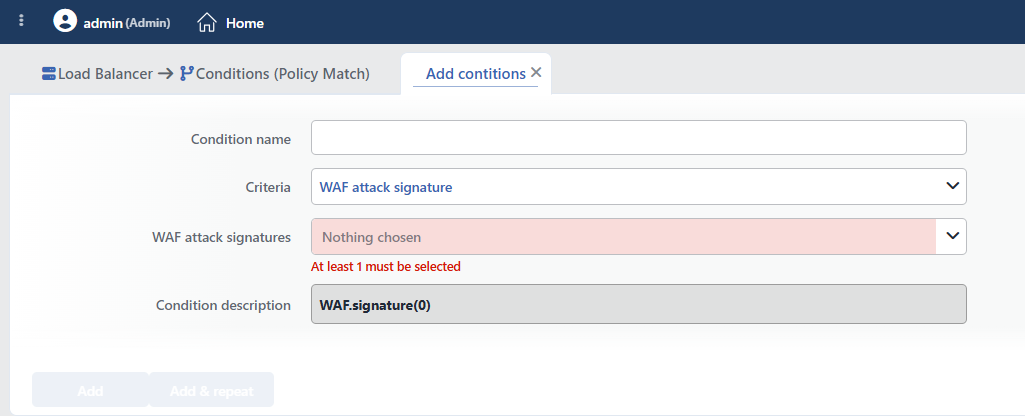 WAF Attack ID Condition Add Form
INFO
Condition Name
An optional name can be entered for the condition to be created.
This field is especially important in the following scenarios:
- When many conditions are defined under the same vService,
- When conditions with similar criteria need to be distinguished,
- When it is necessary to quickly understand which business rule the condition represents.
When this field is left empty, TR7 analyzes the content of the related condition and creates an automatic, descriptive name in the Condition Description field. This generated description is used as the name in condition lists.
INFO
Criteria Required
The field that determines the type of the condition; WAF attack ID is selected from the searchable dropdown list. This selection determines the fields displayed in the form. The criterion cannot be changed after the condition is saved: if a different criterion is needed, a new condition is defined. For all criteria in the list and their scopes, the criteria catalog on the Conditions page can be referred to.
INFO
WAF Attack Signatures Required
The WAF rules to be checked are selected from the multiple selection list that is searched by rule names; the ID is not written manually. Since there are more than 3000 rules in the list, the list is used by searching (the "select all" operation is applied to the search results). At least one rule must be selected.
- The search in the list is made with the rule name seen in the logs or on the WAF Dashboard; when the selection is saved, the ID of the rule is used in the background.
- The list contains OWASP rules and structural rules (Structure Limits/Policies, Content Integrity, IP Reputation); custom WAF rules are not offered in this list.
TIP
When more than one rule is selected, the condition is met if any one of them matches (OR logic).
INFO
Condition Description
It is created automatically by TR7 in line with the entered criteria and values.
This description:
- which value the condition applies to,
- which criterion it works on,
- the quick understanding of the condition on listing screens
is produced dynamically by the system so as to provide these. In this criterion, the description does not show the selected rules but only the number of selected rules (e.g. WAF.signature(3)); if the lists are to be distinguished, giving a Condition Name is recommended.
TIP
For only the "was the request blocked by the WAF" check, the ready-made If is a WAF block condition is offered in the condition selection lists; if rule distinction is not needed, there is no need to define a separate condition.
INFO
Form Buttons
Add
The condition adding process is completed by clicking the Add button.
Add & Repeat
With the Add & Repeat button, the condition adding process is completed, and another new condition can be added with different configurations without leaving the related window.
 Condition Added
Operational Usage Recommendations
- False Positive Management. If false positives are experienced for specific attack IDs, these IDs should be detected with a condition and subjected to different processing (e.g. log but allow).
- Additional Measures for Critical Attacks. Extra security actions (IP ban, CAPTCHA) should be defined for critical attacks such as SQL Injection and Command Injection.
- WAF Attack Signature Group Should Be Used for Attack Groups. If all the IDs in an attack category are to be checked instead of one by one, the WAF Attack Group condition should be preferred.
- Coordination with WAF Logs. When the condition is created, the correct rules should be determined by searching in the list for the rule names seen in the WAF logs.
