
Smarter by Design.Simpler for Business
Log Forwarding
What Is Log Forwarding?
Log Forwarding is the target definition that forwards the audit logs (the logins, the MFA results, the lockouts, the session events) of a vService with AGS enabled to a SIEM or syslog server. The profile keeps the target server address and port, the transport protocol (UDP/TCP), the route table from which the forwarding goes out, the syslog envelope format (RFC 3164 or RFC 5424), the message format (JSON or CEF) and the syslog application name.
The profiles are selected from the Audit Log Forwarders list in the AGS settings of the vService; at most five profiles are bound to one vService and the same profile is used on several vServices. A test event is sent to the target with the Send Test Event button in the preview panel. This screen has no built-in profile.
UDP / TCP
Protocol
UDP (the default) or TCP to the syslog server; the port default is 514
2 × 2
Formats
Syslog Format: RFC 5424 · RFC 3164 (BSD); Message Format: JSON · CEF (Common Event Format)
Route Table
The Outgoing Table
The target name is resolved in the selected route table; the forwarding goes out from this table
5
Targets per vService
At most 5 profiles in the Audit Log Forwarders list
Test
Send Test Event
A test event from the preview for a saved profile
200/s
The Forwarding Ceiling
200 events per second per profile; on an overflow the events are skipped and a warning is sent
How does it work?
- The profile is defined on this screen: the target server, the port, the protocol, the route table and the formats are selected.
- The profile is added to the Audit Log Forwarders list in the AGS settings of the vService.
- The audit log files of the vService are followed by the TR7 management process; the new events are sent to the syslog server from the selected route table, in the selected format.
- The connection is verified by sending a test event to the target with Send Test Event in the preview.
Operational Best Practices
- Reliable forwarding with TCP. There is no delivery guarantee in UDP; TCP must be selected in the installations in which event loss is not acceptable.
- The route table and the name resolution. The target domain name is resolved within the selected Route Table (Route Tables); if the SIEM is on the management network, the related route table must be selected.
- The format according to the SIEM. JSON is suitable for structured parsing, CEF (Common Event Format) for CEF-based SIEMs; the RFC 3164 (BSD) envelope is suitable for old syslog collectors.
- The gap after an outage. The forwarding sends the new events from the moment the following starts; the events produced while the TR7 management process was off are not sent afterwards. The events stay in the vService audit logs on the device.
- The test event must be verified on the SIEM side. Send Test Event only reports that the event has been given to the transport layer; that it has reached the target must be checked on the SIEM side.
- The vServices before deleting. The delete confirmation does not show the usage locations; the vServices that use the profile must be checked from the AGS settings.
How to Add?
A new Log Forwarding profile is added through the TR7 web management interface with the following steps:
- The Configuration Menu is opened by clicking the TR7 logo at the bottom left.
- The AGS → Integrations → Log Forwarding → Add steps are followed.
- A unique and descriptive name is entered for the profile.
- The target server, the port, the protocol and the route table and the syslog and message formats are determined.
- The profile is added by clicking the
Addbutton.
TIP
Reaching the page via quick search
Instead of navigating the menu step by step, the related page is reached directly by using the search bar in the bottom left corner of the screen. The search bar opens with the Alt + T shortcut on Windows and Opt + T on macOS; typing the name of the feature being searched for is then sufficient.
The created profile is used in the Audit Log Forwarders list of one or more vServices with AGS enabled. The profile is also defined without leaving the vService settings with the add icon next to this field.
Log Forwarding Listing Screen
The list of all Log Forwarding profiles that are added on the TR7 device is reached by following the AGS → Integrations → Log Forwarding path. Profile adding, editing and deleting operations are performed on this screen.
 Log Forwarding Profiles Listing Form
The table opens with the following columns by default:
| Column | Description |
|---|---|
| Name | The name of the profile. |
| Syslog Server | The IP address or the domain name of the target syslog server. |
| Port | The target port. |
| Protocol | The transport protocol: UDP or TCP. |
| Message Format | The format of the message body: JSON or CEF (Common Event Format). |
There is no column that is hidden by default. The table is not sorted when it opens; when a column header is clicked, first a descending and then an ascending sort is applied, and on the third click the sort is removed.
The items in the toolbar are arranged from left to right in the following order; the last two items (Page Information and Page Size) are located in the information strip below the table.
Columns
Which columns are shown in the table is selected; all five of the columns come on. In the same panel the columns are reordered by dragging and the alignment is selected per column; the row height is fitted to the page with the Fit rows to the page button and the column layout is returned to the default with the Reset button. When the width badge next to a manually widened column is clicked, the column returns to the automatic width.
Filter
The Filter button is used to filter the profiles shown in the list according to certain criteria. There are three cards in the filter strip; the number next to the card name shows how many different values are found for that card in the profiles in the list:
| Card | What it filters |
|---|---|
| Protocol | By the transport protocol (UDP / TCP). |
| Message Format | By the message format (JSON / CEF (Common Event Format)). |
| Used in | The vServices that use the profiles and the Unused Entries value, which lists the profiles that are not used anywhere. |
Export
The table is exported as Excel, CSV or PDF by clicking the Export button. In the window that opens, the Filename, Format and Data Source, together with the Columns to be exported, are determined; the remaining fields are displayed according to the format: CSV Separator for CSV, Excel Sheet Name for Excel, and Page Orientation and Page Size for PDF.
Add
By clicking the Add button, the form for creating a new profile opens in the Add tab.
Edit
By clicking the Edit button, the edit form of the selected profile opens in the Edit tab. The button becomes enabled only when a single profile is selected.
The edit form is the same as the add form; all the fields including the name are changed and the button at the bottom of the form carries the name Edit. The change is saved without asking for confirmation and the forwarding profiles are re-synchronized.
Delete
When one or more profiles are selected and the Delete button is clicked, the related profiles are deleted. Before deleting, the "Are you sure?" confirmation is asked for.
WARNING
A profile that is in use can also be deleted and the confirmation window does not show the usage locations.
The reference in the Audit Log Forwarders list is not cleared automatically on the vServices that use the profile: the forwarding skips the deleted target, and if no valid profile is left on the vService, the audit log following of that vService stops. The settings canvas does not show the deleted target; the reference stays in the list and must be removed manually from the AGS settings of the vService. The delete operation is written to the user operation record.
Search
Used to search all information in the table.
RegExp Search
Used to search all the information in the table with a regular expression (RegExp). While the usage filter is active, this button is hidden.
Column Based Search
Used to perform a column-based search on the information in the table.
Usage Filter
Used to filter to which vServices the profiles are bound. While the filter is active, a selector takes the place of the search box; when the icon is clicked again, the search box returns.
Page Information
Contains information about the total number of defined profiles and the number of profiles displayed in the list: Showing N-M of T records and the number of selected profiles (N selected, or Nothing selected when there is no selection).
Page Size
The maximum number of profiles to be displayed on the page is selected. On this screen the default is 100; the options are 5, 10, 20, 50, 100, 200, 500 and All.
Right-Click Menu
When a row is right-clicked, a menu with the profile's name in its title opens. Both operations in the menu apply only to the right-clicked profile; a selection made in the list does not affect the menu.
| Operation | What it does |
|---|---|
| Edit | Opens the editing form of the profile in the Edit tab; it is the same as the form opened by the Edit button in the toolbar. |
| Delete | Deletes the right-clicked profile; the same confirmation question as the deletion in the toolbar is displayed. |
Preview of the Selected Profile
When a row in the list is clicked, the preview of the profile opens on the right of the screen; when the selected row is clicked again, the panel closes. The header contains the paper plane icon, the name of the profile and the Log Forwarder subtitle, and two operations are at the top right.
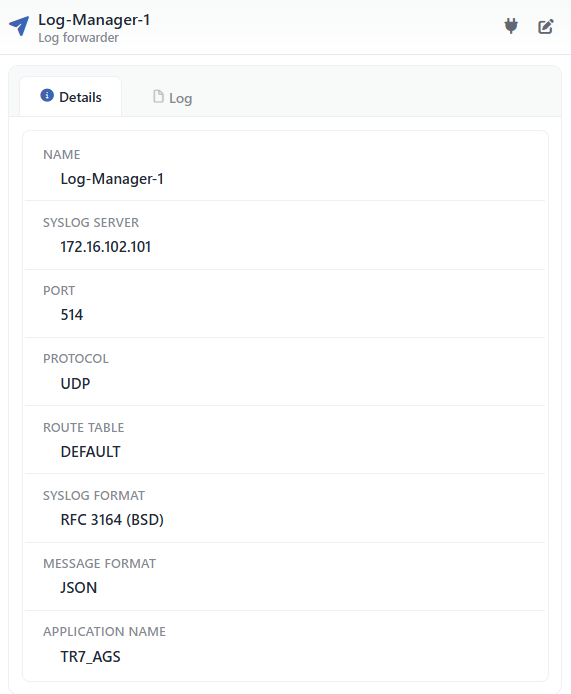 Preview of the Selected Profile
| Operation | What it does |
|---|---|
| Send Test Event | Sends a test event to the target over the saved profile (the details are below). |
| Edit | Opens the editing form of the profile in the Edit tab. |
The event sent with Send Test Event is forwarded to the target with the source the AGS audit log, the severity information, the text TR7 AGS log forwarder test event and additional information that contains the test: true and forwarder: "<name>" fields. For the test it is sufficient that the profile has been saved; it works even if the profile is not bound to a vService and the test event is not counted towards the per-second forwarding ceiling. The operation takes at most 15 seconds. The result is shown in a notification window:
| Result | Message |
|---|---|
| Successful | Test event handed to the transport. UDP gives no delivery guarantee — please confirm it arrived on the SIEM/syslog side. |
| Failed | Test event could not be sent: … (e.g. Log forwarder not found if the profile cannot be found) |
A successful result shows that the event has been given to the log transport infrastructure of the device; it does not show that it has reached the target. A successful result can be displayed even if the forwarding process of the route table is not ready, the target name cannot be resolved or the TCP connection cannot be established; that the event has arrived must be verified on the SIEM or syslog side. The test operation is not written to the user operation record.
There are three tabs in the panel; Used in is displayed only if the profile is used on at least one vService:
Details
Lists the settings of the profile row by row (the table below).
Used in
Lists the vServices that use the profile. The badge next to the tab name shows the usage count.
Log
Lists the user operations on the profile (adding, editing, deleting) as a timeline.
The rows in the Details tab are as follows, in order:
| Row | Description | Visibility condition |
|---|---|---|
| Name | The name of the profile. | Always |
| Syslog Server | The target server address. | Always |
| Port | The target port. | Always |
| Protocol | UDP or TCP. | Always |
| Route Table | The name of the route table from which the forwarding goes out (e.g. DEFAULT). | Always |
| Syslog Format | RFC 5424 or RFC 3164 (BSD). | Always |
| Message Format | JSON or CEF (Common Event Format). | Always |
| Application Name | The syslog application name. | Always |
Profile Add Form
A new Log Forwarding profile is added on the TR7 device by following the AGS → Integrations → Log Forwarding → Add steps.
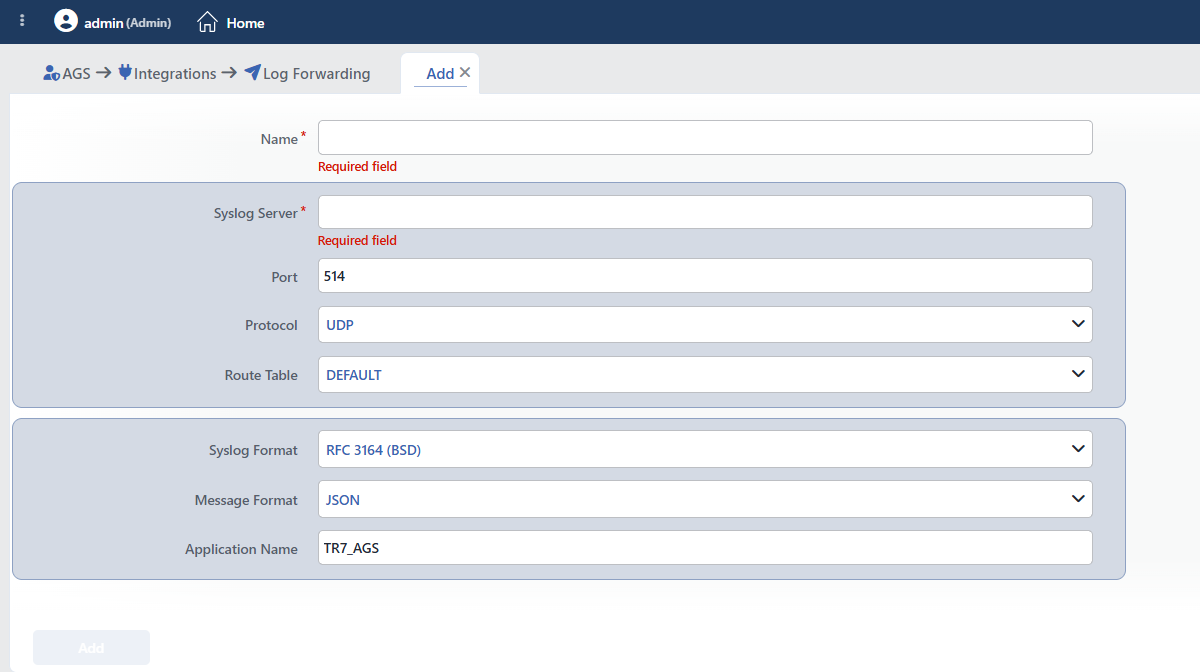 Log Forwarding Profile Add Form
INFO
Name Required
The name of the profile; it identifies the profile in the selection in the vService settings, in the test results and in the logs. The name must be unique on the device; a second profile with the same name is not saved and the Name is used warning is displayed. When it is left empty, the Required field warning is displayed. The name is at most 64 characters.
INFO
Syslog Server Required
The IP address or the domain name of the target syslog server. The domain name is resolved within the selected Route Table. The value is at most 253 characters; when it is left empty, the Required field warning is displayed.
INFO
Port Default: 514
The port of the target syslog server; an integer between 1 and 65535 is entered. On a value outside the range the Port must be in range 1-65535 warning and on a value that is not an integer the Port must be an integer warning is displayed.
INFO
Protocol Default: UDP
The protocol over which the events are carried is selected.
| Option | Meaning |
|---|---|
| UDP | A connectionless sending; there is no delivery guarantee. |
| TCP | A connection-oriented sending; for the installations in which event loss is not acceptable. |
INFO
Route Table Default: DEFAULT
The route table from which the forwarding goes out is selected; the route tables of the host device are listed. If a domain name is written in the Syslog Server field, the name is resolved within this table.
INFO
Syslog Format Default: RFC 3164 (BSD)
The format of the syslog envelope in which the event is placed is selected.
| Option | Meaning |
|---|---|
| RFC 5424 | The current syslog format. |
| RFC 3164 (BSD) | The old (BSD) syslog format; the Application Name is added to the beginning of the message. |
INFO
Message Format Default: JSON
The format of the message body is selected.
| Option | Meaning |
|---|---|
| JSON | The event fields are sent as a JSON object; for structured parsing. The object contains timestamp (the time of the event, in the ISO format), source (agsAuditLogs), severity, message and then the event fields (poolId, eventType, tags, username, userId, ip, userAgent, sessionId, gatewayId, actionType, data, references); the empty fields are not sent. |
| CEF (Common Event Format) | For CEF-based SIEMs. The header is in the CEF:0|TR7|LogTransport|1.0|agsAuditLogs|<message>|<severity>| form; the severity is mapped as information 3, warning 5, error 7 and critical 10. The extension fields are written in the sev=<severity> poolId=… eventType=… form with TR7's own field names. |
INFO
Application Name Default: TR7_AGS
The syslog application name; in the RFC 3164 (BSD) format it is added to the beginning of the message as <Application Name>: , and in the RFC 5424 format it is sent in the application name field of the syslog header. The value is at least 1 and at most 48 characters.
Operating Mechanism
INFO
- The following. The TR7 management process reads the hourly audit log files of the vServices that have AGS on and that have at least one valid profile in the Audit Log Forwarders list every two seconds. The following starts from the current end of the file and only the new events are sent; there is no retroactive sending. At the turn of the hour the file of the previous hour is drained to its end; if the file is compressed, it is read from the archive.
- The event content. Every event is sent with the vService id, the event type, the tags, the username and the user id, the client IP, the browser information, the session id, the gateway id, the flow step type, the event data and the event references; the event data and the references are converted to JSON text and, if they exceed 4096 characters, they are cut and
…is appended to the end. The severity of the event is preserved if it is error, warning or critical, and the other events are forwarded at the information level. The texts are produced in English. - The transport. The profile is given to the log transport infrastructure of the device as a syslog profile with the
ags:prefix; a separate forwarding process runs for each route table. The message is formatted with the Message Format and is placed into the Syslog Format envelope. The timeout on a TCP connection is 10 seconds. - The forwarding ceiling. 200 events per second are sent per profile; the ceiling is common to all the vServices that use the same profile and allows up to 200 events on instantaneous bursts. On an overflow the excess events are skipped (the events stay in the audit log on the device) and, at most once a minute and only to the related profile, the Rate limit: N audit event(s) were not forwarded in the last interval (they remain in the audit log) event is sent at the warning level.
- The reading limits. At most 512 KB is read per vService in each reading round; the excess is left to the following rounds, no event is lost and the forwarding is delayed. A single line longer than 128 KB and the lines that cannot be parsed as JSON are skipped. In the compressed archives the part that exceeds 64 MB is not read; at most 30 hours of files are advanced in one round.
- The synchronization. The forwarding profiles are re-synchronized when the log transport profiles, the Log Forwarding profiles, the AGS gateways or the vServices change.
- Cluster. The profiles are synchronized between the devices with the LB configuration.
- Logs. Adding, editing and deleting are monitored on the User Logs screen with the
"<name>" log forwarder created,editedanddeletedrecords; there is no separate option for this object in the User Logs object filter.
Scope and Limits
INFO
- Permission. The AGS screens depend on the Load Balancer permission area; for a user who does not have the permission the You don't have access to this page card is displayed instead of the page.
- The name is unique. A second profile carrying the same name is not saved.
- There is no built-in profile.
- Only the audit logs of the vServices with AGS enabled are forwarded; at most 5 profiles are selected per vService.
- There is no retroactive sending; the events produced while the management process was off are not forwarded afterwards.
- The length limits (the name 64, the server 253, the application name 48 characters) are checked during saving.
- License. The screen requires the AGS license.
- The general search does not find the Log Forwarding profiles; the profiles are reached from this screen. The screen itself is searched for with the name Log Forwarding.
- Deleting does not perform a reference check; a profile in use is deleted as well.
Usage Location
| Usage location | Field | Purpose |
|---|---|---|
| A vService with AGS enabled → AGS Management | Audit Log Forwarders (multiple selection, at most 5) | The targets to which the vService audit logs are forwarded |
| A vService with AGS enabled → the settings canvas | The Monitoring & Notification row | The audit log is forwarded to this target for each target; The audit log is not forwarded anywhere if there is no target |
| Settings → Log Forwarding | The common transport infrastructure | The Log Forwarding profiles use the same infrastructure with the ags: prefix; the two lists are independent of each other |
