
Smarter by Design.Simpler for Business
Malformed Packets
What Is Malformed Packets?
Malformed Packets checks whether a packet has an open session, a real source address and a path that is not dictated; it carries the four rules of the Packet Integrity band together.
All four rules of the box ask the same question from a different place: can this packet be what it claims to be? If a packet implies that it is part of an open session, does such a session exist; can the source address it carries have come from that address; is it dictating the path it will follow itself. For the packets whose answer is no there is no legitimate explanation.
For this reason there is no threshold in any rule in the box: there is no need to wait for a rate ceiling to be exceeded, the first packet already violates the rule.
4
Rules
Sessionless packet · taking on its own address · private address range · source routing
None
Adjustable Value
There is no limit or threshold field in any of the four
2
Able to Send to Quarantine
In the private address range rule quarantine is not offered at all
1
Exempt from the Promotion Permission
The rule of the packets that take on its own address carries signature certainty
IPv4 Only
The Scope of the Private Address Rule
For IPv6 traffic this rule is never written
1
Producing No Measurement
The source routing setting has no panel on the dashboard
The Malformed Packets Box on L4 DDoS Management
The box is the only box of the Packet Integrity band. In its header there are its name and the number of rules it carries, and in its body four rule rows.
 Packet Integrity - The Malformed Packets Box
| Row | Rule | What it catches |
|---|---|---|
| 1 | Invalid Packets | The packets that cannot be associated with an open session. |
| 2 | LAND / Self-Spoof | The packets that come from outside and show the device's own address as the source. |
| 3 | Martians | The packets that claim to come from the private and reserved address ranges. |
| 4 | (Source routing) - Refuse source-routed packets | The packets that carry the path they will follow inside themselves. |
Invalid Packets
Catches the packets that cannot be associated with an open session. Its definition in the information band is as follows: (Protocol validation) - Drop invalid packets.
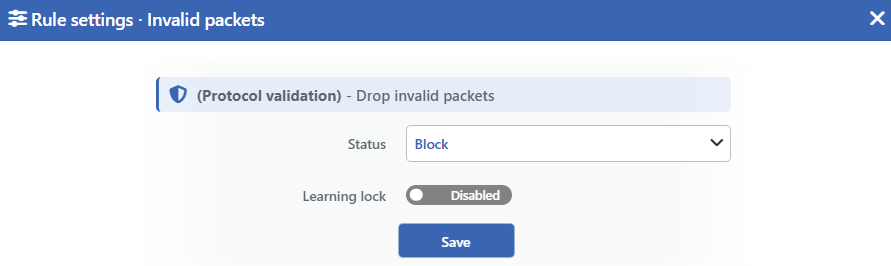 Invalid Packets Edit Screen
INFO
Status
Selects the rule's operating mode. Four values are offered, and the selected value also determines the sentence on the row:
| Value | The sentence in the row |
|---|---|
| Disabled | Invalid-state packets are not monitored |
| Monitor | Invalid-state packets are only monitored |
| Block | Invalid-state packets are dropped |
| Quarantine | Invalid-state packets are dropped and their sources are quarantined |
INFO
Learning Lock Default: Off
Closes the rule to the learning engine. When the switch is turned on, the engine cannot change the mode of this rule; the rule is changed only manually from this window.
It is off by default. While the lock is on, an unlabeled padlock icon is displayed on the row, to the left of the pencil.
INFO
Save
Saves the change made and puts it into force immediately. Only the changed fields are updated.
What does the session tracking count as invalid?
The device follows every flow that passes over it in a state table. If a packet does not match any record in this table and has not come in a way that would start a new flow either, it is counted as invalid.
The most common reasons for this are the delayed packets belonging to a closed connection, the continuation of long-lived sessions that have fallen out of the table, and the made-up packets used in an attack. Observing the rule for a while in the monitoring mode before it is taken into enforcement makes it possible to see the legitimate delayed traffic on the network.
LAND / Self-Spoof
Catches the packets that come from outside but carry one of the device's own addresses as the source address. Its definition in the information band is as follows: (LAND / Self-Spoof) - Drop outside packets claiming this system's own address.
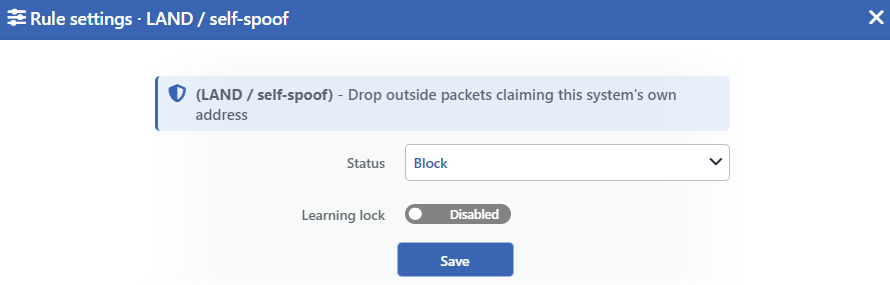 LAND / Self-Spoof Edit Screen
INFO
Status
Selects the rule's operating mode. Four values are offered, and the selected value also determines the sentence on the row:
| Value | The sentence in the row |
|---|---|
| Disabled | Packets spoofing this system's own address are not monitored |
| Monitor | Packets spoofing this system's own address are only monitored |
| Block | Packets spoofing this system's own address are dropped |
| Quarantine | Packets spoofing this system's own address are dropped and their sources are quarantined |
INFO
Learning Lock Default: Off
Closes the rule to the learning engine. When the switch is turned on, the engine cannot change the mode of this rule.
It is off by default. While the lock is on, an unlabeled padlock icon is displayed on the row, to the left of the pencil.
INFO
Save
Saves the change made and puts it into force immediately. Only the changed fields are updated.
This rule is the only rule of the band that is exempt from the promotion permission
The attacker showing the device's own address as the source has no legitimate counterpart; for this reason the rule has been put into the class that carries signature certainty.
Its result is as follows: the learning engine can recommend promoting this rule from monitoring into enforcement while the Mode Promotion permission is off as well. The fact that the back-test and the confidence threshold conditions are not applied in this rule, on the other hand, comes not from the exemption but from the rule not measuring a threshold: the rules without a threshold are counted in the class that carries no false positive risk, and for a rule in the monitoring mode the engine directly recommends the transition into enforcement. The same applies to the Invalid Packets and Martians rules as well; the only difference is that the promotion of these two rules remains bound to the Mode Promotion permission.
Martians
Catches the packets that claim to come from the private and reserved address ranges. Its definition in the information band is as follows: (Martians) - Spoofed private/reserved source addresses.
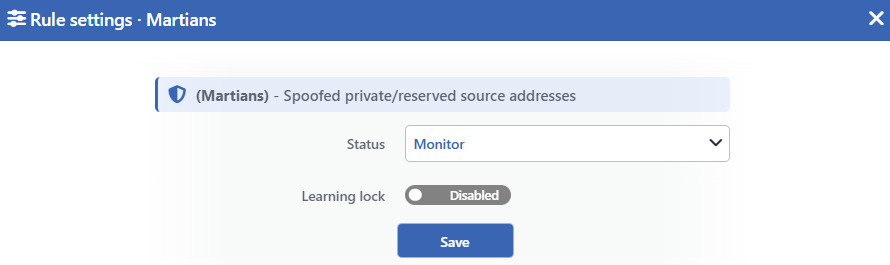 Martians Edit Screen
INFO
Status
Selects the operating mode of the rule. In this rule three values are offered; the quarantine option is not found:
| Value | The sentence in the row |
|---|---|
| Disabled | Packets from spoofed private/reserved sources are not monitored |
| Monitor | Packets from spoofed private/reserved sources are only monitored |
| Block | Packets from spoofed private/reserved sources are dropped |
INFO
Learning Lock Default: Off
Closes the rule to the learning engine. When the switch is turned on, the engine cannot change the mode of this rule.
It is off by default. While the lock is on, an unlabeled padlock icon is displayed on the row, to the left of the pencil.
INFO
Save
Saves the change made and puts it into force immediately. Only the changed fields are updated.
The address ranges the rule covers
The rule recognizes five source ranges and this list is fixed:
| Range | Its use |
|---|---|
10.0.0.0/8 | Private network addresses |
172.16.0.0/12 | Private network addresses |
192.168.0.0/16 | Private network addresses |
100.64.0.0/10 | The range reserved for carrier-grade address translation |
169.254.0.0/16 | Link-local addresses |
The rule works only on the IPv4 traffic; for IPv6 it is never written.
The default exemption entry narrows the scope of this rule to a large extent
The exemption list comes with the XX (local networks) entry in an untouched route table. This entry exempts six IPv4 ranges: 10.0.0.0/8, 172.16.0.0/12, 192.168.0.0/16, 169.254.0.0/16, 192.0.2.0/24 and 0.0.0.0/8. Four of the five ranges the rule recognizes are on this list.
Since the exemption list is applied before the rule, as long as the entry stands on the list the rule does not drop the packets coming from these four ranges and does not produce a counter for them. The fifth range of the rule, 100.64.0.0/10, is outside the exemption; the sources coming from there are dropped and counted in the enforcement mode. If the rule is wanted to work with its whole scope, the exemption entry in question is removed from the Whitelist & Known Peers window.
This removal opens all the traffic coming from the private address ranges to the check of the other rules of the band as well; in a route table that serves from the internal network it is appropriate to observe it in the monitoring mode first.
Source Routing
Determines whether the packets that carry their path inside themselves will be refused. Its definition in the information band is as follows: (Source routing) - Refuse source-routed packets. Since this rule has no short name, the same long definition is displayed in the title of the edit window as well.
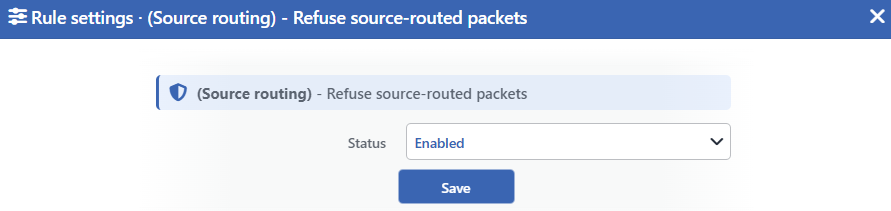 Source Routing Edit Screen
INFO
Status
Selects whether the rule is on or not. Two values are offered:
| Value | The sentence in the row |
|---|---|
| Enabled | Source-routed packets are refused |
| Disabled | Source-routed packets are accepted |
In the Disabled value the whole of the sentence is displayed amber: since the packets are accepted when the rule is off, this is a security warning.
INFO
Save
Saves the change made and puts it into force immediately. Only the changed fields are updated.
There is no learning lock in this rule
The rule does not write a firewall rule; it writes a stance to the operating system and produces no measurement. Since it has no measurement, it never enters the field of view of the learning engine.
This has three visible results: there is no Learning Lock switch in the edit window, no verdict badge is displayed in the row and there is no panel belonging to the rule on the dashboard.
What is source routing?
Source routing is the sender writing the path the packet will follow inside the packet. In the first design of the protocol it was thought of for diagnostics; its use today, on the other hand, is to route the traffic around the security checks and to make the answer return over the path the attacker chooses.
For this reason the default of the setting is to refuse and this value is valid in a route table in which the configuration has never been written as well. The setting is applied for IPv4 and IPv6 together.
Measurement and Dashboard
The three rules of the box that produce measurements are displayed on the Suspicious Packets tab of the dashboard.
| Rule | Suspicious Packets | Quarantine | Dropped Traffic | IP version |
|---|---|---|---|---|
| Invalid Packets | Yes | Yes | Yes | IPv4 and IPv6 merge into a single series |
| LAND / Self-Spoof | Yes | Yes | Yes | IPv4 and IPv6 merge into a single series |
| Martians | Yes | None | Yes | Only IPv4 |
| Source Routing | None | None | None | Produces no measurement |
The drop counter is fed only in the enforcement modes
The volume of packets the rules drop is kept in a separate counter and this counter occurs only in the Block and Quarantine modes. In the monitoring mode the packet itself is counted, but since there is no dropped packet the drop counter stays empty.
For this reason a zero value on the Dropped Traffic tab does not mean "there is no attack"; it can also mean that the rule is in the monitoring mode.
The quarantine cuts wider than the scope of the rule itself
When a source is taken into quarantine with one of these rules, the traffic of that source is cut not only for the rule in question but in the whole of the route table: the new connections both directed at the device and passed through the device stop.
In the traffic directed at the device the cut is applied only to the new connections; the sessions established at the moment of the quarantine continue during their durations. In the traffic passed through the device, on the other hand, the established sessions are cut as well. The quarantine duration is common with all the rules in the route table.
Scope and Limits
INFO
- There is no adjustable threshold in any rule; the decision is made by looking at the packet itself.
- Three rules cover both the traffic directed at the device and the traffic passed through the device; the source routing setting, on the other hand, is applied to the whole network stack of the route table.
- In the private address range rule the quarantine option is not offered at all and the rule works only on the IPv4 traffic.
- The default exemption entry narrows the scope of the private address range rule to a large extent; without the entry being removed the rule does work only on the
100.64.0.0/10sources. - The rule of the packets that take on its own address is exempt from the promotion permission; the other two are subject to the Mode Promotion permission.
- The source routing setting produces no measurement, does not carry a learning lock and has no panel on the dashboard.
- In an untouched route table three rules are born in enforcement and the private address range rule in monitoring.
- The sources in the exemption list are not caught by the three rules that produce measurements and are not written to their measurements either; the source routing setting does not recognize the exemption list.
- Editing requires modify permission in the Network area.
