
Smarter by Design.Simpler for Business
Whitelist & Known Peers
What Is Whitelist & Known Peers?
Whitelist & Known Peers defines the sources that will stay outside all the L4 DDoS measurements in the route table. The traffic coming from an address here is not caught by any threshold, does not pass any signature check, is not taken into quarantine and is not written to the counters.
The box holds two separate forms of exemption together:
- Whitelist: the entries written to the list: single addresses, network blocks and countries. Most of the entries are added manually; the system default and the entries added by the learning engine also stand in the same list and state their source with a badge.
- Known Peers: the sources derived by themselves from the configuration: the device's own addresses and the defined Backend Service servers. These are not written to the list; they are exempted collectively with a single switch.
3
Entry Types
IP · Network · Country
5
Country Ceiling
At most five countries can be exempted; there is no limit in the address and network entries
Local networks (XX)
System Default
The private and local address ranges are exempt at the beginning; it can be deleted
Off
Trust Known Peers
It is off by default; turning it on is a conscious decision
8
Entries Seen on the Card
More than that is folded and is opened by clicking
200
Note Length
The description added to an entry is cut to this length
An exemption means turning the protection off
The traffic of an exempt source does not pass any L4 DDoS check. Even if this source produces a flood or sends a packet that carries an attack signature, it is not stopped. For this reason the exemption is not a "priority" but the turning off of the protection for that source.
There are two exceptions to this and both of them belong to the Blacklist rule: one on the measurement and the other on the enforcement side. They are explained below.
The Whitelist & Known Peers Box in L4 DDoS Management
The box is the third and widest box in the body of the status card. It carries two rows and an entry list below them.
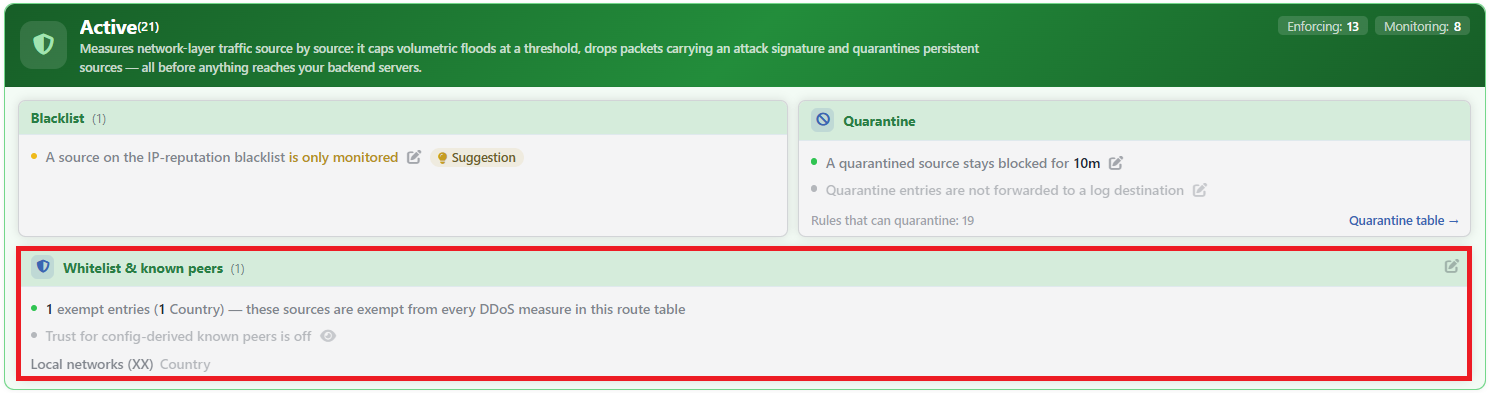 L4 DDoS Protection Mode - Whitelist & Known Peers Box
| Element | Meaning |
|---|---|
| The number in the header | The number of defined exemption entries. While the list is empty, the number is not displayed at all. |
| The first row | Summarizes the number of entries and the type distribution: <number> exempt entries (<distribution>) — these sources are exempt from every DDoS measure in this route table. While the list is empty, it says Whitelist is empty — no source is exempt and the row goes dim. |
| The second row | The state of the peer trust. While it is off, it says Trust for config-derived known peers is off and the row goes dim; while it is on, it says how many sources are exempt. |
| The entry list | Below the rows, every entry is listed together with its own type label. An entry that is the system default is displayed pale; if a note has been added to an entry, the note is displayed as a tooltip when it is hovered over. |
| The pencil icon | It is at the top right of the box and opens the editor. |
Why is the pencil not in the rows?
The two rows are two faces of a single decision: which sources will be exempted. Since both of them open to the same editor, the rows have no pencil icons of their own; the editing is done from the header of the box.
This is different from the other two boxes of the card: in the Blacklist and Quarantine boxes the pencil is in the row itself.
The eye icon is independent of the peer trust
In the second row, if at least one source that enters the trust scope has been derived, an eye icon is displayed. The icon appears even while the trust switch is off: it is there to show the list of the derived sources, it does not state that the exemption is on.
In the window that opens when the icon is clicked, the address and the type of every source are listed: the device's own address or a defined Backend Service server. Only the sources within the trust scope are listed; the servers with a public address that stay outside the scope are not seen here.
The DDoS Whitelist Screen
- The L4 DDoS Management tab is opened.
- The pencil icon at the top right of the Whitelist & Known Peers box is clicked; the DDoS Whitelist editor that gathers all the surfaces of the exemption in a single window opens.
- The fields below are edited and confirmed with the
OKbutton.
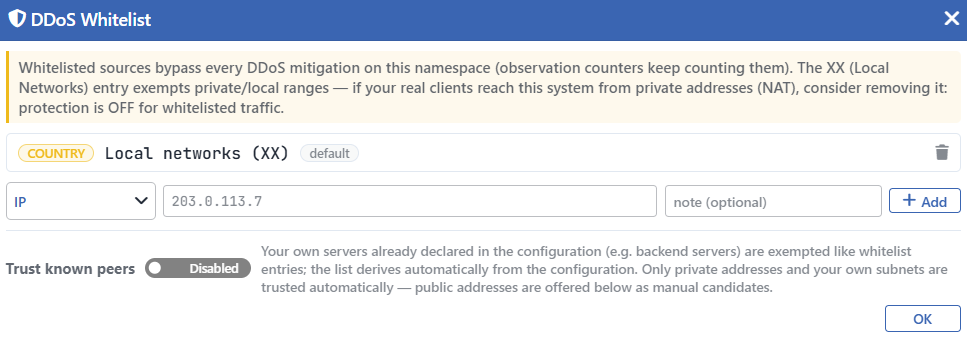 The DDoS Whitelist Screen
At the very top of the window there is a warning band. The band says three things: that the exempt sources skip all the L4 DDoS measures, that the measurement counters continue to count these sources and that the local network entry exempts the private address ranges. The last one is a warning: if the real clients reach the system from private addresses (from behind address translation), that entry must be removed; otherwise all the client traffic stays unprotected.
The counter sentence of the band is not up to date
The band says that the exempt sources continue to be counted in the measurement counters. This information is outdated: the exemption now covers the measurement as well and exempt sources are not written to the rule telemetry. The only exception is the counter of the Blacklist rule, which really does count the exempt sources as well.
INFO
The Entry List
Shows the defined exemptions row by row. In every row there are five elements:
| Element | Its content |
|---|---|
| The type label | The type of the entry: IP, NETWORK or COUNTRY. |
| The value | The address, the network block or the country name. In countries the name and the two-letter code are written together. |
| The note | If a note has been added to the entry, it is displayed next to the value in a small font. |
| The source badge | If the entry has not been added manually, it says where it comes from: default (the system default) or advisor (the learning engine). In the manually added entries there is no badge. |
| The trash icon | Removes the entry from the list. |
INFO
Adding an Entry
The row below the list adds a new entry. From left to right there are four fields:
| Field | Its function |
|---|---|
| The type selector | IP, Network or Country. |
| The value | If the type is Country, a country selector, and in the other types a text box. The placeholder of the text box changes according to the type. |
note (optional) | Adds an optional description to the entry. It is cut to 200 characters. |
+ Add | Adds the entry to the list. It can also be added with Enter in the value and note fields. |
The value is validated while it is being added. An invalid address, a value that is already in the list or a country added on top of the fifth country is rejected with an error message. When an addition is attempted with an empty value, nothing happens.
The accepted values are stored after being corrected: the country code is converted to uppercase and the network block is reduced to its own network address. For this reason a block entered as 10.20.1.5/16 is displayed in the list in the form 10.20.0.0/16.
In the country selector the countries that have been added before drop out of the list.
INFO
Trust Known Peers Default: Off
Exempts collectively the own sources derived from the configuration. It is off by default.
The derivation is made from two sources: the device's own addresses and the defined Backend Service servers. Not every derived source becomes exempt, but the test is applied only to the Backend Service servers: of these, only the ones in the private address ranges or in the route table's own subnets are covered. The device's own addresses are exempt from this test and are counted as trusted in every case.
The servers that carry a public address are seen in the list but are not exempted by themselves: since any address on the internet can also carry the same value, exempting them is counted as a conscious decision and they are expected to be added manually.
The switch is not turned on only from here: if there are derived but not yet exempt servers, an operation that turns on the trust with a single click is also displayed on the Learning strip and it asks for confirmation.
INFO
The Helper Lists
Below the switch there are three lists: one is a preview only, and two are single-click adding shortcuts.
- Known Peers: the derived sources that enter the trust scope. The list is displayed independently of the state of the switch; while the switch is off, it only becomes pale. That is, it is the set that is not "exempt at that moment" but "will be exempt if the switch is turned on". Its rows are not clickable.
- Public addresses in the configuration — not trusted automatically: the servers with a public address. When a row is clicked, the adding row is filled with that address.
- Your defined networks — click to add as a whitelist entry: the networks defined in the route table. These are never trusted by themselves: a network block also covers its neighbors. When clicked, the adding row is filled with that network.
The click sets not only the value but the type as well; if the source has a label and the note field is empty, it writes the label into the note field; the only job left is to press the + Add button.
INFO
OK
Saves the changes. The adding and deleting operations within the window stay local; no change takes effect until this button is used.
The Effect Area of the Exemption
The exemption consists of the union of the entries in the list and (if the trust is on) the derived sources, and it is applied at the very beginning of the L4 DDoS chain in the route table, only behind the blacklist rules. For this reason its scope is wide:
| What is covered | Result |
|---|---|
| The rate and concurrency limits | An exempt source is not counted towards the thresholds at all. |
| The signature checks | Even if the packet of an exempt source makes a signature match, it is not dropped. |
| The quarantine | An exempt source is not taken into quarantine; when a source in quarantine is made exempt, it is released without waiting for its duration. |
| The measurement counters | An exempt source is not written to the rule telemetry on the dashboards. |
The blacklist rule recognizes only a part of the exemption
The Blacklist rule recognizes not the whole exemption list but only the address and network entries and the derived own servers. A country added to the exemption list does not save a source in that country that has entered the blacklist.
In addition, the measurement counter of this rule runs before the exemption check: if an exempt address is also in the blacklist, its traffic is let through but it is written to the counter.
The Local Network Default
While the exemption list of a route table is being created for the first time, a single entry is put into it: the country entry displayed on the screen in the form Local networks (XX). This is not a real country but the special value of the geographic database that represents the private and local address ranges.
Its purpose is that the management and service traffic coming from the internal network is not caught by the protection in the first installation.
This entry can be deleted and does not come back
The trash icon of the entry is the same as that of the other entries; there is no protection that prevents it from being deleted. After it is deleted, it is not added back by itself either: it comes back only by being added manually or by all the L4 DDoS settings being returned to the default.
Deleting it has a result in two directions. It can be necessary for the protection of the real clients behind address translation; on the other hand, the rule that inspects the sources coming from private address spaces starts to see those sources from that moment on. Since the default of that rule is monitoring, no dropping happens immediately; if the rule has been taken into enforcement mode, the dropping also starts.
The local network entry does not count as "the list is filled"
Before promoting a rule from monitoring into enforcement, the learning engine looks at whether the exemption list has been filled or not. In this check every entry other than the system default and (while the trust switch is on) the derived own servers are counted; the local network default is not considered sufficient on its own.
The result of the check changes according to the rule. In the ordinary rules an empty list is a warning: it is attached to the recommendation but it does not prevent the promotion. In the rules that protect the device's own management ports, on the other hand, it is a definite obstacle: since passing these rules into enforcement while one's own address is not exempt can cut the administrator's access to the device, the recommendation is seen but cannot be applied.
Scope and Limits
INFO
- The exemption is per route table. The entries defined in one table do not pass to the other tables.
- There are at most five country entries. There is no number limit in the address and network entries.
- The first eight entries are seen on the card, more than that is folded and is opened by clicking.
- The blacklist rule does not recognize the country exemption and its measurement counter counts the exempt sources as well.
- The local network default can be deleted and does not come back by itself.
- Not all the derived sources are exempt. The servers with a public address are seen in the list but the trust switch does not cover them.
- The eye icon does not show the exemption, it only lists the derived sources.
- The returning of all the L4 DDoS settings to the default also resets this list: only the local network entry remains and the peer trust is turned off. The operation is carried out from the Learning strip and the confirmation window states this result separately.
- The entry values are stored after being corrected. The country code is converted to uppercase and the network block is reduced to its own network address.
- Editing requires change authorization in the Network area. With monitoring-only authorization the box is displayed and the pencil icon is not displayed. While the network configuration is locked during synchronization, the pencil icon is not displayed either.
