
Smarter by Design.Simpler for Business
JSON
What Is JSON?
JSON shows the inspections applied to the request bodies whose content type is JSON. The tab consists of two layers: at the top the common rule applied to all the JSON content, at the bottom the variable table in which the argument rules specific to certain keys are listed.
What Is a JSON Body?
The JSON inspections work in the requests that have a body and whose content type points to JSON (application/json and the types with the +json suffix). The body is parsed and the keys and the values are evaluated in a tree structure: the keys are referred to with dotted paths joined with . for the nested levels (the array indices do not lengthen the path), the measurements are made in UTF-8 bytes and the value inspections are applied only to the text values (the number and boolean values are out of scope). Every one of the inspections in this tab targets a certain element of the body:
An example body:
json
{
  "user": {
    "name": "john",
    "roles": ["admin", "editor"]
  }
}| Element | Its counterpart in the example | The related inspections |
|---|---|---|
| The key name | user, name, roles | JSON Key Length |
| The key path | user.name, user.roles | Allowed JSON Keys, the argument rules |
| The text values | john, admin, editor | JSON Value Length, JSON Value Pattern, OWASP Check |
| The number of values (leaves) | 3 | JSON Key Count |
| The nesting depth | 3 for admin, the deepest value (the objects and the arrays each count as one level) | JSON Depth |
Accessing the Screen
- The rule is clicked in the Page Types list; the detail panel of the rule opens on the right.
- The JSON tab is clicked in the tab strip of the panel.
For the title elements of the panel and the behavior of the tab strip see Path. The value displays in the table also use the same form as in the Path tab: if there is no restriction No Restriction, the one-way restrictions ≤ n / ≥ n, the ranges [a - b], and the fields that are on/off are seen as ✓ / -.
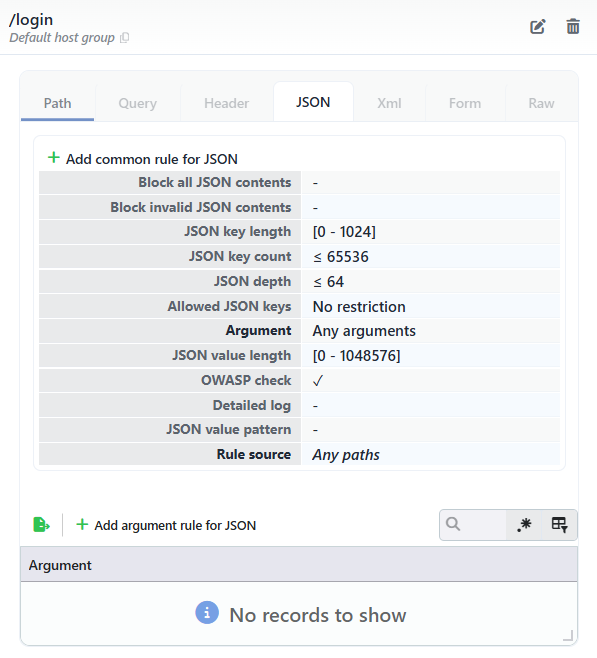 The Detail Panel - The JSON Tab
The inheritance and Rule Source
If the rule has not defined its own JSON inspection, the values are inherited from the glob rule that matches the path or from the Any Paths rule according to the rule matching priority; the Rule Source row at the end of the table shows the path of the rule the inspections come from (for example Any Paths). If the rule defines its own JSON inspection, the Rule Source row is not present.
The Add Common Rule for JSON Screen
When the green plus icon Add common rule for JSON button above the table is clicked, the form that defines the rule's own JSON common inspection opens; with the save, the inheritance ends for that rule. If the rule already has its own JSON inspection, the same button is seen as the pencil icon Edit common rule for JSON (it opens the form with the current values) and Delete common rule for JSON (it removes the common rule without asking a confirmation question). The add form does not open empty; it comes pre-filled with the related inspection values of the Any Paths rule. In the Any Paths rule itself, on the other hand, there is no delete button: the common inspection of the catch-all rule cannot be removed.
This screen is at the same time the edit screen: whether the common inspection has been added manually or has been formed by the learning, the form that opens with the Edit common rule for JSON button shows the same fields below with the current values of the rule.
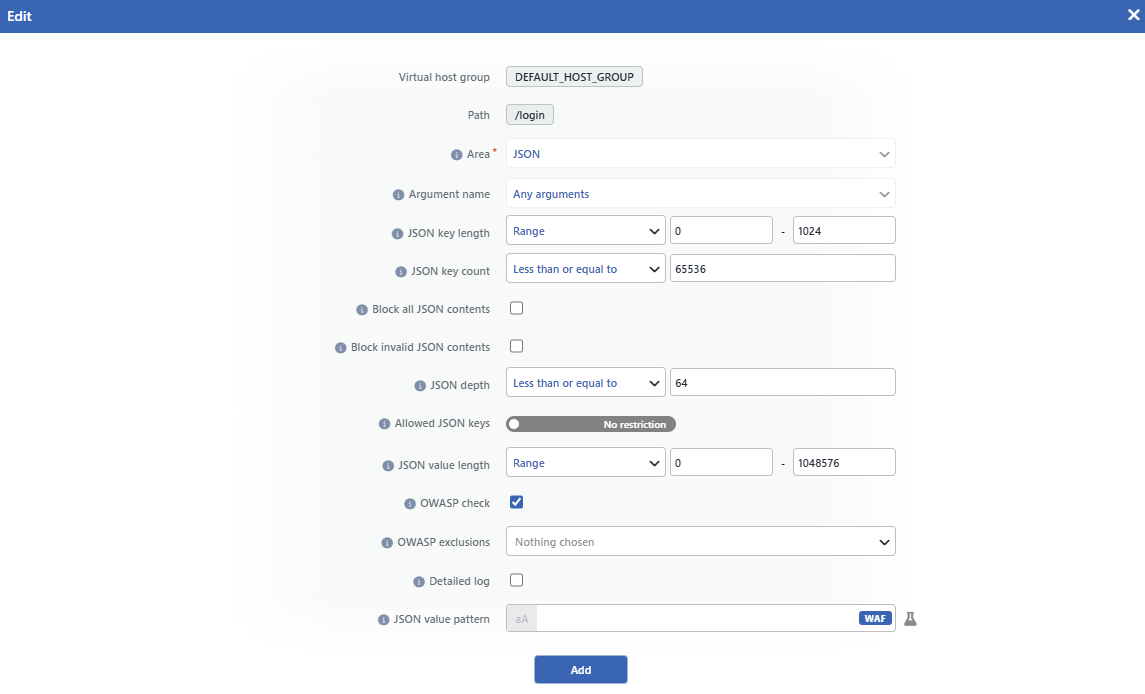 The Add Common Rule for JSON Screen
INFO
Virtual Host Group
The host group to which the inspection will be added is shown as read-only; it is determined according to which group's Page Types screen the panel is opened from and cannot be changed from the form.
INFO
Path
The path of the rule to which the inspection will be added is shown; the form is bound to the rule for which the detail panel has been opened.
INFO
Area
It shows to which section of the request the inspection is applied. The field is locked to the tab the form is opened from: when the form is opened from the JSON tab, it comes as JSON and cannot be changed.
INFO
Argument Name
It shows the scope of the inspection. In the common rule form this field is locked as Any Arguments and the fields are applied to all the JSON content; a rule specific to a certain key, on the other hand, is defined from the Add Argument Rule for JSON screen. In JSON the key name is written as the full dotted path joined with . for the nested levels (for example user.name).
If a key has its own argument rule, the value inspections of that key (JSON Value Length, JSON Value Pattern, OWASP Check, Detailed Log) are taken entirely from this rule; the value inspections of the common rule are no longer applied to that key. The section-wide inspections (JSON Key Length, JSON Key Count, JSON Depth, Allowed JSON Keys), on the other hand, continue to be applied. Defining a rule specific to a name does not add that path to the Allowed JSON Keys list by itself.
INFO
JSON Key Length
The length restriction of the key names in the body is defined; the own name of the key at every depth (the last piece of the path) is measured in UTF-8 bytes and the same name is evaluated once:
| Option | Meaning |
|---|---|
| No Restriction | No length restriction is applied. |
| Less Than or Equal To | The length must be equal to or below the entered value. |
| Equals To | The length must be equal to the entered value. |
| Greater Than or Equal To | The length must be equal to or above the entered value. |
| Range | The length must be between the two entered values (the limits included). |
Only a number can be entered in the value field. Every key name that does not comply with the restriction is scored as a JSON Key Length violation in the Structure Limits category and falls into the attack record.
INFO
JSON Key Count
The restriction of the number of values (leaves) in the body is defined: what is counted is not the keys but the scalar values at the end of the tree. Every one of the array elements is counted separately; the objects and the arrays do not enter the counting (in the body in the example the counting is 3: john, admin, editor):
| Option | Meaning |
|---|---|
| No Restriction | No number restriction is applied. |
| Less Than or Equal To | The number of values must be equal to or below the entered value. |
| Equals To | The number of values must be equal to the entered value. |
| Greater Than or Equal To | The number of values must be equal to or above the entered value. |
| Range | The number of values must be between the two entered values (the limits included). |
Only a number can be entered in the value field. A request that does not comply with the restriction is scored as a JSON Key Count violation in the Structure Limits category and falls into the attack record.
INFO
Block All JSON Contents
When it is checked, every request whose content type is JSON and that carries a body is scored as a Block All JSON Contents violation in the Structure Policies category without the body being parsed. It is used for the paths that do not accept a JSON body.
INFO
Block Invalid JSON Contents
When it is checked, the bodies that cannot be parsed as JSON are scored as a Block Invalid JSON Contents violation in the Content Integrity category. While it is not checked, a body that cannot be parsed is not left uninspected; it is passed through the RAW signature scanning as raw content.
INFO
JSON Depth
The nesting depth restriction of the body is defined; every object and every array around the value counts as one level (for example in the {"a":{"b":1}} body the depth is 2, and in the {"a":[{"b":1}]} body 3):
| Option | Meaning |
|---|---|
| No Restriction | No depth restriction is applied. |
| Less Than or Equal To | The depth must be equal to or below the entered value. |
| Equals To | The depth must be equal to the entered value. |
| Greater Than or Equal To | The depth must be equal to or above the entered value. |
| Range | The depth must be between the two entered values (the limits included). |
Only a number can be entered in the value field. A request that does not comply with the restriction is scored as a JSON Depth violation in the Structure Limits category and falls into the attack record.
INFO
Allowed JSON Keys
The list of the allowed key paths is defined (a positive list). The names are entered as the full dotted path, using . for every depth (for example user.name) and are compared case sensitively. The list must contain not only the paths that carry a value but the container paths as well: for the body in the example all of the user, user.name and user.roles paths must be in the list. While the field is in the No Restriction position, all the keys are allowed; when the restriction is turned on, every different path that is not in the list (including the containers) is scored as an Allowed JSON Keys violation in the Structure Policies category and falls into the attack record.
There is no required key list for JSON; the Required field in the Query and Form sections has no counterpart in JSON. Defining an argument rule specific to a key does not add that path to this list by itself.
INFO
JSON Value Length
The length restriction of the text values is defined. The restriction is applied to every text value separately, in UTF-8 bytes; the number and boolean values are not inspected:
| Option | Meaning |
|---|---|
| No Restriction | No length restriction is applied. |
| Less Than or Equal To | The value length must be equal to or below the entered value. |
| Equals To | The value length must be equal to the entered value. |
| Greater Than or Equal To | The value length must be equal to or above the entered value. |
| Range | The value length must be between the two entered values (the limits included). |
Only a number can be entered in the value field. Every value that exceeds the restriction is scored as a JSON Value Length violation in the Structure Limits category and falls into the attack record.
INFO
OWASP Check
When it is checked, every key name and every text value in the parsed body are subjected to the OWASP signature scanning separately. The signature hits, differently from the structural violations, take part in the attack score by accumulating with their own scores. In the scanning, the signature set that is enabled on the OWASP Rules screen of the vService is used; for the listing of the signatures see Signature & Rule Library.
OWASP Exclusions
With this field that appears in the form when the box is checked, the OWASP rules to be excluded from the scanning are determined with a multiple selection; while the box is not checked, the field is not seen, and when no selection is made, Nothing chosen is written in the field. When an exclusion is defined, the number of the exclusions is shown next to the ✓ mark in the OWASP Check row in the detail panel.
INFO
Detailed Log Default: Not checked
It manages the log detail of the signature (OWASP) hits; for JSON it is not checked by default. While it is on, the matching content is shown together with its surrounding context in the Event Logs record; while it is off, the record still falls but instead of the content the phrase Detailed log disabled is seen. The summary information of the structural violations is always written independently of this setting.
INFO
JSON Value Pattern
The regular expression (regex) pattern the text values must match is defined. The inspection is positive: when the value does not match the pattern, a JSON Value Pattern violation is produced in the Structure Policies category and the value itself is seen in the attack record. The pattern is searched anywhere in the value; if it is wanted that the whole of the value match, the pattern should be bounded with ^ and $. With the aA button next to the field the matching can be made case insensitive; this option is seen in the detail panel as the (-i) suffix next to the pattern. If no pattern is defined, no pattern inspection is applied to the value content.
INFO
Add
The common rule adding operation is completed by clicking the Add button; the button becomes enabled when no error remains in the form. There is no additional confirmation window or deployment (deploy) step; the WAF configuration is automatically produced again and applied and the values in the panel are updated instantly.
The mode behavior and the scoring
The structure inspections in this tab work only in the Blocking and Monitor modes; they are not run in the Learning mode, instead the restriction suggestions are learned from the observed traffic. The structural violations have a high score; at the default blocking threshold a single violation is enough for the request to be blocked in the Blocking mode (in the Monitor mode it is reported as an attack but the request is let through). The OWASP signature hits, on the other hand, reach the threshold by accumulating with their own scores.
The bodies that exceed the buffer
When the body is too big to fit into the inspection buffer, the JSON inspections cannot be run; in this case the behavior is determined by the Block Unparsed Contents setting in the RAW tab.
The Add Argument Rule for JSON Screen
The Argument table below the common rule lists the argument rules specific to certain key paths; with the search box of the table a filtering can be done over the path. The argument rules the rule defines itself are shown in bold, the inherited ones in italic. When the green plus icon Add argument rule for JSON button above the table is clicked, the form that defines an inspection specific to a single key path opens.
When a row in the table is clicked, the detail of the argument rule opens below it; in the rule's own argument rule the pencil icon Edit (it opens the form with the current values) and trash can icon Delete (it removes the argument rule without asking a confirmation question) buttons are seen. In the inherited rows these buttons are not present; an inherited rule can be edited only from the rule that is its source.
In the rules specific to a path the add form does not open empty; the inspection fields come pre-filled with the common JSON inspection values of the Any Paths rule. In the Any Paths rule itself, on the other hand, the form opens with the field defaults. This screen is at the same time the edit screen: the form that opens with the Edit button shows the same fields below with the current values of the rule; in the editing, differently from the add form, the Argument Name field is also locked; to which path the rule is bound cannot be changed afterwards. The repetition limit field in Query and Header (Value Count) has no JSON counterpart; this field does not take place in the form.
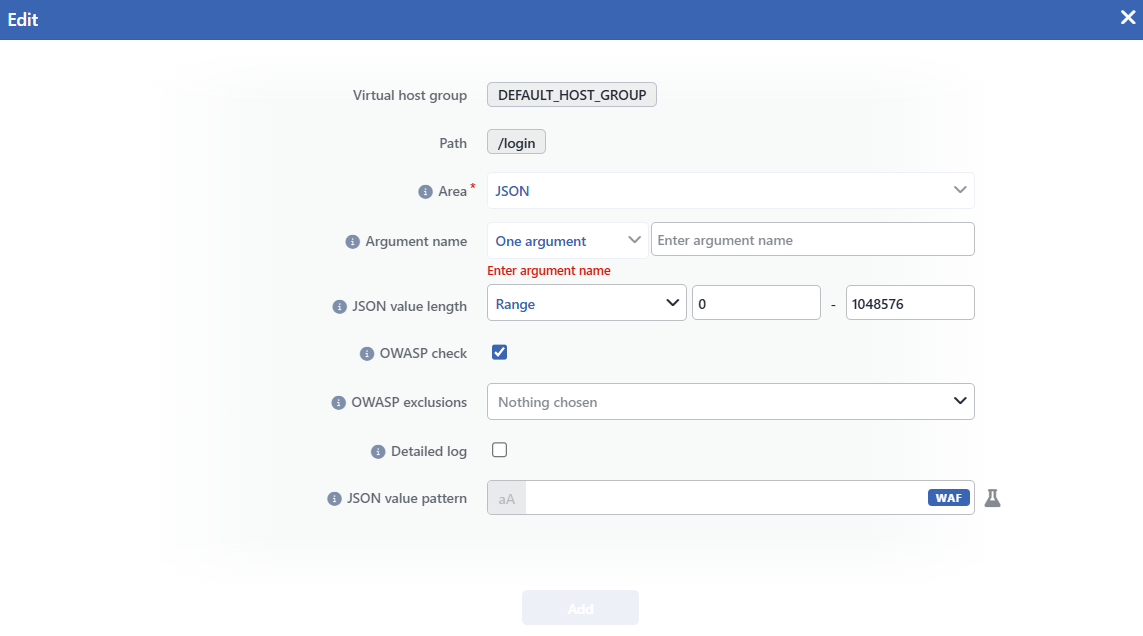 The Add Argument Rule for JSON Screen
INFO
Virtual Host Group
The host group to which the inspection will be added is shown as read-only; it is determined according to which group's Page Types screen the panel is opened from and cannot be changed from the form.
INFO
Path
The path of the rule to which the inspection will be added is shown; the form is bound to the rule for which the detail panel has been opened.
INFO
Area
It shows to which section of the request the inspection is applied. The field is locked to the tab the form is opened from: when the form is opened from the JSON tab, it comes as JSON and cannot be changed.
INFO
Argument Name
The path of the key to which the rule will be bound is defined. The scope selector is locked as One Argument in this form; the path is entered in the text box next to it and cannot be left empty (if it is left empty, the Enter argument name error is seen). The path is written as the full dotted path joined with . for the nested levels (for example user.name) and is matched exactly and case sensitively; an entry that contains only the last piece (name) does not catch the nested key. Since the array indices do not lengthen the path, the elements of an array match with the path of the array itself: the rule bound to the user.roles path is applied to every element in the array.
A second argument rule with the same path cannot be added; on an attempt the part collision error is returned. In the edit form this field cannot be changed; if the rule is wanted to be moved to another path, it must be deleted and added again.
INFO
JSON Value Length
The length restriction of the text values of the key is defined. The restriction is applied to every text value separately, in UTF-8 bytes; the number and boolean values are not inspected:
| Option | Meaning |
|---|---|
| No Restriction | No length restriction is applied. |
| Less Than or Equal To | The value length must be equal to or below the entered value. |
| Equals To | The value length must be equal to the entered value. |
| Greater Than or Equal To | The value length must be equal to or above the entered value. |
| Range | The value length must be between the two entered values (the limits included). |
Only a number can be entered in the value field. Every value that exceeds the restriction is scored as a JSON Value Length violation in the Structure Limits category and falls into the attack record.
INFO
OWASP Check Default: Checked
When it is checked, the name and every text value of the key are subjected to the OWASP signature scanning separately; it is checked by default. When the box is removed, the path goes out of the signature scanning entirely together with the key name and its values; this is the way of exempting from the scanning a field that frequently produces false positives. In the scanning, the signature set that is enabled on the OWASP Rules screen of the vService is used; for the listing of the signatures see Signature & Rule Library.
OWASP Exclusions
With this field that appears in the form when the box is checked, the OWASP rules to be excluded from the scanning are determined with a multiple selection; while the box is not checked, the field is not seen, and when no selection is made, Nothing chosen is written in the field. The exclusions are applied only to the scanning of this path; the other keys continue to use the exclusion list of the common rule.
INFO
Detailed Log Default: Not checked
It manages the log detail of the signature (OWASP) hits; for JSON it is not checked by default. While it is on, the matching content is shown together with its surrounding context in the Event Logs record; while it is off, the record still falls but instead of the content the phrase Detailed log disabled is seen. The summary information of the structural violations is always written independently of this setting.
INFO
JSON Value Pattern
The regular expression (regex) pattern the text values of the key must match is defined. The inspection is positive: when the value does not match the pattern, a JSON Value Pattern violation is produced in the Structure Policies category and the value itself is seen in the attack record. The pattern is searched anywhere in the value; if it is wanted that the whole of the value match, the pattern should be bounded with ^ and $. With the aA button next to the field the matching can be made case insensitive; this option is seen in the detail panel as the (-i) suffix next to the pattern. If no pattern is defined, no pattern inspection is applied to the value content.
INFO
Add
The argument rule adding operation is completed by clicking the Add button; the button becomes enabled when no error remains in the form. There is no additional confirmation window or deployment (deploy) step; the WAF configuration is automatically produced again and applied and the values in the table are updated instantly.
An empty field does not mean inheriting from the common rule
When the argument rule is saved, the value inspections of the path are taken entirely from this rule; the value inspections of the common rule are no longer applied to that path. The pre-filling in the form is only a starting convenience: after the save the fields are independent of the common rule and a field left empty (for example JSON Value Pattern) does not return to the value in the common rule, it means no restriction for that inspection. The section-wide inspections (JSON Key Length, JSON Key Count, JSON Depth, Allowed JSON Keys), on the other hand, are not affected by the argument rule and continue to be applied; an argument rule cannot exempt a path from these inspections or from the Allowed JSON Keys list.
The inheritance and the learning
The argument rules are also inherited according to the rule matching priority: if the rule has not defined its own argument rule for a path, the argument rule with the same path of the glob rule that matches the path or of the Any Paths rule becomes valid. The inherited rules are listed in italic in the table; in their detail the Rule Source row shows the path the rule comes from. When the rule defines its own argument rule for the same path, the inherited rule stays invalid for that rule.
Differently from Header, the JSON inspections are learned per path. The learning (Conditional Learning, AI Learning, Teacher and teaching over Event Logs) writes the updates to the argument rule if there is one with the path on which the violation occurred; for example an exclusion is added to the OWASP Exclusions list or the length limit is widened. A JSON Value Pattern that produces false positives, on the other hand, is not narrowed but cleared entirely. If the path has no argument rule, the change is written to the common rule; the learning does not create a new argument rule by itself.
