
Smarter by Design.Simpler for Business
ICMP
What Is ICMP?
ICMP determines whether the ICMP traffic will be allowed in the ICMP & Reflection band; it is the only permission setting of the band. While the rules in the other boxes describe an attack and stop it, the single rule here opens or closes the door to the whole of a protocol.
ICMP is the protocol that carries the state of the network rather than the data itself: whether an address is reachable, why a packet was dropped and how many bytes a path allows are reported with this protocol. Its best known use is the echo query and its reply; this is the method the network administrators use in access checking.
The same protocol is used in attacks as well. The echo query is cheap and its answer is obligatory; for this reason it is preferred both in volume attacks and in target discovery. The box reduces the decision of this dilemma to a single setting: the protocol is allowed or it is not.
1
Rule
The only permission setting of the band; there is no other rule in the box
Allow
Default Value
The catalog default is to allow and it is in force in an untouched table as well
2
Values Offered
Allow · Deny; the enforcement levels are not found in this rule
None
Adjustable Value
The rule has no limit or threshold
None
Quarantine
The rule cannot send the source to quarantine
IPv4 Only
The Scope of the Counter
The measurement counts only the IPv4 echo queries
The ICMP Box on L4 DDoS Management
The box is the first box in the body of the ICMP & Reflection band. In its header there are its name and the number of rules it carries, and in its body a single rule row.
 ICMP & Reflection - The ICMP Box
| Row | Rule | What it determines |
|---|---|---|
| 1 | Allow ICMP | Whether the ICMP traffic will pass in the route table. |
Allow ICMP
The rule determines whether the ICMP traffic will be allowed. Its definition in the information band is as follows: Allow ICMP traffic.
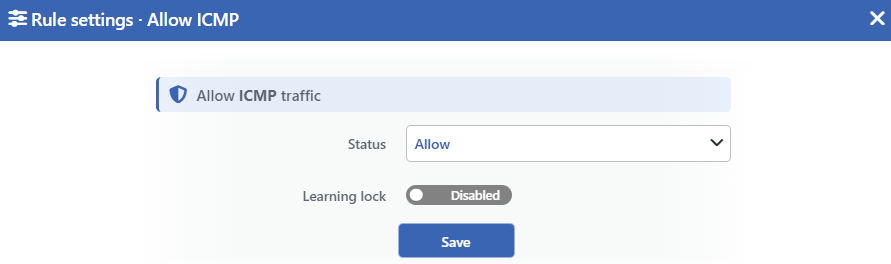 Allow ICMP Edit Screen
INFO
Status
Selects the value of the rule. Two values are offered and the selected value also determines the sentence in the row:
| Value | The sentence in the row |
|---|---|
| Allow | ICMP traffic is allowed |
| Deny | ICMP traffic is denied |
There is no number or threshold in the sentence; the rule has no adjustable value.
INFO
Learning Lock Default: Off
Closes the rule to the learning engine. When the switch is turned on, the engine cannot change the value of this rule; the rule is changed only manually from this window.
It is off by default. While the lock is on, an unlabeled padlock icon is displayed on the row, to the left of the pencil.
INFO
Save
Saves the change made and puts it into force immediately. Only the changed fields are updated.
The row is not green in any value
In the other rules of the band the green dot means "this rule is stopping an attack". This rule does not stop an attack, it only allows the traffic; for this reason the dot and the sentence (ICMP traffic is allowed) are displayed amber in the Allow value. In the Deny value the whole of the row fades, but the sentence (ICMP traffic is denied) is displayed red.
The same distinction is valid on the status card as well: the rule is not among the rules the card takes into the evaluation. In the band badges, on the other hand, the Allow value is written into the Enforcing column.
Deny closes much more than the echo queries
The Deny value does not write a blocking rule; it removes the permission rules. Since the chains of the route table are set to drop by default, the ICMP traffic left without a permission rule falls. The packets belonging to an established session are outside this; the rule that accepts them is written outside the permission. This has three results:
| The permission removed | Its result |
|---|---|
| The echo query and its reply | The ICMP echo traffic directed at the device and passing through the device stops; access checking to the device from outside cannot be done. The replies to the echo queries the device itself started continue to be accepted because they are counted as an established session. |
| The neighbor discovery and path packets of IPv6 | The permission of the eight ICMPv6 types needed for IPv6 to work is removed as well: neighbor solicitation and advertisement, router solicitation and advertisement, packet too big, destination unreachable, time exceeded and parameter problem. |
| The established sessions of the routed traffic | In the traffic passed through the device, the rule that accepts the packets of the established sessions is also inside this permission and is removed together with it. |
The third row concerns not only ICMP but all the traffic routed over the route table. Before the ICMP permission is turned off, whether the route table in question does routing is checked.
One type the device answers itself is closed
While the permission is on, one more rule is written on the IPv4 side: the device is prevented from sending a timestamp reply. This is the only rule that makes it harder for the device to be used as a reflector in the attack of others and it is found only while the permission is on.
When the permission is turned off, this rule is removed as well; but in that case it has no practical difference, since ICMP does not pass anyway.
The learning engine never produces a recommendation for this rule
The rule has a Learning Lock switch, but there is no change the engine could apply to this rule: the rule has no adjustable limit and no enforcement level it could be promoted to.
For this reason turning the switch on or off does not change the behavior of the rule. When the engine has run a round, the Verified verdict badge is displayed in the row; the badge never turns into a recommendation.
Measurement and Dashboard
The counter of the rule works independently of the mode: while the permission is off as well, the echo queries entering the route table continue to be counted. The measurement is displayed on the Suspicious Packets tab of the dashboard, in the panel titled L4 DDoS Packet Class — Allow ICMP, as packets per second.
| Feature | Its value |
|---|---|
| Panel tab | Suspicious Packets |
| What is measured | The number of ICMP echo queries entering the route table; the packets passed through the device are counted as well |
| IP version | Only IPv4; the IPv6 echo traffic is never counted |
| Quarantine panel | None |
| Dropped Traffic panel | None |
The counting continues, but the panel is not always offered
When the permission is taken to the Deny value, the counting does not stop; on the other hand the card of this rule is not offered in the panel list. The data continues to be written in the background and when the permission is turned on again it can be displayed together with its history.
The exempt sources are not written to the counter either
The packets of the sources in the exemption list are taken outside the chain before the counter rule. For this reason the echo queries an exempt source sends are not seen on the panel.
Scope and Limits
INFO
- The rule is not a protection but a permission. Its being on passes the traffic; its being off drops all the ICMP types.
- The permission covers both the traffic coming to the device and the traffic passing through the device. It is not limited only to the device's own interfaces.
- The Deny value closes not only the echo traffic but also the packets needed for IPv6 to work and the established session acceptance of the routed traffic.
- In an untouched route table the value is Allow; the catalog default is written to the configuration while the route table is being created and at device startup.
- The rule has no adjustable value, no quarantine option and no enforcement level.
- The counter counts only the IPv4 echo queries and works independently of the mode.
- The sources in the exemption list are not written to the counter.
- Editing requires modify permission in the Network area. With a monitoring-only authorization the row and the sentence are displayed, the pencil icon is not displayed.
