
Smarter by Design.Simpler for Business
AGS - AAM Data Flow Panel
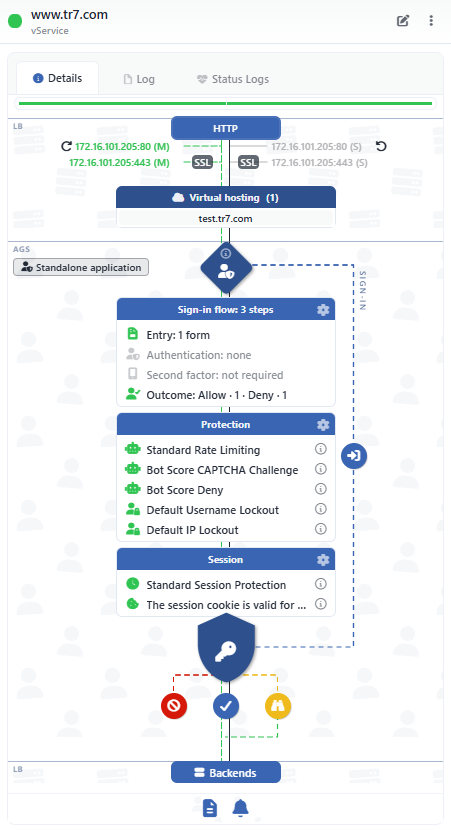
AGS - AAM Data Flow Panel describes the authentication and the access control in front of an application in a single live access flow diagram. The path on which the visitor enters from the AGS gate and is let in, challenged or denied at the decision node by passing through the sign-in flow, the bot and lockout protections and the session policy is seen at a single glance.
However layered the authentication structure is (a form, an identity provider, multi-factor authentication, bot policies, session rules), all of it is gathered in a single readable picture. The access layer added without touching the application is no longer invisible; which user will pass through which steps is read from the diagram.
Where is it located?
The panel stays open on the right of the Dashboard and AGS Management tabs on the management screen of an AGS-enabled vService. For the detailed technical description, see AGS-Enabled vServices › Dashboard.
One Glance
The end-to-end access path
The whole path from the gate to the sign-in flow, the protections and the Backend Services
3 Modes
The working form
With the Standalone Application, Portal or Portal Application badge
Sign-in Flow
A step-by-step summary
The number of the form, identity provider, second factor and result steps in a single card
3 Results
Denied · Signed In · Challenged
The denied, the signed-in and the challenged visitors on separate strips
With Sentences
The policy summary
The bot, lockout and session policies are described with full sentences with the information icon
One Click
Passing to the flow editor
The card gears open the related setting window, and the sign-in flow card opens the flow editor
 AGS - AAM Data Flow Panel
Why Is It Important?
| The classic approach | With the AGS - AAM Data Flow Panel |
|---|---|
| Who accesses an application and through which steps is searched for piece by piece on the identity management screens. | The sign-in flow, the protections and the session policy are read on a single path extending from the gate to the decision node. |
| Whether multi-factor authentication or the identity provider is really in the flow is guessed. | The Sign-in Flow card shows the form, provider, second factor and result steps in the flow with their numbers; a missing step appears faded. |
| How a bot or a large number of failed attempts is met is searched for in the policy lists. | The Protection card shows the bot and lockout policies, and the decision node shows the results that they produce. |
| What the session is bound to and how long it will last is on a separate setting screen. | The Session card summarizes the session policy and the domain on which the cookie is valid in a single row. |
What Does the Diagram Describe?
01 · EntryThe listenersAn HTTP vService, the listener addresses, the SSL badges and the virtual domain names
02 · The GateThe AGS gate and the modeWhich requests pass through AGS and the path on which the sign-in pages are served
03 · IdentitySign-in, protection, sessionThe Sign-in Flow, Protection and Session cards; the application list in the portal modes
04 · The DecisionThe shield with a keyThe Denied, Signed In and Challenged results; the SIGN-IN path for a visitor without a session
05 · The TargetBackendsA request that carries a valid session reaches the Backend Services
The setting strip under the diagram summarizes with a single click the page templates and the language settings (Presentation & Language) together with the notification and log forwarding (Monitoring & Notification).
Highlights
The working form is clear at all timesThe mode badge shows whether the vService works in front of a single application, as a portal, or as an application that takes over the session from a portal.
The sign-in flow in a single cardThe form, identity provider, multi-factor authentication and Allow / Deny steps in the flow are listed with their numbers; a missing stage appears faded.
The protections are visibleThe bot protection and account lockout policies are listed in the order in which they are assigned; the information icon describes the trigger and the action with a full sentence.
The session rules are summarizedThe session policy, the idle and the absolute timeout, the concurrent session limit and the cookie domain are read in a single card.
The results of the access decisionUnder the decision node, only the results that the configuration can produce appear: denial, signing in and challenging.
A bridge to the flow editorThe gear of the sign-in flow card and the Edit in the panel title open the flow diagram in editing mode.
Refreshing the engine in placeThe Restart Engine in the panel menu restarts the AGS engine of the vService on this device with a confirmation.
A history specific to AGSThe Log tab in the panel lists the records labeled AGS, including session revocation, lock clearing, TOTP and engine operations.
Who Is It For?
Identity and access management Policy verification
With which identity provider, with which second factor and with which session rules an application is protected is verified from a single diagram.
The support team User problems
When an "I cannot sign in" report comes, the steps in the flow, the lockout policy and the bot rules are examined in the same picture; the necessary setting is opened from the card.
Audit and compliance Evidence
That multi-factor authentication is mandatory, that the session durations are limited and that failed attempts are locked out is shown with the diagram.
The Detailed Technical Description
Dashboard › AGS - AAM Data Flow Panel
The gate node, the cards, the decision node, the SIGN-IN path, the panel title and the lower setting strip.
→
Flowchart
The flow editor on which the sign-in flow in the diagram is built and edited.
→
AGS Management
The management tab that the panel accompanies.
→
AGS - AAM
The general introduction of the module, the authentication and access control structure.
→
