
Smarter by Design.Simpler for Business
OWASP Protection Level
What Is OWASP Protection Level?
OWASP Protection Level determines the threshold at which the accumulated risk score of the signature (OWASP) hits will turn into blocking a request. Every signature has a risk score; while the request is being inspected, the scores of the triggered signatures are summed and when the total reaches the threshold of the selected level, the request is blocked in the Blocking mode. As the level tightens, the threshold drops: fewer hits become enough for blocking, but on the other hand the probability of the clean traffic being blocked by mistake increases.
The five levels are ordered from the loosest to the tightest as follows:
| Level | The probability of blocking clean traffic | Behavior |
|---|---|---|
| Elementary | very low | The highest threshold: for blocking, a large number of signature hits need to accumulate; a single signature hit never blocks on its own. |
| Normal | very low | For blocking, more than one high-risk hit needs to accumulate. |
| Tight | very low | A single signature hit with the highest risk is enough for blocking. |
| Very Tight | low | A single signature hit with medium risk and above is enough for blocking. It is the default level. |
| Aggressive | high | Even a single signature hit with the lowest risk blocks. The signatures with the lowest risk are in service only at this level; at the other levels they are not run since they cannot make any contribution to the threshold on their own. |
The structural violations are independent of the level
The structural violations that the Path Check Fields inspections produce have a high score and whichever level is selected, a single violation exceeds the blocking threshold. The protection level changes only the accumulation behavior of the signature hits.
The scope
The protection level is valid across the vService and is common in all the host groups. While WAF Mode can change per host group, the protection level does not change according to the host group.
The OWASP Protection Level Card on WAF Management
The OWASP Protection Level card in the Inspection & Blocking section of the WAF Management screen summarizes the selected level and the probability of blocking clean traffic in a single sentence; for example Very tight — Odds of blocking clean traffic: low. At the Aggressive level the probability expression is highlighted in the warning color. When the pencil icon at the top right of the card is clicked, the editing screen opens.
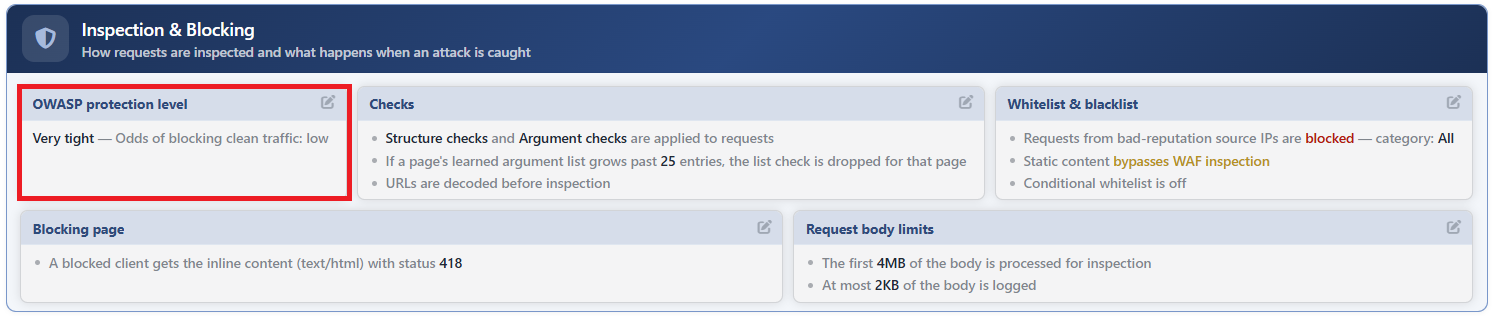 WAF Management - The OWASP Protection Level Card
The OWASP Protection Level Edit Screen
- The WAF Management tab is opened.
- The pencil icon at the top right of the OWASP Protection Level card in the Inspection & Blocking section is clicked; the editing window titled OWASP Protection Level opens.
- The following fields are edited and confirmed with the
Editbutton.
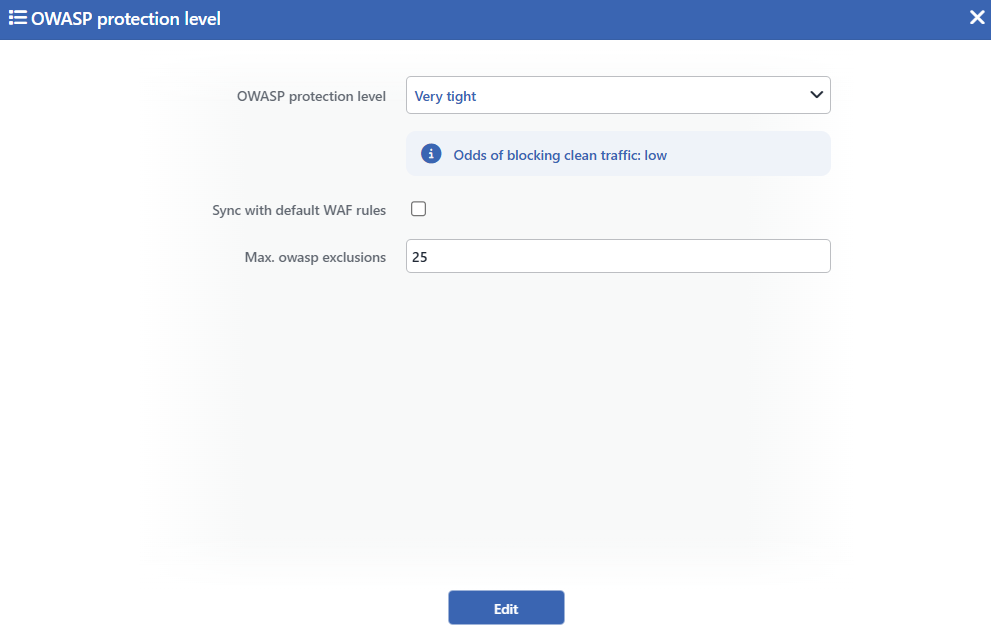 The OWASP Protection Level Edit Screen
INFO
OWASP Protection Level Default: Very Tight
One of the five levels is selected from the drop-down list; the list is ordered from Elementary towards Aggressive. The information line below the selection updates the Odds of blocking clean traffic text instantly according to the selected level. The default level is Very Tight:
| Option | Meaning |
|---|---|
| Elementary | The highest threshold: for blocking, a large number of signature hits need to accumulate; a single signature hit never blocks on its own. |
| Normal | For blocking, more than one high-risk hit needs to accumulate. |
| Tight | A single signature hit with the highest risk is enough for blocking. |
| Very Tight | A single signature hit with medium risk and above is enough for blocking. |
| Aggressive | Even a single signature hit with the lowest risk blocks; the signatures with the lowest risk are in service only at this level. |
INFO
Sync with Default WAF Rules
If it is checked, during the save the confirmation question Are you sure to sync default WAF rules with Owasp protection level? is asked; when it is confirmed, the Any Paths rule in all the host groups is set up again with the default definition suitable for the selected level. At the Aggressive level the tight set (narrower length limits and a more restricted method list) and at all the other levels the standard set is used. It is not a permanent setting; it is a one-off synchronization trigger and comes unchecked every time the form is opened.
The synchronization returns the Any Paths rule to its default state
When Sync with Default WAF Rules is confirmed, all the inspections added manually and formed by the learning on the Any Paths rule in all the host groups (including the argument rules) are deleted; the default header rules are set up again with their default definitions. The rules specific to a path are not touched. The operation has no undo mechanism.
INFO
Max. OWASP Exclusions Default: 25
The maximum number of exclusions that can be kept in the OWASP Exclusions list of an inspection point is defined; only an integer, at least 1, can be entered in the field, its default value is 25. Since the learning can add new entries to the exclusion lists, this limit prevents the lists from growing uncontrollably; in an inspection point whose exclusion list exceeds the limit, the OWASP scanning is disabled.
INFO
Edit
The changes are saved by clicking the Edit button; no additional confirmation is asked for the level change (only if Sync with Default WAF Rules is checked, the confirmation question above appears). With the save, the WAF configuration is automatically produced again and applied.
The mode behavior and the records
The threshold comparison is calculated in the same way in the Blocking and Monitor modes: in the Blocking mode the request that exceeds the threshold is blocked, in the Monitor mode it is reported as an attack but the request is let through. In the Learning mode the scoring does not turn into blocking. The hits of the signatures that have been put into the Monitor state on the OWASP Rules screen fall into the record but do not take part in the total score; the requests that end only with these hits without the blocking threshold being exceeded are seen in the Event Logs record with the verdict Not blocked — Below the blocking threshold. The hits of the active signatures that stay below the threshold, on the other hand, do not produce a record on their own.
