
Smarter by Design.Simpler for Business
What It Can Do for You
What Is What It Can Do for You?
What It Can Do for You turns the result of the last evaluation into doable operations: it gathers the waiting recommendations into a single package and applies them, shows the deficiency in the exemption list, turns on the trust in one's own servers derived from the configuration with a single click and carries the reset step that returns the configuration to its default state. The slogan of the card says this openly: Steps that apply in one click.
This is the only surface that applies the recommendations in the Learning strip: the second card only tells, and the first card is only the door of the learning settings. There are at most four rows on the list and the first three are seen only while they have a counterpart; the reset row is always located there.
The order of the rows is not random either: first the situation that blocks the progress, then the single-click offer, then the recommendation package, and at the very end the destructive operation comes.
The recommendations are applied here
This is the only surface that applies the recommendations the engine produces. The operations started from this card change the live configuration of the route table and take effect immediately.
The What It Can Do for You Card in the Learning Strip
The card is the one on the right among the three cards in the body of the strip. At the top left the lightning icon and next to it the title, below it the slogan, and after that the action rows are located.
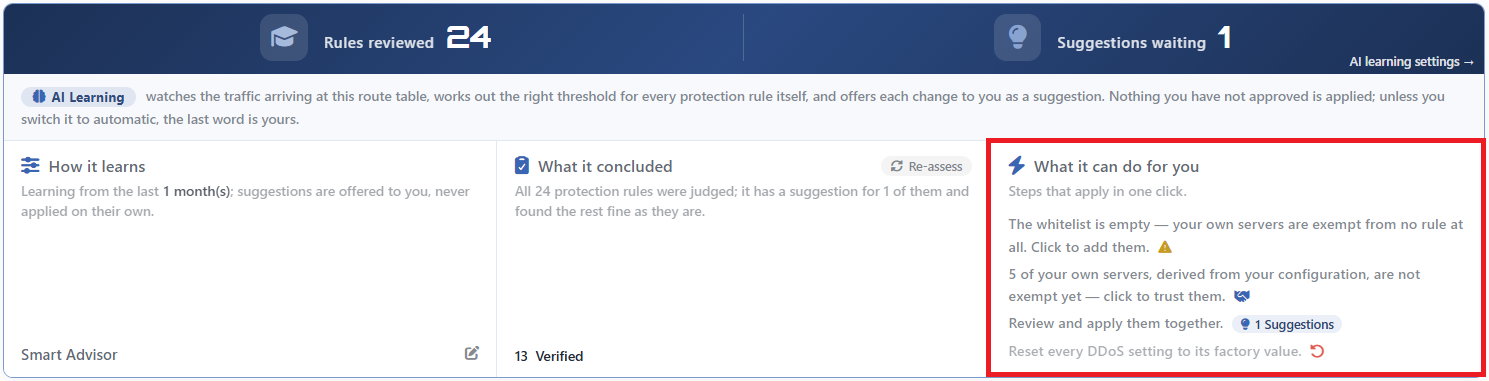 The Learning Strip - The What It Can Do for You Card
The action rows:
| Row | When it is seen | Its text and badge |
|---|---|---|
| The exemption warning | While the exemption list is empty | The whitelist is empty — your own servers are exempt from no rule at all. Click to add them. A yellow warning triangle is found at the end of the row. If the peer trust is on but there is no derived server, the second state of the sentence is written. |
| The peer trust | While there are servers derived from the configuration and the trust switch is off | <number> of your own servers, derived from your configuration, are not exempt yet — click to trust them. A handshake icon is found at its end. |
| The recommendations | If there is at least one recommendation ready to be applied | The sentence Review and apply them together. and the <number> Suggestions badge. When it is clicked, the review window opens. |
| The reset | Always | Reset every DDoS setting to its factory value. It is displayed with a red return icon and dim; when it is hovered over, the row becomes distinct and turns to the error color. |
The number on the badge and the number on the strip
The number on the Suggestions badge expresses the same magnitude as the Suggestions Waiting counter in the upper band: the number of recommendations that will be opened for review. The badge carries the icon and the word of the Suggestion badge in the rule rows; thus the mark to be looked for on the page and the number on the list match visually. The color does not always hold exactly: while a rule row carrying a mode recommendation is displayed in the warning tone, the badge on the strip is in the highlight color in every condition.
The card stays empty without an evaluation being made
If the engine has never run successfully in this route table, no row is displayed on the card; not even the reset row, which is unconditional, comes out. This is different from the card saying "there is nothing to do": when the evaluation is successful and produces no recommendation, the reset row continues to be seen on its own.
If a successful evaluation has been made before, a run that fails afterwards does not remove the rows: the recommendation package row falls off, and the rest stay in place with the data of the previous run.
The Exemption List Warning
The row reports that the exemption list is empty and that for this reason no source is exempt from the protection. The sentence has two states and which one will be written is determined by the state of the peer trust:
| State | Sentence |
|---|---|
| The list is empty, the peer trust is off | The whitelist is empty — your own servers are exempt from no rule at all. Click to add them. |
| The peer trust is on but there is no derived server | Peer trust is on, but this route table derives no peers — nothing is actually exempt. Click to add your own servers. |
The second state describes a more subtle problem: the switch is on, but since there is no server to be derived from the configuration, in fact no source is exempt.
When the row is clicked, the DDoS Whitelist editor opens.
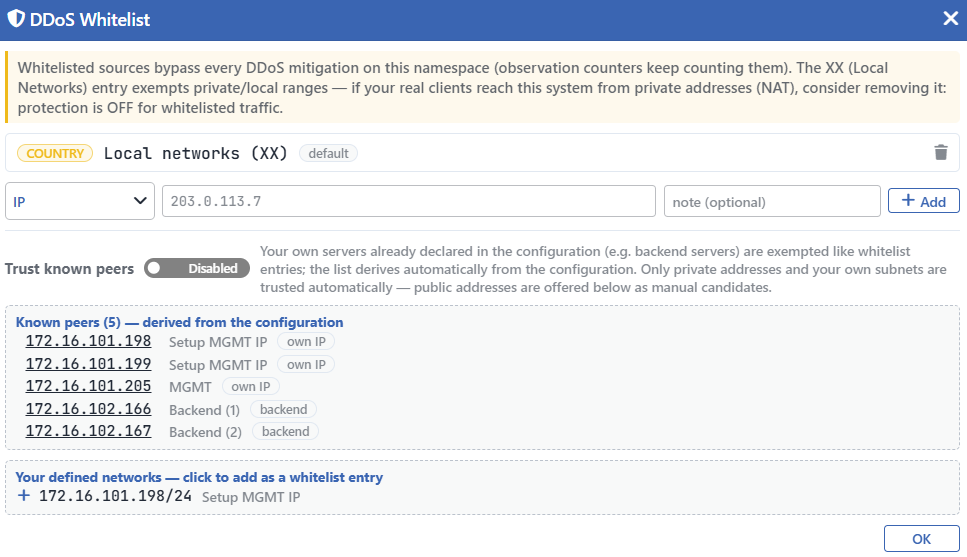 The DDoS Whitelist Editor
The local network default does not count the list as "filled"
For the exemption list to be counted as filled, there has to be a manually added entry or the trust in one's own servers has to be on and a really derived server has to be found. The local network entry that is ready in a new route table is not counted in this check.
For this reason the warning is displayed in a table that has never been touched. For the detail, the Whitelist & Known Peers page is looked at.
The Trust in One's Own Servers
It is displayed while there are servers derived from the configuration and the trust switch is still off:
<number>of your own servers, derived from your configuration, are not exempt yet — click to trust them.
When the row is clicked, a confirmation window opens.
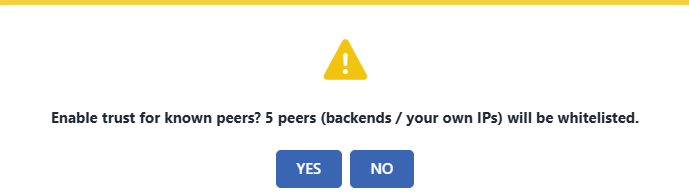 The Confirmation of the Trust in One's Own Servers
When it is confirmed, the Trust Known Peers switch is turned on: the device's own addresses and the Backend Service servers in the private address spaces or in the route table's own subnets become exempt from all the L4 DDoS measurements and enforcements. The servers with a public address are seen on the list but do not ride on this switch.
These addresses are not written to the exemption list; they are kept in a separate set and are updated by themselves as the configuration changes. The only exception is the measurement counter of the IP reputation rule: since it runs above the exemption, it continues to count the exempt sources as well.
This operation is counted as applying a recommendation
Since the switch passes through the recommendation application path, the operation is written to the user log as a recommendation application.
The Recommendation Package
The row makes it possible for the recommendations ready to be applied to be gathered into a single package and applied together. A recommendation enters this package only if it carries the applicable stamp: the limit or the mode transition it recommends has to be really writable. The evaluations that are blocked, whose data has stayed insufficient or that have concluded as uncertain do not enter this number.
When the row is clicked, the Pending Suggestions window opens.
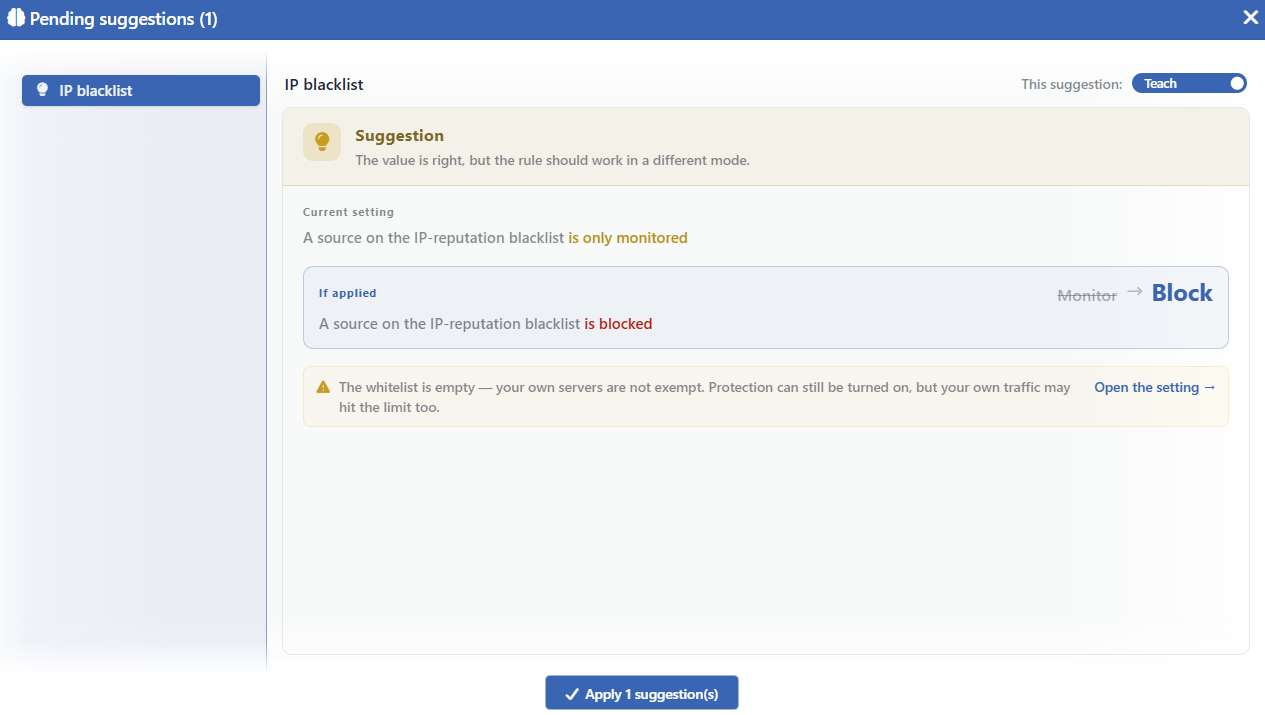 The Pending Suggestions Window
The Left List
On the left, the list of the recommendations ready to be applied is found. Every row is a rule and carries the state icon of the rule. The ordering is not random: first the applicable limit recommendations, then the mode recommendations, then the first value assignments come; within the same group the ones carrying a mode change are taken to the front, and in the case of equality the one in which the confidence of the engine is high goes up to the top.
A recommendation removed from the list is displayed dim and struck through.
The Right Panel
On the right, the full evaluation window of the selected recommendation is located. It is the same as the window that opens when the badge in the rule row is clicked; its only difference is that its own application button is hidden, and the application is left to the collective button at the bottom of the window. It carries the sections below:
| Section | Its content |
|---|---|
| The state band | The type of the recommendation and its single-sentence meaning. |
Current Setting | The sentence of the current state of the rule. |
If Applied | How the sentence will be read if the recommendation is applied; on its right the transition badge from the old value to the new value. |
| The obstacle and warning rows | The obstacles that stop the application with the lock icon, the warnings that do not stop it with a triangle. In the ones whose solution is in a setting, the Open the setting → link is found. |
Why? | The justifications of the engine for reaching this result, item by item. |
How was it worked out? | The derivation steps of the calculation, in order. |
The last two sections are displayed only when the recommendation carries a limit calculation; in a rule that offers only a mode recommendation neither of them is found.
The justifications are prepared in advance
The sentences in the Why? and How was it worked out? sections are not calculated in the interface; the engine produces them during the evaluation and the screen only orders and groups them.
The Teach Switch
At the top of the right panel, a switch that includes the selected recommendation in the package and removes it is found: next to the This suggestion: label it takes the values Teach (included) and Skip (excluded).
All the recommendations open as included in the package; the unwanted ones are removed one by one.
The Application
The Apply <number> suggestion(s) button at the bottom of the window applies all the included recommendations together. While no recommendation is included and while the application is in progress, the button is inactive. The operation asks for a confirmation window.
The application is all or nothing
If the server rejects even one of the recommendations sent, the whole of the operation fails and no value is written. The reason of the rejection is displayed on the screen with a warning box and carries the name of the rejected rule.
The rejection has three reasons and all three of them are conditions that change after the moment the list is displayed: the rule having been closed to learning, the mode promotion not having been allowed and the exemption list being empty in a rule protecting the device's own management ports.
A locked rule does not enter the package at all anyway; this rejection is seen in situations such as the rule being locked while the list is open.
Only the applicable recommendations are found in this window
The evaluations that are blocked, whose data is insufficient or that have stayed uncertain do not enter this list. They are read only from the badges in their own rule rows.
Returning to the Default
It is the last row of the card, it is displayed dim and it is displayed always, unconditionally:
Reset every DDoS setting to its factory value.
When the row is clicked, a warning window in two parts opens. The upper text describes the scope of the operation and that the learning settings will be preserved, and the lower text the detail of the reset: every mode and limit (including the ones turned off manually) returning to the default, the quarantine settings being reset, the exemption list remaining with only the local network entry, the peer trust being turned off and every change being written to the user log.
| Reset | Preserved |
|---|---|
| The modes and the limits of all the rules, including the ones turned off manually | The five learning settings |
| The quarantine duration | The learning locks of the rules |
| The Quarantine Log Forwarding selection | |
| The exemption list: only the local network entry remains | |
| The Trust Known Peers switch is turned off |
The reset does not recognize the learning lock
If a rule has been locked with Learning Lock, the learning engine cannot touch it; a locked rule does not enter the recommendation package at all. The returning to the default operation, on the other hand, ignores this lock: the mode and the limit of the locked rule return to the catalog definition as well. After the reset only the lock itself stays in place.
The reset cannot be undone
The operation has no undo step. All the manually added entries in the exemption list are deleted and the exemptions of one's own infrastructure have to be defined again.
The operation is written to the user log together with the listing of the changed fields.
What Changes in the Automatic Mode?
While the learning mode is Automatic, the actions of this card stay in place, but there is no need to wait for the recommendation package: the engine applies the applicable recommendations itself.
The automatic application has two limits:
- A rule that is off is not turned on by itself. The engine does not apply the transition from off into monitoring automatically; the administrator's "off" decision is preserved.
- The trust in one's own servers is not turned on by itself. This is not a recommendation but an advice, and it is applied only manually.
The mode promotion permission is valid in the automatic mode exactly as well: while the permission is off, the rules that measure a threshold do not pass into enforcement automatically either.
The automatic applications are written to the user log on behalf of the system.
Scope and Limits
INFO
- The card stays empty without an evaluation being made; not even the unconditional action is displayed.
- The returning to the default is always on the list and it stands on its own on a page where there is no recommendation at all.
- The collective application is all or nothing; if one recommendation is rejected, none of them is applied.
- The application list contains only the ready recommendations. The blocked and the immature evaluations are not seen here.
- The trust in one's own servers is not written to the exemption list, it is kept separately and is updated as the configuration changes.
- The reset also deletes the exemption list and it does not recognize the learning lock.
- The reason of a failed operation is shown on the screen. The error returning from the server is displayed with a warning box; the card and the window themselves do not produce a message separately.
- The reset covers only the L4 DDoS settings. It does not touch the network half of the route table (the addresses, the routes, the DNS). Of the quarantine settings only the duration is reset; although the warning text says "quarantine settings", the Quarantine Log Forwarding selection is preserved.
- All the operations require change authorization in the Network area. Applying a recommendation, turning on the trust and returning to the default are written to the user log.
