
Smarter by Design.Simpler for Business
Lockout
What Is Lockout?
Lockout is the tab where the records kept within the scope of Account Lockout Policies in a vService with the AGS access control enabled are listed and managed. The screen combines two record types in a single table: the failed attempt counters (Failure) and the active lockouts that have not expired (Lockout).
Every row represents the record a lockout policy keeps for a specific scope. The scope is the counting unit of the policy: a username, an IP address, the use of the username together with the IP address or a custom combination. If the same user is counted in two separate policies, two separate rows are found in the list.
The screen answers the question "who is locked, who is approaching a lockout?" and makes it possible for a user who is locked by mistake to be released before the duration expires. The data is read from the session store of the AGS engine with its state at the moment it is displayed; it is not a history that is kept. The lockouts that expire and the counters that fall outside the attempt window are not found in the list at the next fetch.
2 Types
Failure · Lockout
The failed attempt counters and the active lockouts in a single table
Instant
From the Session Store
The records at the moment it is displayed; no history is kept
500
Limit
The maximum number of records read per record type and per device
3/5
Status
The number of attempts and the lockout threshold of the policy are shown together
Clear Lockouts
Removes the Lockout
The active lockout and the doubling level are deleted; the attempt counter is preserved
Reset Failures
Resets the Counter
The attempt counter is deleted; the active lockout and the doubling level are preserved
Cluster
A Single Combined List
The records of the two devices in a single list; the same record is displayed in a single row
Manual
Refresh
The list is not refreshed by itself; the current state is taken with Refresh
Accessing Lockout
- Left Monitor Panel is opened.
- AGS-Enabled vServices is selected from the category tabs at the top left.
- The vServices defined on TR7 with AGS access control enabled are listed.
- The vService to be monitored is clicked; the screen opens with the Dashboard tab that carries the vService's name.
- On the screen that opens, the Lockout tab is clicked.
The tab is displayed unconditionally to the users who have monitoring authorization in the Load Balancer area. The records are fetched with the Load Balancer view authorization. The Clear Lockouts and Reset Failures operations require the Load Balancer modify authorization; the buttons look active independently of the authorization and the unauthorized request is rejected on the server.
Lockout Listing Screen
When the Lockout tab is opened, the active lockouts and the failed attempt counters belonging to the lockout policies of the vService are listed in the form of a table. The list is fetched once when the screen is opened and is not refreshed by itself.
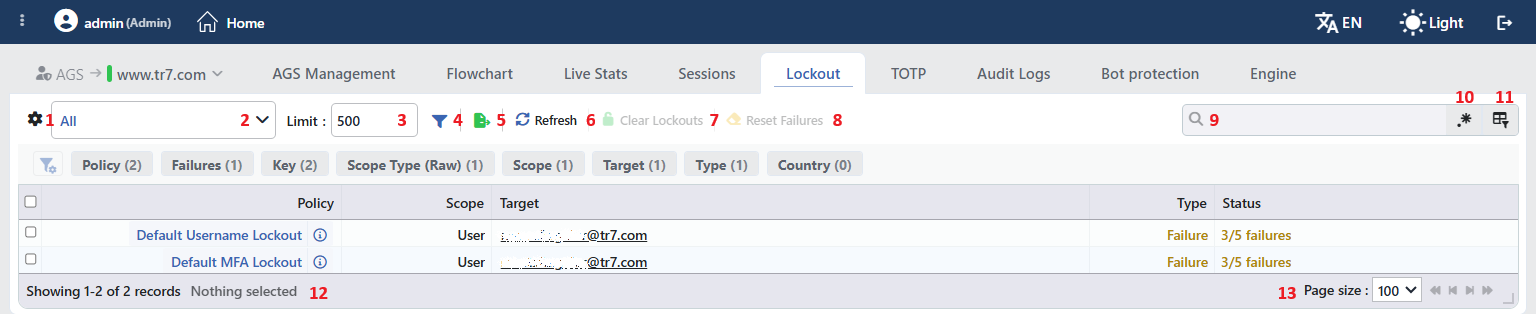 Lockout Listing Screen
The table opens with the following columns by default:
| Column | Description |
|---|---|
| Source | The name of the device the record is read from. (Only in a cluster setup) |
| Policy | The name of the lockout policy that keeps the record. The built-in policies are displayed with the names Default Username Lockout, Default IP Lockout, Default MFA Lockout and Default Username + IP Lockout. When the icon next to the name is clicked, the settings of the policy are shown in a small window without an edit button. If the policy has been deleted, the identity of the policy is written in the column. |
| Scope | The scope type of the record (the table below). |
| Target | The person or the address counted or locked. In the IP addresses whose country can be determined there is a flag; when it is hovered over the reputation summary of the address is displayed, and when it is clicked the IP information window titled <ip> details is opened. In the User + IP scope user @ ip, and in the Composite scope the component values separated by commas, are written. |
| Type | The type of the record: Failure is shown in amber and Lockout in red. |
| Status | The state of the record, in the same color as the Type (the table below). |
The following columns are hidden by default and are added from the column selector:
| Column | Description |
|---|---|
| Failures | In a Failure row the number of failed attempts in the window; in a Lockout row -. |
| TTL | In a Lockout row the duration remaining until the lockout ends (e.g. 4m 12s); in a Failure row -. The value is the duration at the moment the list is fetched, it does not count down on the screen. |
| Expires At | In a Lockout row the date and time at which the lockout will end; in a Failure row -. |
| Key | The operation key of the record in the session store; it carries the counting unit (gw), the policy identity, the scope prefix and the target together (e.g. gw:lockout_username:u:name@domain.com). |
| Scope Type (Raw) | The short prefix of the scope in the session store (the table below). |
The rows are fetched so that first the active lockouts and then the attempt counters come; the lockouts are ordered starting from the one whose end time is the nearest, and the counters starting from the one whose number of attempts is the highest.
Scope
The Scope column shows the readable name of the scope, and the hidden Scope Type (Raw) column its prefix in the session store. The scope comes from the Policy Scope setting of the policy that produces the record.
| Scope | Scope Type (Raw) | Equivalent in the policy |
|---|---|---|
| User | u | Username only |
| IP Address | ip | IP address only |
| User + IP | u_ip | Username + IP |
| Composite | comp | Custom combination |
| Device | dev | The device-scoped records created in the previous versions |
| User + Device | u_dev | The user + device scoped records created in the previous versions |
Status
The Status column is written in a different format according to the type of the record:
| Type | Format | Meaning |
|---|---|---|
| Failure | 3/5 failures | The number of failed attempts in the window and the Lockout Threshold value of the policy. When the number reaches the threshold the scope is locked. |
| Failure | 3 attempts | When the threshold of the policy cannot be read (e.g. if the policy has been deleted) only the number of attempts is written; in that case all of the attempts in the counter, including those that stay outside the window, are counted. |
| Lockout | Expires at 14.09.2026 15:20:00 | The date and time at which the lockout will end. |
The items in the toolbar are arranged from left to right in the following order; the last two items (Page Information and Page Size) are located in the information strip below the table.
Columns
Which columns will be shown in the table is selected; five columns (six columns with Source in a cluster setup) come open. In the same panel the columns are reordered by being dragged and the alignment per column is selected; with the Fit rows to the page button the row height is fitted to the page, and with the Reset button the column layout is taken to the default. The layout is stored per user.
Type Filter
The record type to be shown in the list is selected. The filtering is done on the records fetched on the screen; a request is not sent to the server again. The selection is stored per user.
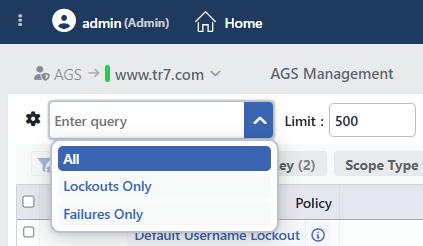 Lockout Record Type Options
| Option | Records shown |
|---|---|
| All Default | The active lockouts and the attempt counters. |
| Lockouts Only | Only the active lockouts. |
| Failures Only | Only the failed attempt counters. |
Limit
The maximum number of records to be read from the session store is entered; the default is 500. The limit is applied to the active lockouts and to the attempt counters separately, and in a cluster setup to every device separately. When the limit is reached the reading stops; which records stay outside is not bound to a specific order. The value is stored per user and is applied with the next Refresh.
Filter
Opens and closes the filter panel; the panel comes open by default. The filters are listed above the table in the form of a card strip and the number next to the card is the number of different values found for that criterion. The order of the cards is changed by being dragged and the selections made are stored. The filter criteria that can be used:
| Filter | Description |
|---|---|
| Policy | The lockout policy that keeps the record. |
| Failures | The number of failed attempts in the attempt counters; the active lockouts do not join this card. |
| Key | The operation key of the record; a search is made within the card. |
| Scope Type (Raw) | The prefix of the scope in the session store. |
| Scope | The readable name of the scope. |
| Target | The person or the address counted or locked; a search is made within the card. |
| Type | The record type (Failure / Lockout). |
| Country | The country of the records that have an IP address in their target. The username-scoped records and the private or local addresses whose country cannot be determined do not join this card. |
| IP Tags | In the records whose target is an IP address, the IP Tags that match the address; untagged addresses are collected under the No Tags option, and the username-scoped records do not take part in this card. |
In a cluster setup the Source card that shows the device the record is read from is added at the beginning of the cards.
Export
The table is exported as Excel, CSV or PDF by clicking the Export button. In the window that opens, the Filename, Format and Data Source, together with the Columns to be exported, are determined; the remaining fields are displayed according to the format: CSV Separator for CSV, Excel Sheet Name for Excel, and Page Orientation and Page Size for PDF.
Refresh
By clicking the Refresh button the active lockouts and the attempt counters are fetched again from the session store. Since the list is not refreshed by itself, the current state is taken with this button. While the fetching continues the button stays passive and shows a turning icon.
Clear Lockouts
The Clear Lockouts button is clicked in order to remove the lockout of the selected Lockout records before the duration expires. Before the operation the "Are you sure?" confirmation is requested. When the lockout is removed the user or the address can make a login attempt again; since the doubling level of the same scope is deleted as well, the next lockout starts from the first duration. The failed attempt counter is not deleted with this operation; if the attempts in the window have reached the threshold, Reset Failures is applied as well so that the scope is not locked again. When the operation deletes at least one record the list is fetched again by itself.
If Failure records are also found in the selection, these records are not touched. If there is no Lockout record among the selected rows the button is passive. The same operation is found in the right-click menu and in the preview title as well.
Reset Failures
The Reset Failures button is clicked in order to reset the failed attempt counter of the selected Failure records. Before the operation the "Are you sure?" confirmation is requested. Only the attempt counter is deleted; if there is an active lockout for the scope it continues and the doubling level is preserved. When the operation deletes at least one record the list is fetched again by itself.
If Lockout records are also found in the selection, these records are not touched. If there is no Failure record among the selected rows the button is passive. The same operation is found in the right-click menu and in the preview title as well.
Search
Used to search all information in the table.
RegExp Search
Used to search all information in the table with a regular expression (RegExp).
Column Based Search
Used to perform a column-based search on the information in the table.
Page Information
Contains information about the total number of fetched records and the range of records displayed in the list: Showing N-M of T records and the number of selected rows (N selected, or Nothing selected when there is no selection).
Page Size
The maximum number of records to be displayed on the page is selected. The default is 100; the options are 50, 100, 250, 500 and All. The selection is not stored.
The operations are written to the user logs
The Clear Lockouts and Reset Failures operations are recorded on the User Logs screen on behalf of the user who performs the operation with the name of the vService (AGS lockout(s) cleared for "<vService>" service or AGS failure record(s) cleared for "<vService>" service). These records are not displayed on the Audit Logs tab that keeps the events of the AGS engine.
Right-Click Menu
When a row is right-clicked, a single-operation menu that has Actions written in its title is opened. The operation in the menu changes according to the type of the row and is applied only to the record right-clicked; the selection made in the list does not affect the menu.
| Operation | What it does | Visibility condition |
|---|---|---|
| Clear Lockouts | Removes the lockout of the record right-clicked; like the Clear Lockouts in the toolbar, it requests the "Are you sure?" confirmation. | A Lockout row |
| Reset Failures | Resets the attempt counter of the record right-clicked; like the Reset Failures in the toolbar, it requests the "Are you sure?" confirmation. | A Failure row |
Preview of the Selected Record
When a row in the list is clicked, the preview of the record opens on the right of the screen. In the title there is the icon that shows the type of the record (an amber exclamation for Failure, a red lock for Lockout), the target and below it the record type. When the icon next to the record type is hovered over, the Key value of the record is shown; by clicking the icon the value is copied to the clipboard.
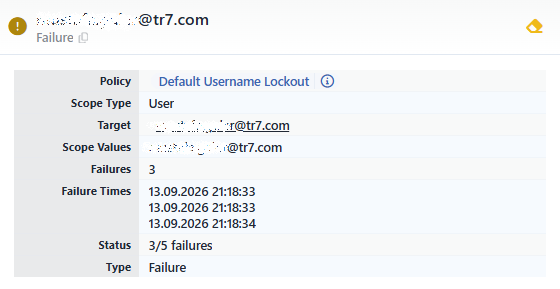 Preview of the Selected Record
At the top right of the title there is a single icon that changes according to the type of the record; the name of the icon is displayed when it is hovered over. While the list is being fetched the icon stays passive.
| Operation | What it does | Visibility condition |
|---|---|---|
| Reset Failures | Resets the attempt counter of the record; it requests the "Are you sure?" confirmation. | A Failure record |
| Clear Lockouts | Removes the lockout of the record; it requests the "Are you sure?" confirmation. | A Lockout record |
The information rows in the panel are as follows in order:
| Row | Description | Visibility condition |
|---|---|---|
| Source | The name of the device the record is read from. | A cluster setup |
| Policy | The lockout policy that keeps the record; the icon shows the settings of the policy. | Always |
| Scope Type | The readable name of the scope; it is the value of the Scope column in the table. | Always |
| Target | The person or the address counted or locked. | Always |
| Scope Values | The values that make up the scope, separated by commas (e.g. the username and the IP address in the User + IP scope). | Always |
| Failures | The number of failed attempts in the window. | A Failure record |
| Failure Times | The date and time of every failed attempt in the window, one below the other. | A Failure record |
| TTL | The duration remaining until the lockout ends. | A Lockout record |
| Expires At | The date and time at which the lockout will end. | A Lockout record |
| Status | The Status value in the table. | Always |
| Type | The record type. | Always |
Scope and Limits
INFO
- It is an instant view. The screen does not show the past lockouts; a lockout that has expired or a counter that has fallen outside the attempt window is not found in the list.
- The lockouts fall with the duration, the counters with the window. The lockout lasts as long as the Lockout Duration in the policy; in repeated lockouts the duration doubles every time and stops at the longest lockout duration in the policy (24 hours in the built-in policies, 1 hour for Default IP Lockout). The failed attempts are counted within the Attempt Tracking Window window of the policy (the default 24 hours in the built-in policies, 1 hour for Default IP Lockout); the counter that has no attempt left in the window goes out of the list.
- The two operations do not take each other's place. Clear Lockouts does not delete the attempt counter, and Reset Failures the active lockout. If both the lockout and the counter of a user are to be cleared, the two operations are applied separately.
- The operations cannot be undone. The lockout or the counter deleted is not restored. After Reset Failures the scope starts to be counted from zero at the next failed attempt; since Clear Lockouts does not delete the attempt counter, the attempts in the window continue to be counted.
- In a cluster setup the records are kept per device. Every device returns the records in its own session store and the screen combines the two in a single list; if the same record is found on both devices the list shows a single row. If one of the devices cannot respond, the list is formed only with the records of the other device. The deletion request is sent to both devices with the same key.
- The reading duration is limited. If the records cannot be fetched within 10 seconds the request ends; a warning is not displayed and the previous list stays in the table.
- What the screen does not show. Which authentication provider records the attempt, the state of the warning and CAPTCHA steps and the doubling level of the scope do not take place on this screen; the detail of the attempt events is examined on the Audit Logs tab.
